
Introduction
Out here, artificial intelligence reshapes how digital art comes to life – changing every step from sketch to final frame. Picture today’s world: smart software isn’t just testing ideas anymore – it runs quietly inside real workspaces, helping people who build ads, teach online, write code, or craft videos across continents.
One early breakthrough in generative AI? Stable Diffusion v1.4 made a lasting mark. Though stronger tools now exist, its presence remains strong years later. By 2026, researchers will still turn to it regularly. Students explore its workings just as often. Open access helped fuel its reach. Because of that openness, labs and classrooms keep using it. Time has passed, yet interest hasn’t faded.
What makes Stable Diffusion v1.4 stand out is how it turns everyday words into sharp, intricate images through powerful neural networks. Because of this, making digital art can be as straightforward as writing a clear description – no prior drawing experience or heavy programs required.
Out west, lone creators started tinkering first. Big teams across Asia slowly followed, then firms in cities like Toronto jumped in too. Pictures made by machines now shape how stories are seen everywhere. That shift? It began when a tool called Stable Diffusion v1.4 arrived quietly on the scene.
This complete walkthrough covers everything you need to know about:
- The conceptual definition of Stable Diffusion v1.4
- Its internal working mechanism and step-by-step pipeline
- Architectural components and neural network structure
- Advanced prompt engineering techniques
- Real-world industry applications
- Strengths, weaknesses, and limitations
- Comparison with modern AI image generation models
- Its relevance in the current AI ecosystem (2026 perspective)
Let’s begin with the foundational concept.
What is Stable Diffusion v1.4?
Stable Diffusion v1.4 is an open-source latent text-to-image diffusion model designed to generate digital images from textual descriptions.
In simpler terms:
You provide a text prompt → The AI interprets it → The system generates a corresponding image
Example Prompt
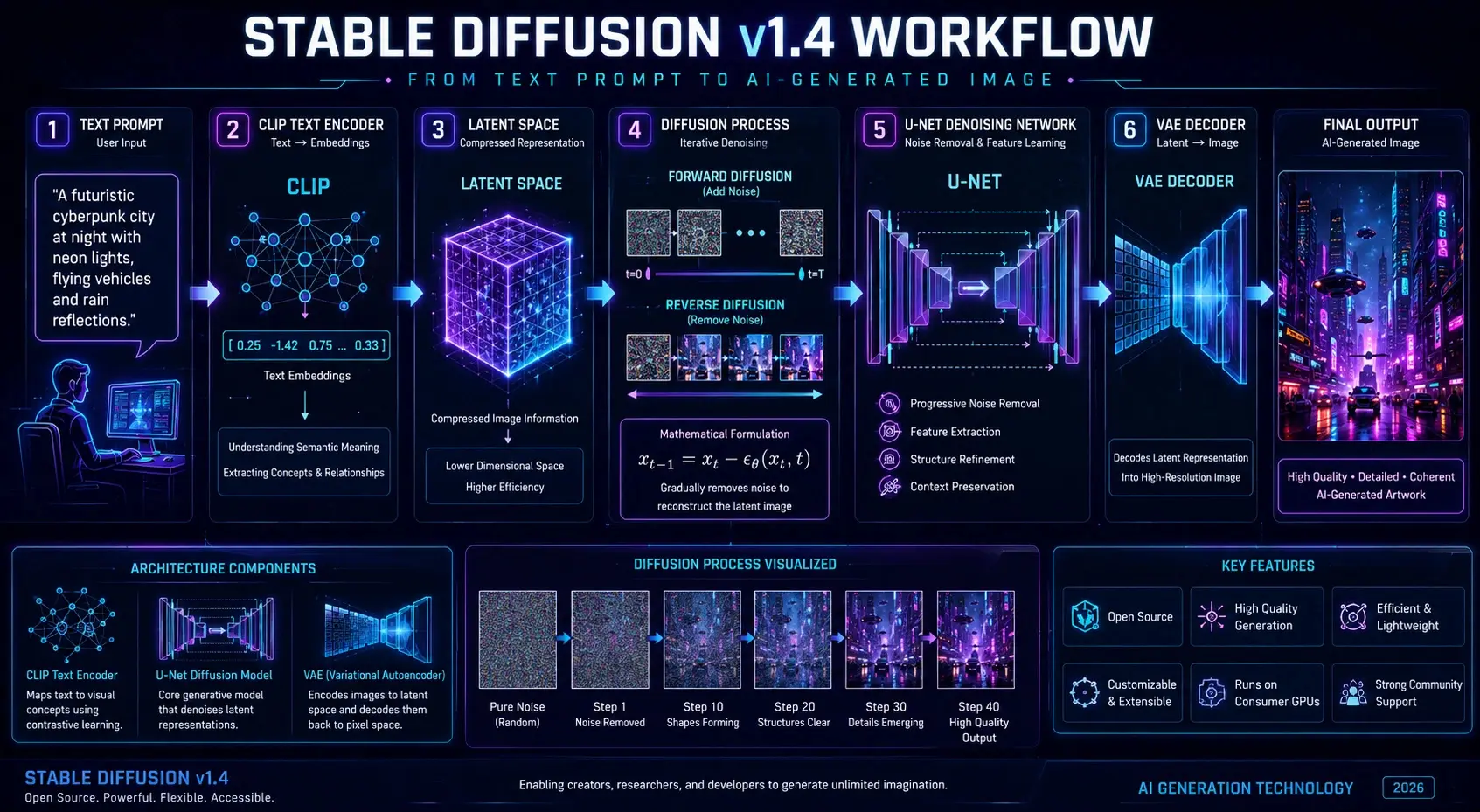
“A futuristic cyberpunk city at night with glowing neon lights, flying vehicles, and rain reflections on the street”
The model processes this input and produces a visually coherent, highly detailed image that reflects the described scenario.
Core Concept Behind Stable Diffusion v1.4
Unlike traditional image generation systems that operate directly on pixel-level rendering, Stable Diffusion v1.4 uses a latent diffusion approach.
This means:
- It does NOT generate images pixel-by-pixel initially
- Instead, it works in a compressed latent representation space
- Then reconstructs the final image through decoding mechanisms
Why this matters:
- Reduces computational cost
- Increases generation speed
- Enables usage on consumer-grade GPUs
- Improves accessibility for independent creators
This efficiency is one of the key reasons it became widely adopted.
How Stable Diffusion v1.4 Works
To understand the system properly, we need to break its workflow into structured phases.
Text Encoding Phase
The first stage involves interpreting the user’s input prompt using a neural language model called CLIP (Contrastive Language–Image Pretraining).
What happens here:
- Text is converted into numerical embeddings
- Semantic meaning is extracted from words
- Relationships between objects and attributes are identified
Example:
“Red sports car on mountain road”
Becomes a structured vector representation containing:
- Object: car
- Attribute: red, sports
- Environment: mountain road
This step bridges language and visual understanding.
Latent Space Compression
Instead of processing high-resolution images directly, Stable Diffusion compresses image information into a latent space representation.
Benefits:
- Reduced memory consumption
- Faster computation cycles
- Efficient neural processing
- Scalability across hardware types
Think of this as converting a detailed painting into a compact mathematical blueprint.
Denoising Diffusion Process
This is the central engine of Stable Diffusion v1.4.
The process begins with random noise—similar to static on a television screen—and gradually refines it into a structured image.
Step-by-step transformation:
- Pure noise initialization
- Rough shapes begin forming
- Structural outlines appear
- Objects become recognizable
- Final refined image emerges
This is handled by a deep neural network known as U-Net, which iteratively removes noise based on learned patterns.
Image Reconstruction
After the latent image is refined, it must be converted back into pixel format.
This is performed by a Variational Autoencoder (VAE).
Role of VAE:
- Decodes latent representation
- Converts compressed data into a full-resolution image
- Enhances Visual Clarity
- Preserves structural integrity
Final Output → High-quality AI-generated image
Mathematical Interpretation
The diffusion process can be represented as:
xt−1 = xt − εθ(xt, t)
This equation describes how noise is gradually reduced step-by-step until a coherent image is formed.
Stable Diffusion v1.4 Architecture Explained
The architecture consists of three major components working in synchronization.
CLIP Text Encoder
Functions:
- Converts text into embeddings
- Understands semantic meaning
- Maps language to visual concepts
It acts as the linguistic intelligence layer.
U-Net Diffusion Network
Functions:
- Core image generation engine
- Progressive denoising system
- Structure formation and refinement
It is responsible for visual creation.
VAE Decoder
Functions:
- Converts latent space into images
- Ensures visual realism
- Improves output stability
It acts as the reconstruction layer.
Why This Architecture Is Powerful
- Efficient GPU utilization
- Open-source adaptability
- High scalability
- Strong generalization capability
- Balanced speed and quality
Key Features of Stable Diffusion v1.4
Stable Diffusion v1.4 gained global recognition due to its flexibility and accessibility.
Core Features:
- Text-to-image generation
- Open-source availability
- Offline execution capability
- Custom fine-tuning support
- Prompt-based control system
- Lightweight architecture
- 512×512 optimized output
Why Creators Prefer It
- No subscription dependency
- Full creative control
- Large community ecosystem
- Plugin and model extensions
- Flexible workflow integration
Training Dataset and Learning Process
Stable Diffusion v1.4 was trained on large-scale image-text datasets.
Primary Dataset:
- LAION-Aesthetics dataset
Training Characteristics:
- Hundreds of thousands of optimization steps
- Fine-tuned diffusion layers
- Large-scale multimodal learning
- Standard resolution training at 512×512
What the Model Learned
The system was trained on diverse visual domains:
- Human portraits
- Natural landscapes
- Architecture
- Fantasy art
- Objects and products
- Abstract compositions
This diversity enables broad image generation capability.
Prompt Engineering
Prompt engineering is the most critical skill in working with Stable Diffusion v1.4.
Optimal Prompt Structure
Subject + Style + Lighting + Detail + Quality
Example:
“A cinematic portrait of a medieval warrior, golden hour lighting, ultra-detailed armor texture, 4K resolution, dramatic atmosphere”
Negative Prompts
Used to eliminate unwanted artifacts:
- blurry
- distorted anatomy
- low quality
- watermark
- extra limbs
Advanced Techniques
Style Fusion
Combining artistic directions:
- cyberpunk + realism + cinematic lighting
Weight Emphasis
Highlighting important elements in the prompt structure.
Artistic Referencing
Simulating known visual aesthetics and styles.
NLP Perspective Insight
From a natural language processing viewpoint, prompt engineering is essentially:
- Semantic structuring
- Intent Optimization
- Contextual weighting
- Feature extraction guidance

Real-World Applications
Stable Diffusion v1.4 is used across multiple industries.
Digital Art Creation
- Concept art development
- Character design
- Illustration generation
Widely used in European creative industries.
Marketing & Advertising
- Social media creatives
- Banner design
- Branding concepts
Common in digital agencies globally.
Game Development
- Environment Design
- Storyboarding
- Character prototyping
Used extensively in AAA and indie studios.
E-Commerce Visualization
- Product mockups
- Lifestyle advertising
- Catalog imagery
Education & Research
- AI experimentation
- Machine learning studies
- Creative learning modules
How to Use Stable Diffusion v1.4
Installation
- Local setup or web-based platform
Prompt Input
- Enter descriptive text
Parameter Adjustment
- Sampling steps
- CFG scale
- Resolution tuning
Image Generation
- AI processes and renders output
Refinement
- Adjust prompt for optimization
Stable Diffusion v1.4 vs Modern Models
| Feature | v1.4 | Modern Models |
| Image Quality | Good | Excellent |
| Speed | Fast | Medium |
| Hardware Requirement | Low | High |
| Prompt Accuracy | Medium | High |
| Flexibility | High | Very High |
Advantages and Disadvantages
Advantages
- Open-source system
- Lightweight architecture
- Offline usability
- Strong customization
- Developer-friendly ecosystem
Disadvantages
- Weak anatomical accuracy
- Limited text rendering ability
- Inconsistent outputs
- Requires prompt skill mastery
- Lower realism than newer models
Best Alternatives in 2026
- Stable Diffusion XL
- MidJourney
- DALL·E 3
- Leonardo AI
- Adobe Firefly
Each offers different creative strengths.
Why Stable Diffusion v1.4 Still Matters
Despite technological evolution, it remains relevant because:
- It is foundational to modern diffusion systems
- It is lightweight and accessible
- It supports educational learning
- It enables experimentation
- It is fully open-source
It continues to serve as a core learning model for AI researchers.
FAQs
Yes, it is completely open-source and free to use.
Yes, with a compatible GPU, it runs efficiently.
MidJourney produces more artistic outputs, while Stable Diffusion offers more control.
It performs best at 512×512 native resolution.
Yes, especially for learning, experimentation, and development.
Conclusion
Back then, Stable Diffusion v1.4 changed how images were made using artificial intelligence. Its release brought forth an adaptable system – free for anyone – that shifted what artists could do on screen. While others stayed locked behind code, this version opened doors. Efficiency became possible without sacrificing quality, simply because it was built to grow. Creativity online hasn’t been quite the same since.
Still matters plenty by 2026 – here’s why. It holds weight simply due to staying power. That kind of presence doesn’t fade without reason. Year after year, it adapts just enough. Without fanfare, it remains a steady force. Time hasn’t lessened its role one bit
- Teaches foundational AI concepts
- Powers experimental workflows
- Supports Creative Industries
- Enables open innovation
Even though newer versions deliver sharper images, Stable Diffusion v1.4 still stands as a key milestone in the progression of generative AI.











