Introduction
Artificial Intelligence is revolutionizing digital creativity faster than ever before. In 2026, creators, marketers, YouTubers, freelancers, Advertising Agencies, and online businesses across Europe and worldwide are using AI image generation platforms daily to produce breathtaking visuals in minutes rather than spending hours on traditional design workflows.
Among all AI art generators, Midjourney continues to dominate because of its cinematic image quality, artistic depth, photorealistic rendering, and highly creative visual storytelling capabilities.
However, before purchasing a subscription, most users ask the same important question:
How Much Does Midjourney Actually Cost in 2026?
The answer is more complicated than simply reading a pricing table.
Most blogs only mention subscription fees while ignoring the real economics behind Midjourney usage, including:
- GPU-hour consumption
- Fast Mode efficiency
- Relax Mode scalability
- Hidden rendering expenses
- Turbo Mode resource usage
- Commercial return on investment
- Cost-per-image calculations
- Long-term business scalability
This complete guide explains everything in simple, beginner-friendly language so both casual creators and professional teams can understand the real financial structure behind Midjourney pricing in 2026.
By the end of this article, you will learn:
- Current Midjourney pricing plans
- What GPU hours actually mean
- Fast Mode vs Relax Mode
- Hidden Midjourney expenses
- Which plan offers the best ROI
- Cost optimization techniques
- Midjourney vs competing AI tools
- Best plans for creators, YouTubers, agencies, and enterprises
If you plan to use Midjourney for AI art, content marketing, branding, social media, YouTube thumbnails, eCommerce visuals, or commercial design projects, this guide will help you avoid wasting money while maximizing productivity.
What Is Midjourney?
Midjourney is an advanced AI-powered image generation platform that converts text prompts into highly detailed artwork, cinematic scenes, illustrations, concept art, photorealistic images, advertising graphics, and branding visuals.
Unlike many competing AI image generators that prioritize raw speed, Midjourney is recognized globally for:
- Cinematic visual quality
- Artistic composition
- Professional lighting realism
- Detailed textures
- Storytelling aesthetics
- Hyper-realistic rendering
That is why creators worldwide use Midjourney for:
- YouTube thumbnails
- AI-generated art prints
- Branding campaigns
- Product mockups
- Fashion visualization
- Advertising assets
- Game concept art
- Social media content
- Print-on-demand businesses
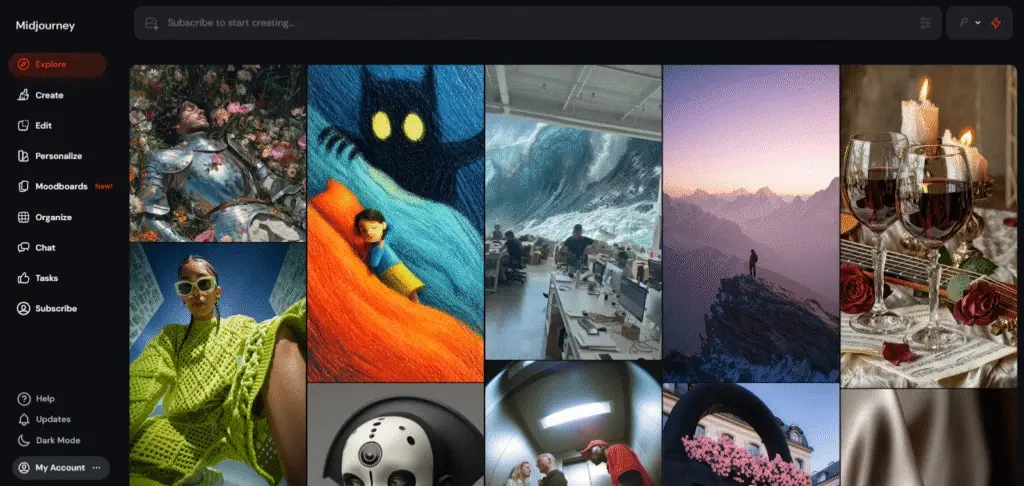
In 2026, Midjourney continues improving its web-based interface, although many professional workflows still operate through Discord integration.
How Midjourney Works
Midjourney functions using sophisticated AI diffusion models and neural rendering systems.
Users enter prompts such as:
“Cinematic futuristic European city at sunset, ultra realistic, neon lighting, volumetric fog, 8k”
The AI model then generates multiple visual interpretations based on the text prompt.
Behind the scenes, Midjourney relies on powerful GPU infrastructure to process every image request.
This is where Midjourney pricing becomes extremely important.
Every image generation consumes computational resources known as:
How Much Does Midjourney Cost in 2026?
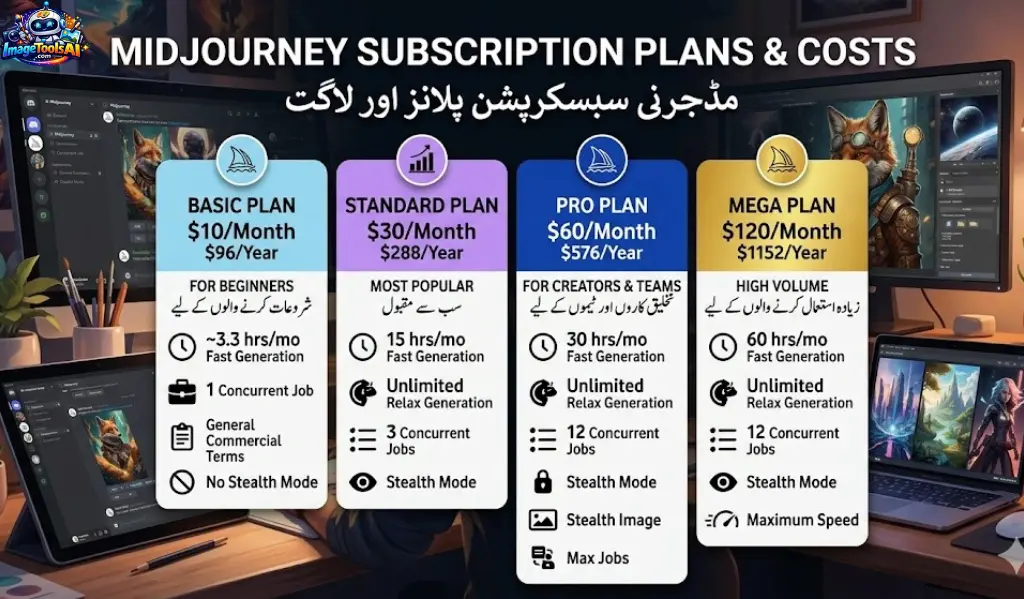
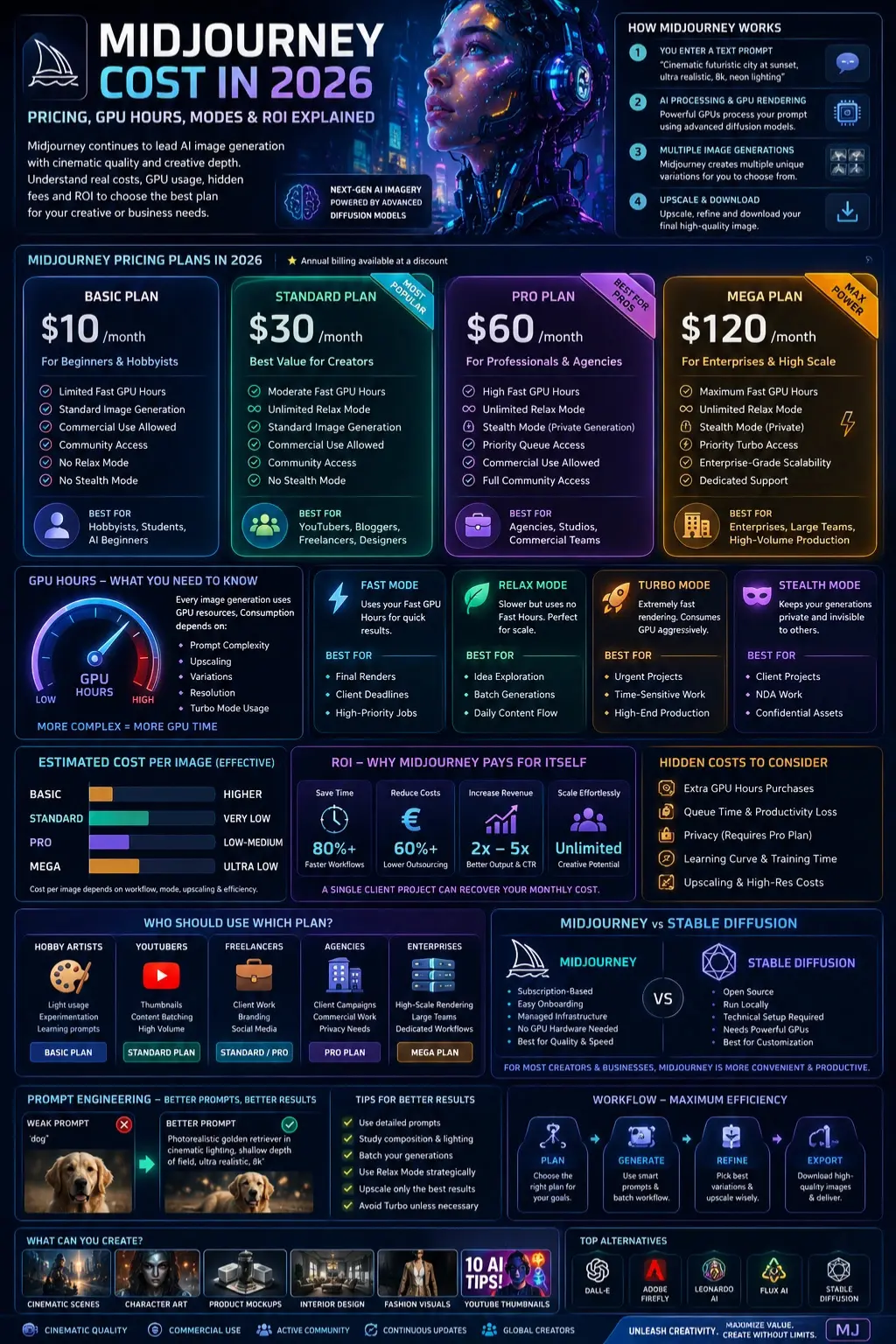
Midjourney Pricing Table
| Plan | Monthly Price | Annual Billing | Fast GPU Hours | Relax Mode | Stealth Mode |
| Basic Plan | $10/month | Lower yearly pricing | Limited | No | No |
| Standard Plan | $30/month | Discounted annual billing | Moderate | Yes | No |
| Pro Plan | $60/month | Reduced yearly pricing | High | Yes | Yes |
| Mega Plan | $120/month | Enterprise-level discounts | Maximum | Yes | Yes |
Midjourney Explained
Basic Plan
The Basic Plan is designed primarily for beginners and casual creators entering the AI art ecosystem.
Best For
- Hobby artists
- Students
- AI beginners
- Prompt experimentation
- Occasional image creation
What You Get
- Limited Fast GPU hours
- Standard image generation access
- Commercial usage rights
- Access to Midjourney community features
Limitations
- No Relax Mode
- GPU hours deplete quickly
- Weak scalability
- Not ideal for heavy production workflows
Estimated Output
Most casual users can generate hundreds of images monthly, depending on:
- Prompt complexity
- Upscaling frequency
- Variation usage
- Rendering settings
Advantages
- Affordable pricing
- Minimal financial risk
- Excellent learning environment
Disadvantages
- Fast hours disappear rapidly
- No Relax Mode support
- Limited professional scalability
Standard Plan
The Standard Plan is widely considered the best-value Midjourney subscription for most creators.
Best For
- YouTubers
- Bloggers
- Freelancers
- Designers
- Etsy sellers
- Social media managers
Why Most Users Choose the Standard Plan
The biggest reason is:
Relax Mode
Relax Mode allows users to continue generating images without aggressively consuming Fast GPU allocations.
Rendering becomes slower, but creators can produce dramatically more content over time.
This fundamentally transforms the economics of Midjourney usage.
Core Benefits
- Unlimited Relax generations
- Improved Long-Term Value
- Lower cost-per-image
- Better creator scalability
- Ideal for content batching
Estimated Output
Heavy users can potentially generate thousands of images monthly using Relax Mode strategically.
Advantages
- Exceptional overall value
- Excellent for content creators
- Strong return on investment
- Scalable workflows
Disadvantages
- No Stealth Mode
- Queue delays during peak demand
Pro Plan
The Pro Plan targets professional creators, commercial teams, and marketing agencies.
Best For
- Agencies
- Client campaigns
- Commercial brands
- Professional designers
- Creative studios
Biggest Feature: Stealth Mode
Stealth Mode enables private image generation.
Without Stealth Mode, many generations may appear publicly.
This becomes critical for:
- Client projects
- NDA campaigns
- Product prototypes
- Confidential branding work
- Sensitive commercial assets
Many businesses upgrade mainly because of privacy protection requirements.
Advantages
- Private rendering workflows
- Strong commercial security
- Higher productivity
- Better enterprise collaboration
Disadvantages
- Higher monthly pricing
- Excessive for casual users
Mega Plan
The Mega Plan is designed for enterprise-scale production environments.
Best For
- Production companies
- Enterprise creative teams
- High-volume AI operations
- Large-scale rendering pipelines
Advantages
- Maximum GPU allocation
- Enterprise scalability
- Heavy rendering support
- Large-team workflow optimization
Disadvantages
- Expensive for individuals
- Unnecessary for average creators
What 1 GPU Hour Actually Means
Many beginners incorrectly assume:
“One image equals one fixed GPU cost.”
That assumption is completely inaccurate.
GPU usage depends on multiple factors:
- Prompt complexity
- Rendering quality
- Upscaling frequency
- Variation count
- Turbo Mode usage
- Resolution settings
Example GPU Consumption
| Workflow Type | GPU Consumption |
| Simple generations | Low |
| Heavy upscaling | Medium |
| Multiple variations | High |
| Turbo workflows | Extremely high |
| Relax Mode workflows | Highly efficient |
How Many Images Can You Generate Per Month?
The answer depends heavily on workflow efficiency.
Beginner Workflow
A beginner generating:
- Simple prompts
- Minimal upscaling
- Limited variations
may create hundreds or even thousands of images monthly.
Professional Workflow
Agencies frequently:
- Generate many concepts
- Iterate aggressively
- Upscale Repeatedly
- Produce client revisions
This dramatically increases GPU consumption.
Recommended Midjourney Plans by User Type
| User Type | Monthly Usage | Recommended Plan |
| Hobby Artist | Light generation | Basic |
| YouTuber | Frequent thumbnails | Standard |
| Etsy Seller | Product mockups | Standard |
| Agency | Client campaigns | Pro |
| Studio | High-scale rendering | Mega |
Hidden Midjourney Costs Nobody Talks About
Most websites completely ignore these important hidden expenses.
Extra GPU Hour Purchases
Heavy Fast Mode users may eventually need additional GPU allocations.
This increases monthly operational costs beyond the standard subscription fee.
Productivity Loss From Queue Times
Relax Mode saves money but can slow production during busy periods.
For businesses, time directly impacts profitability.
Slow queue times may indirectly increase business expenses.
Privacy Costs
Many companies upgrade to the Pro Plan specifically for Stealth Mode.
Privacy becomes essential for:
- Product launches
- Brand campaigns
- Client assets
- Confidential marketing
Learning Curve Expenses
Midjourney still has a moderate learning curve.
Users invest time learning:
- Prompt engineering
- Commands
- Parameters
- Workflow optimization
That training time becomes an indirect business expense.
Upscaling Costs
Upscaling consumes significantly more GPU resources.
This matters for:
- Print-on-demand businesses
- Publishing
- Advertising
- Commercial printing
Midjourney Cost Per Image
This is one of the biggest SEO gaps online.
Most articles never explain cost-per-image economics.
Estimated Cost Per Image
| Plan | Effective Cost Per Image |
| Basic | Higher |
| Standard | Extremely low with Relax Mode |
| Pro | Higher but privacy-focused |
| Mega | Lowest at enterprise scale |
Is Midjourney Worth the Cost in 2026?
Hobby Users
Yes.
The Basic Plan remains affordable for experimentation and creative learning.
Freelancers
Absolutely.
A single client project can often recover the entire monthly subscription fee.
Examples include:
- Logo concepts
- Social media graphics
- YouTube thumbnails
- Product visuals
Agencies
Midjourney often creates massive ROI improvements.
AI workflows reduce:
- Design hours
- Outsourcing expenses
- Production delays
- Creative bottlenecks
Many agencies save hundreds or thousands of dollars monthly.
Etsy Sellers
AI-generated art prints and mockups can create recurring income streams.
Even a few successful sales may recover subscription expenses.
YouTubers
Thumbnail optimization alone can justify the subscription.
Improved thumbnails frequently increase:
- Click-through rates
- Viewer retention
- Advertising revenue
- Channel growth
Midjourney vs Other AI Image Generators
Comparison Table
| Tool | Strength | Weakness | Best For |
| Midjourney | Artistic quality | GPU limits | Creators & agencies |
| OpenAI DALL·E | Ease of use | Less cinematic visuals | Casual users |
| Adobe Firefly | Adobe integration | Less artistic depth | Adobe users |
| Stable Diffusion | Full customization | Technical complexity | Advanced users |
| Leonardo AI | Fast workflows | Mixed consistency | Social content |
| Flux AI | Strong realism | Emerging ecosystem | Experimental creators |
Midjourney vs Stable Diffusion Pricing
Midjourney
- Subscription-based
- Easy onboarding
- Managed infrastructure
- No GPU hardware required
Stable Diffusion
- Can run locally
- Requires technical setup
- Often needs powerful GPUs
- Greater customization freedom
For businesses valuing convenience and simplicity, Midjourney usually wins.
Best Midjourney Plan for Different Users
Beginners
Recommendation: Basic Plan
Best for:
- Learning prompts
- AI experimentation
- Casual generation
YouTubers
Recommendation: Standard Plan
Reasons:
- Unlimited Relax generations
- Thumbnail scalability
- Better cost efficiency
Agencies
Recommendation: Pro Plan
Reasons:
- Stealth Mode
- Client privacy
- Commercial workflow support
Businesses
Recommendation: Pro or Mega Plan
Depends on:
- Team size
- Asset volume
- Production frequency
Benefits of Midjourney for European Creators & Businesses
AI-generated content adoption continues to grow rapidly across Europe.
Popular European Use Cases
UK & Germany
- eCommerce visuals
- Branding campaigns
- Corporate marketing
France & Italy
- Fashion concepts
- Luxury advertising
- Product visualization
Spain & Netherlands
- Influencer branding
- Travel content
- Social media automation
Step-by-Step Guide: How to Use Midjourney Efficiently
Choose the Right Plan
| User Type | Recommended Plan |
| Beginner | Basic |
| Creator | Standard |
| Agency | Pro |
Learn Prompt Engineering
Better prompts reduce wasted generations.
Weak Prompt
“dog”
Better Prompt
“Photorealistic golden retriever in cinematic lighting, shallow depth of field, ultra realistic”
Better prompts dramatically improve GPU efficiency.
Use Relax Mode Strategically
Use Relax Mode for:
- Concept exploration
- Batch generation
- Testing ideas
Save Fast Mode for:
- Final renders
- Client deadlines
- Important commercial work
Avoid Excessive Upscaling
Only upscale your strongest concepts.
Upscaling weak images wastes GPU resources unnecessarily.
Batch Your Workflow
Generate multiple concepts together rather than individually.
This improves:
- Productivity
- Creative variation
- Cost efficiency
How to Reduce Midjourney Costs
Use Relax Mode Frequently
This is the most effective money-saving strategy.
Improve Prompt Quality
Better prompts reduce failed generations and retries.
Avoid Turbo Mode Unless Necessary
Turbo Mode consumes GPU resources aggressively.
Generate Concepts Before Upscaling
Do not upscale weak compositions.
Organize Creative Pipelines
Efficient workflows reduce wasted generations.
Pros and Cons of Midjourney
Pros
- Outstanding artistic quality
- Exceptional cinematic visuals
- Massive creative flexibility
- Excellent for branding
- Strong creator community
- Powerful commercial workflows
Cons
- Subscription required
- GPU-hour confusion
- Discord learning curve
- Privacy limitations on lower tiers
- Can become expensive for heavy Fast Mode users
Best Alternatives to Midjourney
Stable Diffusion
Best for advanced users wanting maximum customization.
DALL·E
Excellent for simplicity and beginner accessibility.
Adobe Firefly
Ideal for Adobe ecosystem workflows.
Leonardo AI
Strong for rapid content creation.
Flux AI
Emerging AI platform with strong realism capabilities.
Tips to Get Better Results with Midjourney
Do
- Use detailed prompts
- Study cinematic composition
- Batch generations
- Experiment with artistic styles
- Use Relax Mode strategically
Don’t
- Waste Fast Hours on weak prompts
- Upscale every image
- Ignore prompt engineering
- Abuse Turbo Mode
FAQs
No. Free trials are extremely limited or unavailable in most regions.
Yes. Users can typically cancel subscriptions anytime.
Fast generations stop until GPU hours reset or additional GPU time is purchased.
Yes, depending on Midjourney licensing terms and subscription level.
Yes. For most creators, the Standard Plan provides the strongest ROI because of Relax Mode.
Conclusion
Midjourney remains one of the strongest AI image generation platforms in 2026 because of its:
- Cinematic image quality
- Creative flexibility
- Professional rendering
- Scalable workflows
- Commercial Applications
However, understanding Midjourney cost requires more than simply reading subscription prices.
The true value depends on:
- GPU efficiency
- Relax Mode usage
- Workflow optimization
- Commercial productivity
- Privacy requirements
- Long-term ROI
For most creators, the Standard Plan delivers the best overall balance between affordability and scalability.
The Basic Plan works well for beginners, while the Pro Plan is ideal for agencies and enterprises requiring Stealth Mode and commercial privacy.
As AI-generated content continues expanding globally, understanding AI workflow economics will become increasingly important for creators, marketers, freelancers, YouTubers, and businesses.











