Introduction
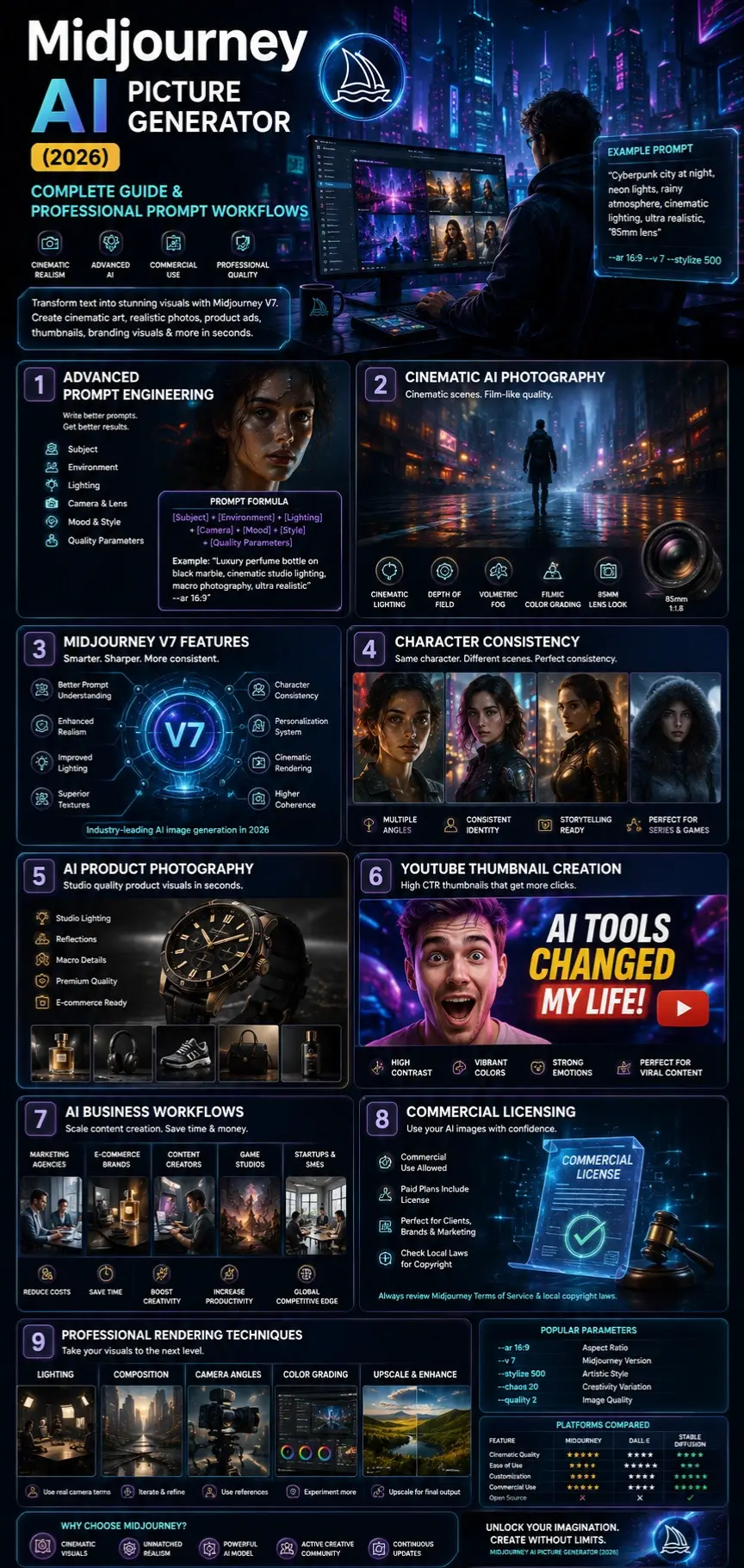
Artificial intelligence is reshaping digital creativity at an accelerating pace, and by 2026, the AI Picture Generator has emerged as one of the leading platforms for generating images with artificial intelligence. Capable of producing cinematic scenes, lifelike portraits, product photos, branding materials, social media content, and game art, Midjourney allows creators and companies to generate high-quality visuals in moments.
Today, professionals across industries—marketers, designers, YouTubers, e-commerce businesses, agencies, and content producers—use Midjourney globally to streamline creative processes, cut production expenses, and expand their visual storytelling capacity. Yet, many existing online resources are outdated, focusing only on basic prompt usage while overlooking advanced techniques such as sophisticated prompt engineering, cinematic effects, maintaining character consistency, and critical topics like commercial rights and AI-related copyright issues.
This comprehensive guide provides an in-depth look at the entire Midjourney landscape in 2026. It covers how the system functions, advanced prompting methods, upgrades in Midjourney V7, professional workflows for AI-generated imagery, real-world business applications, licensing for commercial use, and insights into the evolving role of AI in visual creation. Whether new to the tool or already experienced, readers will gain the knowledge needed to fully leverage AI in modern visual production.
What Is Midjourney AI Picture Generator?
Midjourney is an AI image generator that creates visuals from written prompts. Users describe a scene in simple language, and the system turns those words into detailed artwork using AI, neural networks, and diffusion technology.
Example Prompt:
“Futuristic cyberpunk city at night, neon reflections, cinematic lighting, rainy atmosphere, ultra realistic, 85mm lens”
Within seconds, Midjourney produces multiple high-quality image variations.
Midjourney is popular for:
- Cinematic realism
- Atmospheric lighting
- Artistic composition
- High-detail rendering
- Professional visuals
Originally launched on Discord, Midjourney now works directly in browsers and includes features like AI upscaling, remix editing, style personalization, and commercial-quality exports.
In 2026, Midjourney competes with platforms like DALL·E, Stable Diffusion, Adobe Firefly, Leonardo AI, and Runway ML.
Evolution of Midjourney: V1 to V7
| Version | Major Advancements |
| V1 | Experimental image synthesis |
| V2 | Better image consistency |
| V3 | Improved rendering quality |
| V4 | Significant realism enhancement |
| V5 | Photorealistic breakthrough |
| V6 | Better prompt interpretation |
| V7 | Character consistency, personalization, cinematic realism |
The release of Midjourney V7 dramatically improved multiple AI rendering components, including:
- Prompt comprehension
- Lighting realism
- Texture precision
- Facial identity consistency
- Image coherence
- Visual storytelling
- Camera simulation
- Composition balancing
- Scene continuity
- Cinematic rendering quality
Now that it’s been upgraded, businesses rely on Midjourney a lot more – especially for ads, brand visuals, and polished image narratives. What used to be experimental has slipped into daily creative workflows across studios and agencies.
Why Midjourney Dominates AI Image Generation
Cinematic Visual Quality
One of Midjourney’s biggest strengths is its cinematic visual language. Images often resemble:
- Hollywood film stills
- Netflix promotional frames
- Luxury advertising campaigns
- Editorial magazine photography
- AAA gaming concept art
- Fashion photography
- Premium cinematic posters
The platform excels at realistic lighting, atmospheric effects, and emotional scene composition.
Advanced Artistic Direction
Midjourney demonstrates exceptional understanding of visual storytelling and artistic direction.
It can intelligently generate:
- Professional color grading
- Dynamic Framing
- Soft cinematic shadows
- Realistic reflections
- Depth-of-field simulation
- Emotional ambience
- Environmental storytelling
- Stylized realism
This makes it especially valuable for:
- Creative agencies
- Film studios
- Designers
- Social media marketers
- YouTube creators
- E-commerce companies
- Branding professionals
Superior Prompt Interpretation
The Midjourney AI Picture Generator understands advanced photographic and cinematic terminology, including:
- Camera lenses
- Lighting techniques
- Artistic styles
- Cinematic moods
- Environmental descriptions
- Fashion aesthetics
- Photography composition
- Filmic language
Example Prompt:
“Luxury perfume commercial, dramatic studio lighting, black reflective marble, macro photography, shallow depth of field”
Midjourney interprets these instructions with impressive visual precision.
Accelerated Creative Workflow
Traditional visual production can require hours, days, or even weeks. Midjourney dramatically accelerates content generation.
Users can quickly produce:
- Blog banners
- Product advertisements
- YouTube thumbnails
- Branding materials
- E-commerce campaigns
- Storyboards
- Character concepts
- Marketing graphics
- Social visuals
- Editorial illustrations
This efficiency significantly lowers creative production costs.
How Midjourney AI Works
The Midjourney AI Picture Generator uses diffusion-based machine learning combined with Natural Language Processing to transform text into imagery.
The platform interprets descriptive language and converts it into visual structures using neural diffusion models.
AI Image Generation Pipeline
| Stage | Function |
| Text Analysis | Understands semantic meaning |
| Style Mapping | Applies visual aesthetics |
| Diffusion Rendering | Generates image structure |
| Refinement | Enhances quality |
| Upscaling | Improves resolution |
Core Features of Midjourney AI Picture Generator
Text-to-Image Generation
Generate visuals using natural language prompts and NLP-driven descriptions.
Style References
Apply artistic inspiration, cinematic aesthetics, or visual references.
Character Consistency
Maintain identical characters across multiple scenes, angles, and environments.
Useful for:
- Comics
- Animation concepts
- Storytelling
- Brand mascots
- Gaming narratives
Pan & Zoom
Expand image boundaries while preserving visual consistency.
Remix Mode
Modify prompts dynamically during rendering workflows.
Personalization System
Train Midjourney to understand your preferred artistic style.
Aspect Ratio Controls
Generate optimized visuals for:
- TikTok
- YouTube
- Websites
- Advertising banners
- Posters
High-Resolution Upscaling
Improve image quality for:
- Commercial Publishing
- Professional printing
- E-commerce catalogs
- Marketing campaigns
Best Midjourney Prompt Formula
Use this professional framework:
[Subject] + [Environment] + [Lighting] + [Camera] + [Mood] + [Style] + [Quality Parameters]
Example:
“Luxury perfume bottle on reflective black marble, cinematic studio lighting, macro photography, shallow depth of field, premium advertising aesthetic, ultra realistic –ar 16:9”
Best Midjourney Prompt Examples
Cinematic Prompt
“Epic medieval warrior standing in rain, cinematic lighting, dramatic atmosphere, volumetric fog, ultra realistic, movie still, 85mm lens”
Realistic Portrait Prompt
“Ultra realistic female portrait, soft Rembrandt lighting, freckles, shallow depth of field, Canon EOS photography, natural skin texture”
YouTube Thumbnail Prompt
“Excited tech YouTuber in neon studio, dramatic lighting, exaggerated facial expression, viral YouTube thumbnail style, high contrast”
Product Photography Prompt
“Luxury smartwatch floating above reflective surface, studio lighting, premium ecommerce advertising, ultra detailed.”
Anime Prompt
“Anime samurai girl in cyberpunk Tokyo, neon rain, cinematic anime aesthetic, highly detailed”
Architecture Prompt
“Modern Scandinavian living room, natural lighting, luxury interior design photography, photorealistic”
Professional Midjourney Workflows
Cinematic AI Art Creation
Best for:
- Filmmakers
- Storyboard artists
- Content creators
- Creative agencies
Process
- Begin with a cinematic subject
- Add atmospheric elements
- Use camera terminology
- Introduce emotional mood
- Generate multiple variations
- Upscale final render
E-commerce Product Visuals
Best for:
- Shopify sellers
- E-commerce brands
- Amazon businesses
Process
- Describe the product clearly
- Add premium lighting
- Use luxury advertising language
- Generate multiple angles
- Create lifestyle environments
YouTube Thumbnail Design
Best for:
- Gaming creators
- Tech channels
- Entertainment creators
Process
- Use expressive emotions
- Add dramatic illumination
- Increase contrast
- Create visual tension
- Add vibrant backgrounds
Midjourney for Businesses & Creators
YouTubers
Generate:
- Thumbnails
- Channel banners
- Storyboards
- Branding graphics
Bloggers
Create:
- Featured images
- SEO visuals
- Infographics
- Social graphics
E-commerce Brands
Produce:
- Product advertisements
- Lifestyle campaigns
- Marketing creatives
- Promotional banners
Agencies
Design:
- Client presentations
- Advertising campaigns
- Concept visuals
- Brand identities
Game Studios
Generate:
- Character concepts
- Environment art
- Cinematic scenes
- World-building illustrations
Benefits for European Businesses
European companies increasingly use Midjourney to reduce creative expenses and improve scalability.
| Country | Popular Use Cases |
| UK | Marketing visuals |
| Germany | E-commerce creatives |
| France | Fashion editorials |
| Spain | Tourism campaigns |
| Italy | Luxury branding |
Midjourney is especially beneficial for startups and SMEs needing premium-quality visuals without large production budgets.
How to Use Midjourney AI Picture Generator
Create an Account
Register through the official Midjourney platform.
Choose a Subscription
Select a pricing plan matching your workflow requirements.
Open the Web Application
Modern Midjourney workflows support browser-based image generation.
Enter a Prompt
Describe the desired image using detailed instructions.
Add Parameters
Examples:
- –ar 16:9
- –stylize 500
- –chaos 20
Generate Variations
Experiment with:
- Lighting
- Angles
- Mood
- Composition
- Camera styles
Upscale Final Images
Export high-resolution visuals for publishing and commercial distribution.
Midjourney vs DALL·E vs Stable Diffusion
| Feature | Midjourney | DALL·E | Stable Diffusion |
| Realism | Excellent | Good | Very Good |
| Artistic Quality | Industry-leading | Moderate | Variable |
| Ease of Use | Easy | Very Easy | Advanced |
| Customization | High | Medium | Extremely High |
| Commercial Workflows | Excellent | Good | Excellent |
| Open Source | No | No | Yes |
Pros and Cons of Midjourney AI Picture Generator
Pros
- Exceptional cinematic quality
- Industry-leading artistic realism
- Strong prompt interpretation
- Rapid visual production
- Premium branding capabilities
- Massive creative community
- Advanced rendering aesthetics
Cons
- Learning curve for advanced prompts
- Subscription-based pricing
- Limited open-source customization
- Evolving AI copyright laws
- Increasing market competition
Tips to Get the Best Midjourney Results
Use Detailed Prompts
Specificity improves rendering quality dramatically.
Add Camera Language
Terms like:
- “cinematic”
- “35mm lens”
- “studio lighting”
significantly improve image realism.
Experiment With Aspect Ratios
Use:
- 16:9 for YouTube
- 1:1 for Instagram
- 9:16 for TikTok
Iterate Frequently
Professional creators rarely use the first generation.
Study Photography
Understanding lighting and composition greatly improves prompt quality.
How to Write Better AI Image Prompts
Do
- Be descriptive
- Mention lighting
- Add camera references
- Use storytelling
- Include emotional mood
Don’t
- Use vague descriptions
- Overstuff prompts
- Ignore composition
- Expect perfection instantly
FAQs
A: Midjourney primarily operates through paid subscription plans, although limited promotional trials may occasionally appear.
A: Yes. Midjourney V7 can generate highly realistic photography-style visuals with advanced textures and lighting.
A: Absolutely. Agencies, ecommerce brands, marketers, and creators use Midjourney commercially every day.
A: Paid subscribers usually receive commercial usage rights, though copyright laws differ by country.
A: The best prompts usually include:
Subject
Environment
Lighting
Camera terminology
Mood
Style references
Rendering parameters
Conclusion
Midjourney turns text prompts into high-quality AI-generated artwork within seconds. Users simply describe a scene, and the platform creates cinematic, detailed visuals that often look like professional concept art.
By 2026, Midjourney will be widely used by designers, Filmmakers, marketers, agencies, and content creators because of its realistic rendering, creative flexibility, and advanced prompt understanding.
As AI continues changing digital media, skills like prompt writing and cinematic storytelling are becoming increasingly valuable for modern creators.











