Introduction
Out of nowhere, artificial intelligence began reshaping how digital art gets made – Midjourney stepped into that shift as a key player. Instead of complex software, people now type plain descriptions, letting Midjourney craft images ranging from dreamlike landscapes to sharp, lifelike faces. Movie-style shots appear alongside glossy product visuals, all pulled from words alone. Simple ideas turn into detailed pictures, thanks to this evolving tech tucked inside creative workflows. What once took hours now happens in moments, guided by imagination more than skill.
By 2026, folks who design images lean on Midjourney just as much as YouTubers do. Freelance workers rely on it, while marketers find it useful too. E-commerce companies use it across countries. So do larger businesses. Making thumbnails becomes easier this way. Branding materials get built with it often. Social posts include their graphics regularly. Concept artwork comes from it frequently. Commercial pictures appear thanks to its tools.
This full walkthrough dives into Midjourney AI Art from start to finish – digging into how prompts shape results, crafting movie-style visuals step by step, chasing lifelike detail through smart settings, ways people earn using generated images, what it costs to run projects, real-world company applications, legal questions around ownership, and then wraps up comparing strengths against Stable Diffusion.
Starting out or already creating work, this guide walks through Midjourney AI Art for 2026. Skills grow step by step when learning sticks to practice. Each part builds differently depending on where you begin. Tools change, yet basics hold steady beneath new features. Anyone using the system finds something useful here. Progress shows up quietly after consistent effort. What matters most appears only over time.
What Is Midjourney AI Art?
Art made through Midjourney comes from an AI system that turns words into images. Instead of drawing by hand, users describe what they want; the tool interprets those descriptions visually. Behind the scenes, complex algorithms build pictures step by step, refining shapes and colors over time. Unlike traditional software, it learns patterns from vast image collections to generate new ones. Each result forms gradually, like a sketch emerging from noise into clarity.
A picture forms fast when someone describes what they want – maybe a mood, a person, the way light falls, or how it should look artistically. What comes out is built by AI, shaped from words alone. Seconds pass before something original appears, made only from ideas put into sentences. Each result stands apart, born from description, guided by imagination.
Example Midjourney Prompt
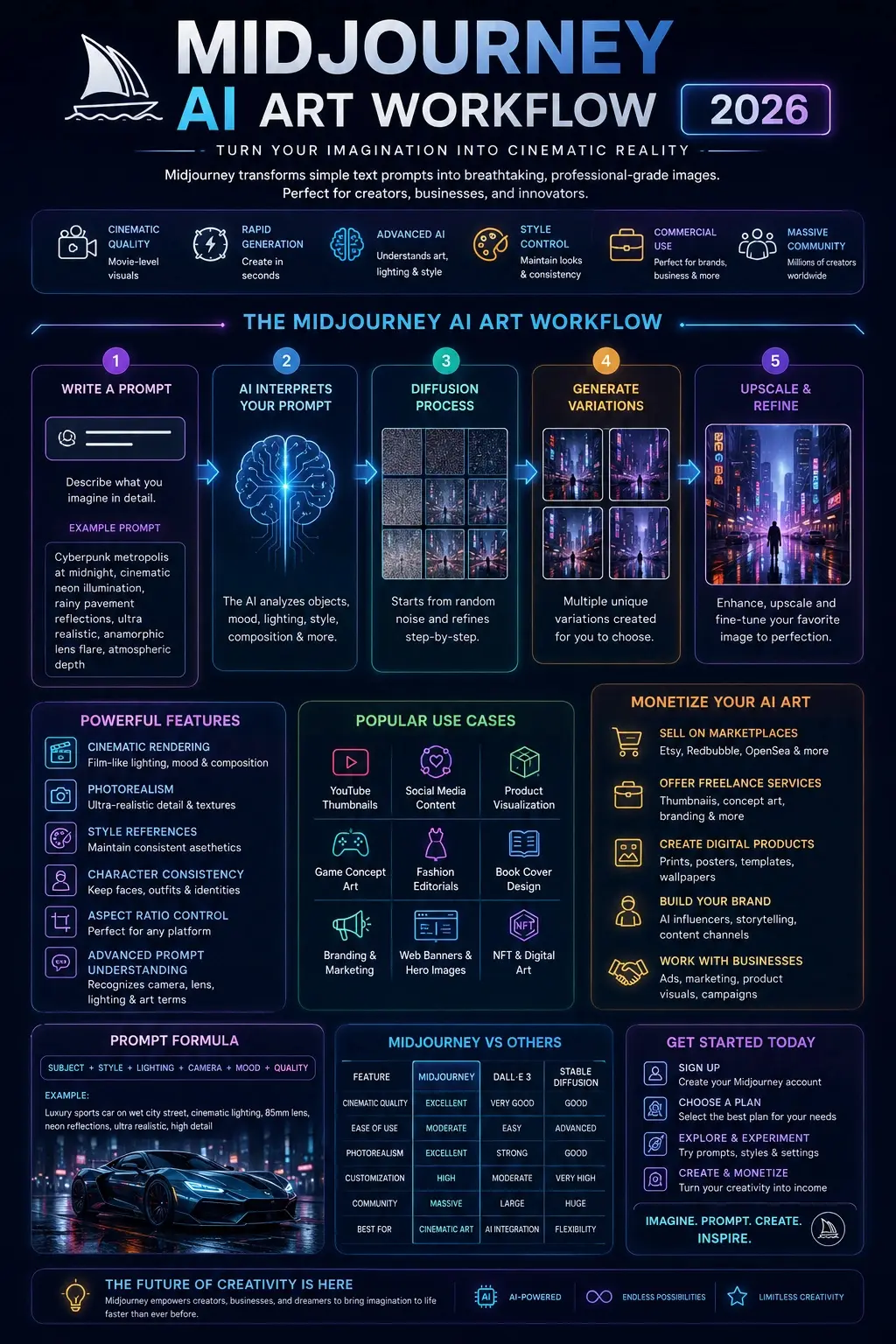
“Cyberpunk metropolis at midnight, cinematic neon illumination, rainy pavement reflections, ultra realistic, anamorphic lens flare, atmospheric depth”
This prompt can produce breathtaking futuristic imagery featuring dramatic mood, realistic lighting, and immersive cinematic aesthetics.
Why Midjourney AI Art Is So Popular in 2026
Midjourney rapidly became one of the leading AI art generators because it focuses heavily on:
- Cinematic visual storytelling
- Professional composition
- Emotional atmosphere
- High-detail rendering
- Artistic consistency
Key Reasons Behind Midjourney’s Popularity
| Feature | Why It Matters |
| Cinematic Rendering | Produces movie-quality visuals |
| Rapid AI Generation | Creates artwork within seconds |
| Advanced Prompt Recognition | Understands artistic and photographic language |
| Commercial Creative Utility | Useful for agencies and businesses |
| Visual Consistency | Helps maintain branding identity |
| Massive Community Ecosystem | Millions of creators share workflows |
| Browser-Based Interface | Easier accessibility for newcomers |
Today, creators use Midjourney AI Art for:
- YouTube thumbnails
- Social media campaigns
- Product visualization
- Fashion editorials
- Gaming concept design
- Storyboarding
- Book covers
- Website Hero Banners
- Branding materials
- NFT-inspired artwork
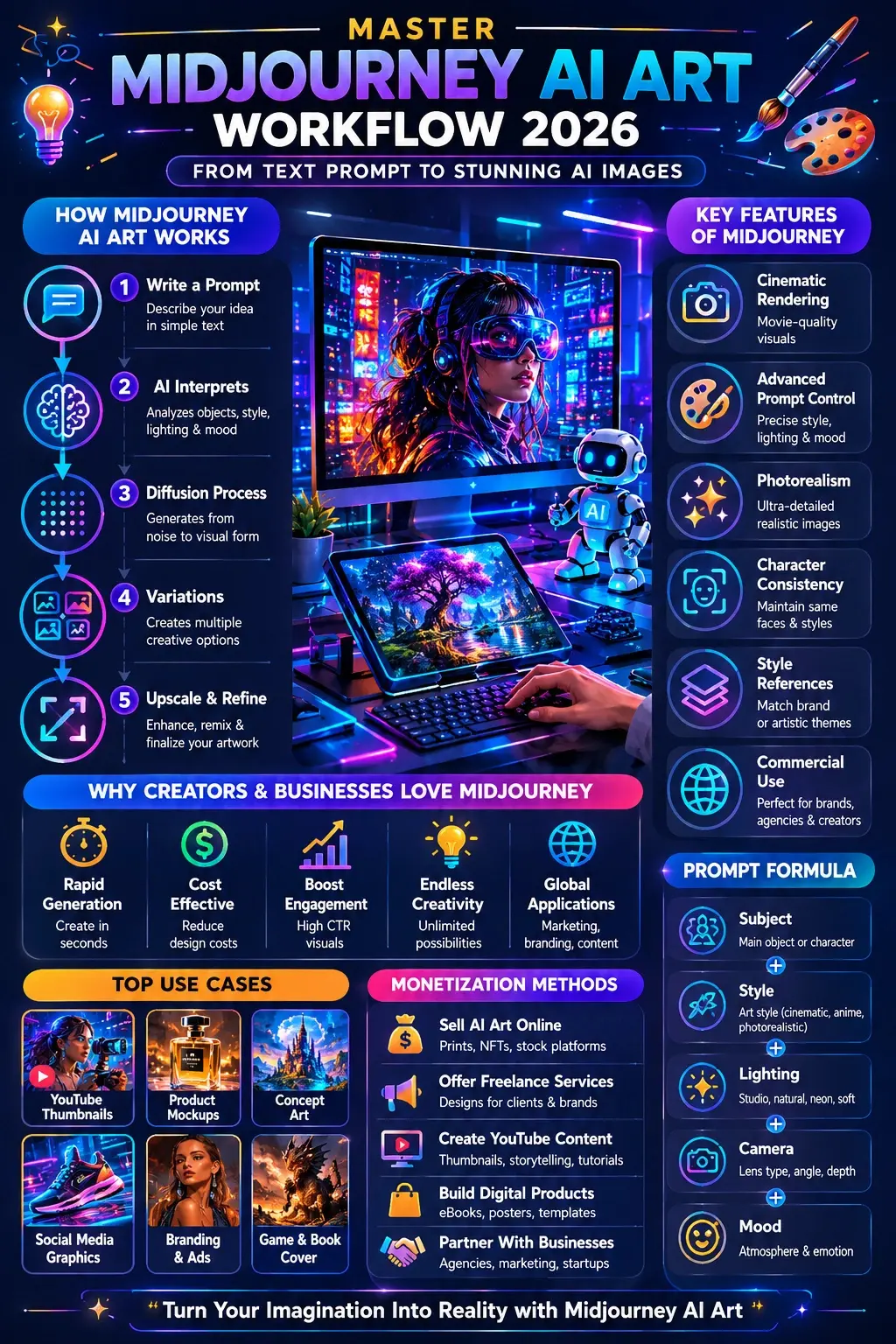
How Midjourney AI Art Works
Midjourney relies on advanced diffusion-based artificial intelligence systems trained on massive datasets containing visual imagery and descriptive text.
The AI gradually learns the relationships between:
- Objects
- Styles
- Lighting setups
- Color palettes
- Composition techniques
- Camera terminology
- Artistic references
User Creates a Prompt
The workflow begins when the user writes a descriptive instruction.
Example
“Ancient samurai warrior standing in snowfall, cinematic lighting, ultra realistic, 85mm lens photography”
AI Interprets the Prompt
The system evaluates:
- Subjects
- Mood
- Environment
- Camera style
- Lighting direction
- Depth of field
- Color grading
- Visual composition
Diffusion Rendering Begins
The AI starts with random visual noise and progressively refines the image until a coherent artwork emerges.
This technique is called diffusion-based image synthesis.
Multiple Variations Are Generated
Midjourney typically provides several visual variations, allowing creators to choose and refine their favorite output.
Upscaling & Refinement
Users can further enhance visuals using:
- Upscaling
- Remix mode
- Style references
- Seed parameters
- Character consistency tools
- Aspect ratio customization
Key Features of Midjourney AI Art
Cinematic Visual Quality
One of Midjourney’s biggest strengths is its cinematic rendering quality.
Midjourney is renowned for:
- Dramatic contrast
- Atmospheric fog
- Rich texture detail
- Emotional storytelling
- Professional framing
- Film-style illumination
This makes the platform ideal for:
- Science fiction artwork
- Fantasy worlds
- Luxury branding
- Editorial fashion
- Film Concept Design
- Advertising campaigns
Advanced Prompt Interpretation
Modern Midjourney models understand highly sophisticated artistic terminology.
The AI can recognize:
- Camera models
- Lens types
- Aperture settings
- Studio lighting
- Film aesthetics
- Cinematic composition
- Photography jargon
Example Prompt
“Editorial fashion portrait, Canon EOS R5, softbox lighting, 85mm lens, shallow depth of field”
This advanced understanding enables creators to generate highly photorealistic visuals.
Style References
Style references help users maintain consistent aesthetics across projects.
This functionality is extremely useful for:
- Branding systems
- Advertising campaigns
- Comics
- Storytelling series
- Marketing visuals
- AI influencers
Character Consistency
Midjourney now supports improved character consistency features.
Creators can preserve:
- Facial structure
- Hairstyles
- Clothing design
- Color palettes
- Background aesthetics
- Personality appearance
This is especially valuable for:
- Animation pipelines
- Graphic novels
- AI storytelling channels
- Brand mascots
- Cinematic series
Browser-Based Workflow
Midjourney has evolved beyond Discord-only workflows.
Users now access:
- Web dashboards
- Personal galleries
- AI moodboards
- Editing interfaces
- Asset management systems
This streamlined experience makes Midjourney far more beginner-friendly and business-oriented.
Benefits of Midjourney AI Art for Businesses & Creators
Businesses around the globe increasingly use Midjourney AI Art for content production and visual marketing.
Industries Using Midjourney
| Industry | Use Case |
| Marketing Agencies | AI advertising campaigns |
| E-commerce Brands | Product mockups |
| YouTubers | Thumbnail creation |
| Designers | Moodboards & branding |
| Publishers | Book cover generation |
| Gaming Studios | Environment concept art |
| Freelancers | Client projects |
| Startups | Brand visualization |
Why Businesses Use Midjourney
Faster Content Production
AI-generated visuals dramatically accelerate creative workflows.
Reduced Design Expenses
Businesses can create professional graphics without massive production teams.
Enhanced Creative Experimentation
Brands can test multiple concepts rapidly before finalizing campaigns.
Improved Social Media Engagement
Cinematic visuals often achieve stronger audience interaction.
Rapid Brand Visualization
Midjourney allows startups and agencies to prototype branding ideas instantly.
How to Use Midjourney AI Art
Create a Midjourney Account
Visit the official Midjourney platform and register for an account.
Select a Subscription Plan
Plans generally vary according to:
- GPU allocation
- Fast-generation access
- Relaxed rendering mode
- Commercial licensing rights
- Concurrent rendering capacity
Access the Midjourney Interface
Users can generate visuals using:
- Browser dashboards
- Discord workflows
- Personal galleries
- Editing panels
Write a High-Quality Prompt
A powerful prompt structure usually follows this framework:
Prompt Formula
Subject + Style + Lighting + Camera + Mood + Quality
Example
“Luxury perfume bottle on marble surface, cinematic studio lighting, premium commercial photography, ultra realistic”
Generate & Refine Artwork
Enhance outputs using:
- Variations
- Upscaling
- Remix mode
- Style references
- Seed controls
Best Midjourney Prompt Engineering Techniques
Prompt engineering is the single most important skill for producing professional AI-generated imagery.
Use Photography Terminology
Photography language significantly improves realism.
Include:
- Camera models
- Lens specifications
- Aperture values
- Studio lighting terms
- Depth-of-field references
Example Prompt
“Portrait of a fashion model, Canon EOS R5, 85mm lens, cinematic soft lighting, shallow depth of field”
Use Cinematic Descriptions
Midjourney responds exceptionally well to cinematic vocabulary.
Powerful Cinematic Keywords
- Film grain
- Volumetric lighting
- Moody atmosphere
- Anamorphic flare
- Dramatic shadows
- Color grading
- Wide-angle composition
Use Art Style References
Popular Midjourney styles include:
- Cyberpunk
- Anime
- Watercolor
- Oil painting
- Surrealism
- Renaissance aesthetics
- Sci-fi illustration
- Minimalism
Control Aspect Ratios
Aspect ratios optimize visuals for specific platforms.
| Aspect Ratio | Best Usage |
| ar 16:9 | YouTube thumbnails |
| ar 9:16 | TikTok & Shorts |
| ar 1:1 | Instagram posts |
| ar 4:5 | Social media advertising |
Use Negative Prompt Concepts
Avoid undesirable results by specifying unwanted elements.
Avoid
- Blurry textures
- Distorted anatomy
- Extra limbs
- Low-quality rendering
- Poor facial symmetry
Advanced Midjourney AI Art Workflows
Photorealism Workflow
To achieve hyper-realistic visuals, creators should use:
- Real-world camera references
- Natural lighting setups
- Authentic skin textures
- Realistic color grading
- –style raw
Example Prompt
“Elderly craftsman in vintage workshop, natural window illumination, Canon EOS R5, realistic skin detail, cinematic realism”
Character Consistency Workflow
For consistent characters:
- Reuse descriptive phrases
- Maintain identical seed values
- Preserve wardrobe design
- Use character references
Best For
- Comics
- AI influencers
- Animation concepts
- Storytelling channels
- Brand mascots
Branding Workflow
Businesses use Midjourney for:
- Product advertising
- Packaging concepts
- Website banners
- Social media branding
- Commercial campaigns
YouTube Thumbnail Workflow
Creators produce:
- Viral thumbnails
- Documentary graphics
- Gaming visuals
- Cinematic reaction art
- Storytelling compositions
Midjourney AI Art Prompt Examples
Fantasy Art Prompt
“Dragon soaring above ancient kingdom, cinematic sunset, fantasy realism, volumetric lighting, epic atmosphere”
Anime Prompt
“Anime warrior girl in neon Tokyo streets, cel-shaded style, rain reflections, dynamic action pose”
Photorealistic Portrait Prompt
“Professional chef inside luxury restaurant kitchen, cinematic illumination, Canon EOS R5, ultra realistic skin detail”
Product Photography Prompt
“Luxury smartwatch on reflective black surface, premium studio lighting, commercial product photography”
Fashion Editorial Prompt
“High-fashion editorial photoshoot in Paris Avenue, dramatic shadows, Vogue-inspired composition”
Midjourney vs Other AI Art Generators
| Feature | Midjourney | OpenAI DALL·E | Stability AI Stable Diffusion |
| Artistic Quality | Excellent | Very Good | Good |
| Ease of Use | Moderate | Beginner-Friendly | Advanced |
| Cinematic Rendering | Exceptional | Good | Moderate |
| Customization | High | Moderate | Extremely High |
| Local Installation | No | No | Yes |
| Community Ecosystem | Massive | Large | Huge |
| Photorealism | Excellent | Strong | Good |
| Style Control | Advanced | Moderate | Powerful |
Midjourney AI Art Pricing
Pricing structures may evolve, but Midjourney subscriptions typically vary according to GPU access and rendering speed.
| Plan Feature | Basic Tier | Professional Tier |
| GPU Access | Limited | Expanded |
| Fast Rendering | Moderate | Extensive |
| Relaxed Mode | Restricted | Included |
| Commercial Rights | Yes | Yes |
| Concurrent Jobs | Lower | Higher |
Professional creators usually prefer premium plans for production-heavy workflows.
Pros and Cons of Midjourney AI Art
Pros
- Exceptional cinematic quality
- Powerful photorealism
- Rapid rendering speed
- Strong style recognition
- Professional composition
- Massive creator ecosystem
- Excellent branding potential
Cons
- Subscription-based pricing
- Learning curve for advanced prompting
- Less customizable than Stable Diffusion
- Ongoing copyright debates
- Cloud-only rendering system
Best Midjourney AI Art Alternatives
OpenAI DALL·E
Best for:
- Simplicity
- Beginner workflows
- AI ecosystem integration
Stable Diffusion
Best for:
- Open-source customization
- Local rendering pipelines
- Workflow automation
Adobe Firefly
Best for:
- Commercial-safe content
- Adobe ecosystem users
- Enterprise branding projects
Leonardo AI
Best for:
- Game assets
- Stylized rendering
- Creative experimentation
Runway ML
Best for:
- AI video generation
- Motion graphics
- Multimedia storytelling
Tips to Get the Best Results with Midjourney AI Art
Do’s
- Use highly descriptive prompts
- Add lighting terminology
- Experiment with compositions
- Study photography principles
- Save successful prompts
- Use cinematic vocabulary
Don’ts
- Use vague wording
- Overload prompts with random keywords
- Ignore the composition structure
- Expect flawless outputs immediately
- Skip prompt refinement
How to Write Better Midjourney Prompts
Strong Prompt Formula
A strong Midjourney prompt typically includes:
- Subject
- Environment
- Mood
- Lighting
- Camera details
- Style references
- Composition techniques
Advanced Prompt Example
“Cyberpunk detective standing inside rainy Tokyo alleyway, cinematic neon lighting, anamorphic lens flare, ultra realistic, 35mm photography, volumetric fog, dramatic atmosphere.”
This type of prompt generates deeper cinematic storytelling and immersive visual composition.
Future of Midjourney AI Art
AI image-generation technology is evolving rapidly.
Emerging Industry Trends
- AI video creation
- Real-time rendering
- 3D AI environments
- AI filmmaking
- Interactive storytelling
- Automated advertising pipelines
- Multimodal AI ecosystems
Midjourney is expected to remain one of the most influential platforms shaping the future of AI creativity.
FAQs
A: Many creators consider Midjourney one of the best AI art generators for cinematic visuals, photorealism, and artistic composition.
A: Yes. Beginners can start with simple prompts and gradually master advanced prompt engineering techniques.
A: In many situations, yes. However, creators should carefully review Midjourney licensing policies and local copyright laws before commercial use.
A: Midjourney excels at cinematic rendering and ease of use, while Stable Diffusion provides deeper customization and local workflows.
A: Yes. Midjourney can generate highly realistic visuals using advanced prompts, realistic lighting, and professional photography terminology.
Conclusion
Out of nowhere, Midjourney AI Art reshaped how images are made today. Pictures once drawn by hand now spring from prompts – detailed, dreamlike, sharp enough to fool the eye. Artists lean on it, yes, but so do small studios, ad teams, and even startups testing bold visuals. Realism pours through every frame, yet each piece carries a hint of surreal surprise. This tool does not replace hands or pencils – it shifts what feels possible.
Picture anything – worlds unseen, faces so real they breathe, thumbnails that grab eyes. Midjourney handles it all by 2026, a leader among tools shaping images from thought. Need ads with punch or brand visuals built smart? This system turns prompts into polished results that others struggle to match. Behind every output lies precision tuned through years of refinement. It does not just guess; it constructs with intent.
The key to success with Midjourney involves mastering:
- Prompt engineering
- Cinematic composition
- Lighting Strategies
- Style consistency
- Workflow optimization
Early learners of AI art tools may shape how stories are told with images online. Those picking up these skills fast could stand out in sharing ideas through visuals. Getting familiar now might open paths others miss later. Those who dive into this tech at the start can lead changes in creative expression. A head start here often means more room to grow when things shift.
Out here, imagination gets a boost from AI art instead of being replaced by it. New creators find wider paths to explore what they can make. Tools shift how ideas grow, opening doors that once seemed shut.











