Introduction
Out here, where pixels meet code, a quiet shift started – Stable Diffusion v1.3 slipped in, reshaping how art gets made. While flashier tools grab attention now, especially those 2026 models packing extra layers and speed, that earlier version still lingers in studios, tucked into workflows. Not because it’s trendy. It sticks around since it works, offering control that some find missing elsewhere. Creators keep coming back, even when faster options blink on their screens.
This isn’t due to age or being light on resources, yet it holds up as one of the sharpest, most adaptable tools around when building images openly. Efficiency sticks, options stay wide, control stays deep – few models match its reach even now.
It still powers workflows in:
- AI art creation
- Game development pipelines
- Marketing content production
- YouTube thumbnail design
- Freelance design services
- Experimental AI research setups
Open models like Stable Diffusion v1.3 put creators in charge – no gatekeeping, just results. That freedom? It sticks around. Professionals keep coming back because oversight matters, and so does saving resources. Not magic. Just steady, predictable power without hidden fees.
What is Stable Diffusion v1.3?
Picture-making software built on code anyone can access – this one called Stable Diffusion v1.3 – turns words into visuals using a method based on gradual refinement. Part of the first wave under the Stable Diffusion name, it opened doors worldwide, letting more people try generating art through text without barriers.
Running right on your own device, away from distant servers, means you keep control plus what’s yours stays private.
Key Capabilities
With Stable Diffusion v1.3, users can:
- Generate high-quality AI images locally
- Avoid subscription-based AI tools
- Customize model behavior
- Train lightweight LoRA models
- Build advanced prompt workflows
- Automate image generation pipelines
- Use AI for commercial projects
Its flexibility makes it highly attractive for both beginners and advanced creators.
Why Stable Diffusion v1.3 Still Matters in 2026
Despite newer models offering improved realism, Stable Diffusion v1.3 remains widely used due to its balance of performance and accessibility.
Lightweight Architecture
Modern AI models often require high-end GPUs with large VRAM capacity. In contrast, Stable Diffusion v1.3 can operate efficiently on mid-range systems.
This makes it ideal for users with:
- Budget gaming laptops
- Older desktop GPUs
- Entry-level creative setups
Fast Image Generation
Because of its simpler architecture, it produces results quickly, making it suitable for real-time experimentation and rapid iteration workflows.
Massive Ecosystem Support
A large community continues to support v1-based models with:
- LoRA libraries
- Custom checkpoints
- Prompt databases
- Extensions and plugins
- Tutorials and workflows
Creative Flexibility
Artists prefer it for experimentation because it allows rapid testing of ideas without heavy computation costs.
Privacy & Local Control
Everything runs locally, meaning:
- No cloud dependency
- No data sharing
- Full creative ownership
This is particularly important for agencies and professionals handling sensitive projects.
How Stable Diffusion v1.3 Works
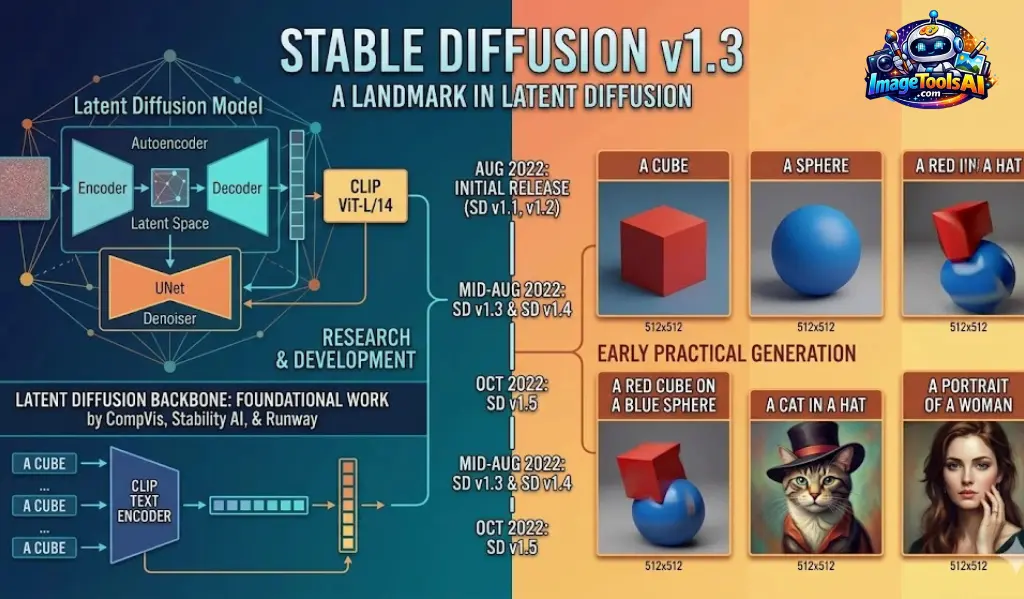
Stable Diffusion uses a diffusion process where noise is gradually transformed into structured images.
Core Components
CLIP Text Encoder
Interprets the meaning of your prompt.
Latent Space Model
Compresses image data into a simplified representation.
U-Net Architecture
Gradually removes noise step-by-step.
VAE Decoder
Converts processed data into a final image.
Step-by-Step Process
Prompt Input
User enters a descriptive text prompt.
Example:
“cinematic futuristic city at night with neon reflections”
Text Understanding
AI analyzes style, objects, lighting, and composition.
Noise Generation
The initial image starts as random noise.
Progressive Denoising
AI refines noise into structured visuals.
Final Output
A complete image is generated.
Evolution of Stable Diffusion v1 Series
| Version | Improvement |
| v1.1 | Early release |
| v1.2 | Better prompt response |
| v1.3 | Improved guidance |
| v1.4 | More consistency |
| v1.5 | Better realism |
| SDXL | Major upgrade |

Stable Diffusion v1.3 vs v1.5 vs SDXL
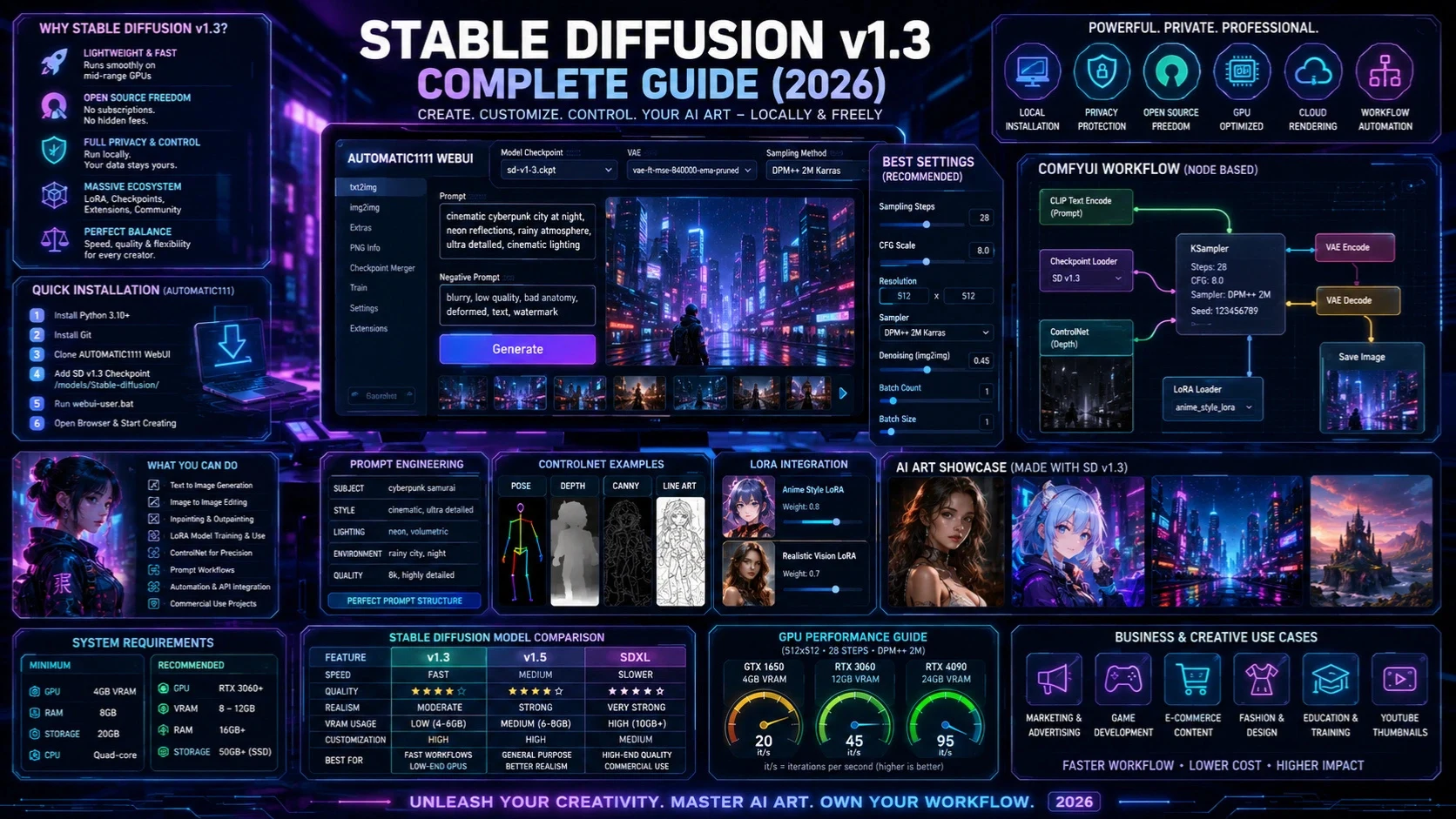
| Feature | v1.3 | v1.5 | SDXL |
| Speed | Fast | Medium | Slower |
| Quality | Good | Better | Excellent |
| VRAM Use | Low | Medium | High |
| Customization | High | High | Medium |
| Realism | Moderate | Strong | Very Strong |
When to Use v1.3
- Low-end GPU systems
- Fast iteration workflows
- Anime or stylized art
- Experimental prompt testing
When to Use SDXL
- High-quality realism
- Commercial production
- Cinematic visuals
- Advanced creative projects
System Requirements
Minimum Requirements
- GPU: 4GB VRAM
- RAM: 8GB
- Storage: 20GB
- CPU: Quad-core
Recommended Setup
- GPU: RTX 3060 or higher
- RAM: 16GB+
- VRAM: 8–12GB
- SSD Storage: 50GB+
Installation Guide
The most popular method to run Stable Diffusion is AUTOMATIC1111 WebUI.
Install Git
Required for cloning repositories.
Download WebUI
Clone the AUTOMATIC1111 repository.
Add Model
Place Stable Diffusion v1.3 checkpoint in:
/models/Stable-diffusion/
Run Application
Launch webui-user.bat
Open Browser
Access the localhost link provided in the terminal.
ComfyUI Installation
ComfyUI is a node-based workflow system designed for professionals.
Advantages
- Visual workflow building
- Memory-efficient processing
- Advanced automation
- Modular design
Best For
- Developers
- AI researchers
- Production pipelines
Cloud-Based Alternatives
For users without GPUs:
- Google Colab
- RunPod
- Vast.ai
- Paperspace
Cloud solutions are ideal for beginners and freelancers.
Best Settings for Stable Diffusion v1.3
Recommended Configuration
- Sampling Steps: 20–40
- CFG Scale: 7–12
- Resolution: 512×512
- Sampler: Euler a / DPM++
CFG Scale Meaning
- Low (1–5): Creative output
- Medium (7–12): Balanced results
- High (15+): Over-processed images
Prompt Engineering Guide
Prompt engineering is the core skill for AI image generation.
Structure of a Strong Prompt
Include:
- Subject
- Style
- Lighting
- Environment
- Camera angle
- Quality terms
Example Prompt
girl in the city
Example Prompt
cinematic portrait of a young woman walking through neon-lit Tokyo streets at night, shallow depth of field, volumetric lighting, ultra-detailed, cinematic composition
Best Prompt Categories
Photorealistic Prompt
ultra realistic portrait photography, cinematic lighting, 85mm lens, natural skin texture
Anime Prompt
anime character, soft lighting, vibrant colors, detailed eyes, studio quality illustration
Cinematic Prompt
futuristic cyberpunk city, neon reflections, rainy atmosphere, cinematic lighting
Image-to-Image Workflow
This method modifies existing images.
Uses:
- Style transfer
- Character redesign
- Image enhancement
- Concept development
Denoising Strength
- 0.2–0.4: Minor changes
- 0.5–0.7: Balanced edits
- 0.8–1.0: Major transformation
Inpainting and Outpainting
Inpainting
Used to edit specific areas of an image.
Outpainting
Expands image boundaries for wider scenes.
LoRA Models
LoRA allows lightweight customization without full retraining.
Benefits
- Small file size
- Easy installation
- Fast Experimentation
- Wide community support
ControlNet Overview
ControlNet enables precise control over image generation.
Features
- Pose control
- Edge detection
- Depth mapping
- Structure consistency
- Sketch-based generation
This makes AI generation more predictable and professional.
Business Use Cases
Stable Diffusion v1.3 is widely used commercially.
Industries
- Marketing agencies
- E-commerce
- Game development
- Fashion design
- Education
Benefits
- Reduced production cost
- Faster workflows
- Scalable content creation
FAQs
A: Yes, Stable Diffusion v1.3 is open-source and free for local installation and use. However, some third-party platforms or cloud services built on it may be paid.
A: Yes, but performance depends on your hardware. A basic setup with 4GB–8GB VRAM can run it, although faster GPUs (like RTX series) provide much smoother results.
A: Yes. Even in 2026, it is widely used because it is lightweight, fast, and supported by a massive ecosystem of LoRAs, models, and extensions.
A: Stable Diffusion v1.3 is faster and lighter, while SDXL produces higher realism and better prompt understanding but requires more powerful hardware.
A: Midjourney is easier for beginners because it is simple and cloud-based. Stable Diffusion is more powerful but requires setup and technical understanding.
Conclusion
Even in 2026, Stable Diffusion v1.3 sticks around – fast, open, useful. Newer tools pop up, yet creators keep coming back because it works without hassle.
It is especially valuable for:
- Beginners learning AI art
- Professionals needing fast workflows
- Businesses optimizing content production
- Developers Building AI Pipelines
Start with clear prompts, then adjust settings step by step. Workflows begin to flow once each part clicks into place. Good results show up even on older machines. No monthly fees stand in the way. Power comes from practice, not pricey tools.











