Introduction
AI image generation changed dramatically when SDXL Turbo arrived.
Before Turbo models, creating high-quality AI art usually meant waiting through 20–50 diffusion steps. Even powerful GPUs needed several seconds to render a single image. That delay slowed creative momentum, especially among designers, developers, marketers, and artists who work interactively.
SDXL Turbo completely changed that experience.
Built on the original SDXL architecture from Stability AI, Turbo uses advanced distillation techniques to generate usable images in as few as 1–4 inference steps. The result feels less like traditional rendering and more like live creative interaction.
Instead of waiting, creators can iterate instantly.
This guide explains everything you need to know about SDXL Turbo in 2026, including:
- How it works
- Why is it so fast
- Best settings
- ComfyUI workflows
- Prompt engineering
- GPU requirements
- API integration
- Business use cases
- Limitations
- Expert optimization strategies
Whether you are a beginner experimenting locally or a developer building real-time AI applications, this guide will help you get the best possible results from SDXL Turbo.
What Is SDXL Turbo?
SDXL Turbo is a distilled real-time text-to-image diffusion model based on the original Stable Diffusion XL (SDXL) architecture.
Unlike traditional diffusion models that gradually denoise images across dozens of sampling steps, Turbo models are optimized to jump toward the final image almost instantly.
The main breakthrough is speed.
Traditional SDXL pipelines often require:
- 20–50 sampling steps
- Higher latency
- Longer iteration cycles
SDXL Turbo typically works best at:
- 1–4 steps
- Extremely low latency
- Interactive image generation
This allows creators to experiment rapidly without interrupting their workflow.

Why SDXL Turbo Matters in 2026
The AI image industry is moving toward:
- Real-time creativity
- Interactive workflows
- Instant feedback loops
- Live AI generation
- Lightweight inference systems
SDXL Turbo became one of the earliest major open-source models to push diffusion into real-time territory successfully.
That shift matters because modern creators increasingly prioritize:
- Speed
- Iteration efficiency
- Automation
- Live ideation
- Workflow integration
For many users, generating 20 images quickly is more valuable than generating one perfect image slowly.
How SDXL Turbo Works
At its core, SDXL Turbo uses a technique called Adversarial Diffusion Distillation (ADD).
Traditional diffusion models progressively remove noise across many denoising steps.
SDXL Turbo compresses that process into very few steps.
xt→x0x_t \rightarrow x_0xt→x0
Instead of slowly refining an image over dozens of iterations, the model learns how to approximate the final output almost immediately.
Core Technologies Behind Turbo
Knowledge Distillation
Turbo learns from larger SDXL pipelines and compresses their behavior into a faster inference process.
Adversarial Training
The model uses adversarial learning methods to preserve image realism despite fewer steps.
Optimized Low-Step Sampling
Turbo is designed specifically for extremely low-step generation.
That’s why typical SDXL settings do not always work properly with Turbo models.
Why SDXL Turbo Is So Fast
The biggest reason for Turbo’s speed is reduced sampling complexity.
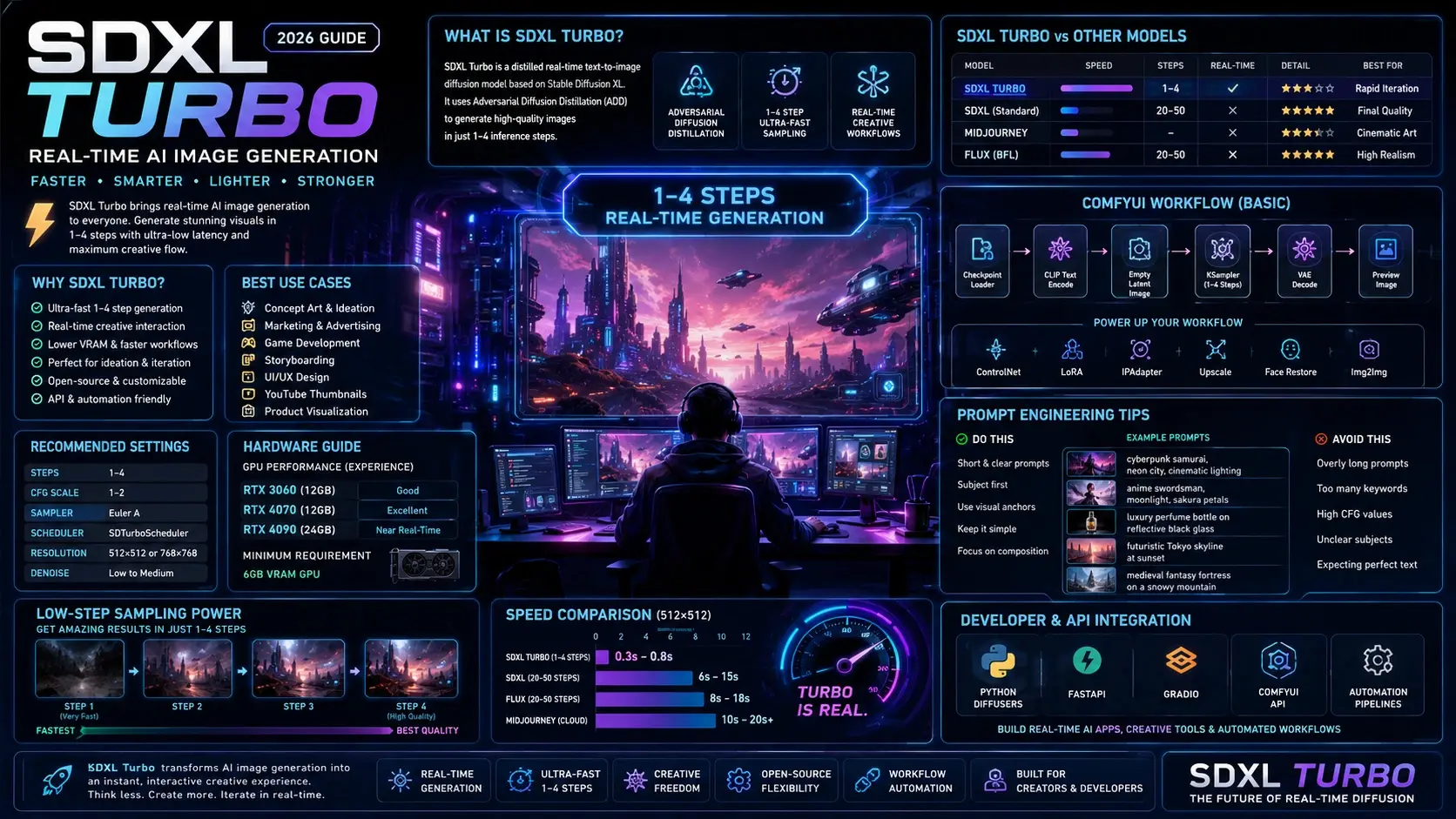
| Model Type | Typical Steps | Speed |
| Standard SDXL | 20–50 | Slower |
| SDXL Turbo | 1–4 | Extremely fast |
On high-end GPUs like the NVIDIA GeForce RTX 4090, some workflows achieve near real-time rendering speeds.
This transforms AI image generation from:
“Generate and wait.”
into:
“Generate while thinking.”
That workflow improvement is enormous for:
- Concept artists
- Game studios
- Marketing agencies
- Product teams
- Filmmakers
- UX designers
- AI startups
SDXL Turbo vs Standard SDXL
Many users wonder whether Turbo replaces normal SDXL.
| Feature | SDXL Turbo | Standard SDXL |
| Speed | Extremely fast | Slower |
| Sampling Steps | 1–4 | 20–50 |
| Real-Time Generation | Excellent | Limited |
| Fine Detail | Moderate | Excellent |
| Prompt Accuracy | Good | Better |
| VRAM Usage | Lower | Higher |
| Workflow Speed | Instant | Slower |
| Best Use | Rapid iteration | Final renders |
When Standard SDXL Wins
Standard SDXL is still better for:
- Ultra-detailed realism
- Luxury commercial work
- Texture-heavy rendering
- High-end print graphics
- Precision refinement
When SDXL Turbo Wins
Turbo excels at:
- Brainstorming
- Live iteration
- Rapid ideation
- Interactive generation
- Real-time demos
- UI experimentation
SDXL Turbo vs Midjourney vs Flux
| Model | Biggest Strength | Biggest Weakness |
| SDXL Turbo | Real-time local generation | Lower detail consistency |
| Midjourney | Beautiful aesthetics | Closed ecosystem |
| Black Forest Labs Flux | High realism | Heavier compute requirements |
| Standard SDXL | Open-source flexibility | Slower inference |

Which Model Is Best?
SDXL Turbo If You Want:
- Real-time generation
- Open-source control
- Workflow automation
- API integration
- Local ownership
- Fast experimentation
Midjourney If You Want:
- Cinematic beauty
- Easy prompting
- Artistic consistency
Flux If You Want:
- Maximum realism
- Strong anatomy
- Advanced visual coherence
Key Features of SDXL Turbo
One-Step Generation
Turbo can generate coherent outputs in as little as one inference step.
Real-Time Workflow Support
Interactive prompting becomes possible.
Open-Source Flexibility
Unlike closed platforms, Turbo supports:
- Local installation
- Custom APIs
- Automation pipelines
- Fine-tuning workflows
ComfyUI Optimization
Turbo works exceptionally well inside ComfyUI.
Lightweight VRAM Usage
Compared to heavier diffusion systems, Turbo is more accessible for local creators.
How to Install SDXL Turbo
ComfyUI
Most advanced users prefer ComfyUI because it gives maximum workflow control.
Installation Steps
- Install ComfyUI
- Download SDXL Turbo checkpoint
- Move model to:
/ComfyUI/models/checkpoints - Update ComfyUI
- Load workflow JSON
- Enable Auto Queue
- Start generating
Recommended ComfyUI Nodes
- Checkpoint Loader
- CLIP Text Encode
- KSampler
- VAE Decode
- Preview Image
Why ComfyUI Is Best for Turbo
ComfyUI enables:
- Auto queue generation
- Live preview workflows
- Custom schedulers
- Real-time iteration
- API integrations
AUTOMATIC1111
AUTOMATIC1111 also supports Turbo models.
Recommended Settings
| Setting | Recommended Value |
| Steps | 1–4 |
| CFG Scale | 1–2 |
| Sampler | Euler A |
| Resolution | 512–768px |
Turbo models behave differently from normal SDXL checkpoints.
High CFG values often reduce image quality.
Best SDXL Turbo Settings
Recommended Universal Settings
| Setting | Best Value |
| Steps | 1–4 |
| CFG Scale | 1–2 |
| Sampler | Euler A |
| Resolution | 512×512 or 768×768 |
| Scheduler | SDTurboScheduler |
| Denoise | Low to Medium |
SDXL Turbo Prompt Engineering
Prompting Turbo is different from prompting standard SDXL.
The model prefers:
- Clear prompts
- Simple composition
- Strong subject focus
- Shorter instructions
Best Prompting Practices
Keep Prompts Concise
Good:
futuristic cyberpunk samurai, neon city, cinematic lighting
Bad:
masterpiece ultra detailed award-winning hyper realistic highly intricate…
Overloaded prompts often reduce coherence.
Put the Subject First
Turbo responds best when the main subject appears early.
Use Visual Anchors
Helpful descriptors include:
- cinematic lighting
- volumetric fog
- sharp focus
- dramatic shadows
- shallow depth of field
Best SDXL Turbo Prompt Examples
Cinematic Portrait
cyberpunk female warrior, neon rain, cinematic lighting, shallow depth of field
Anime Scene
anime swordsman, moonlight, sakura petals, dynamic action pose
Product Photography
luxury perfume bottle on reflective black glass, studio lighting
Architecture
futuristic Tokyo skyline at sunset, ultra-modern skyscrapers
Game Concept Art
medieval fantasy fortress on a snowy mountain, epic atmosphere
SDXL Turbo in ComfyUI
This is where Turbo truly shines.
Advanced users commonly build real-time generation systems using:
- Auto queueing
- Live prompt updates
- Interactive image iteration
- Image-to-image pipelines
Basic Workflow
Checkpoint Loader
CLIP Text Encode
Empty Latent Image
KSampler
VAE Decode
Preview Image
Advanced Workflow Features
Modern Turbo pipelines often include:
- ControlNet
- LoRA support
- Face restoration
- IPAdapter
- Upscaling
- img2img refinement
SDXL Turbo for Image-to-Image
Turbo is surprisingly strong for image transformation workflows.
Popular img2img Use Cases
- Sketch refinement
- Style transfer
- Character ideation
- Storyboarding
- Thumbnail generation
- Concept exploration
Best img2img Tips
Use Lower Denoise Values
Turbo responds better with moderate denoise settings.
Keep Resolution Reasonable
512–768px usually performs best.
Refine Afterward
Many professionals generate quickly in Turbo and refine using standard SDXL afterward.
GPU Requirements & Performance
Minimum Requirements
- 6GB VRAM GPU
Recommended GPUs
| GPU | Experience |
| NVIDIA GeForce RTX 3060 | Good entry-level performance |
| NVIDIA GeForce RTX 4070 | Excellent balance |
| NVIDIA GeForce RTX 4090 | Near real-time generation |
Why Turbo Is Popular
Turbo is lighter than many newer diffusion systems.
That makes it attractive for:
- Indie creators
- Students
- Laptop users
- Developers
- Local AI enthusiasts
SDXL Turbo API & Developer Usage
Developers increasingly use Turbo for:
- AI SaaS apps
- Live AI generation
- Creative automation
- Interactive image systems
- Design tools
Popular Integration Frameworks
- Python Diffusers
- FastAPI
- Gradio
- Node.js
- ComfyUI API
Why Developers Love Turbo
The biggest advantage is ultra-low latency.
That opens possibilities impossible with slower diffusion systems.
Examples include:
- Live image editors
- AI Whiteboards
- Instant avatar generators
- Interactive creative tools
Benefits for Creators & Businesses
Creators
Turbo dramatically improves creative momentum.
Instead of waiting between generations, creators can iterate naturally.
Best Creator Benefits
- Faster experimentation
- Lower workflow friction
- Rapid moodboarding
- Live art exploration
Businesses
Turbo helps businesses reduce production time.
Business Use Cases
- Marketing drafts
- Ad concepts
- Thumbnail generation
- Product ideation
- Storyboards
- Social media creatives
Best Commercial Use Cases
Excellent For
- Concept art
- Advertising drafts
- Game ideation
- Creative direction
- YouTube thumbnails
- UI wireframes
- Moodboards
Less Ideal For
- Luxury print campaigns
- Ultra-high-resolution realism
- Final cinema-grade renders
SDXL Turbo Limitations
Turbo is powerful, but it is not perfect.
Common Issues
Reduced Fine Detail
Standard SDXL still produces cleaner textures.
Anatomy Problems
Hands and faces can still fail.
Prompt Drift
Complex prompts sometimes become unstable.
Typography Weaknesses
Text rendering remains inconsistent.
High-Resolution Fidelity
Turbo prioritizes speed over perfect refinement.
Realistic Expectations
Turbo is best viewed as:
- A creative accelerator
- A rapid ideation engine
- A workflow enhancement system
It is not always the final rendering solution.
Common Mistakes to Avoid
Using Too Many Steps
Turbo does not need 30–50 steps.
That defeats the entire purpose.
High CFG Values
Turbo models usually dislike high CFG settings.
Overloading Prompts
Long prompts reduce coherence.
Expecting Final Cinema-Grade Renders
Turbo is optimized for speed first.
Privacy, Licensing & Commercial Use
Before using SDXL Turbo commercially, always review:
- Official Stability AI licensing terms
- Model card permissions
- Commercial usage policies
Important Considerations
- Licensing rules may evolve
- Fine-tuned checkpoints can have different licenses
- Some third-party models restrict redistribution
Businesses should verify compliance before deploying Turbo commercially.
Future of Real-Time Diffusion Models
SDXL Turbo helped accelerate a major industry trend:
The Future Includes
- One-step diffusion
- Real-time video generation
- Lightweight AI pipelines
- Interactive AI creativity
- Live multimodal systems
Newer systems continue pushing toward:
- Faster inference
- Better realism
- Lower hardware requirements
Turbo was one of the key models that proved real-time diffusion was commercially viable.
Who Should Use SDXL Turbo?
Ideal Users
- Designers
- Content Creators
- AI startups
- Marketers
- Students
- Indie developers
- YouTubers
- Game artists
Best For People Who Want
- Fast iteration
- Local control
- Real-time experimentation
- Workflow automation
Who Should Avoid SDXL Turbo?
Turbo may not be ideal if your primary goal is:
- Luxury-grade realism
- Ultra-high-detail commercial rendering
- Precision anatomy work
- Print-level texture quality
In those cases, standard SDXL or Flux may perform better.
People Also Ask
A: Yes. SDXL Turbo is available as an open model, though licensing and commercial rights can vary depending on the checkpoint and platform you use.
A: Most users get the best results between 1 and 4 steps. Higher step counts usually reduce Turbo’s speed advantage.
A: For customization, local workflows, and API flexibility, yes. For polished cinematic aesthetics, Midjourney often still performs better.
A: Yes. Many users successfully run Turbo on GPUs with 6GB VRAM, though performance improves significantly on RTX-class hardware.
A: ComfyUI is generally considered the best option because of its flexibility, node-based workflows, and real-time generation capabilities.
Conclusion
SDXL Turbo fundamentally changed the AI image generation landscape.
Its biggest innovation is not merely faster rendering.
It is the ability to maintain creative momentum.
By enabling near real-time generation, Turbo transforms AI art from a slow batch process into an interactive creative experience.
While standard SDXL, Flux, and Midjourney still outperform Turbo in some areas of realism and detail, Turbo dominates in:
- Speed
- Workflow efficiency
- Experimentation
- Live iteration
- Open-source flexibility
For creators, developers, and businesses building modern AI-powered workflows, SDXL Turbo remains one of the most important diffusion models in the industry.
If your goal is rapid ideation, interactive creativity, or real-time AI imaging, SDXL Turbo deserves a place in your workflow.
Explore more in-depth AI image generation guides, workflow tutorials, and creator resources on ImageToolsAI.











