Introduction
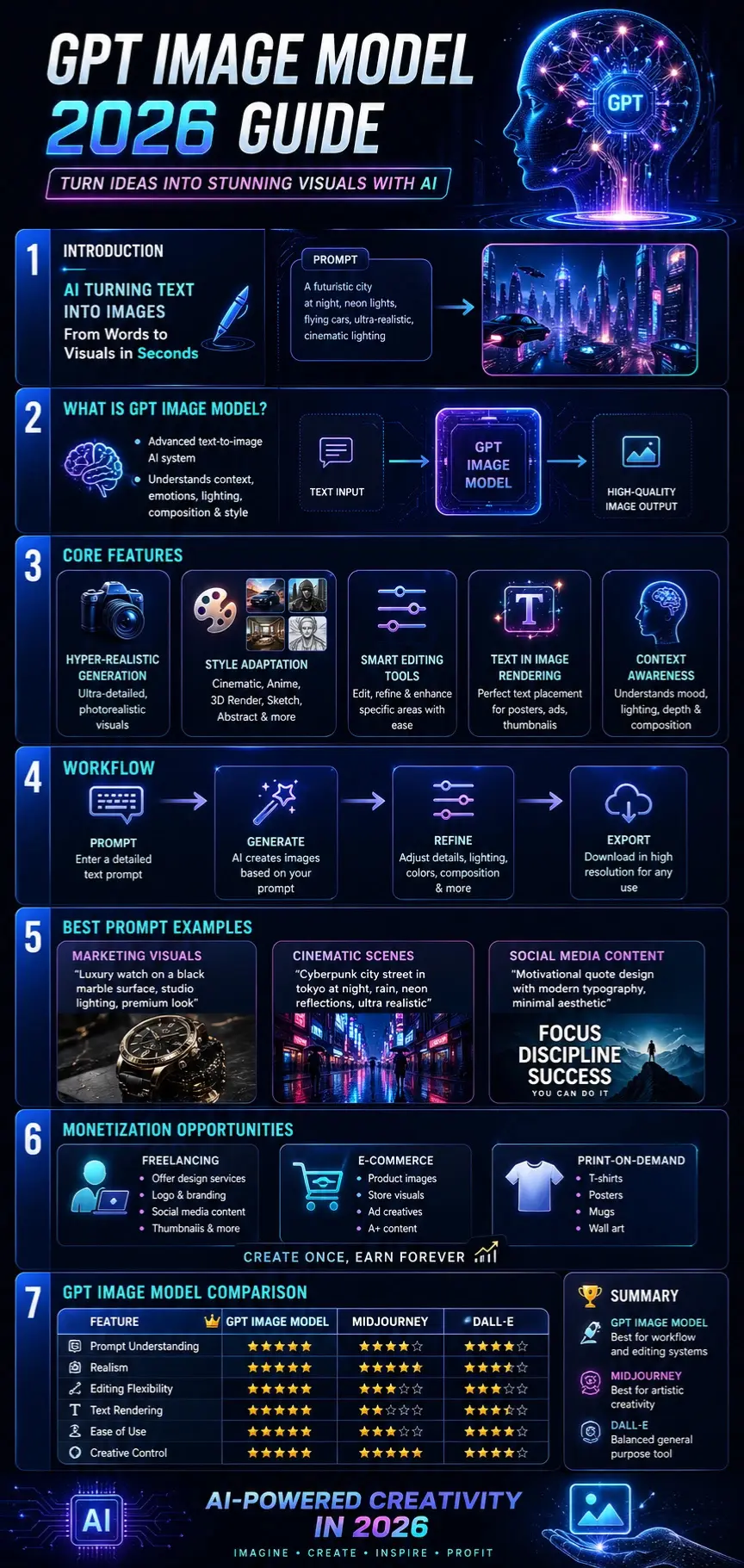
Without warning, computers learned to draw pictures straight from written descriptions. It kicked off with the GPT Image Model, a system that crafts sharp images almost instantly when given phrases – reshaping creativity across continents in quiet but deep ways.
Back then, crafting images meant wrestling with tricky programs – Photoshop, 3D modeling – and logging endless practice hours. Come 2026, artificial intelligence quietly swept most hurdles aside; suddenly, drawing pictures feels quick, smooth, open to all.
A fresh thought takes shape fast – just write it down. Whether sketching a gadget or planning posts, visuals appear right away. Anyone studying, working alone, building brands, or starting ventures gets results quickly. Words turn into images without delay. Ideas pop up as pictures almost immediately.
From Tokyo to Toronto, companies now shape visuals with artificial intelligence. Some brands swap photo shoots for generated scenes in promotions. Logos emerge from algorithms instead of sketchbooks. The entire ad series appears without cameras. Even ideas for things not built yet get pictured first by machines. The fashion industry sketches future lines this way. Marketing teams test messages through synthetic faces. Digital tales unfold using imagined environments. What you see might never have touched reality.
Picture by picture, the GPT Image Model picks up on details – mood shifts, light angles, stylistic hints – not just assembling visuals but grasping what they suggest. Instead of feeling like software, it acts alongside you, reading cues as much as creating them.
This guide will cover:
- What GPT Image Model is
- How it works step by step
- Key features
- Prompt techniques
- Comparison with other tools
- Pricing
- Monetization strategies
- Real-world uses
Let’s explore this powerful AI technology in detail.
What is the GPT Image Model?
Picture what happens when words shape visuals – this tool uses everyday language to create, tweak, or refine images. Built on smart tech, it blends text understanding with visual output in one fluid process. Instead of buttons or tools, you guide it with descriptions. From scratch or existing artwork, changes follow simple directions. It sees meaning in sentences, then draws conclusions you can see. Not magic, just layers of learning turned into visible results.
Picture this: no more wrestling with cluttered menus or tangled toolbars. A person types what they want, plain and clear. Not a single button needs pressing. Words become designs, quietly, without fuss. The screen listens instead of waiting.
Example Prompt:
“A futuristic skyline of Paris at night with glowing holograms, flying vehicles, cinematic lighting, ultra-realistic style”
The AI interprets this instruction and generates a visually coherent and contextually accurate image.
Core Capabilities of GPT Image Model
Text-to-Image Synthesis
Transforms written descriptions into high-quality digital visuals.
Intelligent Image Editing
Allows modification of existing visuals without having to start from scratch.
Style Adaptation System
Supports multiple visual styles such as:
- Cinematic realism
- Anime aesthetics
- 3D rendering
- Sketch art
- Abstract visuals
- Hyper-realistic photography
Marketing-Optimized Outputs
Designed for commercial use cases such as advertisements, branding campaigns, and social media content.
Context Awareness Engine
Understands:
- Emotional tone
- Lighting environment
- Spatial composition
- Artistic direction
Why It Matters in 2026
The GPT Image Model is not just a creative utility—it is part of a larger digital economy shift.
It is widely applied in:
- Digital marketing automation
- E-commerce product visualization
- Freelance design services
- Content creation industries
- Startup branding systems
This evolution represents a transition from manual design workflows to AI-assisted creative intelligence systems.
How GPT Image Model Works
The model operates using advanced transformer-based architectures trained on massive multimodal datasets containing both text and images.
User Prompt Input
The process begins when the user provides a descriptive prompt.
Example:
“Luxury sports car in a desert landscape at sunset with cinematic shadows.”
Semantic Interpretation
The AI breaks down the prompt into structured components:
- Objects (car, desert, sun)
- Style (luxury, cinematic)
- Lighting (sunset glow)
- Mood (dramatic, warm tone)
Image Generation Process
The model synthesizes visual output pixel-by-pixel, ensuring coherence and realism.
Refinement Phase
Users can iteratively adjust:
- Color grading
- Object placement
- Background elements
- Lighting intensity
Final Rendering
The final image is exported in high resolution, ready for:
- Marketing Campaigns
- Social media platforms
- Commercial branding
- Print production
Key Features of GPT Image Model
Hyper-Realistic Output Engine
Generates visuals that closely resemble professional photography.
Advanced Prompt Interpretation
Understands deeply layered instructions involving:
- Emotion
- Environment
- Composition
- Cinematic structure
Text-in-Image Rendering System
Accurately integrates readable typography into visuals for:
- Posters
- Advertisements
- Thumbnails
- Branding materials
Smart Editing Framework
Allows localized adjustments instead of regenerating entire images.
Multimodal Input Capability
Supports:
- Text prompts
- Reference images
- Hybrid inputs
Style Transformation Engine
Enables seamless switching between:
- Photorealism
- Artistic illustration
- Digital painting
- Cinematic design
GPT Image Model vs DALL·E vs Midjourney
| Feature | GPT Image Model | DALL·E | Midjourney |
| Prompt Understanding | Excellent | Strong | Strong |
| Realism | Very High | High | Very High |
| Editing Flexibility | Advanced | Moderate | Limited |
| Text Rendering | Strong | Moderate | Weak |
| Ease of Use | Very Easy | Very Easy | Moderate |
| Creative Control | Very High | High | Very High |
Summary Insight:
- GPT Image Model → Best for workflow + editing systems
- Midjourney → Best for artistic creativity
- DALL·E → Balanced general-purpose tool
GPT Image Workflow
Beginner Level Workflow
- Enter a simple prompt
- Generate image
- Download result
Professional Workflow
- Define the creative concept clearly
- Write a structured prompt
- Generate base image
- Refine prompt iteratively
- Edit final output
- Export for commercial use
Pro-Level Insight
More descriptive input = higher quality output.
Include:
- Lighting conditions (golden hour, neon glow)
- Camera framing (close-up, wide angle)
- Emotional tone (dramatic, calm, futuristic)
Best GPT Image Prompts
Cinematic Prompt Example
“A cyberpunk city street in Tokyo during rainfall at night, neon reflections on wet asphalt, ultra-detailed cinematic lighting, 8K realism, shallow depth of field.”
Product Marketing Prompt
“Premium smartwatch placed on reflective black surface, studio lighting setup, minimal background, luxury commercial photography style”
Social Media Design Prompt
“Modern motivational Instagram post design, clean typography, soft gradient background, aesthetic visual balance”
European Travel Prompt
“Golden sunset over Eiffel Tower in Paris, cinematic sky gradient, realistic tourist photography composition”
Real-World Use Cases in Europe
The adoption of AI image generation is accelerating rapidly across Europe.
Marketing & Advertising
- UK agencies producing digital campaigns
- German brands optimizing social visuals
- French luxury marketing visuals
E-Commerce Industry
- Product visualization
- Fashion catalogs
- Amazon listing images
Content Creation Sector
- YouTube thumbnails
- Blog featured images
- Instagram content design
Freelancing Economy
- Fiverr AI design gigs
- Upwork creative services
- Branding Concepts
Pricing & Cost Structure
The pricing model varies based on usage intensity.
| Tier | Description | Cost Level |
| Basic | Standard image generation | Low |
| Pro | High-resolution output | Medium |
| Enterprise | API & bulk usage | Custom |
Key Insight:
European businesses prefer API-based usage due to scalability and automation efficiency.
Pros and Cons of GPT Image Model
Advantages
- Extremely user-friendly
- Fast image generation
- High visual quality
- Business-ready output
- Strong contextual understanding
Limitations
- Occasional inconsistency in characters
- Complex scenes may require retries
- Advanced editing has a learning curve
Best Alternatives to GPT Image Model
DALL·E
General-purpose AI image generation tool.
Midjourney
Best for artistic and cinematic visuals.
Stable Diffusion
Open-source customization platform.
Adobe Firefly
Professional design ecosystem integration.
Leonardo AI
Popular in the gaming and creative design industries.
How to Monetize GPT Image Model
Sell Digital Artwork
Platforms:
- Etsy
- Redbubble
- Fiverr
Social Media Content Services
Create viral visuals for brands and influencers.
Print-on-Demand Business
Sell:
- T-shirts
- Posters
- Mugs
Freelance Design Services
Offer:
- Logo creation
- Brand identity design
- Social media content
AI Design Agency Model
Build a full-service AI-powered creative agency.
Tips for Better AI Prompt Engineering
- Use detailed descriptions
- Include emotional context
- Specify lighting conditions
- Define artistic style clearly
- Add camera angle instructions
Europe Market Insights
AI image generation adoption is growing rapidly in:
- Germany
- United Kingdom
- France
- Spain
- Italy
Growth Drivers:
- Expansion of digital marketing
- Rise of the freelancing economy
- E-commerce scaling
- Automation adoption
FAQs
A: It is used to generate and edit images with AI-powered text prompts.
A: Yes for workflow and editing; Midjourney excels in artistic output.
A: Yes, it is designed for all skill levels.
A: Yes, through freelancing, e-commerce, and digital content creation.
A: It may be paid or API-based, depending on the usage structure.
Conclusion
A fresh image comes alive when words meet code inside the 2026 GPT model. Speed meets precision without extra cost or delay. Creators in design, promotion, or enterprise now skip old hurdles. Quality stays sharp even as effort drops. What once took hours now finishes in moments.
Across Europe and beyond, found everywhere from online stores to ad campaigns. Not merely creating pictures but grasping tone and mood, because it adapts like a real collaborator. What begins as code ends up feeling human.
Most people see better results when their prompts are sharp, and goals are well-defined. Getting ahead means learning fast – speed turns into leverage for freelance work, promotion tasks, or running web-Based Projects.











