Introduction
These days, smart tech tools are changing the way videos come together. Years ago, making polished footage meant knowing complex skills, buying expensive programs, using high-end machines, and spending hours cutting scenes. By 2026, people who make content, run businesses, promote products, work in studios – even those just starting – get strong results quickly through intelligent software setups.
Right now, plenty of people are talking about a tool called MidJourney V1 Video.
From stills, it now breathes life – images unfold into brief film-like clips through new animation tools. Movement emerges where there was none, thanks to a system that skips complex software hurdles. Anyone can make moments flow, even without a background in filmmaking or endless hours learning tricks.
This is highly valuable for:
- YouTube Shorts
- TikTok videos
- Instagram Reels
- Product advertising
- Storytelling channels
- Music visuals
- Faceless YouTube brands
- E-commerce promotions
- Agency campaigns
- Social media engagement
In this complete MidJourney V1 Video Tutorial 2026, you will learn:
- What it is
- How it functions
- Step-by-step tutorial
- Best prompts
- Pricing insights
- Settings explained
- MidJourney V1 vs Runway vs Kling vs Sora
- How to earn money with it
- Professional tips for stronger results
- Common mistakes to avoid
What is MidJourney V1 Video?
Out of nowhere, MidJourney dropped its debut AI tool for making videos – V1. Picture an image coming to life, shifting gently into brief moving sequences through smart algorithms. Motion appears where there was none, guided by learning systems behind the scenes.
MidJourney slips motion into each frame without you lifting a finger. Movement emerges through shifting light, gliding cameras, evolving backgrounds, subtle weather changes, animated surroundings – done on its own.
A frame might shift into motion like a tiny film. Motion sneaks in where stillness stood. A snapshot may breathe life slowly. Each detail begins to move on its own.
Core Purpose of MidJourney V1 Video
It helps users:
- Build cinematic visuals quickly
- Produce social content faster
- Create ad creatives at a lower expense
- Launch faceless channels
- Test storytelling concepts
- Save production time
- Improve content output volume
How MidJourney V1 Video Works
The workflow is simple, clean, and beginner-friendly.
Basic Workflow
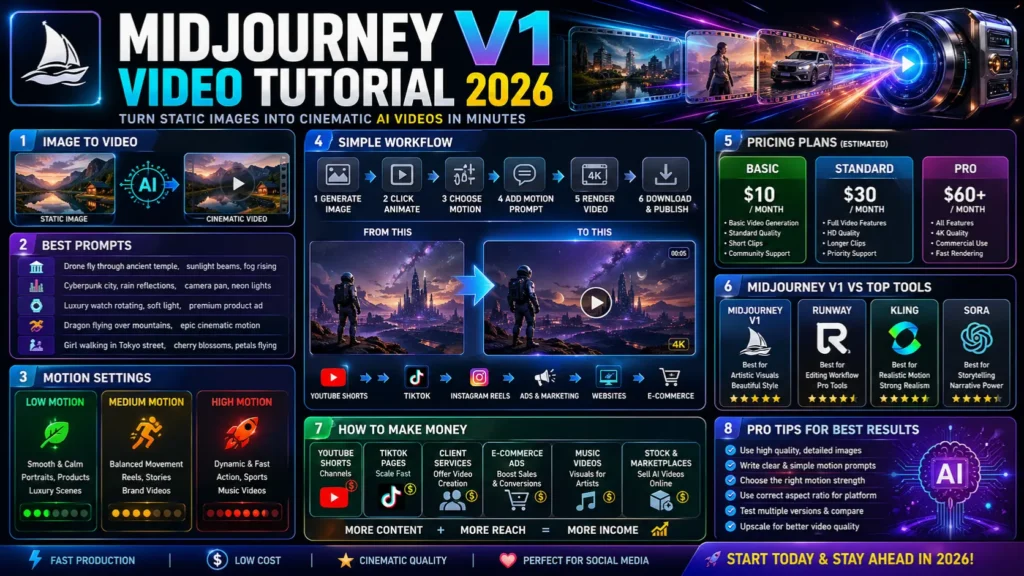
- Generate an image in MidJourney
- Select the image
- Click Animate
- Choose motion mode
- Add an optional motion prompt
- Render the clip
- Download and publish
The AI studies:
- Depth layers
- Faces
- Light direction
- Background objects
- Composition balance
- Perspective angles
Why MidJourney V1 Video Matters in 2026
Creators need:
- Faster production cycles
- Reduced costs
- Better visuals
- Higher publishing volume
- Improved engagement
- Brand consistency
Businesses across Europe and worldwide need content in multiple languages and formats.
Best Use Cases
- Fashion launches
- E-commerce promotions
- Travel campaigns
- Story channels
- NFT showcases
- Startup branding
- Music visuals
- Viral Shorts content
- Product teasers
- Landing page visuals
Key Features of MidJourney V1 Video
Main Features
- Image-to-video generation
- Prompt-based motion control
- Camera pan and zoom effects
- Low / Medium / High motion modes
- Clip extension tools
- Artistic cinematic styling
- Fast rendering
- Easy export
- Social media-ready ratios
- Works with MidJourney image workflow
Step-by-Step MidJourney V1 Video Tutorial 2026
Create a MidJourney Account
Visit the official MidJourney website and register.
Choose a Subscription Plan
Choose based on your goals:
| Plan | Estimated Price | Best For |
| Basic | $10/month | Beginners |
| Standard | $30/month | Regular creators |
| Pro | $60+/month | Agencies |
Always verify current pricing on the official website.
Generate a Strong Base Image
Your video quality depends heavily on the source image.
Example Prompt
futuristic city skyline at sunset, cinematic lighting, realistic detail
Rule:
Better image = Better video
Use clear lighting, detail, and strong framing.
Click Animate
Once your image is ready, choose the Animate button.
Select Motion Type
Automatic Mode
Best for beginners.
AI chooses movement automatically.
Manual Prompt Mode
Best for advanced users.
You guide the motion style.
Add Motion Prompt
Example:
slow camera zoom in, rain falling, lights flicker, fog moving
This gives the AI directional instructions.
Choose Motion Strength
| Setting | Best For |
| Low Motion | Portraits, calm scenes |
| Medium Motion | General social clips |
| High Motion | Action, dynamic edits |
Generate Video
This may take seconds or several minutes, depending on server load.
Download & Publish
Use your clip on:
- TikTok
- Instagram Reels
- YouTube Shorts
- Ads
- Websites
- Landing pages
- Social feeds
Best MidJourney V1 Prompts for Cinematic Clips
Cinematic Prompt
drone fly through ancient temple, sunlight beams, fog rising
Anime Prompt
girl walking under cherry blossoms, petals flying, camera pan
Product Ad Prompt
luxury perfume bottle rotating, golden reflections, premium lighting
Horror Prompt
dark corridor, flickering light, slow forward movement
Fantasy Prompt
dragon flying above castle, clouds moving, epic cinematic motion
Tips to Write Better AI Video Prompts
Use this formula:
Subject + Environment + Camera Motion + Atmosphere + Style
Example:
woman walking in Paris street, slow pan camera, rain reflections, cinematic realism
Better Camera Terms
- zoom in
- zoom out
- dolly forward
- orbit shot
- pan left
- pan right
- handheld shake
- slow rise
MidJourney V1 Settings Explained
Low Motion
Best for:
- Portraits
- Luxury products
- Calm landscapes
- Elegant ads
Medium Motion
Best for:
- Reels
- Shorts
- Brand videos
- Story scenes
High Motion
Best for:
- Action edits
- Sports content
- Fast reels
- Music videos
MidJourney V1 vs Runway vs Kling vs Sora
| Tool | Best For | Strength |
| MidJourney V1 | Artistic visuals | Beautiful style |
| Runway | Editing workflow | Pro tools |
| Kling | Realistic motion | Strong realism |
| Sora | Story scenes | Narrative power |
Benefits for European Creators & Businesses
UK
Fast ecommerce ads.
Germany
Startup explainers and product campaigns.
France
Luxury and fashion visuals.
Spain
Travel and tourism promotions.
Italy
Design-focused storytelling.
How Creators Make Money With MidJourney V1 Video
YouTube Shorts Channels
Create:
- Fantasy clips
- Motivation edits
- History scenes
- Story channels
TikTok Pages
Daily AI content can scale rapidly.
Client Services
Offer:
- Product ads
- Restaurant promos
- Brand reels
- Real estate videos
E-commerce Ads
Create performance visuals for Shopify stores.
Music Videos
Artists need affordable visuals.
Pros and Cons
Pros
- Beautiful cinematic style
- Easy to use
- Great for social media
- Fast rendering
- Strong Image quality
- Powerful branding potential
Cons
- Short clips only
- Paid plan needed
- Prompt testing required
Best Alternatives to MidJourney V1 Video
- Runway – Best for editors
- Kling – Strong realism
- Sora – Advanced storytelling
- Pika – Good beginner option
- Kaiber – Great for music visuals
Tips to Get the Best Results
Use Strong Images First
Sharp source visuals work better.
Keep Prompts Simple
Too many commands can weaken results.
Use Correct Aspect Ratios
- Vertical = Shorts / Reels
- Square = Ads
- Wide = YouTube
Upscale First
Higher resolution improves motion quality.
Test Multiple Versions
Never rely on one render only.
SEO Use Cases for Bloggers & Agencies
MidJourney V1 Video can help bloggers create:
- Featured image videos
- YouTube previews
- Social snippets
- Product showcases
- Pinterest motion pins
Agencies can package it for clients.
Future of MidJourney V1 Video
By the end of 2026, AI video tools may improve with:
- Longer clips
- Better lip sync
- Character consistency
- Voice generation
- Scene transitions
- Commercial templates
- Faster exports
Early users may gain the strongest advantage.
FAQs
A: No. Most features require a paid plan.
A: Currently focused on short clips.
A: For visual style, yes. For the editing workflow, Runway may be stronger.
A: Yes, depending on feature availability.
A: Yes. Great for ads, branding, launches, and social media.
Conclusion
Picture something moving, born from stillness – MidJourney V1 Video does that. Imagine your ideas slipping into motion naturally, no steep learning curve holding back what you see. This tool arrives in 2026, already turning heads. Smooth visuals emerge where once only static art lived. Effort fades behind results. Creation feels less like work now. Each clip breathes on its own, built quietly beneath user choices. Complexity gets replaced by clarity. Motion becomes an extension of thought.
For creators, Freelancers, ecommerce sellers, and agencies, this means:
- Faster production
- Lower cost
- More content
- Better branding
- New income streams
Winning Strategy
Create strong images + Use clear prompts + Test motion levels + Optimize for each platform











