Introduction
Out of nowhere, Stable Diffusion XL 0.9 changed how open-source tools create images with AI. Earlier attempts often messed up body shapes, ignored prompts, or failed at realistic light – cinematic scenes barely stood a chance.
Later came SDXL 0.9 by Stability AI, shifting how people saw what open models could do when it came to making images. That release redefined progress in a space once thought limited.
Now, picture-making hit a new mark. Creators saw sharper results at 1024×1024. Clarity stepped up, and prompts matched intent more closely. Depth gained subtlety, and surfaces looked less fake. Composition tightened up, frame by frame. Progress was made in how elements fit together.
Even in 2026, SDXL 0.9 still matters.
It wasn’t the latest version. What mattered was how it laid down the core structure – alongside the working methods – that later became the base for today’s SDXL system favored by artists.
In this complete guide, you will learn:
- What Stable Diffusion XL 0.9 is
- Why it changed AI image generation forever
- How SDXL architecture works
- Installation and workflow setup
- Best prompts and settings
- ComfyUI optimization
- Refiner pipelines
- LoRA compatibility
- Real-world creator use cases
- Limitations and future trends
If you want a practical, expert-level understanding of SDXL 0.9, this guide covers everything in one place.
What Is Stable Diffusion XL 0.9?
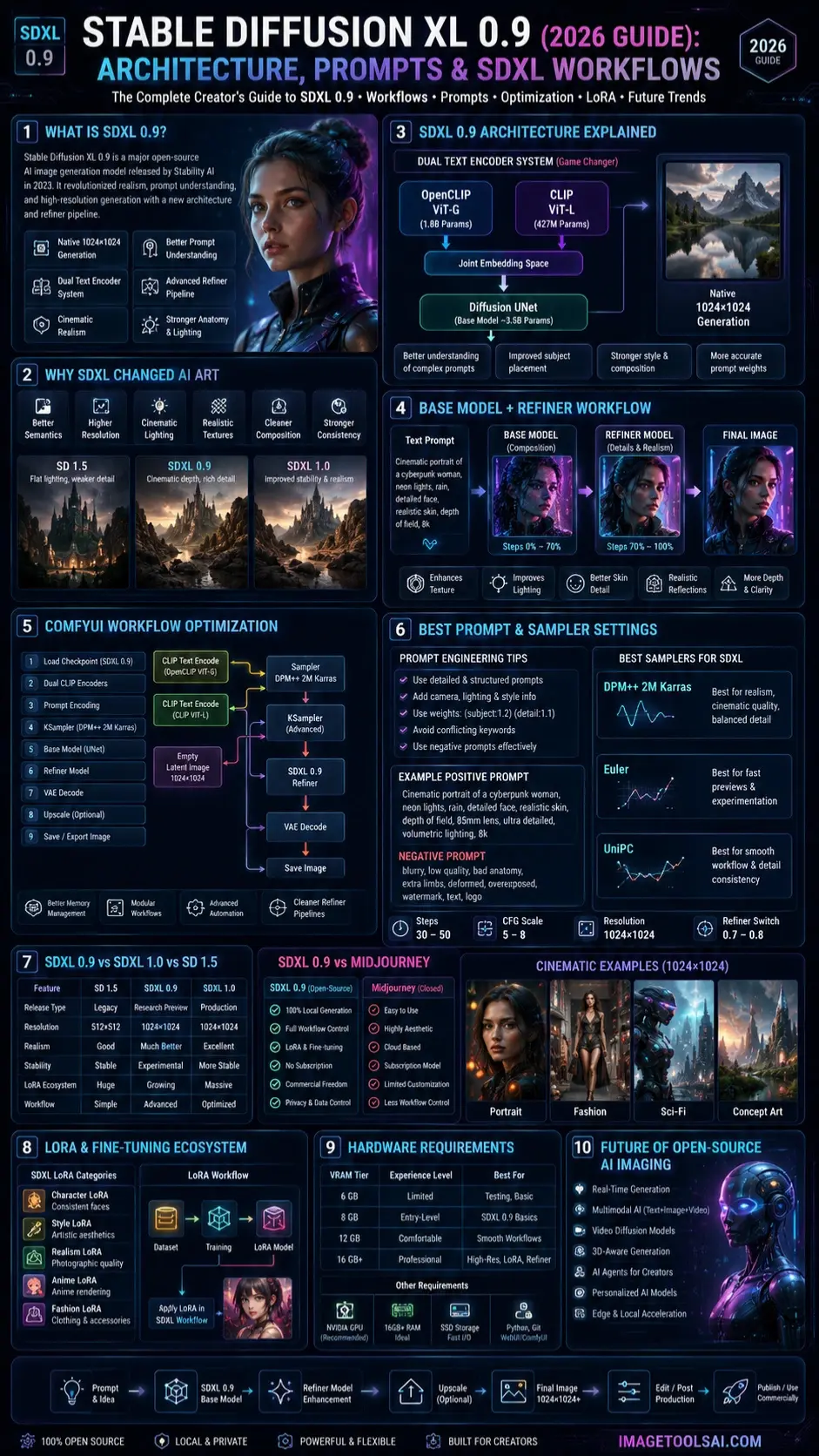
Stable Diffusion XL 0.9 (SDXL 0.9) is an advanced open-source AI image generation model released by Stability AI in 2023.
It was designed as a major upgrade over earlier Stable Diffusion models like SD 1.5 and SD 2.1.
The model introduced several groundbreaking improvements:
- Native 1024×1024 generation
- Better prompt understanding
- Improved anatomy rendering
- Cinematic lighting quality
- Dual text encoder architecture
- Enhanced realism
- Advanced refiner workflows
- Better texture generation
At release, many creators compared SDXL 0.9 directly against Midjourney because the visual quality improvement was so dramatic.
Why Stable Diffusion XL 0.9 Was a Major Breakthrough
Earlier Stable Diffusion models had several common problems:
- Distorted hands
- Weak facial consistency
- Flat lighting
- Poor text interpretation
- Limited environmental detail
- Lower-resolution outputs
SDXL 0.9 significantly improved all of these areas.
What Changed With SDXL?
Better Semantic Understanding
The model could understand prompts more accurately.
That meant:
- better scene composition
- improved subject placement
- stronger cinematic framing
- cleaner stylistic interpretation
Native High Resolution
Unlike older models trained mainly around 512×512 images, SDXL 0.9 was designed for high-resolution generation.
Benefits included:
- sharper textures
- improved skin detail
- realistic lighting
- cleaner edges
- better environmental complexity
Stronger Realism
This became one of SDXL’s biggest advantages.
Creators noticed improvements in:
- skin texture
- hair rendering
- depth of field
- lens realism
- fabric detail
- shadows and reflections
How Stable Diffusion XL 0.9 Works
SDXL 0.9 uses a latent diffusion architecture designed for advanced image synthesis.
The workflow generally follows this process:
- User enters a text prompt
- Text encoders interpret semantic meaning
- Latent diffusion generates image structure
- Base model creates a composition
- Refiner model enhances detail
- The final image is rendered
SDXL 0.9 Architecture Explained
Larger Parameter Model
SDXL introduced a much larger architecture compared to previous Stable Diffusion releases.
The base model reportedly used around 3.5 billion parameters.
Benefits included:
- improved prompt accuracy
- better contextual understanding
- more detailed image generation
- stronger realism capabilities
Dual Text Encoder System
One of the most important innovations was the dual encoder design.
SDXL used:
- OpenCLIP ViT-G
- CLIP ViT-L
This improved the semantic interpretation dramatically.
Why This Matters
Earlier models often misunderstood prompts.
SDXL improved:
- subject consistency
- style interpretation
- scene relationships
- prompt weighting behavior
This became foundational for modern AI prompting systems.
Benefits included:
| Feature | SD 1.5 | SDXL 0.9 |
| Native Resolution | 512×512 | 1024×1024 |
| Texture Detail | Moderate | High |
| Composition Quality | Basic | Advanced |
| Realism | Good | Much Better |
| Lighting Quality | Limited | Cinematic |
The SDXL Refiner Pipeline
The refiner became one of SDXL’s most influential innovations.
Workflow
| Stage | Purpose |
| Base Model | Creates overall composition |
| Refiner Model | Enhances realism and details |
| Final Output | Produces a cinematic-quality image |
The refiner improved:
- skin detail
- reflections
- textures
- lighting realism
- clothing detail
- Environmental Depth
Many modern ComfyUI workflows still use this multi-stage concept today.
Why SDXL 0.9 Still Matters in 2026
Even though newer models exist, SDXL 0.9 remains historically important.
It Changed Open-Source AI Forever
Before SDXL:
- Open-source realism lagged behind closed AI systems
- creators relied heavily on commercial tools
- Local workflows were less professional
After SDXL:
- creators gained professional-grade local generation
- fine-tuning exploded
- LoRA ecosystems expanded rapidly
- ComfyUI adoption accelerated
It Influenced Modern AI Workflows
Many modern techniques started here:
- SDXL fine-tuning
- advanced prompt weighting
- refiner pipelines
- node-based workflows
- cinematic realism generation
Understanding SDXL helps creators understand the evolution of modern AI image systems.

SDXL 0.9 vs SDXL 1.0
Key Differences
| Feature | SDXL 0.9 | SDXL 1.0 |
| Release Type | Research Preview | Official Production |
| Stability | Experimental | Improved |
| Ecosystem | Early | Mature |
| LoRA Support | Growing | Massive |
| Workflow Optimization | Limited | Better |
| Community Support | Strong | Much Larger |
Which One Is Better?
SDXL 0.9
Best for:
- historical research
- workflow experimentation
- architecture study
- early SDXL testing
SDXL 1.0
Best for:
- production workflows
- modern fine-tuning
- stable creator pipelines
- broader compatibility
SDXL 0.9 vs Stable Diffusion 1.5
SD 1.5 Advantages
- Lower VRAM usage
- Faster generation
- Lightweight workflows
- Massive legacy ecosystem
SDXL 0.9 Advantages
- Better realism
- Better anatomy
- Stronger composition
- Improved cinematic quality
- Better prompt understanding
SDXL 0.9 vs Midjourney
This comparison became extremely popular after launch.
Midjourney Strengths
- artistic stylization
- easy workflow
- highly aesthetic outputs
- beginner friendly
SDXL 0.9 Strengths
- open-source freedom
- local generation
- workflow customization
- fine-tuning support
- commercial flexibility
- no subscription lock-in
Which Is Better?
That depends on the user.
| User Type | Better Option |
| Casual creators | Midjourney |
| Technical creators | SDXL |
| Businesses | SDXL |
| Designers | Either |
| AI workflow enthusiasts | SDXL |
How to Install Stable Diffusion XL 0.9
Automatic1111 Setup
Requirements
- NVIDIA GPU
- 8GB+ VRAM recommended
- Python
- Git
- Automatic1111 WebUI
Installation Steps
- Install Python
- Install Git
- Clone Automatic1111 repository
- Download SDXL 0.9 checkpoints
- Place models into the checkpoints folder
- Launch the WebUI
- Select the SDXL model
- Start generating images
ComfyUI Workflow Setup
Many advanced creators now prefer ComfyUI.
Why ComfyUI Became Popular
- better memory management
- modular workflows
- advanced automation
- node-based flexibility
- cleaner SDXL refiner pipelines
Recommended SDXL Workflow
- Load checkpoint
- Add prompt encoder
- Configure sampler
- Set latent resolution
- Run base generation
- Apply refiner
- Upscale if needed
- Export image
Best SDXL 0.9 Settings
Recommended Base Settings
| Setting | Recommended Value |
| Steps | 30–50 |
| CFG Scale | 5–8 |
| Sampler | DPM++ 2M Karras |
| Resolution | 1024×1024 |
| Refiner Switch | 0.7–0.8 |
Best Samplers for SDXL
DPM++ 2M Karras
Best for:
- realism
- cinematic quality
- balanced detail
Euler
Best for:
- experimentation
- faster previews
UniPC
Best for:
- smoother workflow performance
- detail consistency
Best SDXL 0.9 Use Cases
Realistic Photography
SDXL became famous for:
- portraits
- fashion photography
- cinematic scenes
- editorial visuals
Concept Art
Artists used SDXL for:
- sci-fi worlds
- fantasy environments
- character design
- matte painting
Business Marketing
Companies used SDXL for:
- ad creatives
- ecommerce images
- Packaging Concepts
- branding visuals
YouTube & Social Media
Creators generated:
- thumbnails
- cinematic backgrounds
- avatars
- promotional artwork
SDXL 0.9 LoRA Ecosystem
Although SDXL 1.0 later dominated the ecosystem, SDXL 0.9 helped establish the foundation.
Popular LoRA Categories
| LoRA Type | Purpose |
| Character LoRA | Consistent faces |
| Style LoRA | Artistic aesthetics |
| Fashion LoRA | Clothing generation |
| Anime LoRA | Anime rendering |
| Realism LoRA | Photographic quality |
GPU Requirements for SDXL 0.9
Recommended Hardware
| GPU Tier | Experience |
| 6GB VRAM | Limited |
| 8GB VRAM | Entry-level SDXL |
| 12GB VRAM | Comfortable |
| 16GB+ VRAM | Professional workflows |
Privacy, Safety & Commercial Use
Is SDXL Open Source?
Yes, SDXL was released under open-access principles that allowed creators to run models locally.
Commercial Usage
Always verify:
- model licenses
- fine-tune licensing
- dataset restrictions
- commercial deployment terms
Privacy Advantages
Local workflows provide:
- better data control
- offline generation
- Reduced cloud dependency
This became especially important for businesses and agencies.
Who Should Use Stable Diffusion XL 0.9?
Great For
- AI artists
- marketers
- designers
- technical creators
- workflow experimenters
- local AI enthusiasts
Who Should Avoid It?
Not Ideal For
- users without GPUs
- complete non-technical beginners
- creators wanting instant results
- low-end hardware users
Cloud tools may be easier for casual users.
Future AI Image Trends Beyond SDXL
The AI image industry continues evolving rapidly.
Emerging Trends
- real-time generation
- multimodal AI systems
- video diffusion
- AI agents for design
- 3D-aware generation
- personalized AI models
- local AI acceleration
SDXL played a major role in enabling many of these innovations.
People Also Ask
A: Yes, mainly for learning, experimentation, and understanding how modern SDXL workflows evolved. Many creators still study its architecture and prompting behavior.
A: For realism and composition, absolutely. However, SD 1.5 remains faster and easier for low-end hardware systems.
A: The refiner introduced a two-stage workflow that dramatically improved texture quality, lighting realism, and cinematic detail.
A: Yes, but the learning curve is steeper than that of cloud-based AI image generators. Beginners often start with Automatic1111 before moving to ComfyUI.
A: Yes. It helped establish the modern SDXL fine-tuning ecosystem, which is widely used in AI art communities today.
Conclusion
Stable Diffusion XL 0.9 was one of the defining moments in the history of open-source AI image generation.
It introduced major innovations that reshaped the AI art industry:
- dual text encoders
- high-resolution generation
- Cinematic Realism
- advanced prompt interpretation
- refiner pipelines
- professional creator workflows
Even in 2026, understanding SDXL 0.9 helps creators better understand how modern AI image ecosystems have evolved.
For advanced creators, researchers, marketers, and AI workflow enthusiasts, SDXL remains historically significant and educationally valuable.
If you want deeper insights into AI image generation, prompt engineering, ComfyUI workflows, and modern creator tools, explore more expert guides on ImageToolsAI.com.
The AI image industry changes quickly, but foundational technologies like SDXL 0.9 continue influencing the future of creative AI.











