Introduction
By 2026, Stable Diffusion v1.5 will still keep up, even as newer versions such as SDXL draw more attention. While fresh models spread fast, the older ones stick around. Its place stays firm, not fading as others might expect. Though advances move quickly, this version refuses to vanish. Instead of disappearing, it holds ground quietly. Not flashy, yet always present. Even with change all around, it remains.
Here’s why: this open-source AI stays light, adapts easily, yet remains powerful without bulk. Still unmatched in freedom to tweak, it bends to needs instead of forcing rules. Flexibility like that does not come often – lightweight design helps it run fast, even on modest hardware. Customization goes deep, letting users shape every part their way.
Open setups give more freedom. With Stable Diffusion v1.5, artists run their own process from start to finish. Instead of restrictions, they shape unique styles through training. Full access means crafting AI artwork freely. There are no imposed boundaries. Creators design systems that fit exact needs.
This makes it especially valuable for:
- Freelancers and digital artists
- AI content creators
- Design agencies
- Developers building AI tools
- E-commerce and marketing professional.
You will learn:
- How Stable Diffusion v1.5 works internally
- Step-by-step installation methods
- Advanced prompt engineering strategies
- LoRA and ControlNet usage
- Real-world monetization systems
- Professional AI workflow design
What is Stable Diffusion v1.5?
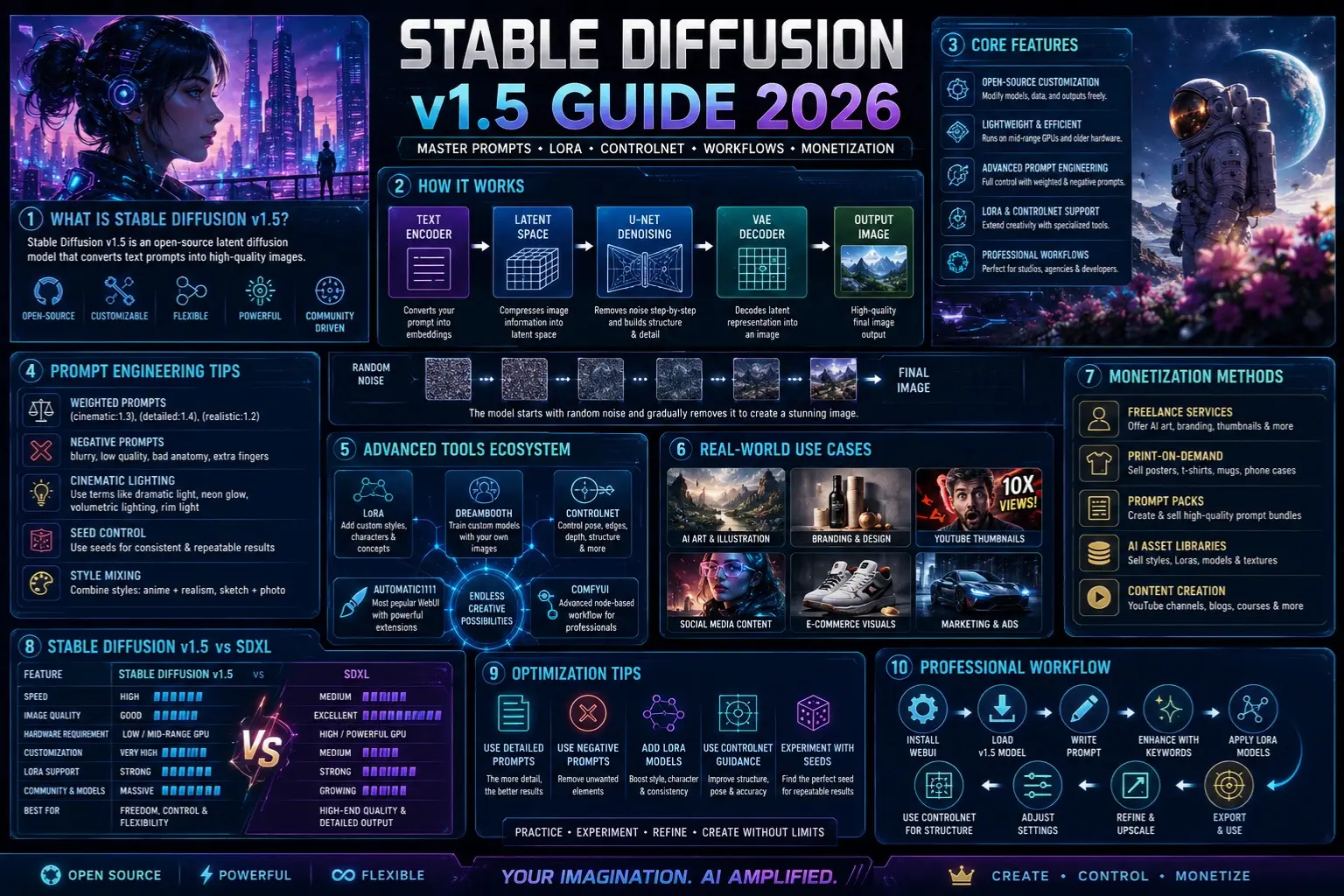
Stable Diffusion v1.5 is an open-source latent diffusion model that converts text prompts into high-quality images.
In simple terms:
You type a description
The AI interprets your text
The system gradually generates an image
Unlike traditional graphics tools, it does not draw directly. Instead, it builds images through a gradual refinement process.
Core Concept Behind Stable Diffusion
Stable Diffusion works like an artist starting from chaos:
- It begins with random noise (pure static)
- Slowly removes noise step-by-step
- Shapes structure based on your prompt
- Adds fine details until a full image appears
This method allows:
- High creative flexibility
- Strong customization control
- Efficient performance on local machines
How Stable Diffusion v1.5 Works
Let’s break down the internal pipeline in a simplified, human-readable way.
Text Encoding Stage
Your prompt is first converted into numerical representations called embeddings.
Example prompt:
“cyberpunk city at night”
This becomes a machine-readable vector that captures meaning, style, and context.
Latent Space Processing
Instead of working on full-resolution images, Stable Diffusion operates in a compressed latent space.
This means:
- Faster image generation
- Lower GPU Usage
- More efficient computation
U-Net Denoising System
This is the core intelligence engine.
It:
- Removes noise step-by-step
- Builds structure progressively
- Adds textures and fine details
Think of it as a digital sculptor shaping raw material into art.
VAE Decoder
Finally, the system converts latent representation into a real image.
It transforms compressed data into a visible, high-resolution output.
Simplified Workflow Table
| Stage | Function |
| Text Encoder | Understands prompt |
| Latent Space | Compresses image data |
| U-Net | Denoises and builds an image |
| VAE Decoder | Outputs the final image |
Key Features of Stable Diffusion v1.5
Fully Open-Source System
You can modify everything:
- Model weights
- Training data
- Output styles
This makes it extremely powerful for developers and artists.
Lightweight Performance
Unlike heavy modern models, v1.5 runs on:
- Mid-range GPUs
- Even older hardware setups
This makes it highly accessible.
Advanced Prompt Control
You can control output using:
- Weighted prompts
- Negative prompts
- Style blending
Example:
(cinematic:1.4), ultra detailed, 4k, dramatic lighting
Powerful Plugin Ecosystem
Supports advanced extensions like:
- LoRA models
- DreamBooth training
- ControlNet conditioning
Deep Creative Control
You can control:
- Lighting style
- Camera Angle
- Character pose
- Art direction
Installation Guide
There are multiple ways to use Stable Diffusion v1.5.
Local Installation
Tools:
- AUTOMATIC1111 WebUI
- ComfyUI
Steps:
- Install Python
- Install Git
- Clone WebUI repository
- Download SD v1.5 model checkpoint
- Launch interface
- Open in browser
Advantages:
- Full control
- No API restrictions
- Supports advanced tools
Cloud Platforms
You can use:
- Google Colab
- Hugging Face Spaces
Pros:
- No GPU required
- Easy setup
Cons:
- Limited customization
- Slower performance
API Integration
Best for developers:
- Stability AI API
- SaaS AI platforms
Used in:
- Automation systems
- Web applications
- AI products
Prompt Engineering for Stable Diffusion v1.5
Prompting is the MOST important skill in AI image generation.
Basic Prompt Structure
A strong prompt follows:
Subject + Style + Lighting + Details
Example:
“A cinematic portrait of a cyberpunk hacker, neon lighting, ultra-detailed, 4k, shallow depth of field”
Negative Prompting
Used to eliminate unwanted results:
Examples:
- blurry
- low quality
- bad anatomy
- extra fingers
Example:
negative prompt: blurry, distorted face, low quality
Advanced Prompt Techniques
Style Weighting
You can emphasize elements:
- (cinematic:1.3)
- (realistic:1.5)
Seed Control
Locks randomness for consistent outputs.
Style Mixing
Combine styles like:
- anime + realism
- sketch + photography
Advanced Tools Ecosystem
LoRA
Used for:
- Character consistency
- Brand identity
- Specific artistic styles
Example:
- Anime character models
- Fashion brand styles
DreamBooth
Used for training custom AI models:
- Personal portraits
- Real-world objects
- Identity-based generation
ControlNet
One of the most powerful extensions.
Used for:
- Pose control
- Edge detection
- Depth mapping
- Structural accuracy
Real-World Use Cases
🎨 Graphic Design Industry
Used in:
- Berlin agencies
- London studios
- Paris design firms
Social Media Content Creation
Popular for:
- Instagram visuals
- YouTube thumbnails
- TikTok content
E-Commerce Industry
Used for:
- Product visualization
- Ad creatives
- Fashion Previews
Freelancing Economy
Platforms:
- Fiverr
- Upwork
Services include:
- AI portraits
- Book covers
- Brand visuals
💰 Monetization Strategies
Print-on-Demand
Sell:
- Posters
- T-shirts
- Mugs
Freelance Services
Offer:
- AI art generation
- Branding visuals
- Social media content
Digital Products
Create:
- Prompt packs
- Style bundles
- AI asset libraries
Content Creation
Platforms:
- YouTube AI channels
- Blogs
- Stock image marketplaces
Stable Diffusion v1.5 vs Modern Models
| Feature | v1.5 | SDXL |
| Speed | High | Medium |
| Quality | Good | Excellent |
| Hardware | Low | High |
| Customization | Very High | Medium |
| LoRA Support | Strong | Strong |
Conclusion:
v1.5 remains unmatched in flexibility and control.
Pros and Cons
Advantages:
- Fully open-source
- Lightweight system
- Huge plugin ecosystem
- Highly customizable
- Strong community support
Limitations:
- Requires prompt skill
- Inconsistent hands/faces
- Complex scene struggles
Best Optimization Tips
- Always use negative prompts
- Write detailed descriptions
- Experiment with seed values
- Add LoRA models for style
- Combine ControlNet for structure
Step-by-Step Professional Workflow
- Install WebUI
- Load v1.5 model
- Start simple prompt
- Enhance with style keywords
- Apply LoRA models
- Use ControlNet for structure
- Adjust the seed for the best results
❓ FAQs
A: Yes, it is completely open-source.
A: No, mid-range GPUs work fine.
A: Yes, through freelancing and digital products.
A: A lightweight method to customize AI styles.
A: Midjourney is easier, but v1.5 offers more control.
Conclusion
Still going strong in 2026, Stable Diffusion v1.5 holds its ground as a leading open-source model for generating images with artificial intelligence. While tools like SDXL have emerged, along with closed options including Midjourney, many makers stick with v1.5 – control matters to them, so does shaping their own process, plus the ability to tweak freely.
What makes it powerful isn’t only image creation – it hands control back to the person shaping every part of how things are made. Starting with crafting prompts, moving through specialized tools such as LoRA and ControlNet, everything fits together into one steady workflow for serious AI artwork.
Starting? This opens doors to AI-made images without needing costly gear or monthly fees. Pros find it turns into a strong tool for ads, brand designs, and even big batches of content.
Yet skill with Stable Diffusion v1.5 goes beyond setup – Shaping Prompts Well, refining results, and seeing clearly matters most. Those who thrive? They see it as a full creative loop, not just an app that draws pictures.











