Introduction:
Picture-Making Powered by smart machines now gives users a real advantage. By 2026, people who design online content – along with business builders, promoters, and learners from Europe and beyond – are turning to tools like Stable Diffusion. These systems deliver sharp images while skipping costly programs, big staffs, or old-school workflows.
Out of nowhere, tools powered by artificial intelligence started shaping everything from thumbnails on YouTube to creative posts for Instagram. Not long after, mockups for products began appearing quicker than traditional methods allowed. Ad concepts now form in minutes instead of hours. Brand materials get built without endless back-and-forth edits. Speed shows up where it wasn’t expected. Cost drops quietly behind the scenes. Quality sometimes surprises even those who’ve worked manually for years.
However, there’s a critical gap most users face:
The majority only utilize a small fraction of Stable Diffusion’s capabilities
They lack a structured, repeatable workflow system
They don’t understand how to convert skills into revenue
This comprehensive guide solves all of that.
By the end of this article, you will understand:
✔ A complete beginner-to-advanced workflow system
✔ Advanced prompt engineering frameworks
✔ Essential tools, extensions, and models
✔ Practical ways to monetize AI-generated content
What is Stable Diffusion?
A picture comes from words when Stable Diffusion gets involved. This system builds images using text, thanks to artificial intelligence inside it. Words shape what shows up, guided by layers of learned patterns. Instead of hiding how it works, the code stays visible to everyone. Deep networks handle the translation, turning phrases into frames you can see.
Unlike many other AI art generators, Stable Diffusion provides:
- Complete creative control over outputs
- Local installation options for privacy and security
- Custom-trained models and styles
- Advanced modular workflows
In simple terms:
Picture this: Stable Diffusion isn’t merely software – instead, it functions like a living space where making visuals grows naturally. With it, people shape ideas, tweak details, then push output further than before. While crafting images, control stays in hand, yet expansion happens without breaking rhythm. Creation shifts from single acts into flowing processes, guided by choice rather than limits.
How Stable Diffusion Works
A cloud of noise slowly clears into shapes when guided by rules – this is how Stable Diffusion works. Not magic, just step-by-step refinement shaped over time.
Step-by-Step Process
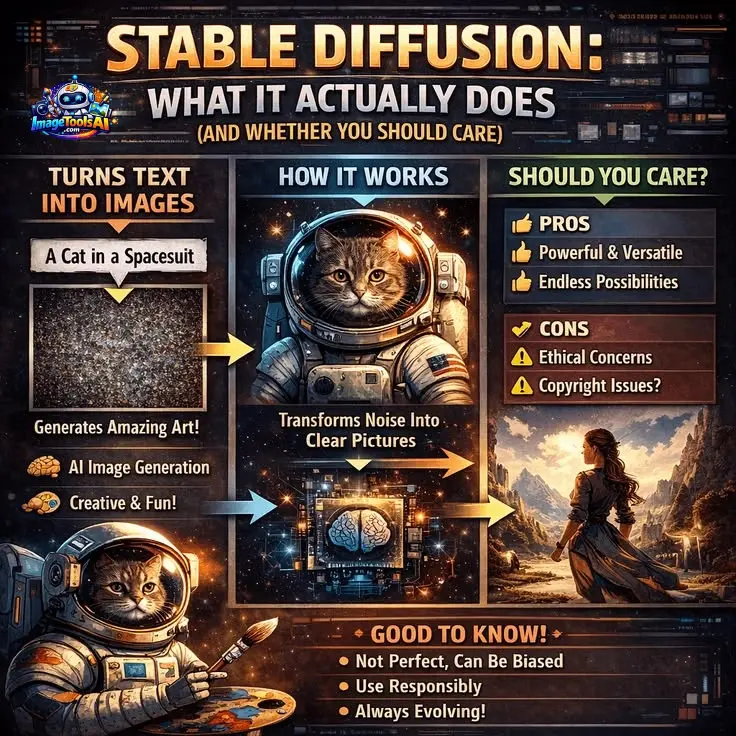
- The system begins with pure random noise
- It interprets your text prompt
- It gradually refines the noise into a meaningful image
Simplified Breakdown
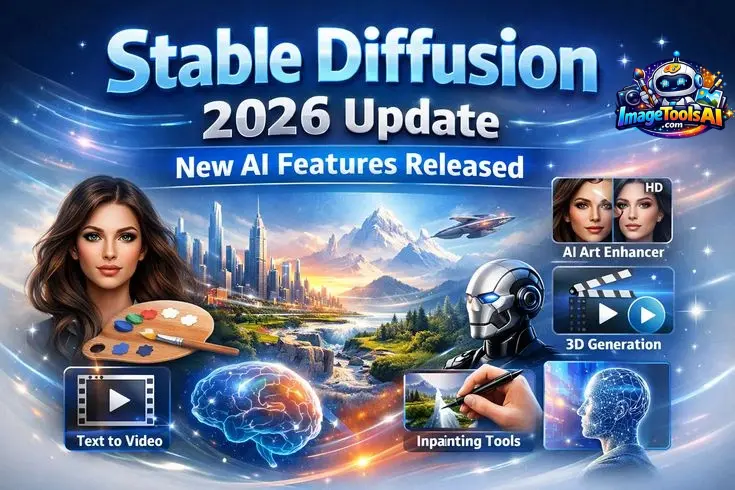
| Stage | Description |
| Input | Text prompt |
| Process | Noise reduction guided by AI |
| Output | Final generated image |
Picture shaping stone: rather than creating from nothing, the machine chips away what does not belong, so the picture appears.
Key Features of Stable Diffusion
Stable Diffusion stands out due to its flexibility, customization, and scalability.
Core Capabilities
- Text-to-image generation
- Image-to-image transformation
- Inpainting (editing specific parts of an image)
- Outpainting (extending image boundaries)
Advanced Functionalities
- Custom models such as SDXL and LoRA
- ControlNet for pose, depth, and structure control
- Seed control for reproducibility
- CFG scale for prompt strength
- Adjustable sampling steps
Flexibility & Deployment
- Runs locally (no subscription required)
- Compatible with cloud GPU services
- Supports plugins, extensions, and integrations
🇪🇺 Benefits & Use Cases
Stable Diffusion has gained massive popularity in Europe, particularly due to strict data protection regulations like GDPR.
Content Creators
- Social media visuals
- YouTube thumbnails
- Digital artwork and collectibles
Businesses
- Marketing creatives
- Product visualization
- Branding materials
Agencies
- High-volume content generation
- Workflow automation
- Campaign asset production
Students
- Academic presentations
- Research illustrations
- Creative Assignments
Key advantage: Local execution ensures data privacy—especially important in countries like Germany and France.
Stable Diffusion Workflow
Most tutorials fail because they don’t provide a structured process. Here is a complete system.
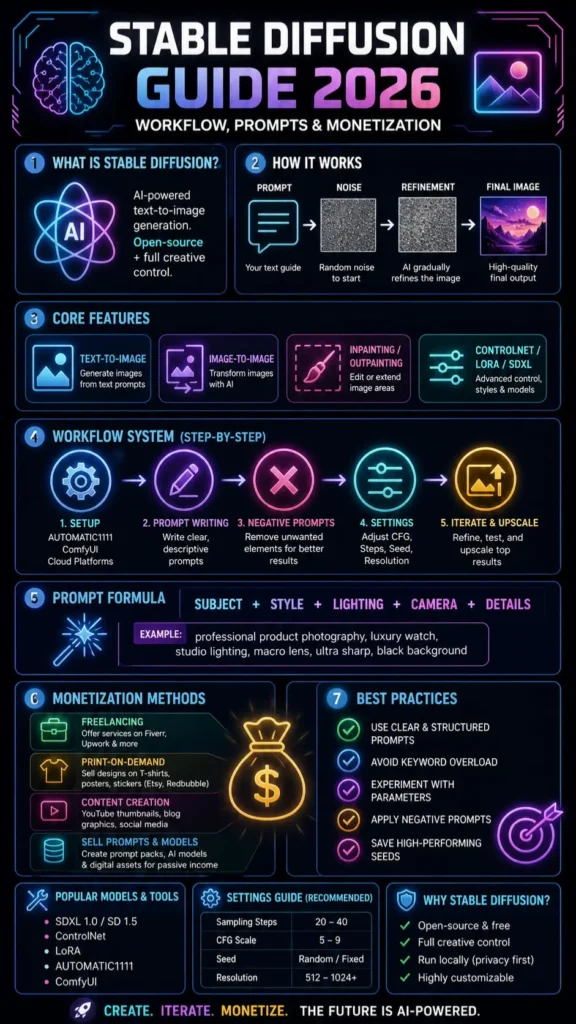
Setup
You have three primary options:
Beginner-Friendly
- AUTOMATIC1111 WebUI
- User-friendly interface
- Minimal technical knowledge required
Advanced Users
- ComfyUI
- Node-based system
- Maximum flexibility and customization
No GPU Users
- Cloud platforms (Google Colab, RunDiffusion)
Recommendation: Start with AUTOMATIC1111, then transition to advanced tools.
Write a Prompt
The prompt is the foundation of your output.
Basic Prompt Formula
[Subject] + [Style] + [Lighting] + [Details]
Example
“ultra realistic portrait, cinematic lighting, 85mm lens, sharp focus”
The clearer and more descriptive your input, the better the output quality.
Add Negative Prompt
Negative prompts eliminate unwanted elements.
Examples
- blurry
- distorted face
- extra limbs
This dramatically enhances image quality and consistency.

Adjust Settings
| Setting | Purpose | Recommended |
| Sampling Steps | Detail refinement | 20–40 |
| CFG Scale | Prompt strength | 5–9 |
| Seed | Reproducibility | Random/Fixed |
| Resolution | Image clarity | 512–1024+ |
Beginners should keep settings simple and gradually experiment.
Iterate & Improve
Professional results require iteration.
- Modify prompts incrementally
- Reuse seeds for consistency
- Upscale top results
Golden rule: Perfection rarely happens in one attempt.
Advanced Prompt Engineering
To achieve high-end results, mastering prompt engineering is essential.
Perfect Prompt Structure
[Subject] + [Style] + [Lighting] + [Camera] + [Details]
Key Techniques
✔ Place important keywords first
✔ Avoid excessive keyword stuffing
✔ Use specific artistic styles
✔ Maintain clarity and precision
Example
“professional product photography, luxury watch, studio lighting, macro lens, ultra sharp, black background”
Types of Images You Can Create
Stable Diffusion supports a wide range of visual categories:
- Photorealistic portraits
- Anime and stylized art
- Product mockups
- Architectural concepts
- Social media graphics
This versatility allows you to build entire businesses around it.
How to Make Money with Stable Diffusion
Now let’s explore monetization opportunities.
Freelancing
Platforms:
- Fiverr
- Upwork
Services you can offer:
- YouTube thumbnails
- AI portraits
- Product visualizations
Print-on-Demand
Sell designs on:
- T-shirts
- Posters
- Stickers
Platforms: Etsy, Redbubble
Content Creation
- YouTube visuals
- Blog graphics
- Instagram Posts
Faster production leads to higher output and growth.
Digital Assets
Sell:
- Prompt packs
- AI models
- Stock images
Creates passive income streams.
Pros and Cons
Advantages
- Open-source and free
- Full creative control
- No usage restrictions (local)
- Highly customizable
Limitations
- Learning curve for beginners
- Requires a GPU for best performance
- Setup complexity
Pricing Breakdown
| Option | Cost |
| Local Installation | Free |
| Cloud Platforms | Pay-as-you-go |
| GPU Hosting | $5–$50/month |
Best Alternatives
Midjourney
- Best for artistic visuals
- Easy to use
DALL·E
- Beginner-friendly
- Integrated ecosystem
Leonardo AI
- Game asset creation
- Clean interface
Adobe Firefly
- Commercial-safe outputs
- Adobe integration
Comparison Table
| Feature | Stable Diffusion | Midjourney | DALL·E | Firefly |
| Control | High | Medium | Low | Medium |
| Open Source | Yes | No | No | No |
| Custom Models | Yes | No | Limited | No |
| Ease of Use | Medium | Easy | Easy | Easy |
| Cost | Free | Paid | Paid | Paid |
Tips to Get the Best Results
- Use clear and structured prompts
- Avoid keyword overload
- Experiment with parameters
- Apply negative prompts
- Save high-performing seeds
Tips to Write Better AI Prompts
- Be descriptive and precise
- Use visual language
- Include lighting conditions
- Avoid ambiguity
Europe-Specific Insight
In Europe, privacy and data protection are critical considerations.
Stable Diffusion is preferred because:
- Local processing ensures no data sharing
- GDPR compliance is easier
- Greater control over content generation
Countries like Germany and France favor privacy-focused AI tools.
FAQs
A: Yes, the core software is free. Cloud services may cost money.
A: No. Tools like AUTOMATIC1111 are beginner-friendly.
A: SDXL is currently the best for high-quality images.
A: Yes, but always check licensing rules.
A: Stable Diffusion offers more control, while Midjourney is easier to use.
Conclusion
By 2026, Stable Diffusion isn’t merely an artistic toy; it’s turned into a sought-after ability blending artificial intelligence with visual craft and Web-Based Earnings. While once seen as playful tech tinkering, it now powers real financial paths through smart image creation. Though rooted in code, its strength shows up in logos, art, and custom visuals people pay for. Because tools evolve fast, those who learn early gain ground without waiting for permission. Not magic – just machines trained well enough to follow directions creatively.
What sets new people apart from experienced ones isn’t natural ability. It’s how they organize their work. Regular effort matters more than flashes of skill. A clear plan shapes results over time.
Most people fail because they:
Use random prompts
Skip structured workflows
Never move beyond basic usage
But now, you have a clear advantage.
If you apply what you’ve learned in this guide:
✔ Follow a step-by-step workflow instead of guessing
✔ Master prompt engineering instead of writing randomly
✔ Leverage tools, models, and extensions properly
✔ Focus on monetization early instead of “just experimenting.”











