
Introduction
Out of nowhere, image-making tools have changed fast. Yet plenty of people keep hitting the same wall – spend time crafting exact directions only to get pictures that skip steps, mess up words, or leave out key details. That gap sparked something new. Enter Leonardo Phoenix 1.0. Built on purpose, it targets those hiccups head-on.
Starting with precision, Phoenix 1.0 powers creative tasks by sticking close to your directions. Instead of guessing, it shapes letters clearly – ideal for layouts needing clean type. Designers lean on it when crafting logos, ads, or mockups that demand consistency. For team projects, outputs fit smoothly into structured pipelines. When visualizing ideas – from packaging shots to storyboards – it responds with tighter accuracy compared to similar tools. Because details matter, results often align better with initial requests.
Start here if you’re curious how Leonardo Phoenix 1.0 works. Inside, find details on the tools it offers alongside ways to adjust them. Settings appear next to examples showing real use. Workflows unfold step by step, yet each path shifts depending on goals. Prompting ideas mixes practical steps with subtle tricks pros apply. When stacked against similar systems, differences stand out clearly. Business cases pop up where creativity meets efficiency. Limits exist, just like any tool made by people. Hidden insights hide near the end – those bits often help most.
What Is Leonardo Phoenix 1.0?
Leonardo Phoenix 1.0 is an advanced AI image generation model developed by Leonardo AI to provide highly controllable image creation.
Unlike earlier AI image models that often struggle with detailed instructions, Phoenix was designed to:
- Follow prompts more accurately
- Generate cleaner typography
- Improve visual consistency
- Support design-focused workflows
- Produce commercially useful assets
Phoenix 1.0 builds upon earlier versions by enhancing image quality, realism, prompt understanding, and layout control.
Why It Matters
Most image generators excel at creating artistic visuals. Phoenix 1.0 focuses on creating visuals that businesses, marketers, and designers can actually use in production environments.

Key Features of Leonardo Phoenix 1.0
Industry-Leading Prompt Adherence
One of Phoenix’s strongest capabilities is understanding complex prompts.
Benefits include:
- Better object placement
- Improved scene composition
- More accurate instruction following
- Reduced prompt rewriting
Improved Text Rendering
Typography remains one of the most difficult challenges for AI image generation.
Phoenix improves:
- Headlines
- Logos
- Product labels
- Advertising copy
- Poster designs
Professional Design Support
Phoenix is especially useful for:
- Marketing creatives
- Brand assets
- Social media campaigns
- Product advertisements
- Presentation graphics
Multi-Subject Scene Understanding
Complex scenes containing multiple objects, characters, and environmental details tend to be more coherent than earlier generations.
High Resolution Output
Phoenix supports professional-quality image generation suitable for commercial workflows.
Leonardo Phoenix 1.0 Settings Explained
Contrast Settings
Contrast significantly impacts image mood and visual impact.
| Setting | Best For |
| Low Contrast | Soft portraits, lifestyle photography |
| Medium Contrast | General-purpose content |
| High Contrast | Dramatic advertising and cinematic visuals |
Alchemy Mode
Alchemy Mode enhances generation quality through additional processing.
Best for:
- Product photography
- Marketing creatives
- Commercial campaigns
Avoid when:
- Rapid testing
- Fast iterations
- Large-volume experimentation
Ultra Mode
Benefits:
- Enhanced detail
- Better texture quality
- More refined realism
Trade-Off:
- Increased generation time
- Higher credit usage
Style Presets
Popular presets include:
- Cinematic
- Photography
- Illustration
- Concept Art
- Branding

Leonardo Phoenix 1.0 Prompt Engineering Framework
Universal Prompt Structure
Subject + Environment + Lighting + Composition + Style + Camera
Example:
“A luxury smartwatch floating above a reflective black surface, dramatic studio lighting, commercial product photography, ultra-realistic, premium advertising campaign, 85mm lens.”
Marketing Prompt Framework
Audience + Product + Emotion + Brand Identity + Call To Action
Example:
“Premium fitness watch for ambitious professionals, modern luxury aesthetic, confidence and success, minimalist branding, social media advertisement.”
Character Design Framework
Character Identity + Appearance + Clothing + Personality + Environment + Style
Example:
“Cyberpunk detective, silver hair, futuristic trench coat, intelligent and confident expression, neon city background, cinematic concept art.”
20 Best Leonardo Phoenix 1.0 Prompts
Product Photography
- Luxury perfume bottle on black marble, studio lighting, premium advertising photography.
- Modern smartwatch on a reflective surface, ultra-realistic product campaign.
- High-end headphones floating in a minimalist environment.
Marketing Ads
- Luxury skincare campaign with elegant typography.
- Sports drink billboard advertisement with dynamic motion.
- Fitness brand promotional creative.
Social Media Graphics
- Instagram travel campaign.
- Modern podcast cover.
- LinkedIn business banner.
Character Design
- Fantasy warrior queen.
- Cyberpunk hacker.
- Futuristic astronaut.
Cinematic Scenes
- Rain-soaked futuristic city.
- Epic medieval battlefield.
- Space exploration mission.
Branding
- Minimalist luxury logo concept.
- Modern startup brand identity.
- Technology conference poster.
E-Commerce
- Amazon product showcase.
- Fashion catalog photography.
Professional Workflows
Marketing Campaign Creation
Research
Identify:
- Target audience
- Brand Guidelines
- Campaign goals
Prompt Development
Create structured prompts using a marketing framework.
Iteration
Generate multiple variations.
Refinement
Improve composition and typography.
Delivery
Export final assets for deployment.
Product Photography
- Define product positioning
- Create a studio prompt
- Generate multiple angles
- Upscale selected images
- Prepare commercial assets
Social Media Content Factory
- Create a visual template
- Build prompt library
- Generate content batches
- Repurpose across platforms
- Schedule publishing

Image Editing With Phoenix 1.0
Phoenix supports various image-guided workflows.
Style References
Useful for:
- Brand consistency
- Visual matching
- Artistic direction
Character References
Helpful when:
- Maintaining identity
- Building visual stories
- Creating recurring characters
Content References
Useful for:
- Layout inspiration
- Product positioning
- Design consistency
How To Create Consistent Characters
Use Character References
Upload reference images whenever possible.
Use Prompt Anchors
Repeat:
- Hair color
- Clothing
- Facial features
- Style descriptors
Use Seeds
Consistent seeds often improve repeatability.
Iterate Carefully
Small prompt adjustments generally outperform complete rewrites.
Leonardo Phoenix 1.0 for Business
Marketing Agencies
Create:
- Ad creatives
- Campaign assets
- Client concepts
E-Commerce Stores
Generate:
- Product photography
- Lifestyle imagery
- Promotional banners
Content Creators
Produce:
- Thumbnails
- Social graphics
- Visual storytelling assets
Freelance Designers
Deliver:
- Brand concepts
- Presentation graphics
- Client Mockups
Common Mistakes To Avoid
Overloading Prompts
Too many instructions can reduce consistency.
Ignoring Composition
Always specify framing and layout.
Weak Lighting Descriptions
Lighting often determines image quality.
Style Conflicts
Avoid combining contradictory artistic directions.
Unrealistic Typography Expectations
AI-generated text continues to improve, but may still require editing.
Troubleshooting Guide
Text Not Rendering Correctly
Solutions:
- Simplify text requests
- Use fewer words
- Increase design clarity
Missing Objects
- Make object importance explicit
- Reduce competing instructions
Character Inconsistency
- Use references
- Reuse prompt anchors
- Maintain seed values
Strange Anatomy
- Use realism-focused prompts
- Increase generation quality settings
Phoenix 1.0 vs Phoenix 0.9
| Feature | Phoenix 0.9 | Phoenix 1.0 |
| Prompt Adherence | Good | Excellent |
| Typography | Improved | Significantly Better |
| Visual Consistency | Good | Strong |
| Commercial Design | Good | Excellent |
| Workflow Efficiency | Moderate | High |

Phoenix 1.0 vs Midjourney vs Flux
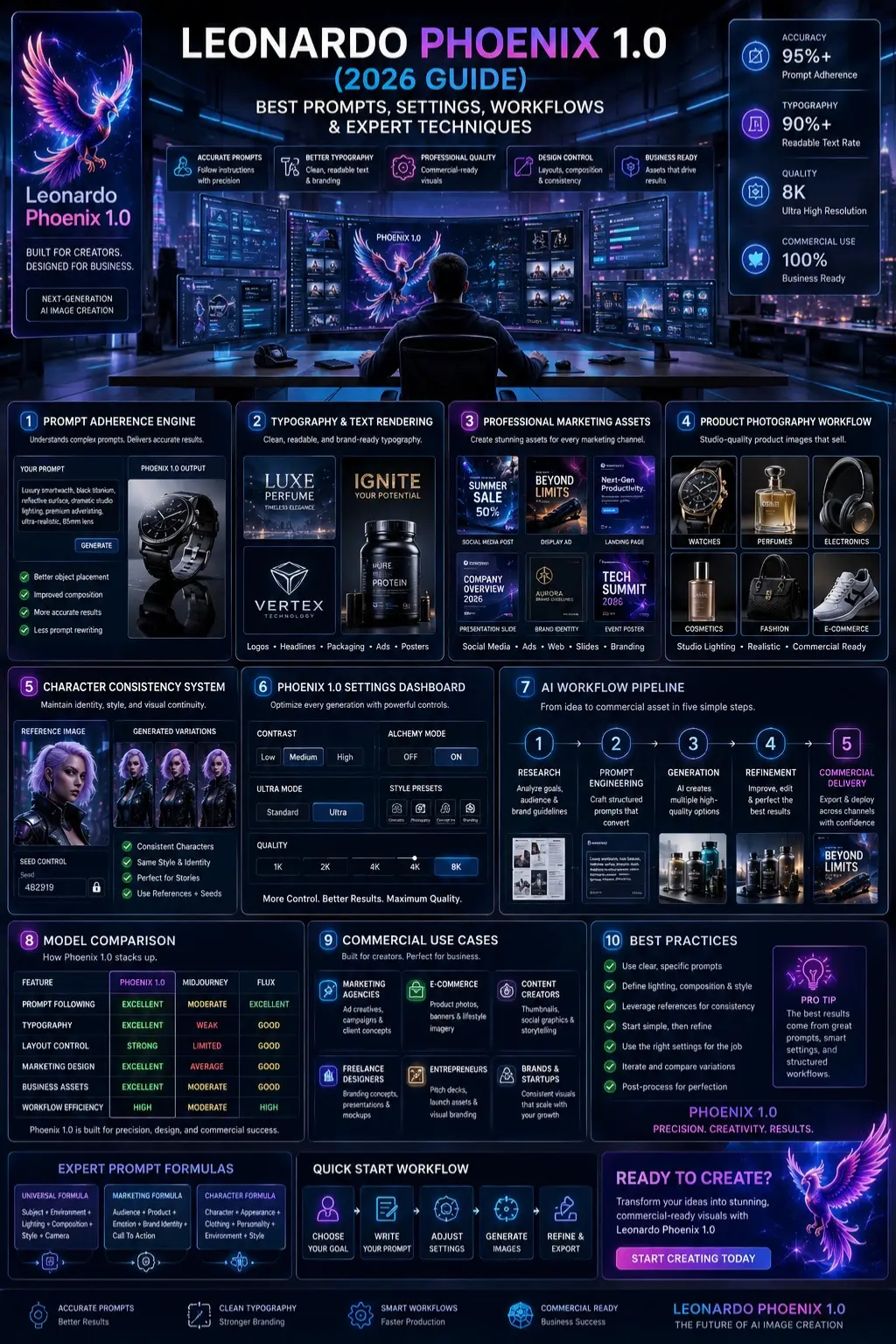
| Feature | Phoenix 1.0 | Midjourney | Flux |
| Prompt Following | Excellent | Moderate | Excellent |
| Typography | Excellent | Weak | Good |
| Marketing Design | Excellent | Average | Good |
| Layout Control | Strong | Limited | Good |
| Business Assets | Excellent | Moderate | Good |
Best Use Cases
Phoenix 1.0 excels at:
- Graphic design
- Marketing campaigns
- Product photography
- Branding assets
- E-commerce visuals
- Social media content
- Concept development
Realistic Limitations
Despite its strengths, Phoenix 1.0 is not perfect.
Current limitations include:
- Typography may still require editing
- Complex layouts can occasionally fail
- Fine-grained character consistency requires references
- Commercial projects often need post-processing
Understanding these limitations helps create realistic expectations and better workflows.
Who Should Use Leonardo Phoenix 1.0?
Ideal users:
- Marketers
- Designers
- Agencies
- E-commerce businesses
- Content creators
- Freelancers
- Entrepreneurs
Who May Prefer Alternatives?
Artists focused solely on highly stylized creative exploration may still prefer models optimized specifically for artistic experimentation.
Future of Leonardo Phoenix
Future AI image generation trends will likely focus on:
- Better typography
- Stronger layout control
- Improved video generation
- Enhanced character consistency
- Enterprise workflow integration
- Multimodal design systems
Phoenix appears well-positioned for these developments due to its emphasis on controllability and commercial usability.
People Also Ask
A: For marketing assets, typography, and prompt accuracy, many users prefer Phoenix. Midjourney remains highly popular for artistic creativity and visual aesthetics.
A: Yes. Phoenix significantly improves text rendering compared to many earlier AI image models, though manual editing may still be required for professional projects.
A: Many businesses use Phoenix for marketing, branding, product photography, and content creation. Always review current licensing terms before commercial deployment.
A: Most professionals start with medium contrast, Alchemy Mode enabled, and a photography or cinematic style preset.
A: Yes. Users can leverage style references, character references, and content references to guide edits and maintain consistency.
Conclusion
Picture-making tech in 2026 doesn’t get more down-to-earth than Leonardo Phoenix 1.0. Most artificial brains chase wild visuals, yet this one sticks close to what you describe. Precision matters here – shapes follow orders, fonts behave, layouts stay tidy. Because it works reliably, businesses find it useful without extra fuss. Not flashy, just solid when results count.
What stands out is how well it follows prompts while refining text quality. For those shaping campaigns or visuals, the workflow feels smooth. Marketers find uses that fit real tasks. Designers notice details that help their output. Agencies rely on their steady performance across projects. Content builders see fewer hiccups when scaling ideas. E-commerce teams apply it without reworking systems.
What stands out most is not just creating pretty pictures. It’s about getting closer to what you actually imagine. Through careful prompts, Adjusted Controls, using examples, and repeated tweaks, results match the purpose better. Time once lost fixing errors now leads to finished work instead.
Should you want more precision in AI art, try getting good at Leonardo Phoenix 1.0 – it handles complex requests without failing. Because steady results matter when creating visuals for work, this tool stands out through consistency. When fine-tuned output is needed, its performance stays strong across different styles.
Curious about AI images? Head over to ImageToolsAI.com for walkthroughs, how-they-work breakdowns, plus honest takes on tools that actually matter. A fresh look at what’s inside each guide – no fluff, just steps and insights. Find your next move buried in real examples, not promises. Details live where practice begins.











