Introduction
Most tools shape pixels without really listening. Yet precision matters when building visuals piece by piece. Following directions should mean something – like placing a cup exactly on the table edge, not floating mid-air. Some systems skip details no matter how clearly you state them. Words get scrambled. Shapes twist oddly. What shows up misses the point entirely. That kind of letdown slows everything down. But here’s an option that tracks closer to what you describe. It stitches together scenes with a tighter grip on layout, clarity, and even lettering. Instructions stay respected, not loosely interpreted. The output feels less like guessing, more like crafting.
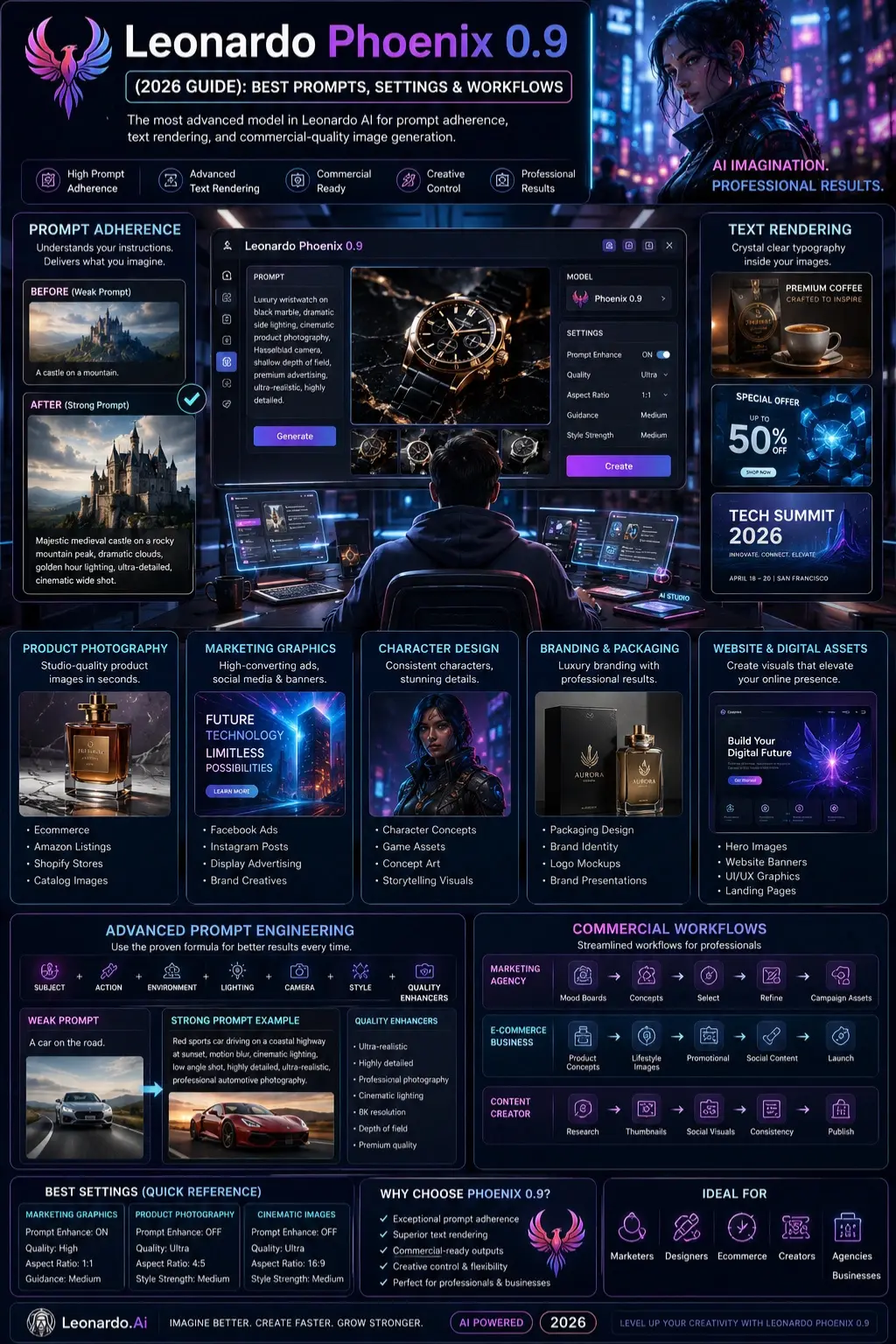
Starting as a top-tier model in Leonardo AI’s lineup, Leonardo Phoenix 0.9 places strong emphasis on following prompts exactly, delivering sharp creativity while generating clear, detailed images. For marketers developing ads, ecommerce professionals setting up product shots, designers shaping visual identities, or creators making standout graphics, this version offers what it takes to quickly transform concepts into polished visuals without sacrificing reliability. Though built with complexity, its results feel straightforward and focused.
Jump into this full walkthrough of Leonardo Phoenix 0.9 – how it runs, what tools stand out, which settings hit best, ways to shape prompts like a pro, real-world pipelines, business applications, smart tweaks for sharper output. Once through, clarity arrives: leverage its power fully, spot if it fits your vision-making needs now, later, down the line.
What Is Leonardo Phoenix 0.9?
Out of all the tools in Leonardo AI’s lineup, this version stands tall – its ability to stick closely to your prompts sets it apart. Picture clarity gets a boost when words appear just where they should. Structure feels more guided, less random. Quality jumps up without flashy tricks behind the scenes. Each detail lands with sharper intent.
Not long ago, most AI tools had a hard time making pictures exactly how people wanted. More often than not, key details got left out without warning. What changed things? A new system called Phoenix started paying closer attention to what users actually asked for. Instead of guessing, it builds images much more aligned with the given words.
Now here’s something different – Leonardo Phoenix 0.9 shifted things quietly but firmly into new territory. Not loud, not flashy, just steady progress under the surface. Creators found room to move. Marketers saw options open without chaos. Designers got space to shape ideas while keeping hold of details. Agencies noticed how smoothly tasks unfolded across teams. Businesses watched outputs align better with goals. Control stayed present, yet didn’t block imagination. Instead of choosing one over the other, both grew stronger together.
Whether you want to create:
- Marketing advertisements
- Product photography
- Social media graphics
- Brand visuals
- Concept art
- YouTube thumbnails
- Character designs
- Website assets
Phoenix 0.9 provides a reliable foundation for professional image generation workflows.
Why Leonardo Phoenix 0.9 Matters in 2026
The AI image generation industry has evolved rapidly. However, many creators still face challenges such as:
- Inconsistent outputs
- Poor text rendering
- Weak prompt understanding
- Object placement errors
- Difficulty maintaining brand consistency
Leonardo Phoenix 0.9 remains relevant because it addresses these problems better than many earlier-generation models.
Key Advantages
Better Prompt Adherence
Phoenix follows instructions more accurately than many legacy models.
Improved Typography
Creating readable text inside images remains difficult for many AI systems. Phoenix is known for handling text more effectively.
Greater Creative Control
Users can specify:
- Camera angles
- Lighting styles
- Subject positioning
- Composition details
- Visual aesthetics
Commercial-Friendly Output
Businesses can rapidly generate marketing assets without hiring large creative teams.
How Leonardo Phoenix 0.9 Works
At its core, Phoenix converts text instructions into images using advanced generative AI architecture.
The process generally follows four stages:
Prompt Analysis
The model reads and interprets the prompt.
Semantic Understanding
Phoenix identifies:
- Main subject
- Supporting objects
- Environment
- Style
- Lighting
- Mood
Composition Planning
The model organizes elements within the scene.
Image Generation
The final image is rendered based on the instructions provided.
This process happens within seconds but involves billions of calculations behind the scenes.
Key Features of Leonardo Phoenix 0.9
Superior Prompt Adherence
One of Phoenix’s strongest capabilities is understanding detailed prompts.
Example:
Weak Prompt:
A woman standing outside.
Strong Prompt:
Confident female entrepreneur standing in downtown Tokyo at sunset, black tailored suit, luxury magazine photography, cinematic lighting, shallow depth of field, highly detailed.
The stronger prompt produces significantly better results.
Advanced Text Rendering
Phoenix performs particularly well when generating:
- Posters
- Flyers
- Product packaging
- Social media advertisements
- Promotional banners
Many competing models still struggle with typography.
High-Quality Commercial Visuals
Businesses can create:
- Product images
- Marketing Campaigns
- E-commerce assets
- Website graphics
- Presentation visuals
without expensive photoshoots.
Flexible Style Control
Phoenix supports numerous visual styles:
- Photorealistic
- Cinematic
- Anime
- Fantasy
- Concept art
- Editorial
- Fashion photography
- Product photography
Better Subject Consistency
While no AI model is perfect, Phoenix often produces more consistent character details than earlier Leonardo models.
Leonardo Phoenix 0.9 vs Other Leonardo Models
| Feature | Phoenix 0.9 | Lightning XL | Kino XL |
| Prompt Adherence | Excellent | Good | Good |
| Text Rendering | Excellent | Average | Average |
| Speed | Good | Excellent | Good |
| Creative Control | Excellent | Moderate | Good |
| Marketing Graphics | Excellent | Good | Moderate |
| Product Photography | Excellent | Good | Moderate |
| Character Design | Excellent | Good | Excellent |
| Commercial Use | Excellent | Good | Good |
Quick Summary
Choose Phoenix 0.9 when:
- Prompt accuracy matters
- Text generation is important
- Commercial content is required
- Branding consistency is needed

Leonardo Phoenix 0.9 vs Midjourney vs Flux
| Feature | Phoenix 0.9 | Midjourney | Flux |
| Prompt Accuracy | Excellent | Good | Excellent |
| Text Rendering | Excellent | Average | Good |
| Ease of Use | High | Medium | Medium |
| Marketing Assets | Excellent | Good | Good |
| Product Images | Excellent | Good | Good |
| Artistic Creativity | Good | Excellent | Excellent |
| Commercial Workflows | Excellent | Good | Good |
Best Leonardo Phoenix 0.9 Settings
Marketing Graphics
Recommended Settings
- Prompt Enhance: ON
- Quality: High
- Aspect Ratio: 1:1
- Guidance: Medium
Best for:
- Facebook Ads
- Instagram Posts
- Brand Creatives
- Display Advertising
Product Photography
Recommended Settings
- Prompt Enhance: OFF
- Quality: Ultra
- Aspect Ratio: 4:5
- Style Strength: Medium
Best for:
- Ecommerce
- Amazon Listings
- Shopify Stores
- Catalog Images
Cinematic Images
Recommended Settings
- Prompt Enhance: OFF
- Quality: Ultra
- Aspect Ratio: 16:9
Best for:
- Storytelling
- Movie Concepts
- YouTube Thumbnails
- Visual Narratives
Ultimate Leonardo Phoenix Prompt Formula
Professional creators often use a structured framework.
Formula
Subject + Action + Environment + Lighting + Camera + Style + Quality Enhancers
Example:
Luxury wristwatch displayed on polished black marble, dramatic side lighting, cinematic product photography, Hasselblad medium format camera, shallow depth of field, premium advertising campaign, ultra-realistic, highly detailed.
This framework consistently produces stronger outputs.
Best Leonardo Phoenix 0.9 Prompts
Product Photography
Luxury perfume bottle on reflective marble surface, soft studio lighting, premium commercial advertising photography, ultra-realistic, highly detailed.
E-commerce Product Shot
Modern wireless earbuds floating above a minimalist white background, luxury product showcase, studio lighting, premium ecommerce photography.
Social Media Advertisement
Futuristic laptop displayed in a neon blue environment, technology advertising campaign, dramatic lighting, and premium branding aesthetic.
Character Design
Cyberpunk female hacker, neon city skyline, cinematic lighting, futuristic clothing, realistic skin textures, ultra detailed portrait.
Fantasy Character
Ancient elven warrior standing in an enchanted forest, glowing armor, magical atmosphere, cinematic fantasy artwork, highly detailed.
Luxury Branding
Minimalist luxury coffee brand packaging mockup, Scandinavian design aesthetic, clean typography, premium branding presentation.
Professional Workflows
Marketing Agency
Step 1
Create mood boards.
Step 2
Generate multiple concepts.
Step 3
Select winning designs.
Step 4
Refine creative direction.
Step 5
Export final campaign assets.
E-commerce Business
Step 1
Generate product concepts.
Step 2
Create lifestyle imagery.
Step 3
Build promotional creatives.
Step 4
Produce social media content.
Step 5
Launch campaigns.
Content Creator
Step 1
Research trending topics.
Step 2
Generate thumbnails.
Step 3
Create social visuals.
Step 4
Maintain visual consistency.
Step 5
Publish across platforms.
Best Industry Use Cases
Digital Marketing
Marketers use Phoenix to create:
- Ad creatives
- Social graphics
- Landing Page Visuals
- Banner advertisements
Ecommerce
Store owners generate:
- Product photography
- Lifestyle images
- Product mockups
- Seasonal campaigns
Content Creation
Creators build:
- YouTube thumbnails
- Blog illustrations
- Podcast covers
- Social posts
Graphic Design
Designers rapidly explore:
- Brand concepts
- Packaging designs
- Marketing assets
- Visual identities
Pros and Cons
Pros
Excellent prompt adherence
Strong text rendering
Commercial-friendly outputs
Good creative control
Reliable marketing visuals
High-quality image generation
Beginner-friendly interface
Cons
Character consistency is not perfect
Complex prompts may require testing
Premium features may require paid plans
Some outputs still need editing
Common Mistakes to Avoid
Overstuffing Prompts
Adding too many instructions can confuse the model.
Ignoring Lighting
Lighting dramatically affects image quality.
Always specify:
- Soft studio lighting
- Golden hour lighting
- Cinematic lighting
- Rim lighting
- Neon lighting
Weak Composition Guidance
Specify:
- Foreground
- Background
- Camera angle
- Framing
- Subject placement
Using Generic Descriptions
Detailed prompts almost always outperform generic prompts.
Troubleshooting Guide
Text Looks Incorrect
Solution
- Use shorter text phrases
- Increase prompt clarity
- Generate multiple versions
Subject Placement Errors
Solution
- Define foreground elements
- Specify background objects
- Use directional language
Inconsistent Characters
Solution
- Save successful prompts
- Reuse exact descriptions
- Maintain character specifications
Low Realism
Solution
Add:
- Photorealistic
- Professional photography
- Realistic lighting
- High detail
- DSLR camera references
Commercial Usage and Licensing
Leonardo Phoenix 0.9 is widely used by:
- Marketing agencies
- Startups
- E-commerce brands
- Content creators
- Publishers
- Graphic designers
- Social media teams
Before commercial deployment, always review Leonardo AI’s latest licensing terms, subscription plans, and usage policies.
Commercial rights can vary based on plan type and platform updates.
Privacy, Safety, and Responsible AI Use
Professional users should:
- Verify commercial rights
- Respect copyright laws
- Avoid misleading content
- Follow platform policies
- Review privacy settings
Responsible usage helps protect both creators and businesses.
Who Should Use Leonardo Phoenix 0.9?
Ideal users include:
- Marketers
- Designers
- E-commerce sellers
- Content creators
- Small Businesses
- Agencies
- Bloggers
- Startup founders
Who Should Avoid Leonardo Phoenix 0.9?
You may prefer other solutions if:
- You require absolute character consistency
- You need advanced video generation
- You need complex 3D workflows
- You need enterprise-level custom training
Realistic Expectations and Limitations
Phoenix 0.9 is powerful, but no AI model is perfect.
Users should expect:
- Occasional prompt revisions
- Multiple generations for best results
- Minor image editing after generation
- Ongoing experimentation
The highest-quality outputs typically come from strong prompt engineering rather than one-click generation.
Future of Leonardo Phoenix
AI image generation continues evolving rapidly.
Future developments will likely focus on:
- Better consistency
- Improved typography
- Faster rendering
- Higher resolution outputs
- Enhanced brand control
- Multi-image storytelling
- AI-powered design workflows
Phoenix remains an important milestone in Leonardo AI’s evolution and continues to be a valuable tool for professional image generation.
People Also Ask
Yes. It remains one of the strongest Leonardo models for prompt adherence, commercial content creation, and text rendering.
Marketing graphics, product photography, branding assets, advertising creatives, and structured image generation workflows.
It performs significantly better than many earlier AI image models and is particularly useful for banners, posters, and promotional graphics.
Yes. E-commerce brands commonly use it for product visuals, lifestyle images, and marketing campaigns.
Absolutely. Beginners can achieve strong results with simple prompts, while professionals can leverage advanced prompt engineering techniques.
Conclusion
Out here, Leonardo Phoenix 0.9 still stands tall – no flash, just results. It listens closely to what you type, almost like it’s reading your mind. Text shows up cleaner now, far less messy than before. Tweak things freely without losing grip on style or direction. Finished images? Ready to use however needed. Marketers find it sharp. Designers rely on it daily. Agencies speed through drafts. Online stores build visuals fast. Creators shape ideas smoothly. Entrepreneurs get moving quicker.
Most tools stumble when given complex directions. Not Phoenix 0.9 – it follows intricate steps without losing clarity. Because it gets things right the first time, users waste less time reworking outputs. Workflow moves faster since fewer fixes are needed down the line. Creative outcomes stay sharp whether used for ads, Brand Mockups, or online visuals. Where others require constant tweaking, this one adapts smoothly across real-world tasks.











