Introduction
AI creative tools are evolving faster than ever, but most platforms still focus on only one part of the workflow.
Some generate beautiful images but lack editing tools. Others offer automation, but feel limiting for professional creators. And many AI art platforms still rely on confusing chat-based interfaces that slow down real production work.
That’s exactly why Leonardo Creative has become one of the fastest-growing AI creative ecosystems in 2026.
Originally known for AI image generation and game assets, Leonardo has evolved into a complete AI-powered visual production suite used by:
- designers
- YouTubers
- content creators
- marketing agencies
- indie game developers
- ecommerce brands
- social media teams
- creative freelancers
Unlike many competitors, Leonardo focuses heavily on workflow flexibility, creative control, and production efficiency.
In this complete guide, you’ll learn:
- What Leonardo Creative actually is
- How professionals use it
- best features and workflows
- advanced prompt strategies
- pricing and limitations
- Leonardo vs Midjourney comparisons
- creator-focused productivity systems
- commercial usage considerations
- realistic strengths and weaknesses
If you want a practical, creator-focused understanding of Leonardo Creative, this is the guide most competitors failed to build.
What Is Leonardo Creative?
Leonardo Creative is an AI-powered visual creation platform designed for professional-grade creative workflows.
It combines:
- AI image generation
- realtime editing
- AI Canvas workflows
- motion and animation tools
- custom model training
- texture generation
- image upscaling
- style consistency systems
- prompt enhancement
- creative asset management
Instead of acting like a simple “AI art toy,” Leonardo functions more like a creative production environment.
That’s a major reason why creators increasingly use it for:
- brand asset creation
- social media systems
- concept art
- game development
- thumbnail generation
- marketing visuals
- ad creatives
- ecommerce graphics
Why Leonardo Creative Matters in 2026
AI content production has changed dramatically.
Creators no longer need tools that only generate isolated images. They need systems that support:
- scalability
- consistency
- collaboration
- editing
- iteration
- multi-platform publishing
Leonardo fits this new creator economy better than many older AI art tools.
Key Industry Shifts Driving Leonardo’s Growth
Demand for Faster Content Production
Brands now publish:
- TikToks
- Shorts
- reels
- carousels
- ads
- blog graphics
- landing page visuals
at extremely high volume.
Leonardo helps creators generate assets much faster.
Workflow-Based AI Is Replacing “Single Prompt” AI
The future of AI creativity is:
- editing
- refinement
- iteration
- consistency
not simply typing prompts.
Leonardo’s Canvas system aligns perfectly with this trend.
Businesses Want Commercially Useful AI
Companies need:
- reusable styles
- branding systems
- character consistency
- scalable creative production
Leonardo performs well in these business-focused scenarios.
How Leonardo Creative Works
Leonardo operates through a browser-based interface that combines:
- prompting
- generation
- editing
- asset management
- workflow control
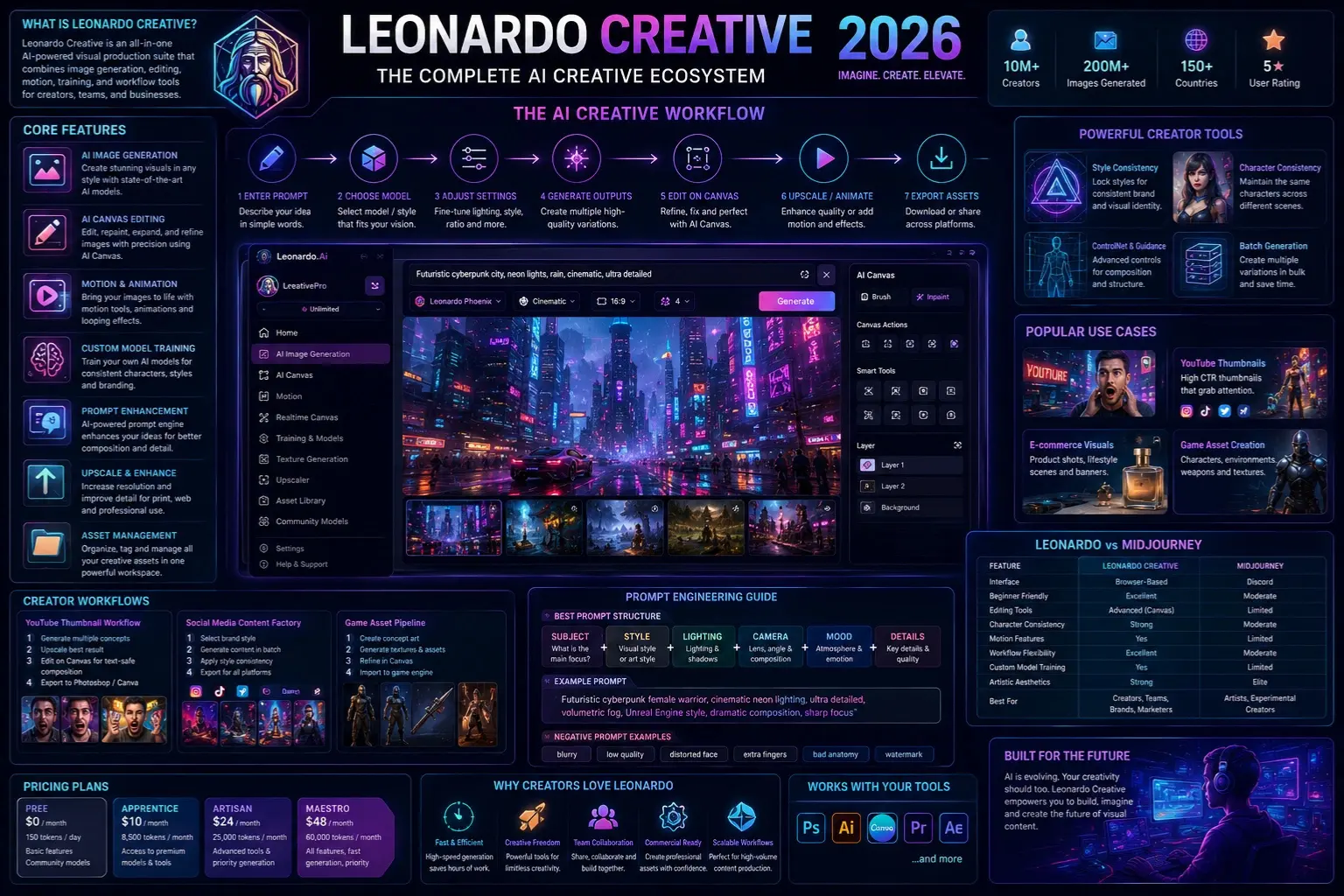
Basic Workflow
| Step | Action |
| 1 | Enter a prompt |
| 2 | Choose model/style |
| 3 | Adjust settings |
| 4 | Generate outputs |
| 5 | Edit using Canvas |
| 6 | Upscale or animate |
| 7 | Export assets |
This production-oriented workflow is one of Leonardo’s biggest advantages over simpler AI generators.
Leonardo Creative Core Features
AI Image Generation
Leonardo supports a wide range of image styles:
- cinematic realism
- anime
- fantasy
- cyberpunk
- editorial
- Product Photography
- illustration
- architecture
- sci-fi
- stylized branding
Its model ecosystem is one of the platform’s strongest features.
AI Canvas
AI Canvas allows creators to:
- repaint sections
- expand scenes
- fix compositions
- refine details
- create iterative workflows
This transforms Leonardo from a prompt tool into a real design environment.
Why Canvas Matters
Most professional creators rarely use first-generation outputs directly.
Canvas enables:
- controlled refinement
- art direction
- visual experimentation
- production consistency
That dramatically improves usability.
Motion & Video Tools
Leonardo increasingly supports:
- AI animation
- motion effects
- looping visuals
- animated backgrounds
- social media motion assets
This is especially valuable for:
- TikTok creators
- YouTube intros
- Instagram reels
- ad creatives
Custom AI Models
Users can train custom styles for:
- brand identity
- recurring characters
- product aesthetics
- fantasy worlds
- game environments
This is a major competitive advantage.
Prompt Enhancement
Leonardo includes AI-assisted prompt expansion systems that:
- enrich details
- improve compositions
- optimize aesthetics
- create more cinematic outputs
This helps beginners generate stronger visuals without requiring advanced prompt-engineering knowledge.
Best Leonardo Creative Workflows
YouTube Thumbnail Workflow
One of Leonardo’s most popular creator use cases.
Workflow Example
Step 1
Generate multiple concepts using emotional expressions and cinematic lighting.
Step 2
Upscale the strongest image.
Step 3
Use Canvas for text-safe composition adjustments.
Step 4
Export to Photoshop or Canva.
Why It Works
Leonardo excels at:
- dramatic lighting
- emotional reactions
- cinematic scenes
- visual storytelling
Perfect for thumbnails.
Social Media Content Factory
Brands use Leonardo to produce rapidly:
- carousel graphics
- ad creatives
- quote cards
- story visuals
- Pinterest assets
- campaign graphics
This can reduce design production time dramatically.
Mini Summary
Leonardo performs especially well for high-volume visual marketing workflows.
Game Asset Pipeline
Leonardo became famous partly because of game creators.
Developers use it for:
- character concepts
- textures
- environments
- loading screens
- cinematic scenes
- weapons
- armor
- UI concepts
Its stylized art generation is particularly strong.
E-commerce Product Marketing
Online businesses use Leonardo for:
- product mockups
- lifestyle scenes
- ad creatives
- promotional banners
- seasonal campaigns
This reduces reliance on expensive photoshoots.
Leonardo Creative Prompt Engineering Guide
Best Prompt Structure
Professional Leonardo prompts usually follow this structure:
Subject + Style + Lighting + Camera + Mood + Details
Example:
futuristic cyberpunk female warrior, cinematic neon lighting, ultra detailed, volumetric fog, Unreal Engine style, dramatic composition, sharp focus
Best Leonardo Settings for High-Quality Results
Use Phoenix for Balanced Outputs
Phoenix works well for:
- realistic images
- social content
- thumbnails
- branding visuals
- product scenes
Use Fine-Tuned Models for Stylized Art
These models perform better for:
- anime
- comic styles
- fantasy art
- cinematic aesthetics
Avoid Overusing Prompt Guidance
Too much guidance may:
- reduce creativity
- produce repetitive outputs
- overfit compositions
Balance is important.
Advanced Prompt Tips Professionals Use
Use Camera Language
Examples:
- cinematic close-up
- 85mm lens
- shallow depth of field
- wide-angle composition
This improves realism significantly.
Use Mood Keywords
Mood strongly affects outputs.
Examples:
- dystopian
- dreamy
- atmospheric
- energetic
- minimalist
- luxurious
Use Negative Prompts Aggressively
Negative prompts improve:
- anatomy
- composition
- Image Cleanliness
- realism
Example:
- blurry
- low quality
- extra fingers
- distorted face
- watermark
- bad anatomy
Leonardo Creative vs Midjourney
| Feature | Leonardo Creative | Midjourney |
| Interface | Browser-based | Discord |
| Beginner Friendly | Excellent | Moderate |
| Editing Tools | Advanced | Limited |
| Character Consistency | Strong | Moderate |
| Canvas Editing | Yes | No |
| Motion Features | Yes | Limited |
| Workflow Flexibility | Excellent | Moderate |
| Artistic Aesthetics | Strong | Elite |
| Fine-Tuning | Available | Limited |
Which One Is Better?
Choose Leonardo If You Want:
- workflow control
- editing flexibility
- easier onboarding
- branding consistency
- production scalability
Choose Midjourney If You Want:
- ultra-artistic outputs
- stylized cinematic art
- experimental aesthetics
Many professionals actually combine both tools.
Leonardo Creative Pricing
Leonardo typically offers:
- Free plan
- Apprentice plan
- Artisan plan
- Maestro plan
What Affects Token Usage?
Heavy usage increases with:
- motion tools
- realtime generation
- upscaling
- premium models
- Canvas editing
Is the Free Plan Good?
Yes.
Leonardo’s free tier remains one of the better entry-level AI image plans available today.
However, professionals may outgrow it quickly.
Leonardo Creative Pros and Cons
Pros
- Excellent interface
- Strong workflow flexibility
- Great for teams
- Powerful Canvas editing
- Fast generation speed
- Good beginner onboarding
- Strong customization
- Great for creators and marketers
Cons
- The token system can feel confusing
- Advanced workflows consume credits quickly
- Some models vary in consistency
- Photorealism may trail Flux in certain cases
- Learning curve for advanced workflows
Best Leonardo Creative Use Cases
Content Creators
Perfect for:
- thumbnails
- reels
- blog visuals
- social graphics
- storytelling art
Designers
Excellent for:
- moodboards
- UI inspiration
- concept art
- creative exploration
- rapid ideation
Marketing Teams
Useful for:
- campaign visuals
- ad mockups
- promotional assets
- social content systems
E-commerce
Great for:
- AI product scenes
- seasonal campaigns
- catalog visuals
- ad graphics
Hidden Leonardo Creative Tips
Use Style Locking
Style consistency improves dramatically when generating batches.
This is essential for:
- branding
- social systems
- recurring campaigns
Save Prompt Templates
Professional creators rarely write prompts from scratch every time.
They build reusable prompt systems.
Combine Canvas + Prompting
This often produces better outputs than prompting alone.
Canvas editing is one of Leonardo’s strongest competitive advantages.
Common Mistakes to Avoid
Overcomplicated Prompts
Too many keywords can confuse the model.
Focus on clarity.
Ignoring Composition Language
Camera framing and composition keywords matter significantly.
Skipping Negative Prompts
Negative prompts help reduce common AI issues.
Expecting Perfect Outputs Instantly
Professional creators iterate constantly.
AI generation is still a refinement process.
Best Leonardo Prompt Ideas
Cinematic Portrait Prompt
cinematic portrait of a futuristic hacker, neon lighting, shallow depth of field, ultra-realistic, atmospheric rain, cyberpunk city background
YouTube Thumbnail Prompt
shocked YouTube creator reaction, dramatic lighting, viral thumbnail composition, expressive face, ultra detailed, cinematic shadows
E-commerce Product Prompt
luxury skincare bottle on marble surface, soft natural lighting, premium branding aesthetic, realistic product photography
Fantasy Concept Art Prompt
ancient dragon warrior standing on volcanic mountain, fantasy cinematic lighting, epic composition, ultra detailed armor
Privacy, Safety & Commercial Use
Before using Leonardo commercially, businesses should review:
- licensing terms
- usage rights
- model restrictions
- privacy policies
AI-generated commercial rights can evolve.
This is especially important for:
- agencies
- brands
- client projects
- e-commerce businesses
Who Should Use Leonardo Creative?
Leonardo is ideal for:
- creators
- marketers
- designers
- freelancers
- YouTubers
- indie developers
- startups
- ecommerce brands
It performs especially well for creators who need scalable workflows.
Who Should Avoid Leonardo?
Leonardo may not be ideal if:
- You only need occasional AI images
- You dislike token systems
- You want a fully automated design generation
- You require absolute photorealism above all else
Realistic Expectations & Limitations
Leonardo is powerful, but not magic.
Users still need:
- prompt skills
- composition understanding
- editing judgment
- workflow experimentation
AI tools amplify creativity — they don’t replace creative thinking entirely.
Future AI Creative Trends
Workflow AI Will Beat Single-Prompt AI
Creative ecosystems are replacing isolated generators.
AI Video Integration Will Expand
Motion generation will become increasingly important.
Brand Consistency Systems Will Grow
Businesses want reusable AI identity systems.
AI-Assisted Creative Teams Will Become Normal
AI will increasingly support:
- designers
- marketers
- editors
- creative directors
rather than replacing them completely.
People Also Ask
A: Yes. Leonardo has one of the easiest onboarding experiences among advanced AI art tools. Its browser-based workflow feels more approachable than Discord-based systems.
A: In many cases, yes. However, creators should always verify current licensing terms and commercial usage policies directly through official documentation.
A: It depends on your goal. Midjourney often wins in raw artistic aesthetics, while Leonardo usually offers better workflow control, editing flexibility, and usability.
A: Leonardo performs especially well for:
thumbnails
game assets
branding visuals
social media graphics
concept art
marketing creatives
A: Yes. Leonardo increasingly includes motion and animation capabilities for short-form visual content and creative assets.
Conclusion
Leonardo Creative is no longer just an AI image generator.
It has evolved into a full AI-powered creative production environment designed for modern creators, businesses, and visual teams.
Its combination of:
- AI Image Generation
- Canvas editing
- motion workflows
- fine-tuning
- prompt systems
- creative scalability
makes it one of the most complete creator-focused AI platforms in 2026.
For marketers, designers, YouTubers, ecommerce businesses, and digital creators, Leonardo offers something many competitors still lack:
a true end-to-end visual workflow.
If you want a balance of creativity, usability, and production efficiency, Leonardo Creative is absolutely worth exploring.
For more expert AI tool research, creator workflows, and in-depth AI image guides, continue exploring ImageToolsAI.com.