Introduction:
Still remembered today, Stable Diffusion v1.1 marked a turning point in how machines create images from words. Not long after its release, it became clear that this tool reshaped what was possible with artificial intelligence. Instead of relying on older methods, researchers leaned into neural networks that understood language more naturally. Because of these shifts, image generation took on new levels of accuracy and detail. While later versions arrived quickly, many still refer back to this version as the one that changed the path forward.
These days, most folks in the field lean on newer setups like Stable Diffusion XL or diffusion transformers – yet somehow, v1.1 still shows up in classrooms. It sticks around not because it’s flashy but because it makes clear what happens when words turn into images through machine eyes. By 2026, flashier models run the show, true – but learning often starts where things move more slowly.
This model matters in NLP since it shows the impact of semantic embeddings on generating images. Because of tokenization, visual outputs shift in noticeable ways. Contextual representation learning shapes results just as clearly. What stands out is how closely language processing links to what appears visually. Image creation leans heavily on these underlying text techniques. One sees clear traces of linguistic structure in generated visuals. The connection runs deep between word meaning and pixel patterns.
In simpler terms, Stable Diffusion v1.1 teaches:
How machines interpret language → convert meaning → generate visual content
Worldwide, folks digging into AI – researchers, coders, creators, students – often start right here. This model matters because it opens doors without needing a PhD.
What is Stable Diffusion v1.1?
A picture comes from words, once Stable Diffusion v1.1 gets them. This system builds visuals quietly behind the scenes using old-school text clues. Instead of rushing, it unfolds details slowly through layers others cannot see. Language shapes each outcome, not chance. High resolution appears after careful steps hidden from view. The method leans on past versions but acts brand new.
From a machine learning standpoint, it combines:
- NLP-based text encoding (CLIP)
- Deep convolutional neural networks (U-Net)
- Probabilistic generative modeling (diffusion process)
- Latent space compression (VAE)
NLP Definition
Stable Diffusion v1.1 = A multimodal neural architecture that maps linguistic embeddings into visual representations through iterative denoising in latent space.
Core Working Principle
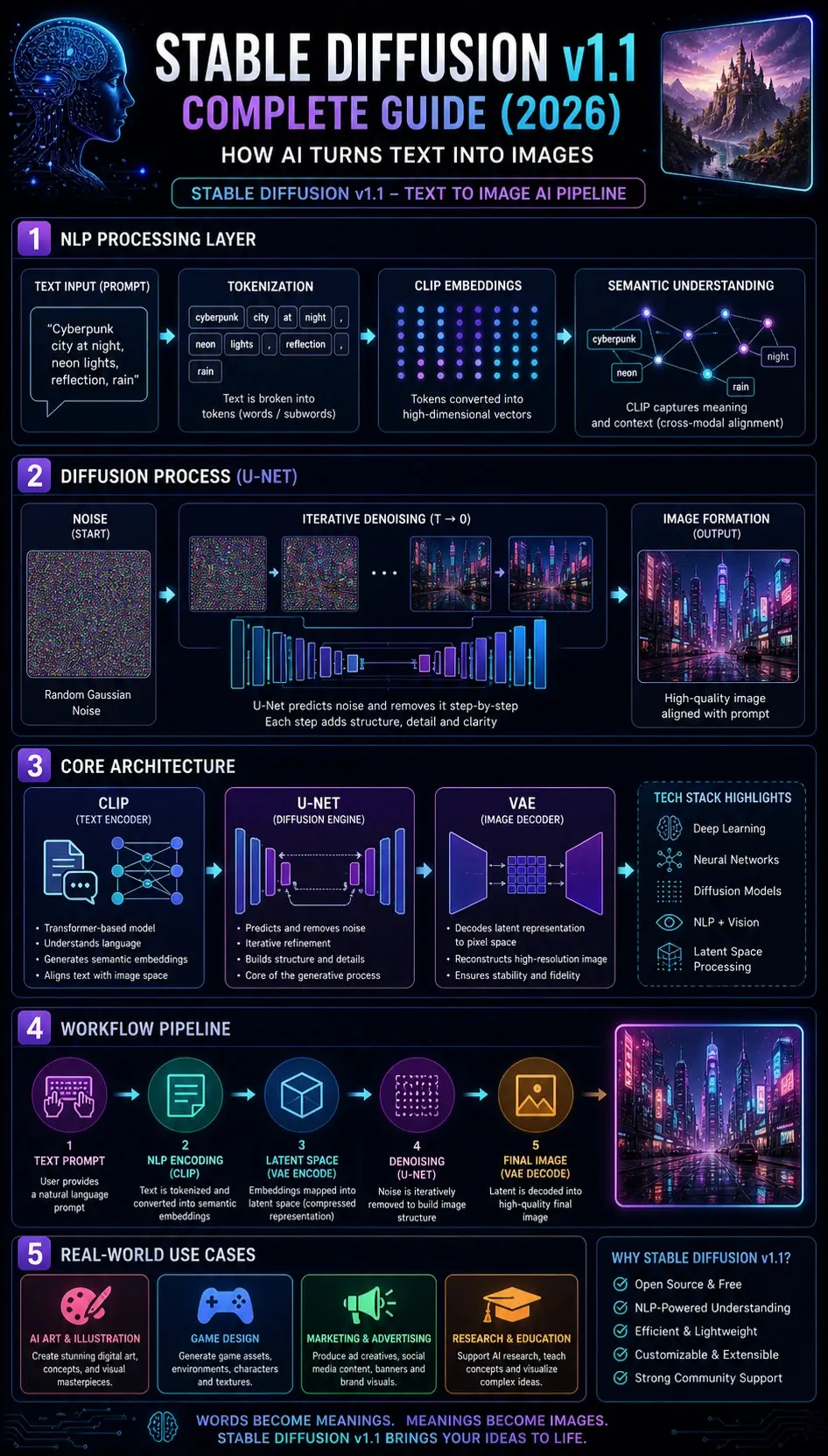
At its core, the model follows this transformation pipeline:
Natural Language Input → Semantic Encoding → Latent Representation → Noise Diffusion → Iterative Denoising → Image Reconstruction
This reflects a cross-modal mapping system between:
- Language space (text embeddings)
- Visual space (image generation)
How Stable Diffusion v1.1 Works
Text Encoding via CLIP
The input prompt is processed using the CLIP model (Contrastive Language–Image Pretraining).
From an NLP perspective, CLIP performs:
- Tokenization of input text
- Contextual embedding generation
- Semantic vector mapping
- Cross-modal alignment
Example:
Prompt:
“Cyberpunk city at night”
CLIP extracts semantic features:
- cyberpunk → futuristic neon aesthetic
- city → urban environment
- night → low-light conditions
This results in a dense vector representation in embedding space.
Latent Space Projection
Instead of operating on pixel-level data, the model compresses information into a latent representation space.
NLP + ML Concept:
This is similar to:
dimensionality reduction + semantic compression
Benefits:
- Reduced computational cost
- Faster inference time
- Efficient GPU utilization
Noise Initialization
The model begins with the generation from a Gaussian Noise Distribution.
From a probabilistic ML perspective:
Image generation starts from randomness (entropy) rather than structure.
At this stage:
- No semantic structure exists
- Only stochastic noise is present
Iterative Denoising via U-Net
The U-Net neural network performs step-by-step denoising.
This is the central generative mechanism.
Each iteration:
- Reduces entropy
- Adds semantic structure
- Enhances spatial coherence
- Refines object boundaries
NLP Analogy:
Think of it as:
refining vague semantic meaning into a precise visual representation
Image Decoding via VAE
The Variational Autoencoder (VAE) converts latent representation into pixel space.
Functions include:
- Data reconstruction
- Image upscaling
- Feature stabilization
Final output:
Fully generated image aligned with prompt semantics
Architecture of Stable Diffusion v1.1
Stable Diffusion v1.1 is built on three foundational neural components:
CLIP Text Encoder
Responsibilities:
- Converts natural language into embeddings
- Extracts the semantic meaning
- Performs cross-modal alignment
From an NLP perspective:
It acts as a transformer-based semantic interpreter
U-Net Diffusion Model
This is the generative core.
Functions:
- Noise prediction
- Iterative refinement
- Structural image construction
It behaves like a deep feature reconstruction network.
VAE Decoder
Responsibilities:
- Converts latent vectors into pixel images
- Reconstructs final visual output
- Ensures fidelity and stability
Architecture Summary
| Component | Function |
| CLIP | NLP semantic encoding |
| U-Net | Diffusion-based generation |
| VAE | Image reconstruction |
Key Features of Stable Diffusion v1.1
Open Source Accessibility
- Freely Available
- Highly customizable
- Community-driven ecosystem
NLP-Based Prompt Control
- Text-driven image generation
- Semantic prompt interpretation
- Context-aware outputs
Efficient Latent Processing
- Low computational cost
- Fast inference pipeline
- Reduced memory consumption
Structured Output Generation
- Improved visual consistency
- Reduced artifacts
- Stable image synthesis
Real-World Applications
Creative Industries
- Concept art generation
- Digital illustration
- Game environment design
Marketing
- Ad creatives
- Branding visuals
- Social media content
Education & Research
- NLP research experimentation
- Machine learning visualization
- AI Teaching Models
Freelancers
- Rapid prototyping
- Client visualization
- Portfolio creation
Step-by-Step Usage Workflow
Select Platform
- Web UI (AUTOMATIC1111)
- Local GPU setup
- Cloud AI tools
Enter NLP Prompt
Example:
“A futuristic European city at sunset, cinematic lighting, ultra-realistic”
Configure Parameters
Recommended:
- Sampling steps: 20–50
- CFG scale: 7–12
- Resolution: 512×512
Generate Output
Model processes:
NLP → Embedding → Diffusion → Image
Optimize Results
- Add negative prompts
- Refine semantic keywords
- Iterate variations
NLP Prompt Engineering Techniques
Semantic Enrichment
Instead of:
“city”
Use:
“futuristic cyberpunk city with neon lighting and atmospheric fog”
Style Conditioning
Add descriptors:
- cinematic lighting
- ultra-detailed
- photorealistic
- 4K resolution
Negative Prompting
Remove unwanted artifacts:
blurry, distorted, low quality, extra limbs
Multi-Concept Blending
Combine semantics:
cyberpunk + realism + cinematic + night scene
Comparison: v1.0 vs v1.1 vs Modern Models
| Feature | v1.0 | v1.1 | SDXL |
| Stability | Low | Medium | High |
| NLP Understanding | Basic | Improved | Advanced |
| Image Quality | Low | Medium | Very High |
| Consistency | Weak | Good | Excellent |
Pros and Cons
Advantages
- Open-source ecosystem
- Lightweight architecture
- Beginner-friendly NLP pipeline
- Fast image generation
Limitations
- Lower realism than SDXL
- Weak text rendering
- Limited fine detail accuracy
Pricing Overview
- Local installation → Free
- Cloud tools → €10–€30/month
- API usage → Pay-per-generation
Alternatives
- Stable Diffusion XL
- MidJourney
- DALL·E 3
- Leonardo AI
- Playground AI
Best Workflow Strategy
To maximize performance:
- Use long NLP prompts (30–60 words)
- Experiment with semantic variation
- Apply iterative generation loops
- Adjust CFG dynamically
- Incorporate reference images
FAQs
Yes, it is still widely used for learning, experimentation, and NLP research.
Yes, it runs on mid-range GPUs efficiently.
Yes, it is completely open-source.
v1.1 improves stability, semantic accuracy, and output consistency.
SDXL is better for production; v1.1 is better for foundational learning.
Conclusion
Picture words shaping images, one step at a time – this version builds links between reading text and creating visuals. A base model emerges, using language smarts to guide how pictures form through gradual changes.
Despite newer models in 2026, it remains essential because it teaches:
- Semantic text interpretation
- Latent diffusion processes
- Cross-modal AI systems
- Prompt Engineering Fundamentals
Should you want to explore how artificial intelligence turns words into visuals, Stable Diffusion v1.1 remains a key example worth examining. Yet its value lies not in being new, but in revealing early design choices that shaped later versions. While newer models exist, this version shows core mechanics clearly. Because it came at a pivotal moment, it captures decisions that influence many tools today. So tracing image generation back here helps uncover what drives current systems forward.











