
Introduction:
Back in the day, Stable Diffusion v1 changed how machines create images using math that mimics human imagination. While flashier versions now run most apps, those early models still power much of what artists build today.
One way to see Stable Diffusion v1? It works like a bridge between words and pictures, guided by patterns in data. Instead of simply drawing from text, it interprets meaning through layers of learned associations. Think of it as reshaping ideas into visuals, step by uncertain step. While built on math-heavy methods, its core task feels almost linguistic – mapping sentences onto scenes. Rather than treating prompts as commands, the model treats them as signals within noise. Each output emerges slowly, shaped by how language links to form across massive examples.
Why it still matters:
- Lightweight architecture suitable for local deployment
- Open-source accessibility for developers and researchers
- Highly customizable latent-space manipulation
- Cost-efficient inference compared to modern large models
- Strong ecosystem of extensions, plugins, and community models
For digital creators, marketers, developers, and AI entrepreneurs, mastering Stable Diffusion v1 is still strategically valuable in 2026.
What is Stable Diffusion v1 Series?
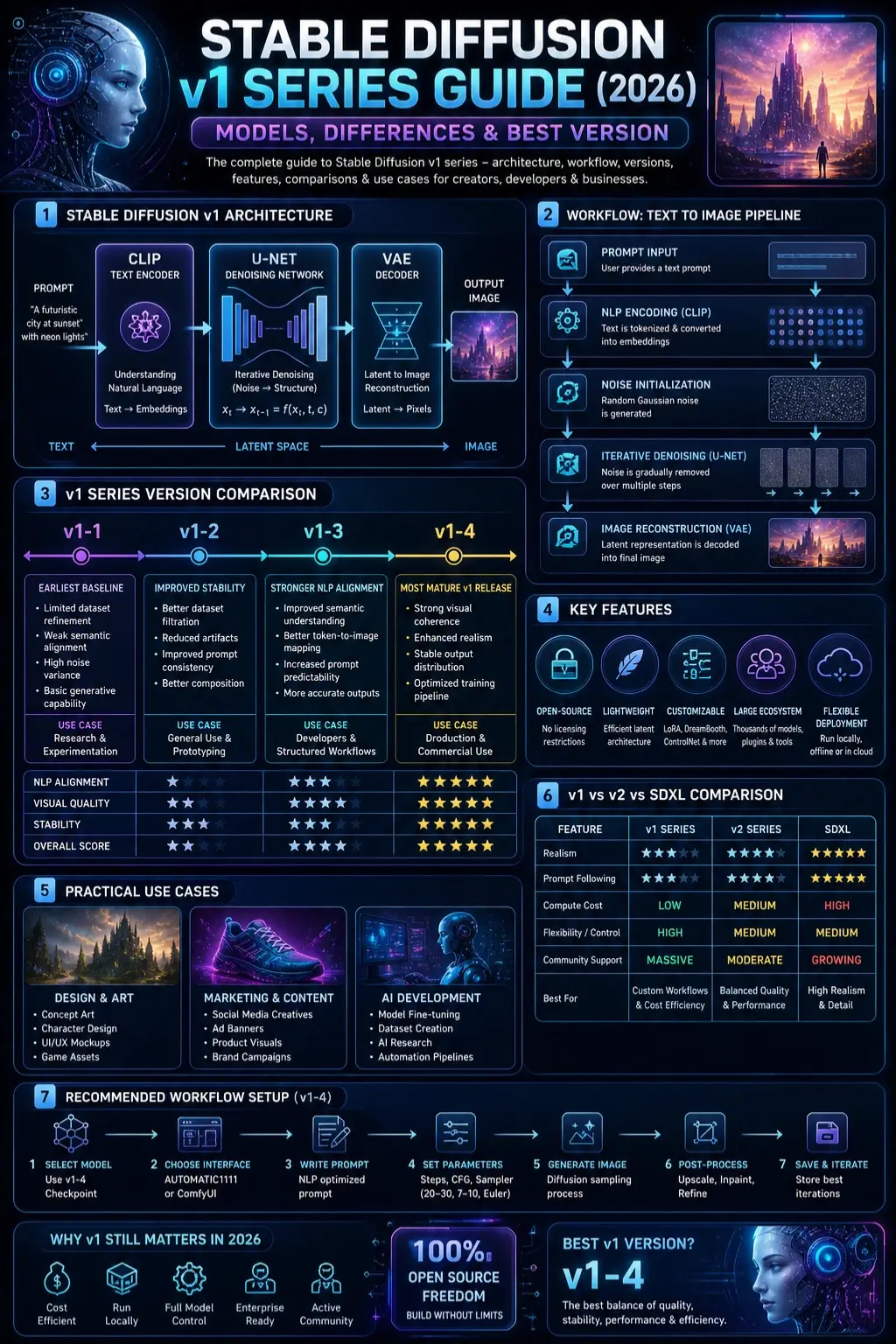
Stable Diffusion v1 is a family of latent diffusion models (LDMs) designed to generate high-dimensional visual outputs from natural language prompts.
In simple NLP terms:
The model performs semantic encoding of text → transforms meaning into latent vectors → reconstructs visual representations through iterative denoising.
Core NLP Interpretation:
When you input a prompt like:
“A futuristic city at sunset with neon lights”
The system performs:
Tokenization (NLP stage)
Breaks text into semantic tokens
Text Encoding (CLIP model)
Converts language into embeddings
Latent Mapping
Translates embeddings into compressed image space
Diffusion Process
Gradually removes noise using probabilistic refinement
Decoding (VAE stage)
Converts latent representation into a pixel-level image

Core Architecture of Stable Diffusion v1
Stable Diffusion v1 consists of three major AI subsystems:
CLIP Text Encoder
This module is responsible for natural language understanding (NLU).
It performs:
- Semantic parsing of user prompts
- Context embedding generation
- Token relationship mapping
- Multi-modal alignment (text ↔ image)
U-Net Denoising Network
y=f(xt,t,c)y = f(x_t, t, c)y=f(xt,t,c)
This equation represents the denoising function where:
- xtx_txt = noisy latent state
- ttt = timestep
- ccc = conditional text embedding
The U-Net progressively refines noisy input into structured image features.
VAE Decoder
The Variational Autoencoder (VAE) performs:
- Latent-to-pixel transformation
- Color space reconstruction
- Detail enhancement
- Output normalization
How Stable Diffusion v1 Works
From a machine learning pipeline perspective, the workflow can be described as:
Prompt Input
User provides semantic instruction.
NLP Encoding
Text is transformed into vector embeddings.
Noise Initialization
A random Gaussian noise tensor is created.
Iterative Denoising
The model gradually refines its structure using learned probability distributions.
Image Reconstruction
The final latent representation is decoded into visual output.
NLP Simplified Analogy:
Think of it like writing a story and asking an artist to “visualize imagination from chaos.” The model slowly organizes randomness into meaningful structure.

Stable Diffusion v1 Versions Explained
Each version represents a progressive optimization stage in training data quality, prompt alignment, and visual fidelity.
🔹 v1-1
This is the earliest baseline version.
Characteristics:
- Limited dataset refinement
- Weak semantic alignment
- High noise variance in outputs
- Basic generative capability
Use Cases:
- Academic research
- Model Benchmarking
- AI experimentation
🔹 v1-2
Focus: improving dataset filtration and output stability.
Improvements:
- Better image composition
- Reduced artifacts
- Improved prompt-to-image consistency
Use Cases:
- Basic commercial usage
- Early-stage design prototypes
🔹 v1-3
This version introduces stronger NLP alignment.
Enhancements:
- Improved semantic understanding
- Better token-to-image mapping
- Increased prompt predictability
Ideal For:
- Prompt engineering
- AI developers
- Structured workflows
🔹 v1-4
This is the most mature v1 release.
Features:
- Strong visual coherence
- Enhanced realism
- Stable output distribution
- Optimized training pipeline
Best For:
- Marketing creatives
- Product visualization
- Production-level workflows
- Freelance AI design work
📈 Comparison Table
| Version | NLP Alignment | Visual Quality | Stability | Use Case |
| v1-1 | Low | Low | Low | Research |
| v1-2 | Medium | Medium | Medium | General use |
| v1-3 | High | High | Medium | Developers |
| v1-4 | Very High | Very High | High | Production |
🎨 Key Features of Stable Diffusion v1 Series
Open-Source Accessibility
No licensing restrictions, enabling global developer adoption.
Lightweight Latent Architecture
Efficient GPU utilization compared to transformer-heavy models.
Modular Customization
Supports:
- LoRA fine-tuning
- DreamBooth adaptation
- ControlNet conditioning
- Embedding injection
Large Community Ecosystem
Thousands of community-trained checkpoints and plugins.
Flexible Deployment
Compatible with:
- AUTOMATIC1111 WebUI
- ComfyUI Pipelines
- InvokeAI systems
🌍 Why Stable Diffusion v1 Still Matters in 2026
Even in the era of SDXL and multimodal foundation models, v1 remains relevant due to:
Cost Efficiency
Low computational requirements reduce infrastructure cost.
Local Deployment Advantage
Can run offline without cloud dependency.
Developer Control
Full model access allows deep customization.
Enterprise Use Cases
- Internal design pipelines
- Product prototyping
- Rapid concept generation
Step-by-Step Workflow
Model Selection
Recommended: v1-4 checkpoint
Interface Setup
- AUTOMATIC1111 (Beginner-friendly)
- ComfyUI (Advanced workflow graphs)
Prompt Engineering
Example NLP-optimized prompt:
“Ultra-realistic cyberpunk city, neon lighting, cinematic depth, volumetric fog, 8K detail”

Parameter Optimization
| Parameter | Recommended Value |
| CFG Scale | 7–10 |
| Steps | 20–30 |
| Sampler | Euler / DPM++ |
Image Generation
Model executes diffusion sampling process.
Post-Processing
- Upscaling
- Inpainting
- Style refinement
Stable Diffusion v1 vs v2 vs SDXL
| Feature | v1 | v2 | SDXL |
| Flexibility | High | Medium | High |
| Realism | Medium | High | Very High |
| Compute Cost | Low | Medium | High |
| Community Support | Massive | Moderate | Growing |
Is Stable Diffusion v1 Free?
Yes, it is fully open-source.
However, indirect costs may include:
- GPU hardware investment
- Cloud computing usage
- Storage & pipeline tools
Best Alternatives
SDXL
High realism, heavy computation.
MidJourney
Artistic outputs, closed ecosystem.
DALL·E
Strong semantic understanding.
Leonardo AI
Beginner-friendly interface.
Playground AI
Web-based simplicity.
👍 Pros and Cons
Advantages:
- Open-source freedom
- Lightweight execution
- Deep customization
- Large ecosystem
- Offline Capability
Limitations:
- Weak text rendering
- Lower realism vs SDXL
- Requires setup knowledge
- Dataset bias challenges
🎯 Best Use Cases
Designers:
- Concept art
- UI mockups
- Branding visuals
Marketers:
- Social media creatives
- Ad banners
- Product visuals
Businesses:
- E-commerce imagery
- Prototyping
- Campaign design
Pro Prompt Engineering Formula
Subject + Style + Lighting + Detail Layer
Example:
“Luxury sports car, cinematic lighting, hyper-detailed, reflective surfaces, studio quality”
Professional Workflow Pipeline
- Select model (v1-4)
- Load interface
- Define NLP prompt
- Adjust parameters
- Generate outputs
- Post-process visuals
- Store the best iterations
FAQs
A: Yes, due to flexibility and low-cost deployment.
A: v1-4 offers the best balance of stability and quality.
A: Yes, especially with modern UI tools.
A: Yes, fully open-source.
A: v1 = control, SDXL = realism.
Conclusion
Years pass, yet Stable Diffusion v1 still holds ground as a go-to Generative AI base by 2026. Creators lean on it because it bends to their needs – budgets stay intact while options multiply through tailored setups.
Picture this working hard behind the scenes, turning meaning into visuals with surprising strength. Though built on smart language rules, it holds its ground in real work settings – provided someone tunes it just right.











