Introduction
Chances are, if you looked up Discord Midjourney, you’ve wondered how an AI that creates images so well lives inside a chat platform rather than standard design tools. Instead of buttons and menus, it works through messages typed back and forth. That setup might seem odd at first glance. Yet, once people start using it, the flow begins to make sense. Commands arrive like notes passed between users in conversation. Responses come back as pictures appearing right there in the thread. The whole experience feels more like talking shop than operating software. This mix of casual talk and high-end generation turns out to be oddly efficient. Some find the idea strange until they try dropping a prompt into the stream. Then, seeing results pop up fast changes their view completely.
Strange at first glance. What makes Discord the place for this? A regular site seems easier, sure. Yet folks craft sharp AI visuals using only typed words. Commands turn into artwork, somehow.
Here’s how it actually works: Midjourney runs on Discord since it grew from live collaboration mixed with an AI bot setup.
Start here, find every step laid out clearly – set up first, then move through pro-level routines real creators actually use. Peek behind the curtain where most new users stop: uncover tucked-away layers like how servers link up, ways to stack prompts neatly, fixes when things glitch, and even how personal work zones get built.
When it finishes, you will not only operate Midjourney through Discord – you will grasp the full system with real confidence.
🧩 What Is Discord Midjourney?
Discord Midjourney refers to using the AI image generation system of Midjourney inside Discord through a bot-based interface.
Instead of a traditional app, users interact with:
- Discord servers
- Midjourney Bot
- Text commands like /imagine
💡 Simple Explanation:
Discord is the “workspace,” and Midjourney is the “AI engine.”
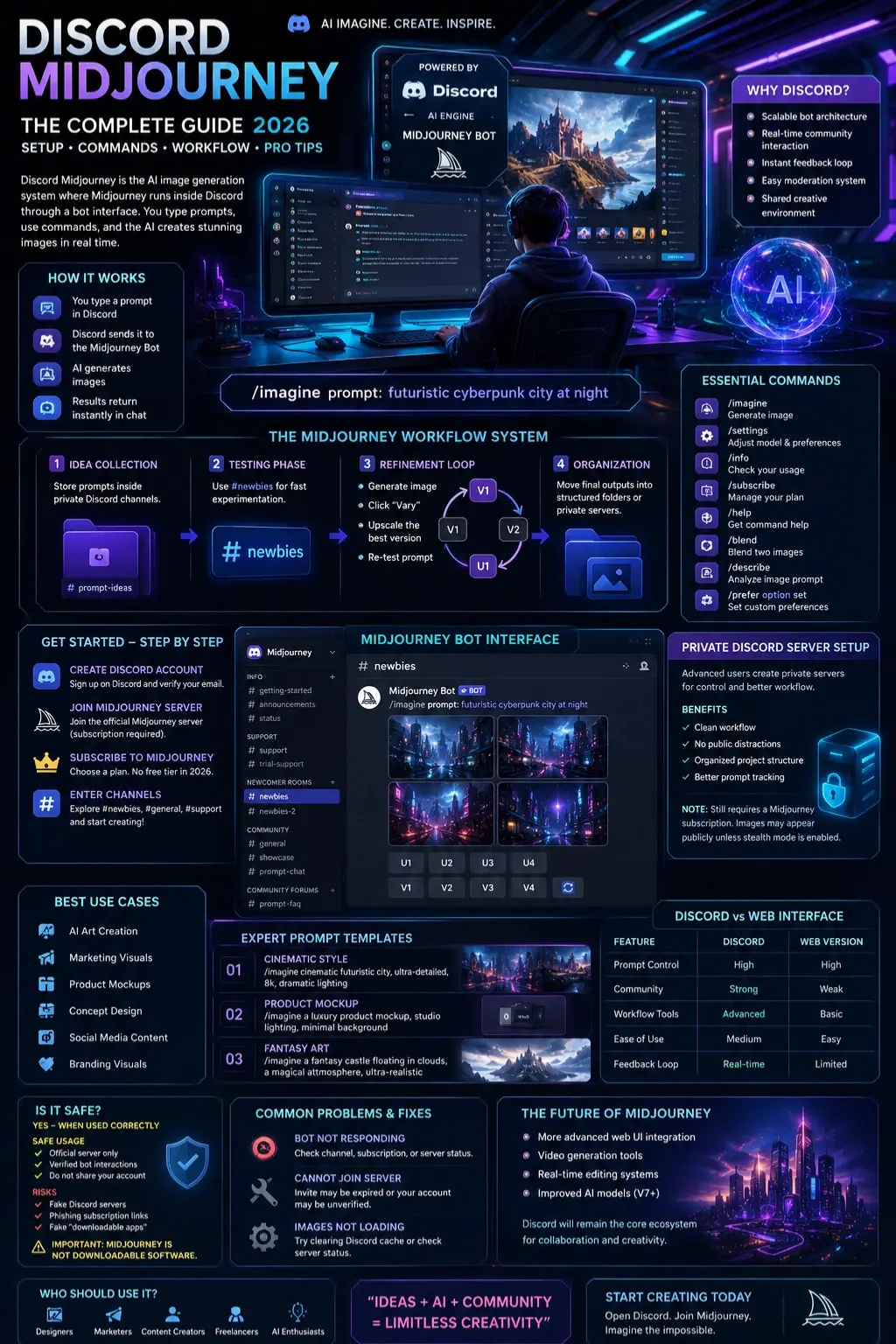
How It Actually Works
- You type a prompt
- Discord sends it to the Midjourney Bot
- AI generates images
- Results return instantly in chat
Why This System Is Unique
Unlike traditional tools like Canva or Photoshop:
- Everything is chat-based
- Real-time community feedback exists
- Prompts are publicly visible (unless private mode is used)
- Users learn from others instantly
Why Midjourney Uses Discord in 2026
Most competitors fail to explain this properly.
Key Reasons:
- Scalable bot architecture
- Built-in community interaction
- Instant feedback loop
- Easy moderation system
- Shared creative environment
In simple terms:
Discord = interface layer
Midjourney Bot = AI processing engine
How to Join Discord Midjourney (Step-by-Step)
Create a Discord Account
Sign up on Discord and verify your email.
Join the Official Midjourney Server
You must join the official server (subscription required).
Subscribe to Midjourney
There is no free tier anymore. You need an active plan.
Enter Channels
Inside the server, you’ll see:
- #newbies
- #general
- #support
Each channel has a different role in the workflow.
Midjourney Bot System Explained
The Midjourney Bot is your AI assistant inside Discord.
It can:
- Read prompts
- Generate images
- Provide Variations
- Upscale outputs
Core Command:
/imagine prompt: futuristic cyberpunk city at night
Discord Midjourney Workflow System
This is where most guides fail—but professionals rely on this system.
Idea Collection Phase
Store prompts inside private Discord channels.
Testing Phase
Use #newbies for fast experimentation.
Refinement Loop
- Generate image
- Click “Vary”
- Upscale the best version
- Re-test prompt
Organization Phase
Move final outputs into structured folders or private servers.
Private Discord Server Setup
Advanced users create private servers for control.
Benefits:
- Clean workflow
- No public distractions
- Organized project structure
- Better prompt tracking
Limitation:
- Still requires a Midjourney subscription
- Images may appear publicly unless stealth mode is enabled
Essential Midjourney Discord Commands
| Command | Function |
| /imagine | Generate image |
| /settings | Adjust model |
| /info | Check usage |
| /subscribe | Manage plan |
Is Discord Midjourney Safe?
Yes—but only when used correctly.
Safe Usage:
- Official server only
- Verified bot interactions
Risks:
- Fake Discord servers
- Phishing subscription links
- Fake “downloadable Midjourney apps.”
Important:
Midjourney is NOT downloadable software.
Common Problems & Fixes
Bot not responding
- Wrong channel
- No subscription
Cannot join the server
- Invite expired
- Unverified Discord account
Images not loading
- Discord cache issue
- Server delay
Discord Midjourney vs Web Interface
| Feature | Discord | Web Version |
| Prompt control | High | High |
| Community | Strong | Weak |
| Workflow tools | Advanced | Basic |
| Ease of use | Medium | Easy |
Best Use Cases
- AI art creation
- Marketing visuals
- Product mockups
- Concept design
- Social media content
- Branding Visuals
Expert Prompt Templates
Cinematic Style
/imagine cinematic futuristic city, ultra-detailed, 8k, dramatic lighting
Product Mockup
/imagine a luxury product mockup, studio lighting, minimal background
Fantasy Art
/imagine a fantasy castle floating in clouds, a magical atmosphere, ultra-realistic
Future of Discord Midjourney
- More advanced web UI integration
- Video generation tools
- Real-time editing systems
- Improved AI models (V7+)
But Discord will remain the core ecosystem for collaboration.
Who Should Use It?
- Designers
- Marketers
- Content creators
- Freelancers
- AI enthusiasts
Who Should Avoid It?
- Users expecting free AI tools
- People unfamiliar with Discord
- Users needing offline software
People Also Ask
A: Because it allows real-time collaboration, scalable AI processing, and a strong creative community environment.
A: No. Discord is still the primary interface for Midjourney generation.
A: No, it requires a paid subscription to generate images.
A: Yes, but users still need subscriptions, and outputs may remain public unless privacy mode is used.
A: It is the main prompt command used to generate AI images inside Discord.
Featured Image Prompt
“Futuristic Discord interface showing Midjourney bot generating AI art, glowing prompts, creative digital workspace, Cyber Aesthetic, ultra detailed.”
Social Media Captions
- “Midjourney runs on Discord—but most users don’t know how powerful the workflow really is.”
- “From /imagine to pro AI art: Discord Midjourney explained simply.”
- “This is how creators are building AI art systems inside Discord in 2026.”
Pinterest Title
Discord Midjourney Guide 2026: Complete Setup & Pro Workflow Explained
YouTube Title
Discord Midjourney Full Tutorial 2026 (Beginner to Pro Workflow Explained)
AI Overview Snippet
Discord Midjourney is the system where Midjourney AI runs inside Discord using bot commands like /imagine. Users join servers, enter prompts, and generate AI images in real time. It works through a community-based workflow that combines chat channels, AI bots, and subscription access, making it one of the most powerful AI image generation systems in 2026.
CONCLUSION
What you get with Discord Midjourney isn’t merely software. It’s a space where people build things together, guided by Smart automation. Workflow fits naturally here, shaped by users who share and adapt. Creation flows not from isolated features but from how everything connects – community driving output, feedback shaping tools. The system grows as people use it, not because it’s told to. Power Comes Quietly, through repeated use and shared habits.
For designers, marketers, or creators, mastering this method shifts how visuals come together. One skill change – it alters the entire workflow. Seeing structure first changes what shows up later. A single approach rewrites the output every time. Without extra tools, results still grow sharper. The process skips clutter and lands faster. When layout clicks, everything else follows quietly.
Curious about how AI tools stack up? Head over to ImageToolsAI.com for breakdowns of workflows and real comparisons. Jump into detailed guides there instead.
Curiosity keeps you sharp when new tools appear. Creativity grows stronger each time you try something different. The way pictures are made tomorrow starts today.











