Introduction:
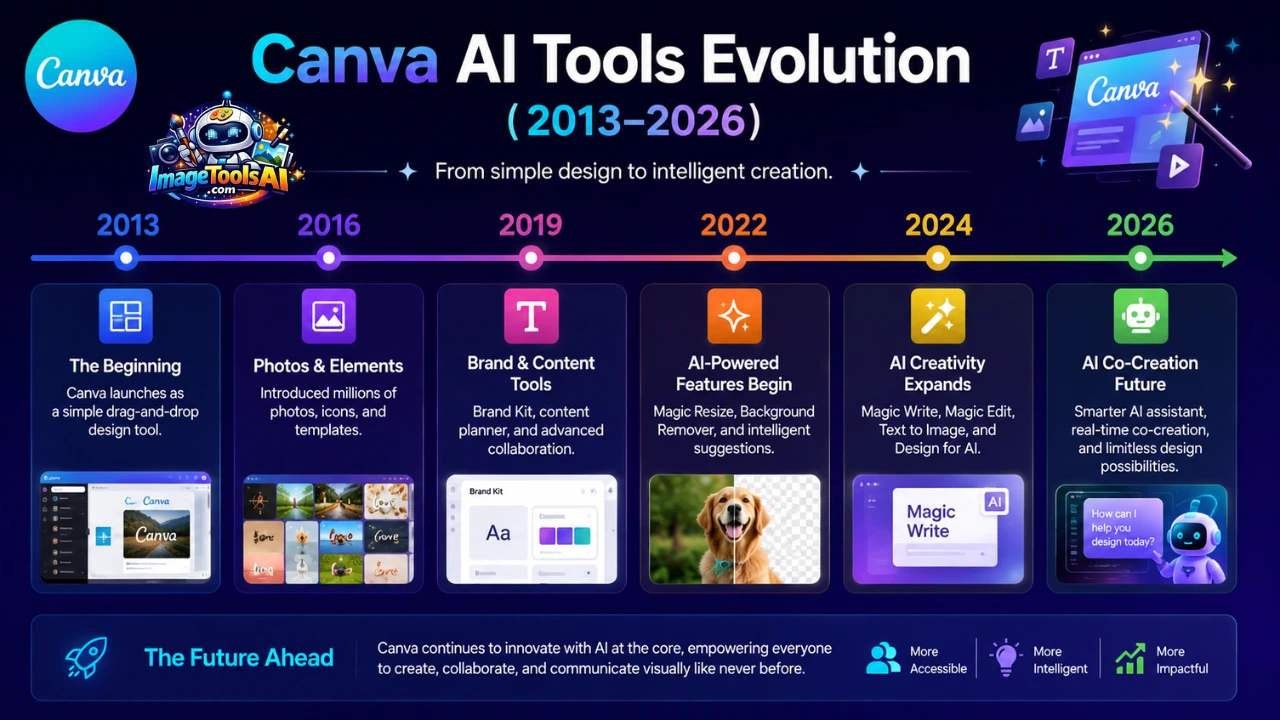
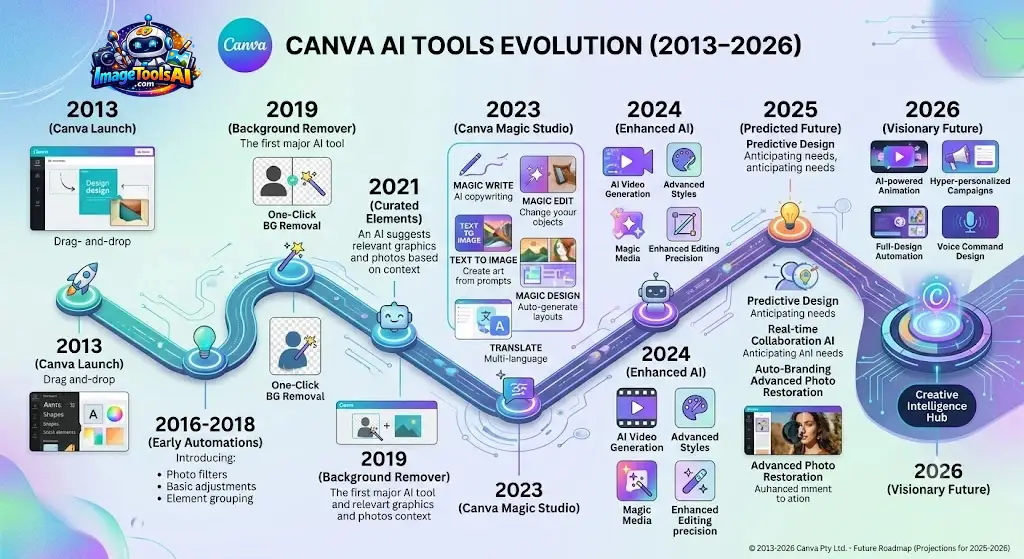
From nothing much more than an idea back then, today Canva shapes how millions create – quietly growing beyond basic tools. A quiet shift began in 2013, meant for those who had never touched design before. Now, it weaves together making visuals, teamwork, generating material, organizing tasks, showing numbers clearly, along with smart tech that adapts. Not loud, not flashy – just steadily becoming part of how work happens, Canva AI Tools Evolution (2013–2026).
Nowadays, Canva isn’t just up against old-school design software – it’s going head-to-head with smart systems that create visuals, slideshows, ads, clips, sometimes even programming scripts. With features like Magic Studio, Dream Lab, Canva AI, Canva Sheets, Magic Charts, and Canva Code popping up, clearly something broader is unfolding beyond mere image editing.
Start with one step: Canva didn’t leap into AI overnight. Its growth unfolded slowly, piece by piece. Each update added strength beneath the surface. That quiet progress shaped what users see today. A steady build made room for smarter tools to emerge naturally. Creators watch this shift to grasp where design might go next. Businesses study it to spot patterns worth copying. Marketers notice how workflows change when machines help shape ideas. Educators find clues about the skills students will need later. Tech leads track decisions that turned a simple tool into something adaptive. The whole path shows what happens when vision meets patience.
This story walks through Canva’s journey since 2013, unfolding year by year until 2026. What changed at each turn comes into view when you look closely at key moments. AI slowly took center stage, shaping tools in ways few expected. By connecting past steps with present moves, a sense emerges of where things might go next – possibly toward 2030. Each phase adds something quiet but real to the whole picture.
The Foundation Era (2013–2015)
Back then, Canva arrived amid a market ruled by complex programs needing long learning curves. Most companies, learners, and young founders found it tough to make sharp visuals without paying for experts.
Canva solved this problem through simplicity.
Its core mission was straightforward:
Empower anyone to design anything.
The early platform introduced:
- Drag-and-drop editing
- Pre-built templates
- Cloud-based design tools
- Easy image uploads
- Beginner-friendly workflows
These features may seem basic today, but they were revolutionary at the time.
Why This Era Was Important
Most AI platforms succeed because they already have massive amounts of user interaction data.
Between 2013 and 2015, Canva collected insights about:
- Design behavior
- Template usage
- Content preferences
- Visual trends
- User workflows
Although AI was not yet a major focus, these years quietly created the data foundation necessary for future machine-learning systems.
Key Milestones
| Year | Milestone |
| 2013 | Canva officially launched |
| 2014 | Rapid user growth begins |
| 2015 | Template ecosystem expands globally |
The foundation era established Canva’s reputation for accessibility and ease of use.
Early Growth and Product Expansion (2016–2019)
After proving demand for simplified design tools, Canva entered a period of aggressive growth.
The company expanded its platform capabilities while continuously improving the user experience.
Key developments included:
Canva for Work
Canva introduced premium business features such as:
- Brand kits
- Team collaboration
- Shared assets
- Custom templates
This helped businesses maintain brand consistency across large teams.
Massive Template Expansion
Canva invested heavily in template creation.
New categories included:
- Social media graphics
- Marketing materials
- Presentations
- Infographics
- Business documents
- Event designs
The platform evolved from a design tool into a complete visual communication system.
Strategic Infrastructure Development
During this period, Canva focused on:
- Cloud scalability
- Global performance
- Asset management
- Collaboration systems
These investments later enabled AI features to operate efficiently across millions of users.
Why This Era Matters for AI
Many people assume Canva’s AI journey began in 2023.
In reality, AI adoption became possible because Canva spent years building:
- User trust
- Design workflows
- Content libraries
- Data infrastructure
Without this groundwork, large-scale AI integration would have been much harder.
The Collaboration Revolution (2020–2022)
The pandemic fundamentally changed how teams worked.
Remote collaboration became essential.
Canva quickly adapted by transforming itself into a collaborative workspace.
Major Collaboration Features
Canva introduced:
- Real-time editing
- Shared workspaces
- Team folders
- Workflow approvals
- Commenting systems
- Brand governance tools
These capabilities made Canva attractive to organizations seeking alternatives to traditional design software.
The Rise of Visual Communication
Businesses increasingly relied on:
- Presentations
- Marketing visuals
- Internal communications
- Educational content
Canva positioned itself as the central hub for visual communication.
Preparing for AI Integration
By 2022, Canva already had:
- Millions of active teams
- Huge design datasets
- Collaborative workflows
- Strong cloud infrastructure
The stage was set for AI-powered transformation.
Visual Suite Changed Everything
One of Canva’s most important strategic moves was the introduction of Visual Suite.
Before Visual Suite, users often needed separate applications for:
- Presentations
- Documents
- Whiteboards
- Social media graphics
- Marketing assets
Visual Suite unified these experiences.
What Made Visual Suite Different?
Instead of switching between multiple tools, users could create:
- Docs
- Presentations
- Videos
- Whiteboards
- Social campaigns
Inside one ecosystem.
This increased productivity dramatically.
Why Visual Suite Matters for AI
AI works best when it understands context.
Visual Suite provided AI access to:
- Documents
- Images
- Presentations
- Marketing content
- Team workflows
This created opportunities for smarter automation.
Business Impact
Visual Suite positioned Canva as more than a design platform.
It became a productivity platform.
That distinction would become critical during the AI era.
Canva’s First Major AI Push in 2023
The year 2023 marked a turning point.
Artificial intelligence became a central part of Canva’s strategy.
The company launched Magic Studio, introducing multiple AI-powered tools.
Major AI Features Introduced
Magic Write
An AI writing assistant capable of generating:
- Blog outlines
- Marketing copy
- Social media content
- Product descriptions
Magic Design
Generated complete design concepts from prompts.
Magic Edit
Allowed users to modify images using AI instructions.
Magic Eraser
Removed unwanted objects from images.
Magic Expand
Extended image boundaries using AI-generated content.
Why 2023 Was So Important
For the first time:
AI became integrated directly into creative workflows.
Users no longer need separate AI tools for:
- Writing
- Editing
- Designing
Everything existed within Canva.
This dramatically improved workflow efficiency.
Understanding Magic Studio
Magic Studio represented Canva’s vision for AI-powered creativity.
Rather than offering isolated AI features, Canva created a unified ecosystem.
Core Components of Magic Studio
| Feature | Purpose |
| Magic Write | AI content generation |
| Magic Design | Automated design creation |
| Magic Edit | AI image editing |
| Magic Eraser | Object removal |
| Magic Expand | Canvas extension |
| Magic Switch | Content transformation |
Why Users Loved Magic Studio
Benefits included:
- Faster content production
- Lower design costs
- Increased productivity
- Better creative experimentation
Limitations
Despite impressive capabilities, Magic Studio also faced challenges:
- Prompt quality affects output
- Complex designs still require human oversight
- Generated content sometimes requires editing
The best results come from combining AI assistance with human creativity.
AI Features That Defined 2023
Several AI innovations fundamentally changed how Canva users worked.
Text-to-Design
Users could describe ideas using prompts and receive complete design suggestions.
Example:
“Create a modern Instagram post for a coffee shop promotion.”
Within seconds, Canva generated multiple design concepts.
AI-Powered Content Creation
Marketing teams began using Canva for:
- Email graphics
- Ad creatives
- Social campaigns
- Blog visuals
Smart Editing Tools
Previously time-consuming tasks became almost instant.
Examples include:
- Background removal
- Object replacement
- Image cleanup
- Design resizing
Productivity Impact
Many businesses reported significant reductions in design production time.
This shift demonstrated Canva’s growing role as an AI productivity platform.
Dream Lab and the Rise of Generative Design
As AI image generation became mainstream, Canva expanded further through Dream Lab.
Dream Lab introduced advanced text-to-image generation capabilities.
What Dream Lab Does
Users can create images from prompts such as:
- Fantasy scenes
- Product mockups
- Marketing visuals
- Character concepts
- Digital artwork
Why Dream Lab Matters
It moved Canva beyond editing.
Now users can generate entirely new visual assets.
This placed Canva in direct competition with:
- Midjourney
- Adobe Firefly
- DALL-E
- Stable Diffusion tools
Key Benefits
- Integrated workflow
- Beginner-friendly interface
- Commercial content creation
- Faster creative experimentation
Challenges
Dream Lab still shares common AI image-generation limitations:
- Prompt dependency
- Occasional inconsistencies
- Style control constraints
However, it significantly expanded Canva’s creative capabilities.
Canva’s AI Ecosystem in 2024
By 2024, Canva’s AI ecosystem had matured substantially.
AI was no longer a standalone feature.
It became embedded throughout the platform.
Major AI Categories
Writing AI
Used for:
- Content creation
- Brainstorming
- Marketing copy
Design AI
Used for:
- Layout generation
- Template recommendations
- Visual optimization
Image AI
Used for:
- Generation
- Editing
- Enhancement
- Background removal
Productivity AI
Used for:
- Workflow automation
- Collaboration support
- Content transformation
Mini Summary
Between 2013 and 2024, Canva evolved through four major stages:
- Design Accessibility
- Platform Expansion
- Collaboration Transformation
- AI Integration
This progression laid the groundwork for Canva’s next phase: becoming a fully AI-powered creative operating system.
Visual Suite 2.0 and Canva AI in 2025
In 2025, Canva was no longer just about design tools. When the team spoke at Create gatherings or shared big updates, they introduced Visual Suite 2.0 – this version pulled together creation, teamwork, information handling, workflow features, along with artificial intelligence, under one roof.
A shift was happening across tech – tools once standalone now leaned into smarts. Visual Suite 2.0 fit right in, not as an app but as a thinking space. Instead of separate programs doing one thing, everything began blending with learning machines. What used to be static now adjusted, responded, evolved. The line between user and tool got blurry. Intelligence wasn’t bolted on anymore – it lived inside by default.
What Changed with Visual Suite 2.0?
Visual Suite 2.0 introduced deeper integration between:
- Documents
- Presentations
- Whiteboards
- Videos
- Social media content
- Data visualization
- AI workflows
Instead of creating content manually from scratch, users could increasingly start with a prompt and let AI generate a first draft.
The Rise of Canva AI
Canva AI became a centralized assistant capable of helping users:
- Generate content
- Create presentations
- Edit images
- Build marketing campaigns
- Analyze information
- Transform designs
This shift represented Canva’s move toward a prompt-driven creative environment.
Why It Matters
For creators and businesses, Canva AI reduced friction between ideas and execution.
Traditional workflow:
Idea → Research → Design → Edit → Publish
AI-powered workflow:
Idea → Prompt → Refine → Publish
The productivity gains were substantial.
Mini Summary
Visual Suite 2.0 wasn’t simply a product update.
Canva declared that AI would become the primary interface for creative work.
Canva Sheets, Magic Charts, and Data Intelligence
One of Canva’s most surprising developments was its expansion into data and productivity.
Historically, Canva focused on visual design.
Now it was entering territory traditionally dominated by spreadsheets and business intelligence tools.
Canva Sheets
Canva Sheets introduced a more visual approach to handling information.
Users could organize:
- Marketing campaigns
- Project plans
- Content calendars
- Business data
Within Canva’s ecosystem.
Why Canva Sheets Are Important
Most spreadsheet tools prioritize calculations.
Canva Sheets prioritizes communication.
The goal is not just storing data but turning data into visual stories.
Magic Charts
Magic Charts uses AI to transform raw information into engaging visualizations.
Benefits include:
- Faster reporting
- Better presentations
- Easier data interpretation
- Improved storytelling
Example Use Cases
| Industry | Use Case |
| Marketing | Campaign performance reports |
| Education | Classroom analytics |
| Business | Executive dashboards |
| Sales | Revenue visualizations |
| Nonprofits | Impact reporting |
Data Intelligence Becomes Creative Intelligence
Canva recognized that modern organizations need more than design tools.
They need systems that connect:
- Data
- Communication
- Collaboration
- Creativity
This strategy expands Canva’s addressable market significantly.
Canva Code and the No-Code Creativity Revolution
One of Canva’s boldest innovations was Canva Code.
Traditionally, creating interactive experiences required programming skills.
Canva Code aims to lower that barrier.
What Is Canva Code?
Canva Code allows users to generate interactive experiences using prompts rather than traditional coding workflows.
Potential use cases include:
- Interactive content
- Educational tools
- Business applications
- Web experiences
- Internal company tools
Why Canva Code Matters
The software industry is moving toward no-code and low-code solutions.
Canva Code aligns perfectly with this trend.
Instead of writing hundreds of lines of code, users describe what they want.
The AI handles much of the technical complexity.
Benefits
- Faster prototyping
- Lower development costs
- Increased accessibility
- Enhanced creativity
Limitations
Users should maintain realistic expectations.
Complex applications still require:
- Technical oversight
- Testing
- Security review
- Human expertise
AI-generated code accelerates development but does not eliminate the need for professional judgment.
Mini Summary
Canva Code represents Canva’s expansion beyond design into software-assisted creation.
Canva AI 2.0 and the Future of Design
The next stage of Canva’s evolution can be described as AI-native creativity.
Rather than adding AI features to existing workflows, Canva is increasingly redesigning workflows around AI.
Characteristics of Canva AI 2.0
Future systems are likely to focus on:
Context Awareness
AI understands:
- Brand guidelines
- Past projects
- Team preferences
- User objectives
Multi-Modal Creativity
AI works across:
- Text
- Images
- Video
- Audio
- Data
Simultaneously.
Workflow Automation
Instead of generating individual assets, AI may manage complete campaigns.
For example:
A marketer could request:
“Create a product launch campaign.”
The AI could generate:
- Social posts
- Ads
- Presentations
- Landing page assets
- Email content
From a single prompt.
The Shift Toward AI Agents
Many technology companies are exploring AI agents.
Canva is likely moving in the same direction.
AI agents could:
- Manage projects
- Create content
- Coordinate assets
- Optimize campaigns
- Suggest improvements
This would transform Canva into a proactive creative assistant.
What Canva Could Become by 2030
Predicting technology is difficult, but several trends appear likely.
Possible Future Developments
Autonomous Design Systems
Users describe outcomes.
AI creates complete design systems automatically.
Real-Time Personalization
Content adapts dynamically for:
- Different audiences
- Geographic regions
- Platforms
Interactive Content Creation
AI-generated interactive experiences become common.
Business Operating Layer
Canva evolves into a workspace connecting:
- Design
- Marketing
- Collaboration
- Data
- Productivity
Creative Agents
Specialized AI assistants handle:
- Branding
- Advertising
- Education
- Sales enablement
Independently.
Potential Challenges
Future growth will depend on:
- Privacy protection
- Copyright management
- AI transparency
- Ethical AI deployment
- User trust
Companies that ignore these issues risk losing credibility.
Key Benefits of Canva’s AI Evolution for Creators and Businesses
Canva’s AI transformation delivers advantages across multiple industries.
Content Creators
Benefits include:
- Faster production
- More creative options
- Reduced design barriers
- Enhanced productivity
Businesses
Advantages include:
- Lower content costs
- Improved consistency
- Faster campaign launches
- Better collaboration
Educators
Benefits include:
- Lesson materials
- Presentations
- Visual learning aids
- Interactive content
Freelancers
AI enables:
- Faster client delivery
- More services
- Increased profitability
Summary Table
| User Type | Biggest Benefit |
| Creators | Faster content creation |
| Businesses | Cost efficiency |
| Educators | Visual learning resources |
| Freelancers | Increased productivity |
| Students | Easier project creation |
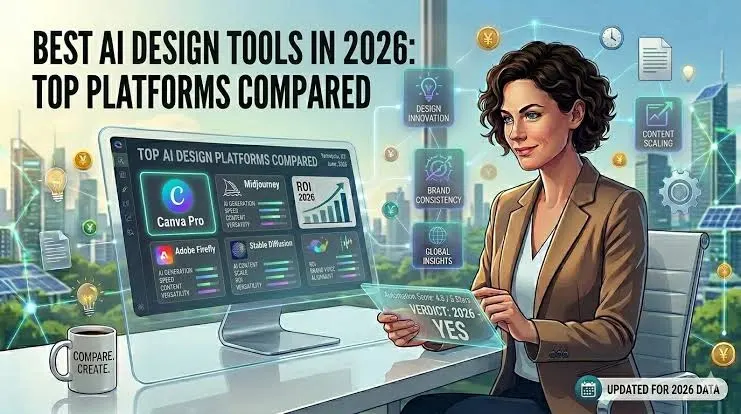
Best Canva AI Alternatives in 2026
Although Canva is powerful, it is not the only AI creative platform.
Top Alternatives
Adobe Express
Best for Adobe ecosystem users.
Adobe Firefly
Strong AI image generation and editing.
ChatGPT
Excellent for content ideation and text generation.
Midjourney
Popular for artistic image generation.
Figma AI
Useful for product design and interface workflows.
Comparison Table
| Tool | Strength |
| Canva AI | All-in-one creative ecosystem |
| Adobe Firefly | Professional image generation |
| Midjourney | Artistic visuals |
| ChatGPT | Content creation |
| Figma AI | Product design |
Which Is Best?
For most users:
Canva offers the strongest balance between:
- Simplicity
- Features
- Collaboration
- AI integration
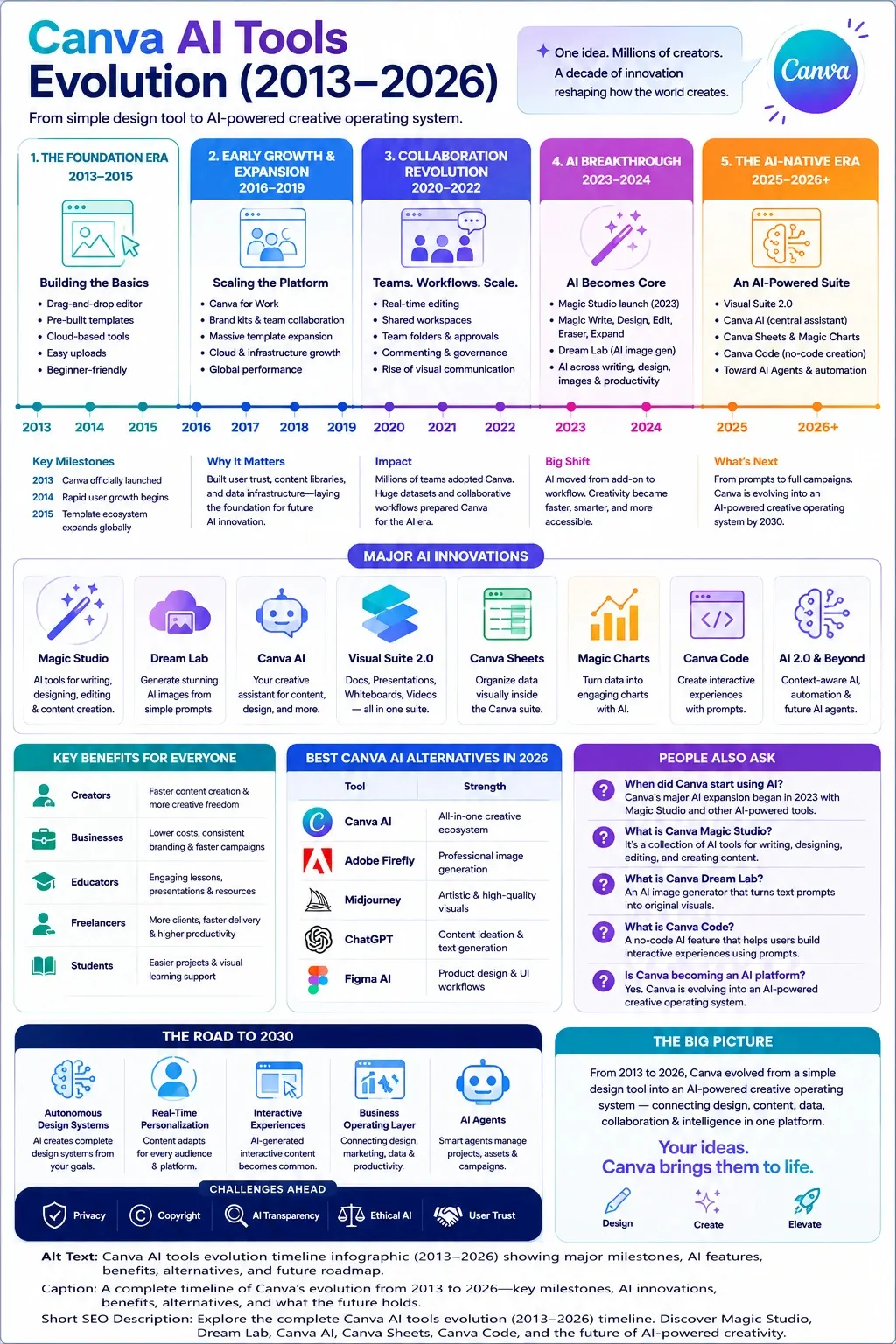
People Also Ask:
A: Canva began experimenting with intelligent automation earlier, but its major AI expansion became visible in 2023 through Magic Studio and related AI-powered features.
A: Magic Studio is Canva’s collection of AI tools for writing, designing, editing, and content creation. It serves as the foundation of Canva’s modern AI ecosystem.
A: Dream Lab is Canva’s AI image generation platform that transforms text prompts into original visuals and artwork.
A: Yes. Canva is increasingly positioning itself as an AI-powered creative operating system rather than just a graphic design tool.
A: Canva Code is a no-code AI capability that helps users create interactive experiences and applications through prompts.
Conclusion
From 2013 to 2026, Canva’s journey wasn’t just about new features rolling out now and then. Behind each change stood an idea – turning basic tools for dragging shapes into something smarter, deeper. What started as a way to make posters without skills slowly grew restless. Instead of staying small, it pulled in artificial intelligence like building blocks. One update after another quietly shifted its core. By the middle of the decade, templates did more than sit there – they responded. Users began noticing hints of prediction, suggestions that felt almost psychic. The system learned rhythms and paused at the right moments. Not magic, but math tuned close to instinct. A blank canvas still greeted everyone first – but behind it, engines hummed. Designs came faster now, shaped by unseen patterns. This was never only about graphics anymore. It became a space where intent met automation, again and again.
Right now, Canva’s shifting – moving into a space where smart tools shape how people create. Instead of just making visuals, it leans on prompts and automated help to guide the process. This isn’t about isolated features; everything ties together. Design meets words, numbers, teamwork, and artificial intelligence – all inside one place. What stands out is how these pieces flow, not just sit side by side.