Introduction
These days, making lifelike AI images feels surprisingly straightforward. By 2026, MidJourney still stands out – its strength shows best when crafting faces, sleek shots of products, sweeping nature scenes, movie-style moments, bold fashion spreads, magazine-ready material, or visuals packed so tightly with detail they trick the eye like high-end photography.
However, many creators still experience one common issue:
Their MidJourney outputs look fake, overly polished, or digitally artificial.
Wax might come to mind when looking at faces. Fingers could twist in odd ways on screen. Something about the dark parts doesn’t sit right. The surface of the cheeks sometimes feels unreal. Items shown up close fail to convince. Places behind the subject seem made of plastic.
The reason is usually straightforward:
Most users rely on weak prompts.
Start by thinking about light – where it comes from, how it falls. Picture the scene through a real photographer’s eyes, not just shapes but surfaces, rough bark or smooth stone catching shadows. Choose your lens like you pick paths in a forest, each one changing what feels close, what fades. Place the subject so that balance happens without trying, as if the frame already existed. Set the camera mind, ISO low, aperture wide – not guessed, known. Nature appears sharper when wind, water, and earth are named in detail. Words become tools, precise, quiet. Parameters adjust behind the scenes, steady, unseen.
This full walkthrough shows top MidJourney prompts that create lifelike visuals, featuring ready-to-use samples, complex structures, pro-level blueprints, lesser-known tweaks, plus techniques seasoned users apply behind the scenes.
Whether you are:
- A blogger in the UK
- An eCommerce seller in Germany
- A content creator in France
- A marketer in Spain
- A freelancer anywhere in the world
This guide can help you generate elite-quality AI imagery quickly and consistently.
What Are MidJourney Realistic Prompts?
A photo-like image comes from MidJourney when the prompt pushes realism instead of cartoon styles or dreamy scenes. Words matter most – specific details pull results closer to real life, steering clear of artistic exaggeration. Instead of vague ideas, exact lighting, textures, and settings shape what appears. Real-world accuracy shows up best through precise descriptions, avoiding anything too flashy or surreal. The goal stays fixed on mimicking actual photographs, not invented visuals.
These prompts often include:
- Subject identity
- Camera type
- Lens selection
- Lighting source
- Mood or emotion
- Scene environment
- Skin detail
- Texture realism
- Framing and composition
- MidJourney parameters
Example Prompt
young woman sitting in Paris cafe, natural window light, Canon EOS R5, 50mm lens, realistic skin pores, shallow depth of field, editorial photography –style raw
This works effectively because it gives MidJourney enough context and direction.
Why Some MidJourney Images Look Fake
Many beginners enter prompts like:
Beautiful woman portrait
That often creates generic or unnatural outputs.
Common Reasons Images Look Artificial
- No camera instructions
- No lighting guidance
- Prompt too short
- Missing texture terms
- Excessive stylization
- Unrealistic anatomy requests
- Weak background context
- Random keyword overload
- Incorrect aspect ratio
- Too many fantasy descriptors
Quick Truth
MidJourney rewards specificity, clarity, realism, vocabulary, and balanced prompt structure.
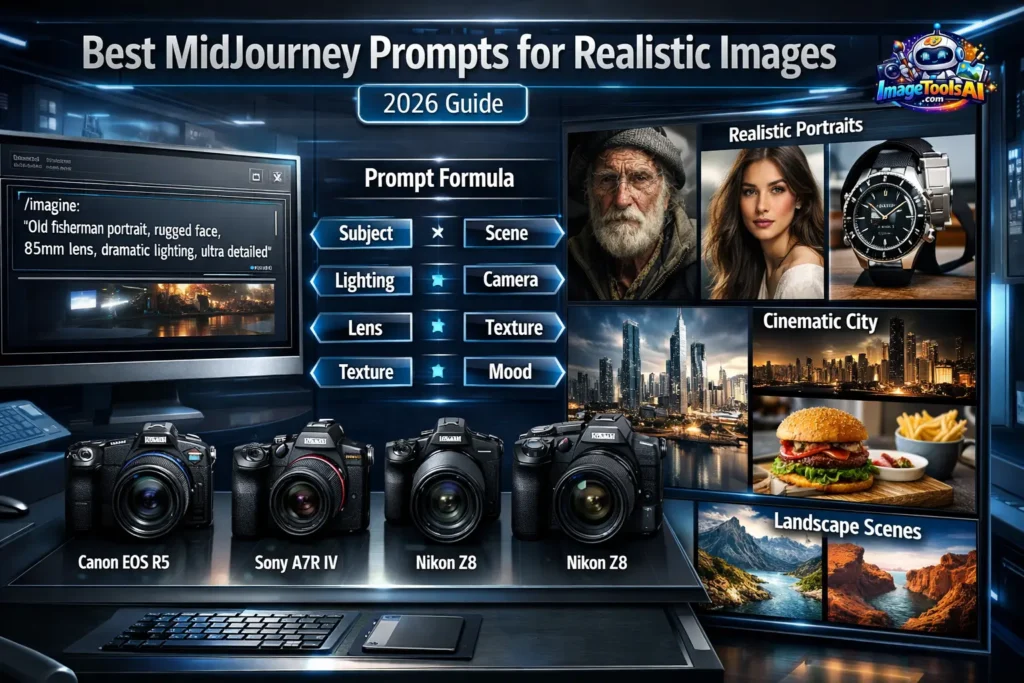
The Perfect MidJourney Realism Formula
Use this framework:
Prompt Formula
Subject + Scene + Lighting + Camera + Lens + Texture + Mood + Detail + Parameters
Example
confident businessman in modern London office, morning sunlight through glass windows, Canon EOS R5, 85mm lens, natural skin texture, shallow depth of field, corporate editorial photography –style raw
This formula provides stronger control, cleaner visuals, and more believable outcomes.
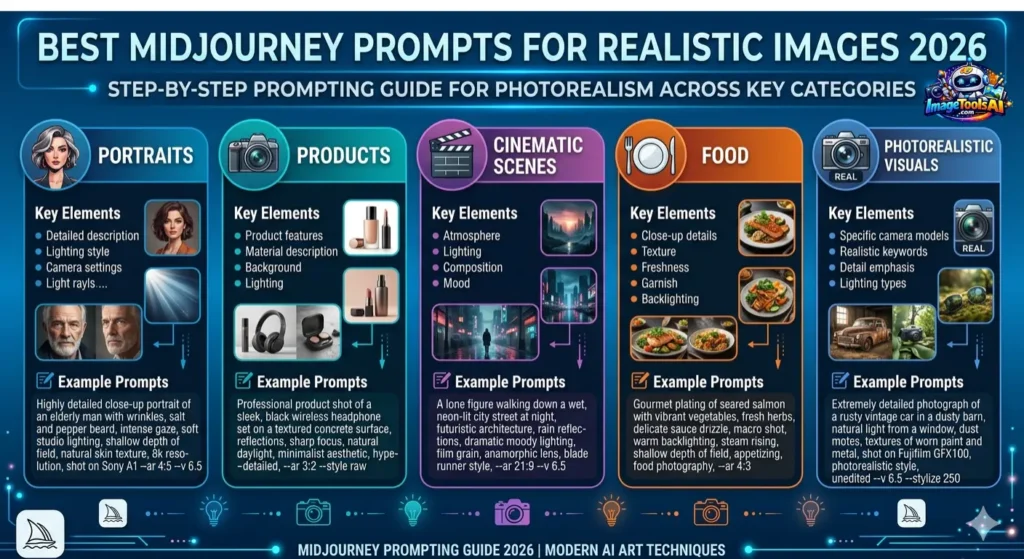
Best MidJourney Prompts for Realistic Images
Below are high-performing prompts you can use immediately.
Realistic Portrait Prompt
handsome man in his 30s, natural beard texture, studio lighting, Canon EOS R5, 85mm lens, realistic skin pores, ultra detailed portrait photography –style raw
Why It Works
- An 85mm lens creates portrait compression
- Beard texture adds authenticity
- Skin pores improve realism
- Studio lighting gives balanced exposure
Realistic Portrait Prompt
beautiful woman smiling softly, natural freckles, soft window light, Nikon DSLR photo, 50mm lens, realistic skin texture, shallow depth of field –style raw
Why It Works
- Freckles reduce the plastic skin effect
- Window light creates natural softness
- A 50mm lens gives a realistic perspective
Elderly Face Prompt
elderly man close-up portrait, wrinkles, lifelike eyes, dramatic soft lighting, Sony A7R IV, skin texture realism, sharp focus –style raw
Why It Works
Wrinkles, aging texture, and eye detail often make AI portraits more believable than overly smooth youthful faces.
Child Portrait Prompt
young child laughing outdoors, natural sunlight, realistic hair texture, Canon portrait photography, warm tones, detailed skin texture –style raw
Why It Works
Outdoor sunlight plus genuine emotion creates stronger realism.
Business Headshot Prompt
professional businesswoman in modern office, natural daylight, clean background, Canon EOS R5, 85mm lens, realistic facial detail, LinkedIn style headshot –style raw
Ideal For
- LinkedIn banners
- Corporate branding
- Resume images
- Business marketing
Best MidJourney Cinematic Prompts
Rain Street Scene
man walking alone in rainy Tokyo street at night, neon reflections, wet pavement, cinematic movie still, realistic lighting, 35mm lens –style raw
Why It Works
Rain reflections, neon glow, and street depth create an instant film atmosphere.
Action Scene
woman running through desert storm, dust particles, dramatic sky, IMAX movie frame, cinematic realism, motion blur –style raw
Why It Works
Motion blur introduces believable movement rather than static posing.
Luxury Car Shot
black sports car parked in Milan street at sunset, reflections on body, cinematic shadows, premium ad photography –style raw
Best For
- Automotive campaigns
- Social ads
- Website hero banners
Police Thriller Scene
detective standing under street lamp in dark alley, rain, smoke, dramatic shadows, cinematic realism, thriller movie frame –style raw
Best MidJourney Prompts for Product Photography
Perfume Ad Prompt
luxury perfume bottle on marble table, softbox lighting, realistic reflections, premium commercial photography, ultra detailed –style raw
Why It Works
Glass reflections and marble texture add premium brand aesthetics.
Watch Prompt
luxury wristwatch close-up, black background, sharp steel texture, macro lens, cinematic lighting –style raw
Smartphone Prompt
premium smartphone on minimalist desk, modern shadows, realistic reflections, clean product photography, studio shot –style raw
Shoe Brand Prompt
modern running shoes floating above a clean platform, dramatic side lighting, realistic materials, ad campaign style –style raw
Best MidJourney Prompts for Realistic Landscapes
Mountain Lake
sunrise over Swiss mountain lake, fog, realistic water reflections, HDR drone photography, ultra sharp details –style raw
Forest Path
autumn forest trail in Germany, wet leaves, soft morning mist, cinematic sunlight rays, realistic nature photo -style raw
Beach Sunset
Mediterranean beach sunset in Spain, golden light, realistic ocean waves, cinematic landscape photography –style raw
Best MidJourney Food Photography Prompts
Burger Prompt
gourmet cheeseburger on wooden table, melting cheese, realistic steam, restaurant commercial photo, ultra detailed –style raw
Coffee Prompt
latte art coffee cup near window, natural morning light, shallow depth of field, cozy cafe realism –style raw
Dessert Prompt
luxury chocolate cake slice, soft lighting, realistic texture, bakery commercial photography –style raw
Best Camera Terms for MidJourney Realism
| Camera Terms | Effect |
| Canon EOS R5 | Sharp premium realism |
| Sony A7R IV | Cinematic detail |
| Nikon Z8 | Natural tones |
| 35mm lens | Street photography style |
| 50mm lens | Balanced realism |
| 85mm lens | Portrait depth |
| Macro lens | Product close-up |
| Drone shot | Landscape realism |
MidJourney Settings for Realistic Images
Use these parameters:
- –style raw
- –stylize 50
- –ar 3:4
- –ar 16:9
- –chaos 5
| Parameter | Best For |
| –style raw | Natural realism |
| –ar 3:4 | Portraits |
| –ar 16:9 | Cinematic scenes |
| –stylize 50 | Balanced detail |
| low chaos | Consistency |
Benefits for Creators & Businesses in Europe
For Businesses
- Product mockups for Amazon UK
- Fashion promotions in France
- Restaurant visuals in Italy
- Real estate imagery in Spain
- Brand campaigns in Germany
For Creators
- YouTube thumbnails
- Instagram content
- Blog featured images
- Portfolio galleries
- Freelance design services
Pros and Cons
Pros
- Fast, realistic image generation
- No costly camera required
- Excellent for marketing content
- Strong portrait quality
- Powerful product photography results
- Great for creators and agencies
Cons
- Requires prompt skill
- Some faces need rerolls
- Text in images may fail
- The premium plan may be necessary for heavy use
- Hands sometimes need correction
Best MidJourney Alternatives
| Tool | Best For |
| DALL·E | Fast creative visuals |
| Leonardo AI | Game assets |
| Ideogram | Text in images |
| Stable Diffusion | Full control |
| Adobe Firefly | Commercial workflows |
Tips to Get the Best Results
Do:
- Use specific subjects
- Add lighting terms
- Mention camera/lens
- Keep prompts clean
- Use –style raw
- Test multiple versions
- Save top prompts
- Compare outputs
- Refine wording gradually
Don’t:
- Use random keyword stuffing
- Use fantasy words if realism is needed
- Overuse stylized settings
- Forget environment detail
- Ignore shadows or reflections
- Make prompts overly messy
FAQs
A: Use prompts with camera, lighting, texture, and lens details. –style raw is strongly recommended.
A: Use an 85mm lens, natural skin pores, soft lighting, shallow depth of field, and subtle asymmetry.
A: The newest production version in 2026 usually delivers the strongest realism, especially with raw styling.
A: Yes. It can generate premium mockups, ad visuals, and polished eCommerce imagery.
A: –ar 3:4 is excellent for realistic portrait outputs.
A: Usually, because prompts lack facial detail, lighting control, symmetry balance, or realism keywords.
Conclusion
For sharper results in MidJourney, skip brief, one-size-fits-all cues. Try skipping vague directions if lifelike visuals are what you’re after.
Strong AI visuals come from combining:
- Photography language
- Natural lighting logic
- Lens depth
- Real textures
- Smart settings
- Clear environments
- Balanced composition
Running a company? Growing an audience online? These prompts sharpen how things look. Launching something new works better with clear visuals. Even blogs gain when images feel intentional. Quality shifts when you start here. Pictures carry more weight than most think.
Start with those templates up top. Try shifting small pieces each time you run one. See how different outputs stack against each other. Keep adjusting until the prompts feel like they’re yours.
The more intentional your prompts become, the more realistic your MidJourney images will look.











