
Introduction
Ever snapped a photo that looked just right, yet turned out wrong for where you had to post it?
Here’s one thought: that Instagram shot could pull double duty as a YouTube preview. Picture this – the same product image, only stretched to leave room for words. What if the banner on your site played better when it spread wider across the screen?
Back in the day, folks copied background sections by hand. Sometimes they pulled pictures until they fit. Other times, endless tweaks filled their screen inside Photoshop.
Right now, Firefly’s generative Expand tool fixes that within moments. It works fast. Seconds is all it takes. The answer appears almost instantly. Problem gone – just like that.
Out past the edges, fresh pixels appear. Built on Adobe’s artificial intelligence, Firefly Generative Expand fills those spaces smartly. Light stays matched. The angle of view holds steady. Surfaces keep their feel. Shadows fall just right. Everything fits together without breaking rhythm.
Picture this: rather than stretching a photo bigger, it guesses what fits just outside the current edges. What shows up feels like it was always meant to be there.
Now here’s a tool that quietly changed how visuals get shaped – creators lean on it, marketers notice results, photographers tweak details faster, design work flows smoother, businesses save hours without saying much about it.
This full guide shows what you need to know:
- What Firefly Generative Expand is
- How it works
- Why it matters in 2026
- Professional workflows
- Best use cases
- Expert tips
- Prompt strategies
- Limitations
- Future developments
You will understand its full use by then, just as someone who does this every day.
What Is Firefly Generative Expand?
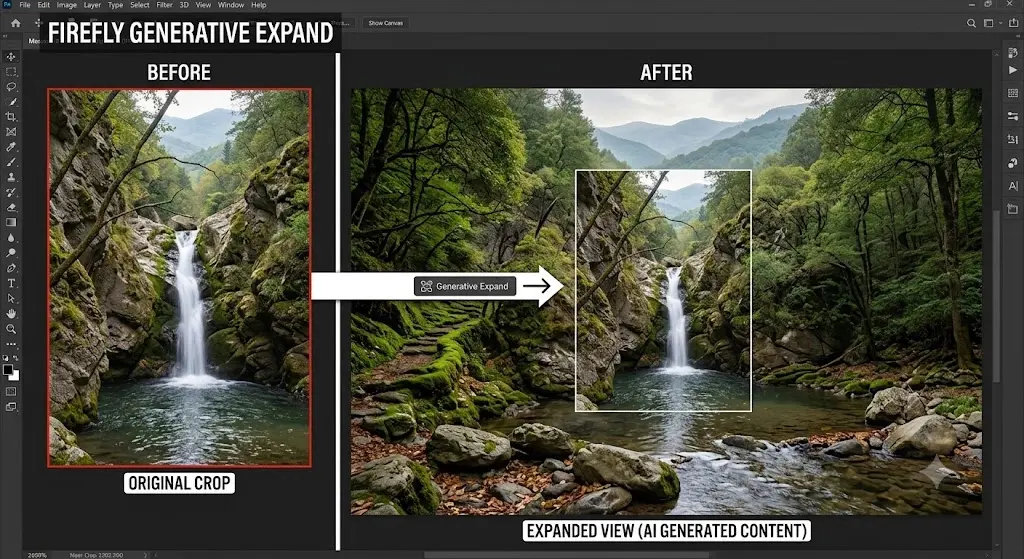
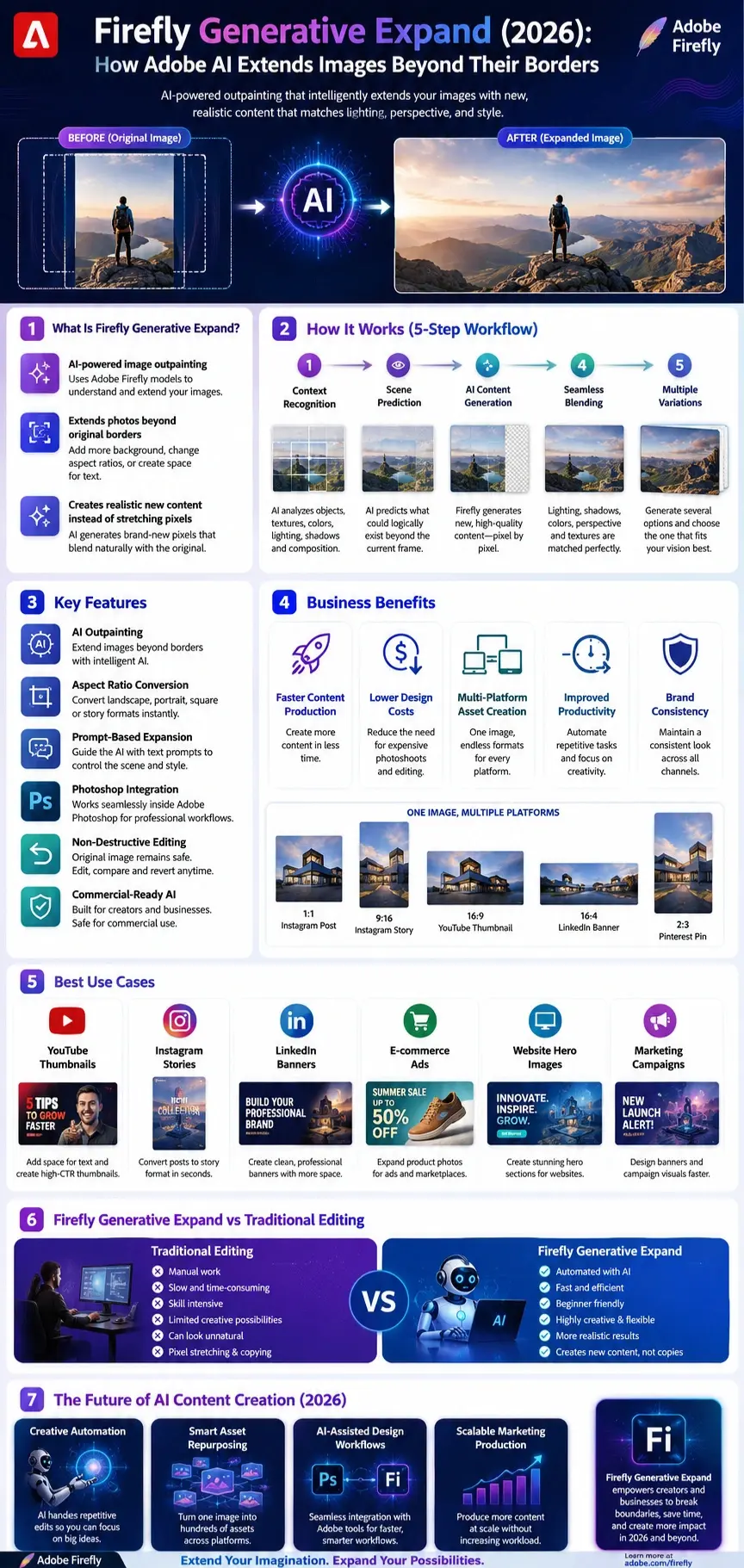
Firefly Generative Expand is Adobe’s AI-powered image expansion technology that extends an image beyond its original borders.
It belongs to a category of AI technology known as outpainting.
Unlike traditional resizing tools, it doesn’t stretch pixels.
Instead, AI creates entirely new image content.
The system analyzes:
- Objects
- Textures
- Colors
- Perspective
- Lighting
- Shadows
- Composition
Then it generates new content that looks naturally connected to the original image.
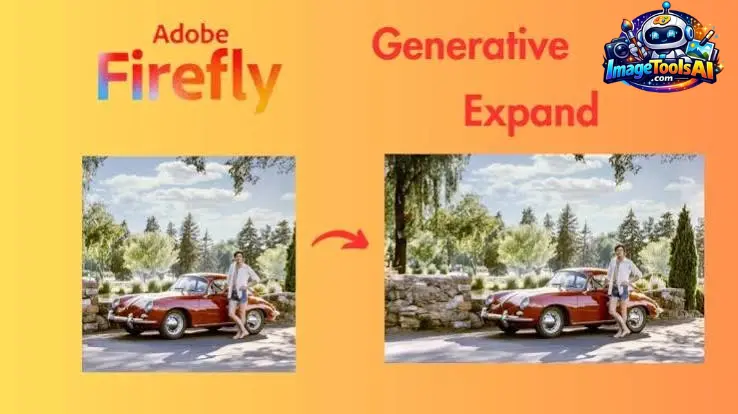
Imagine having a photo like this:
Original
[Person Standing]
AI transforms it into:
[Landscape + Person + Additional Background]
The result appears as if the image was originally captured that way.

Firefly Generative Expand vs Traditional Editing
| Traditional Editing | Firefly Generative Expand |
| Manual work | Automated |
| Time-consuming | Fast |
| Requires advanced skills | Beginner friendly |
| Can look unnatural | More realistic |
| Limited creativity | Highly flexible |
| Static editing | AI-powered generation |
Mini Summary
Firefly doesn’t enlarge images.
It intelligently creates new visual information.
How Firefly Generative Expand Works
The technology relies on multiple AI systems working together.
Context Recognition
The AI studies the image.
It analyzes:
- Foreground objects
- Background elements
- Shapes
- Perspective
- Visual relationships
Scene Prediction
The AI predicts what could logically exist outside the current frame.
For example:
If there’s a beach, it may continue:
- sand
- waves
- sky
- clouds
If there’s a city, it may extend:
- buildings
- roads
- lights
- sidewalks
AI Content Generation
Adobe Firefly generates completely new pixels.
This isn’t copying.
It’s creating.
Seamless Blending
The AI matches:
- Lighting
- Shadows
- Colors
- Texture
- Perspective
Everything blends naturally.
Multiple Variations
The system often creates several options.
Users can choose the best one.
Mini Summary
Firefly acts like a creative assistant that predicts what exists beyond the image.
Why Firefly Generative Expand Matters in 2026
AI image editing has evolved rapidly.
But content creators face increasing demands.
A single image may need to work across multiple platforms.
For example:
| Platform | Recommended Format |
| Instagram Post | 1080×1080 |
| Instagram Story | 1080×1920 |
| YouTube Thumbnail | 1280×720 |
| LinkedIn Banner | 1584×396 |
| Pinterest Pin | 1000×1500 |
| Facebook Cover | 851×315 |
Without AI, this takes considerable time.
With Firefly:
One image becomes multiple assets.
Why Businesses Love It
Businesses save time by:
- Repurposing content
- Reducing design costs
- Accelerating campaigns
- Improving productivity
- Maintaining brand consistency
Why Creators Love It
Creators can:
- Produce more content
- Reduce editing time
- Experiment Creatively
- Increase output
Firefly’s Growing Role in Creative Automation
In 2026, AI will become part of everyday workflows.
Firefly is no longer a novelty.
It has become a productivity tool.
Many professionals now use it daily.
Industries adopting it include:
- Marketing agencies
- E-commerce brands
- YouTubers
- Social media managers
- Photographers
- Graphic designers
- Bloggers
- Small businesses
Key Features of Firefly Generative Expand
AI-Powered Outpainting
Extend images beyond their original borders.
Ideal for:
- banners
- thumbnails
- posters
- presentations
Aspect Ratio Conversion
Convert images instantly.
Examples:
- Square → Landscape
- Landscape → Portrait
- Portrait → Story format
Prompt-Based Expansion
Guide AI with instructions.
Examples:
Continue the snowy mountain range
Add tropical beach scenery
Extend the city skyline
Blank Prompt Generation
No prompt needed.
AI can automatically continue the image.
This often produces surprisingly realistic results.
Non-Destructive Editing
Original images remain untouched.
Users can easily revert changes.
Multiple Variations
Generate several options.
Choose the best version.
Photoshop Integration
Works inside professional workflows.
No need for multiple tools.
Commercially Oriented AI
Adobe positions Firefly as suitable for commercial creative projects.
Businesses can confidently integrate it into production workflows after reviewing Adobe’s current policies.
Firefly Fill & Expand Model Explained
Adobe has significantly improved its AI ecosystem.
Many users confuse these terms:
- Firefly
- Generative Fill
- Generative Expand
- Firefly Models
Let’s simplify them.
Adobe Firefly
The overall AI platform.
Think of it as the engine.
Generative Fill
Adds or replaces objects inside an image.
Examples:
- Add a dog
- Remove a tree
- Replace a sky
Generative Expand
Extends the image beyond existing borders.
Examples:
- Make the image wider
- Add more background
- Convert aspect ratio
Firefly Image Models
These are AI model generations that improve output quality.
Each new version typically improves:
- realism
- prompt understanding
- consistency
- detail quality
- edge blending
Why New Models Matter
Modern Firefly models produce:
Better Prompt Accuracy
AI follows instructions more precisely.
Better Edge Quality
Fewer visible seams.
More Realistic Lighting
Natural blending.
Improved Textures
Higher-quality details.
Stronger Object Consistency
Objects remain more stable.
Benefits for Creators & Businesses
Content Creators
Benefits include:
Faster production
Better thumbnails
More social content
Improved engagement
E-Commerce Stores
Benefits include:
Better product displays
Professional catalogs
Marketing banners
Multi-platform assets
Designers
Benefits include:
Faster workflows
Creative freedom
More experimentation
Less repetitive work
Agencies
Benefits include:
Faster client delivery
Scalable content creation
Improved productivity
Table: Best Users for Firefly Generative Expand
| User Type | Benefit Level | Main Use |
| YouTubers | ⭐⭐⭐⭐⭐ | Thumbnails |
| Bloggers | ⭐⭐⭐⭐⭐ | Featured images |
| E-commerce Brands | ⭐⭐⭐⭐⭐ | Product marketing |
| Photographers | ⭐⭐⭐⭐ | Composition fixes |
| Designers | ⭐⭐⭐⭐⭐ | Creative projects |
| Agencies | ⭐⭐⭐⭐⭐ | Client campaigns |
| Students | ⭐⭐⭐⭐ | Presentations |
| Small Businesses | ⭐⭐⭐⭐⭐ | Marketing assets |
50+ Best Firefly Generative Expand Prompts
Landscape Prompts
- Continue mountain range
- Extend sunset sky
- Add distant hills
- Expand the river valley
- Continue the desert landscape
- Extend a tropical island
- Add rolling green fields
- Continue ocean horizon
- Add a rocky coastline
- Extend the waterfall scenery
Forest Prompts
- Continue dense forest
- Add pine trees
- Extend the woodland path
- Add wildflowers
- Continue autumn forest
Urban Prompts
- Extend the city skyline
- Add modern skyscrapers
- Continue downtown street
- Add traffic lights
- Extend urban architecture
Product Photography Prompts
- Expand the white studio background
- Add a luxury marble surface
- Continue soft shadows
- Add elegant reflections
- Expand premium backdrop
Social Media Prompts
- Add text space
- Create banner composition
- Expand thumbnail layout
- Add negative space
- Create an advertising background
Office Prompts
- Extend the modern workspace
- Add glass windows
- Continue office desk
- Add soft lighting
- Expand the professional environment
Portrait Prompts
- Continue park background
- Add blurred city lights
- Extend sunset scenery
- Add natural trees
- Continue studio setup
Fantasy Prompts
- Extend the magical kingdom
- Add floating islands
- Continue enchanted forest
- Expand a futuristic city
- Add glowing mountains
Technology Prompts
- Continue digital workspace
- Add holographic displays
- Extend the AI laboratory
- Add a futuristic environment
- Continue cyberpunk city
Bonus Prompts
- Add space for headlines
- Expand newsletter banner
- Continue the elegant background
- Add a minimalist design
- Extend presentation layout
People Also Ask
A: Yes, for large image extensions. Content-Aware Fill copies nearby pixels, while Firefly Generative Expand uses AI to create entirely new content that matches lighting, textures, and perspective. For extending backgrounds or changing aspect ratios, Generative Expand is usually the better option.
A: Yes. Firefly Generative Expand is integrated into Adobe Photoshop. Users can expand the canvas using the Crop Tool and let AI generate realistic content beyond the original image boundaries.
A: Yes, but the final quality depends on the source image, expansion size, and selected Firefly model. Smaller incremental expansions often produce more realistic and sharper results.
A: Absolutely. Many creators use it to convert square images into YouTube thumbnail dimensions (1280×720), add space for text, and create more engaging compositions.
A: Yes. E-commerce brands can quickly transform product photos into banners, advertisements, marketplace images, and social media assets without organizing expensive photoshoots.
Conclusion:
Now it’s a full creative helper for people and companies alike. Firefly Generative Expand does way more than tweak images with artificial intelligence. This tool speeds up reusing visuals like never before. What started small now powers fast content changes across projects.
Picture this: rather than crafting each image version by hand, artists tap into smart tools that stretch scenes naturally. These systems keep tones, surfaces, depth, and light looking true across formats. One frame grows – without losing its soul.
What stands out most is how little it wastes. Efficiency defines its strongest point.
A single image can be transformed into multiple assets for:
- YouTube thumbnails
- Instagram posts
- Pinterest pins
- LinkedIn Banners
- Website hero sections
- Marketing advertisements
- E-commerce product campaigns
Every month, folks who make content, run ads, handle brands, shoot photos, or manage companies might skip a heap of work. Instead of grinding through tasks, they could spend time elsewhere – simply because this exists.
Just because it’s automated doesn’t mean it works on its own. Strongest outcomes happen when people shape the prompts, guide the process, and then refine what comes out. Machines assist, sure – yet imagination stays with the user. Editing matters just as much as starting.
Explore more AI image generators, AI photo editors, AI design tools, and creator resources on ImageToolsAI.com to stay ahead in the rapidly evolving world of AI creativity.











