Introduction:
Years after its release, Stable Diffusion v2.0 still holds weight in the world of image-generating AI – despite tools like SDXL now leading how artists create. By 2026, flashier models take center stage, yet the older version lingers as a quiet benchmark. Its impact refuses to fade, tucked beneath faster, shinier successors. Not loud, not new, but never fully replaced.
Back then, artists didn’t lean on it quite so much anymore – yet conversations about Stable Diffusion v2.0 keep popping up, simply because it marked a turning moment in how machines learned to draw. That version brought sharper architecture, smarter reading of prompts, along with upgrades behind the data flow; however, people argued, since it boxed out some wild ideas and stumbled when painting faces. Still talked about.
In simple terms, its identity can be summarized as:
- More structured and logically consistent outputs
- Better language-to-image alignment
- Reduced artistic unpredictability
- Lower performance in human anatomy and facial realism
This walkthrough pulls apart each piece you should know – how it’s built, what it does, where it falls short, how it stacks up against others, plus ways people actually use it today when making things.
What is Stable Diffusion v2.0?
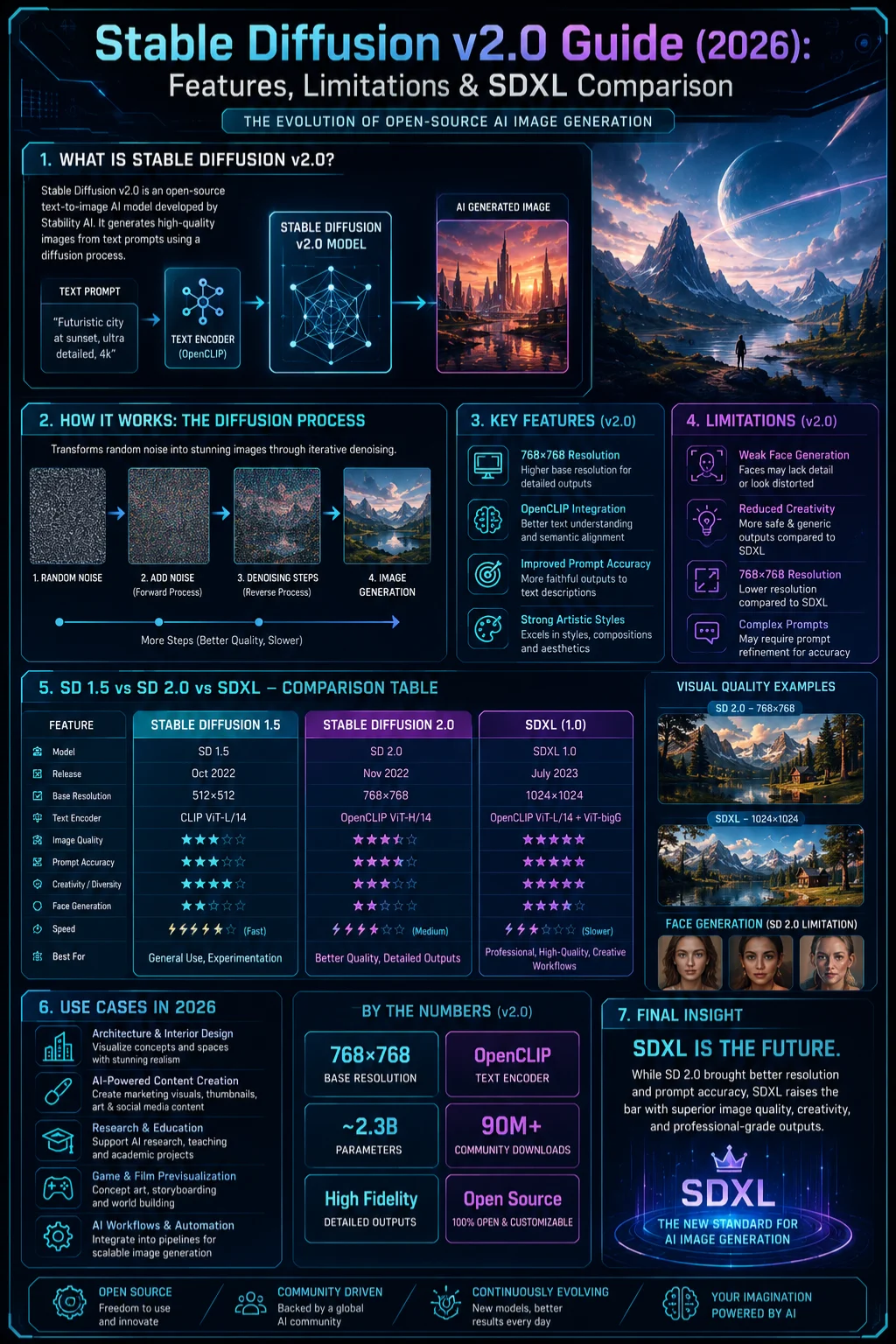
Pictures come from words, thanks to what came after the first version of Stable Diffusion. This one, number 2.0, works by turning sentences into hidden patterns that slowly form images. Though built like its older siblings, it thinks differently about phrases people type. Its job? Take plain descriptions and shape them into something eyes can follow. Not magic – math shaped over time helps match meaning with visuals.
Simplified Explanation
To understand it intuitively:
- SD 1.5 → imaginative, chaotic, artistic randomness
- SD 2.0 → structured, organized, predictable generation
- SDXL → balanced, high-fidelity modern system
The core objective of SD 2.0 was not just aesthetic improvement but semantic alignment—ensuring the model better understands what users actually mean in prompts.
How Stable Diffusion v2.0 Works
Stable Diffusion operates through a process known as diffusion modeling, where noise is gradually transformed into coherent images.
Initial Noise Generation
The system starts with pure randomized pixel noise—no structure, no meaning.
Progressive Denoising
Step by step, the model removes noise while shaping patterns, textures, and objects.
Text Encoding Interpretation
A transformer-based text encoder converts your prompt into numerical representations that guide image formation.
Image-Text Alignment
The model continuously adjusts output until it aligns with the semantic meaning of the prompt.
Key Architectural Shift: OpenCLIP Integration
A major transformation in SD 2.0 was the replacement of the original CLIP encoder with OpenCLIP.
This change resulted in:
- Stronger understanding of structured prompts
- Better object relationships in scenes
- Reduced stylistic freedom and artistic interpretation
In essence:
The model became more “logical” but less “imaginative.”
Key Features of Stable Diffusion v2.0
Native 768×768 Resolution Support
One of the most notable upgrades was native support for higher resolution outputs:
768×768768 \times 768768×768
This improvement provided:
- Sharper details in landscapes
- Better architectural structure
- Improved edge definition
However, it introduced trade-offs:
- Faces often appeared distorted
- Portrait consistency decreased
Enhanced Prompt Interpretation
The OpenCLIP encoder improved semantic understanding, allowing SD 2.0 to handle:
- Complex scene descriptions
- Multi-object relationships
- Environmental storytelling
But it struggled with:
- Celebrity likenesses
- Anime-Style Generation
- Highly artistic abstract prompts
This shift significantly changed how users had to write prompts.
Filtered and Refined Training Dataset
The dataset used in SD 2.0 was more curated and controlled.
Benefits:
- Cleaner outputs
- Reduced NSFW generation
- More predictable results
Drawbacks:
- Less stylistic diversity
- Reduced creative randomness
- Limited artistic experimentation
Strong Scene Composition Ability
One of SD 2.0’s strongest capabilities is environmental structure.
It performs particularly well in:
- Urban landscapes
- Cinematic lighting scenes
- Nature environments
- Architectural visualization
This made it valuable for technical visualization tasks.
Limitations of Stable Diffusion v2.0
Despite its improvements, SD 2.0 faced heavy criticism.
Weak Human Generation
The most widely reported issue:
- Distorted facial structures
- Unnatural hand formations
- Anatomically incorrect body proportions
This limitation alone caused many creators to abandon it.
Reduced Creative Flexibility
Compared to earlier versions:
- Less artistic randomness
- Harder style manipulation
- Reduced expressive output diversity
It felt more “controlled” than “creative.”
Prompt Compatibility Issues
Prompts that worked well in SD 1.5 often behaved differently in SD 2.0.
Problems included:
- Altered keyword weighting behavior
- Unexpected output variations
- Reduced predictability for experienced users
Low Adoption in Creative Communities
Most users migrated toward:
- SD 1.5 fine-tuned models
- SDXL Modern Pipelines
As a result, SD 2.0 became more of a transitional system than a production standard.
Stable Diffusion 2.0 vs 1.5 vs SDXL
| Feature | SD 1.5 | SD 2.0 | SDXL |
| Flexibility | High | Medium | Very High |
| Human Quality | Medium | Low | High |
| Prompt Accuracy | Medium | High | Very High |
| Artistic Freedom | High | Low | High |
| Modern Usage (2026) | Medium | Low | Dominant |
Key Insight
- SD 1.5 → creativity-first
- SD 2.0 → structure-first
- SDXL → balanced modern excellence
Why Stable Diffusion 2.0 Lost Popularity
SD 2.0 was not a failure—it was an experimental evolution stage.
Main reasons for declining usage:
- Reduced artistic control, frustrated creators
- SDXL delivered superior performance
- The existing SD 1.5 ecosystem was already mature
- Prompt behavior changed too drastically
In short:
It changed too much, too quickly.
Who Should Still Use Stable Diffusion 2.0?
Suitable For:
- Architectural rendering experiments
- AI research and academic study
- Structured scene generation
- Technical visualization workflows
Not Suitable For:
- Portrait or character art
- Anime or stylized illustration
- Marketing or branding visuals
- Social media content creation
Real-World Creator Feedback
Community discussions consistently describe SD 2.0 as:
- “Highly structured but creatively limited.”
- “Better understanding, worse personality.”
- “Technically strong but artistically restrictive.”
This sentiment explains its limited adoption in commercial creative industries.
Stable Diffusion 2.0 vs SDXL
In modern workflows, SDXL clearly dominates because it offers:
- Superior human realism
- Better stylistic adaptability
- Improved prompt interpretation
- More Consistent Outputs
Meanwhile, SD 2.0 is primarily used for:
- Research comparison
- Historical benchmarking
- Experimental AI studies
Benefits and Use Cases
Even in 2026, SD 2.0 still has niche relevance.
Useful In:
- Architecture visualization
- Game environment prototyping
- AI training environments
- Academic research studies
Limited Use In:
- Commercial advertising
- Freelance design work
- Social media content production
Step-by-Step Guide: How to Use Stable Diffusion 2.0
Choose Platform
Install locally or use a cloud-based AI generator.
Load Model
Select the SD 2.0 checkpoint file.
Write Structured Prompt
Focus on clarity instead of artistic exaggeration.
Set Resolution
Recommended:
768×768768 \times 768768×768
Adjust Parameters
- Guidance scale: 7–10
- Sampling steps: moderate range
Generate and Refine
Iterate multiple times for the best output.
Pro Tips for Better Results
- Use structured prompt formats
- Avoid conflicting descriptors
- Focus on lighting and composition
- Keep prompts concise and descriptive
- Test multiple variations
Pros and Cons Summary
Advantages
- Strong prompt understanding
- Stable scene composition
- Higher resolution support
- Cleaner outputs
Disadvantages
- Weak human anatomy
- Limited creativity
- Reduced style diversity
- Inconsistent artistic performance
Best Alternatives to Stable Diffusion 2.0
- SDXL → Best all-round modern model
- SD 1.5 fine-tuned models → Creative flexibility
- MidJourney → Artistic excellence
- DALL·E 3 → Strong prompt accuracy
Prompt Engineering Tips
- Use subject + environment structure
- Add lighting and camera details
- Keep prompts short and precise
- Avoid overloading style keywords
- Iterate instead of over-describing
FAQs
It is useful for structured and technical generation tasks but not for modern creative workflows.
It reduced creative freedom and struggled with human image generation quality.
It is better in structure but worse in creativity.
It is not recommended except for technical or non-human visuals.
SDXL is currently the most advanced and balanced option.
Conclusion
Out of nowhere, Stable Diffusion v2.0 shifted how AI creates images. Its grasp on shapes got sharper, following prompts became more precise, while image clarity jumped up – yet somehow people started looking less real. Creativity Tightened.
By 2026, though dethroned as the top creative software, its role lingers – shaping how people view progress in AI that makes things. What sticks isn’t dominance but influence, quietly marking a turning point few name outright.
Truth settles in when you see past SD 2.0 – AI grows not by leaps, but by steady steps. Progress hides in plain sight, less flash than grind. What matters emerges slowly, shaped by trial, error, and then more trial. Breakthroughs? Often, just patience is wearing a new coat. The real story isn’t speed – it’s persistence showing up every day
What moves things forward isn’t just sharper images – working carefully, thinking differently, and staying focused matter just as much.











