Introduction
Out of nowhere, artificial intelligence shook up how pictures are made across the internet. Earlier days saw companies relying heavily on artists, photo shoots, post-production programs, and big budgets just to get decent imagery. Now? Type a few words into an AI system – suddenly logos, lifelike scenes, ads, previews, even mockups appear without hiring experts. Tools driven by machine learning put what once took weeks within reach in seconds.
Midjourney V7 stands out across AI art tools this year like a sudden shift in light. Speed jumps ahead, thinking feels sharper, and details click into place better now compared to past builds. Creators find their visuals done fast, almost before asking – marketers see campaigns fill up quickly. Online shops get product shots that look lived-in; video makers pull thumbnails without stress. Writers add illustrations while ideas are still hot. Teams at small firms move quicker, solo workers stretch further. Everyone using it lands images that feel finished, right away.
Besides running an e-commerce shop in Germany, handling a blog based in the UK might also benefit. Running a growing startup out of France? That workflow could get smoother. A marketing agency operating across Spain may find tasks take less time. With Midjourney V7, design expenses tend to drop. Content often ends up sharper. Efficiency climbs without extra effort.
This guide covers everything needed to understand Midjourney V7 by 2026. Instead of skipping steps, it builds from the beginning. Because details matter, each part connects clearly. Not every tutorial explains why settings change outcomes – this one does. Since mistakes slow progress, common errors appear alongside fixes. With practice, control improves. One thing leads to another, until results match intent.
What Is Midjourney V7?
Picture words becoming visuals – Midjourney V7 does that, the newest update in a line of AI tools good at drawing from descriptions. Instead of sketches, it leans on smart algorithms trained to see patterns in data. A typed idea turns into detailed artwork through layers of digital guesswork refined over time. This version sharpens how clearly it reads those inputs. Each prompt gets broken down, weighed, and then rebuilt as an image with better accuracy than before.
Midjourney became famous because it creates:
- Cinematic visuals
- Fantasy artwork
- Photorealistic portraits
- Fashion photography
- Product advertisements
- Creative concept art
- Branding graphics
- Interior design visuals
Now things feel more real with Version 7. Because performance gets a boost across the board. This update thinks through prompts with sharper clarity. Speed picks up, without sacrificing quality. Workflow steps flow more smoothly from start to finish. Consistency sticks closer throughout each result.
Starting? Simple prompts now bring stronger outcomes. When you work at a higher level, speed increases along with precision.
Why Midjourney V7 Matters in 2026
Pictures shape the web now. Because of this, people tend to pay attention when they see bold images on websites or clips. A post stands out if it carries sharp visuals instead of plain words. Video grabs eyes best when design elements guide the viewer through. Social media moves faster when color and layout pull someone in. Strong artwork makes a difference every time.
Today, visuals are needed for:
- Blog featured images
- E-commerce product ads
- YouTube thumbnails
- Social media campaigns
- Landing pages
- Presentations
- Course content
- Pinterest graphics
- Website banners
- Email marketing creatives
Spending money and hours on handmade designs slows things down. With Midjourney V7, unique images appear right away instead.
Speed counts more than ever for companies today. Since marketing shifts fast, staying still isn’t an option. Platforms on social media will barely look the same by tomorrow. Creativity in ads can’t rely on old material forever. With Midjourney V7, brands find a way to match that pace.
Main Improvements in Midjourney V7
1. Better Realism
Midjourney V7 produces more natural images with:
- Improved skin texture
- Better lighting balance
- Cleaner hair strands
- More realistic eyes
- Better facial symmetry
- Natural shadows
Perfect when working with clothes, items on sale, daily life themes, or business visuals.
2. Improved Hands and Anatomy
Fingers used to look weird in pictures made by older AI. Now Midjourney V7 handles them much better
- Finger count
- Hand shape
- Body posture
- Facial alignment
- Proportions
Images of people work better now.
3. Faster Rendering Speed
Faster results help those who make things. With Midjourney V7, pictures appear more quickly – useful when trying out concepts or looking into new ideas.
4. Draft Mode
A fresh idea pops up fast thanks to Draft Mode, a standout new feature.
5. Better Prompt Understanding
Improvements have made longer prompts perform more smoothly. Because of this, detailed directions get handled with greater precision.
6. Stronger Consistency
From one picture to the next, a consistent look sticks around – whether it’s how someone dresses or how a logo appears. Through different scenes, visual traits stay familiar without needing reminders. Style holds steady even when backgrounds shift or lighting changes. A person’s vibe remains fixed, just like packaging on shelves over time. These details keep recognition alive without saying a word.
How Midjourney V7 Works
Midjourney uses text-to-image AI generation.
You enter something you want written – just a line of what’s on your mind
A single drop of light catches the curve of the glass. Marble holds the weight beneath it, cold and smooth. Light falls across the scene like a whisper. The camera sees every glint, sharp and true. Shadows stretch where the liquid meets the neck. Air feels still, caught in the moment. Details emerge without asking. Surfaces mirror each other in quiet agreement
Afterward, pictures begin to form through what was written. The machine uses those words like a guide. From that point, choices appear one by one. Each version reflects part of the description. Slowly, visuals take shape from the details given.
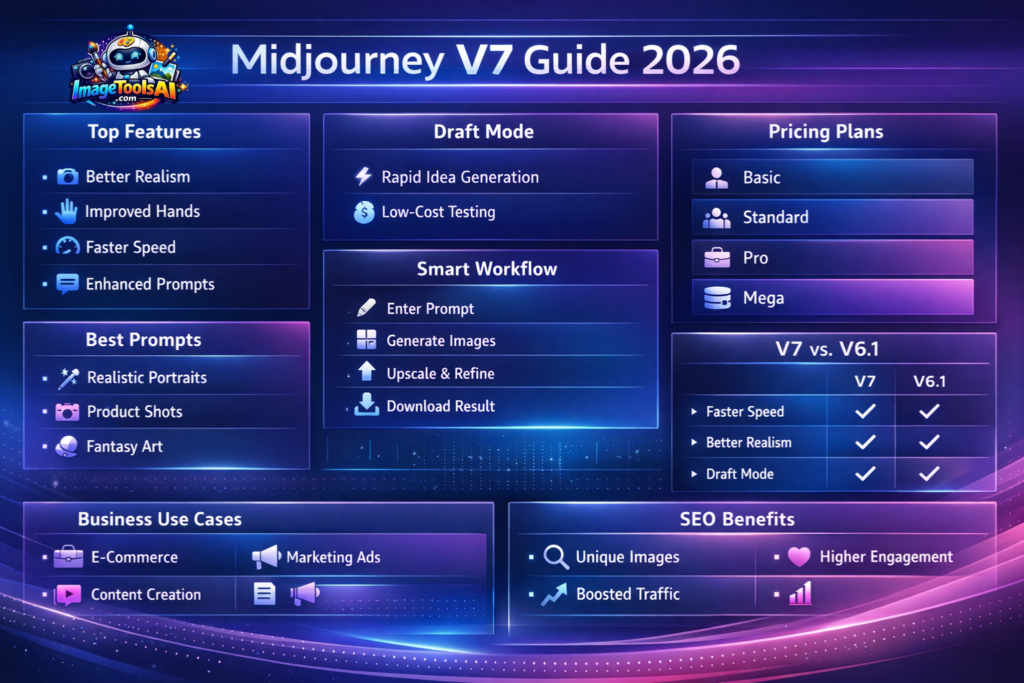
Basic Workflow
- Enter prompt
- Generate image grid
- Choose the option that works most effectively
- Create variations
- Upscale final image
- Download result
Starting out or already skilled, the method works just fine either way. Still, even experts won’t find it too basic to use.
Midjourney V7 Draft Mode Explained
Draft Mode is one of the most exciting features in Midjourney V7.
Starting with messy drafts lets people skip long waits for perfect visuals. Rough ideas come together fast, before any final touches show up.
Benefits of Draft Mode
- Much faster generations
- Great for brainstorming
- Lower testing costs
- Perfect for agencies
- Better workflow speed
- Rapid campaign ideation
Example Use Cases
- Testing 20 ad concepts
- Experimenting with different thumbnail designs
- Exploring product backgrounds
- Character concept development
- Landing page hero image testing
Working things out slowly means less rushing at the end. Picking strong ideas early cuts down busywork afterward.
Midjourney V7 Pricing Plans
Midjourney generally uses monthly subscription plans.
| Plan | Best For | Usage |
| Basic | Beginners | Casual use |
| Standard | Creators | Frequent use |
| Pro | Freelancers & Agencies | Heavy work |
| Mega | Power Users | Large-scale production |
Pricing Tip
Visit the real Midjourney site now and then – details shift without warning. What works today might not tomorrow, so stay close to the source.
Midjourney V7 vs Midjourney V6.1
| Feature | V6.1 | V7 |
| Speed | Fast | Faster |
| Prompt Accuracy | Good | Excellent |
| Realism | Strong | Better |
| Hands | Improved | More Accurate |
| Draft Mode | No | Yes |
| Personalization | Basic | Advanced |
| References | Limited | Better |
| Workflow | Good | Excellent |
Step-by-Step Tutorial: How to Use Midjourney V7
Step 1: Access Midjourney
Start with Discord, try the Midjourney website. Either works fine, depending on where you feel more comfortable jumping in.
Step 2: Select Version 7
Pick the newest version through preferences.
Step 3: Write Your Prompt
Example:
A dim glow climbs the wall behind the desk. Lights breathe color into the corners of the space. A wide surface holds gear without clutter. The camera catches how light bends on edges. Shadows sit where movement stops. Colors shift slowly across surfaces. Space feels still even when full
Step 4: Generate Images
Options come up when the machine runs through its steps. Different choices appear depending on what happens next.
Step 5: Choose the Best Result
Favorite one? Pick it. Your call, really. Go with what feels right.
Step 6: Upscale
Increase image resolution.
Step 7: Refine
Adjust wording and regenerate if needed.
Step 8: Download
Try it on websites, maybe toss it into an ad. Works fine on social platforms too. Could land in a printed piece without trouble.
Best Midjourney V7 Prompts
Realistic Portrait Prompt
A graceful lady fills the frame, lit by gentle morning light. Her face shows every subtle detail, captured sharply yet naturally. The photo feels like a page from a high-end magazine, though quiet in mood. A narrow depth of field pulls focus softly around her eyes. Realism comes through in tiny pores and faint shadows across cheeks. This is fashion with stillness, not motion
E-commerce Product Prompt
A sleek watch hovers mid-air inside a shadowed room. Gleaming highlights trace its frame, giving it that high-end look. The scene feels like an advertisement meant for magazines. Light cuts sharply across the surface, creating bold contrasts
Fantasy Prompt
A gust of wind lifts the old dragon higher. Above frozen peaks, it glides, slow and heavy. Clouds stretch wide beneath its wings. The sky burns with deep red light near dusk. Every scale is carved like stone by time. This scene breathes stillness, yet moves with power. Mountains sleep under endless white. Art so sharp you feel the cold
Thumbnail Prompt
A person looks surprised in a YouTube image. Their eyes widen near shiny words that seem to glow. Colors burst everywhere in bold shades. The look grabs attention fast, as many top thumbnails do
Interior Design Prompt
A sunlit space feels calm under soft light. Wooden floors stretch wide beneath clean-lined seating. Windows frame the day with quiet precision. Furniture sits low, built for stillness. Walls stay bare except for shadows moving slowly across them
Best Prompt Formula
Use this formula:
Subject + Environment + Lighting + Camera + Style + Quality
Example
A red sports car sits on a wet road through Tokyo, rain tapping the pavement. Glowing signs reflect in puddles beside it. The photo feels like a movie scene, sharp and alive. An 85mm lens caught every drop, each wire, each shadow. Details pile up without crowding – clear, close, real
A single change here makes a big difference right away.
Midjourney V7 Use Cases for Bloggers
Bloggers can use Midjourney for:
- Featured images
- Pinterest pins
- Blog banners
- Infographics
- Comparison graphics
- Social media visuals
A fresh look at graphics makes articles pop when people scroll through searches.
Midjourney V7 Use Cases for E-commerce Stores
Online stores can create:
- Product mockups
- Seasonal ad creatives
- Lifestyle product scenes
- Landing page banners
- Facebook ad images
- Instagram promotions
Pictures become cheaper to make because of this.
Midjourney V7 Use Cases for Agencies
Agencies benefit from:
- Fast client concepts
- Campaign testing
- Branding ideas
- Ad prototypes
- Social Media graphics
- Creative presentations
Faster results come when teams move more quickly, boosting what they keep. Profit grows if timing is tight.
Midjourney V7 Use Cases for YouTubers
Creators can generate:
- High CTR thumbnails
- Background art
- Story scenes
- Channel banners
- Community post graphics
Strong thumbnails can increase click-through rates.
Professional Midjourney Workflow
Idea Stage
Use Draft Mode to quickly create many concepts.
Selection Stage
Pick the three best picks. One stands out first. Then two others follow close behind. Each fits different needs.
Refinement Stage
Improve prompt wording.
Final Stage
Make the finest picture higher quality.
Distribution Stage
Resize for:
- Website
- YouTube
- Blog posts
Tips to Get the Best Results in Midjourney V7
1. Be Specific
Bad Prompt:
Car on the road
Better Prompt:
Red sports car driving through rainy Tokyo street at night, neon lights, cinematic photography
2. Use Camera Terms
- Wide angle
- Macro shot
- 85mm lens
- Depth of field
3. Add Lighting
- Golden hour
- Soft studio light
- Neon glow
- Moody shadows
4. Mention Style
- Luxury branding
- Cyberpunk
- Editorial photography
- Minimalist
5. Test Variations
Something clear tends to show up only once you’ve tried a few versions. A different look comes through following multiple changes.
Midjourney V7 for SEO and Blogging
- Most bloggers choose Midjourney – unique images tend to lift engagement. A personal touch in pictures often makes content stand out more. Visuals shaped by your own prompts add distinction. Seeing something crafted specially pulls readers closer. Original artwork simply feels different than generic stock photos
- User engagement
- Time on page
- Social shares
- Brand trust
- Click-through rate
One-of-a-kind pictures stick in your mind better than cookie-cutter photos. While most stories rely on standard shots, custom graphics leave a sharper impression.
Midjourney V7 in Europe Market
Because brand battles get fierce across Europe, Midjourney V7 finds its place. A tool steps in where standing out matters most.
Examples:
- UK online shops running ads
- German Startups Design Landing Pages
- French fashion brands testing visuals
- Spanish Bloggers Capture Travel Moments
- Italian Agencies Craft Client Mockups
Pros and Cons of Midjourney V7
Pros
- Excellent image quality
- Faster workflow
- Great realism
- Better prompt understanding
- Strong creative style
- Good for professionals
- Draft Mode saves time
Cons
- Paid subscription
- Learning curve for beginners
- Text rendering is not perfect
- Practice shapes how well things turn out
Midjourney V7 Alternatives
| Tool | Best For |
| DALL·E | Easy prompting |
| Leonardo AI | Game assets |
| Stable Diffusion | Open-source control |
| Adobe Firefly | Commercial design |
| Ideogram | Better text generation |
FAQs
A: Most of the time, you need to pay for access to Midjourney. It does not run on free usage.
A: True enough, faster results show up with sharper details plus better guesses at what you meant. Speed jumps, things look more real, and understanding gets closer to the right.
A: Fresh off the mark, new users might try basic prompts first.
A: True, works well for branding, plus it fits thumbnails. Ads benefit too, alongside product visuals.
A: A single idea might come from it, though real polish happens when someone works on it by hand.
Conclusion
Picture-making tools don’t get much sharper than Midjourney V7 by 2026. Speed meets lifelike detail here, tied together through clever design choices.
Beauty emerges naturally when performance and precision share space. Work flows more smoothly because thinking ahead is built in. This tool stands tall where others stall.
Now picture this: Draft Mode sharpens how prompts are read, shapes anatomy more accurately, tunes results to you, boosts reference handling – each piece of image making just clicks closer into place.
Picture this. If blogging’s your thing, orFilming Videos, launching startups, selling online, working solo, running an agency – Midjourney V7 speeds up how fast you make high-end images. Think less waiting, more doing.
Should you aim to craft AI-driven content for work, getting familiar with Midjourney V7 makes solid sense.
Worthwhile skills often come from tools that fit the task – this one does. It handles detail well, responds clearly, yet demands practice like any precision instrument. Learning it isn’t flashy, just effective when used right. Mastery shows up quietly in better results over time
today.











