Introduction:
By 2026, AI will have changed digital content creation. Tasks that once needed expensive software and advanced skills are now faster and easier.
MidJourney V1 Video lets users turn AI images into animated videos in seconds.
Best for:
- Content creators
- Marketers
- Freelancers
- Influencers
- Businesses
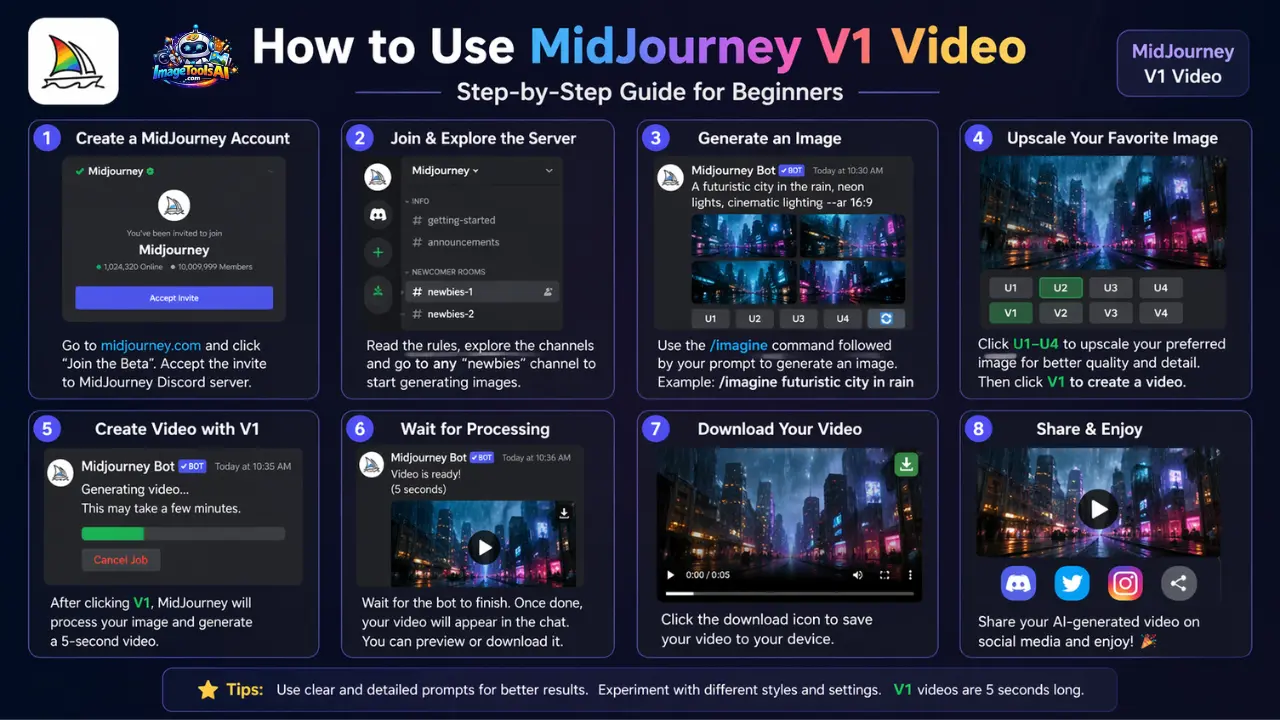
Simple process:
- Write a prompt
- Create an image
- Add motion settings
- Export video
What MidJourney V1 Video?
MidJourney V1 Video is an AI-driven visual generation feature that transforms static images into short animated video sequences using deep learning motion simulation models.
In simple terms:
It converts AI-generated images into cinematic motion clips.
Instead of manually animating frames or using complex editing tools, the system automatically generates movement based on:
- Depth detection
- Object recognition
- Scene composition
- Lighting simulation
- Motion prediction algorithms
Key Output:
- 5 to 21-second AI-generated cinematic videos
This allows creators to produce professional-grade visual content without traditional animation skills.
Why MidJourney V1 Video is Becoming So Popular
MidJourney Solution:
✔ Instant AI video generation
✔ No editing expertise required
✔ Fast workflow for creators
✔ High-quality cinematic output
This makes it a powerful tool for modern digital creators in 2026.
Who Should Use MidJourney V1 Video?
- YouTube Shorts creators
- TikTok influencers
- Instagram Reels editors
- Freelancers (Fiverr & Upwork)
- Digital Marketers
- AI artists
- Branding agencies
- Social media managers
How MidJourney V1 Video Works
MidJourney V1 Video operates using advanced machine learning models that analyze image structure and generate motion patterns.
Internal AI Workflow:
- Image analysis and scanning
- Depth and object detection
- Scene understanding
- Motion simulation generation
- Cinematic video rendering
Supported Motion Effects:
- Camera zoom in/out
- Horizontal and vertical panning
- Lighting transitions
- Environmental effects (wind, rain)
- Particle animation
Step-by-Step Guide: How to Use MidJourney V1 Video
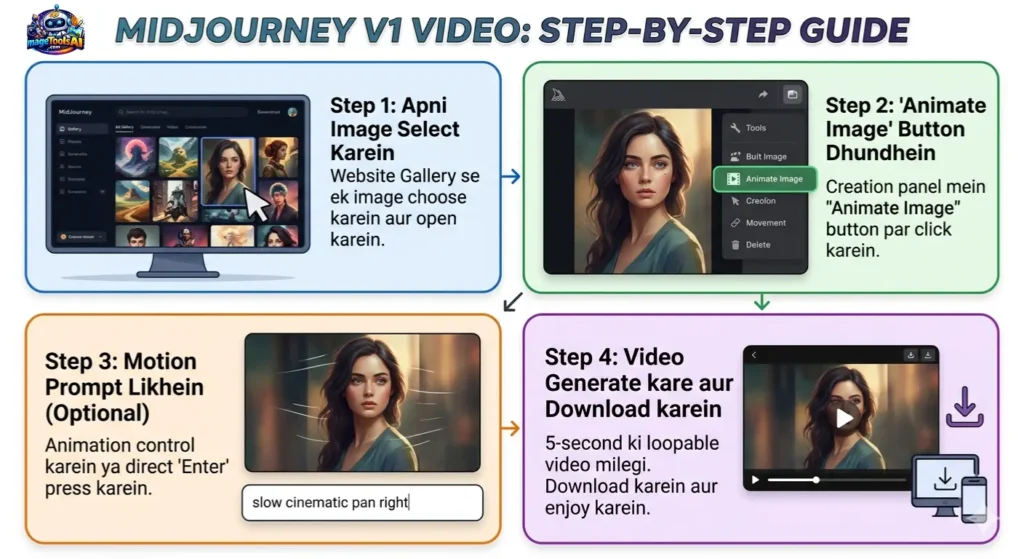
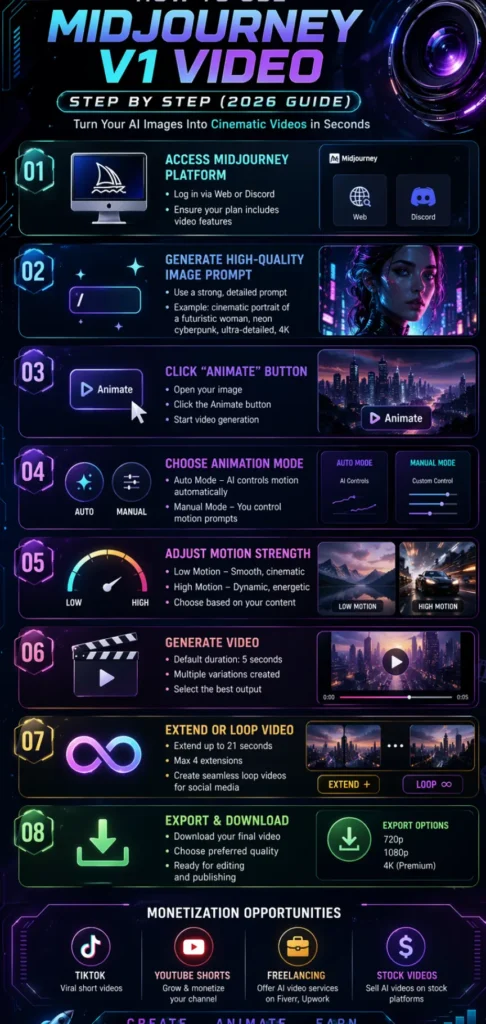
Access the MidJourney Platform
To begin using MidJourney V1 Video:
- Log in to MidJourney (Web or Discord)
- Ensure your subscription includes video features
- Use the /imagine command to create images
Important Notes:
✔ Web version is beginner-friendly
Generate a High-Quality Image
Before creating a video, you must first generate a strong visual foundation.
Example Prompt:
“cinematic portrait of a futuristic woman, neon cyberpunk lighting, ultra-detailed, 4K resolution”
Why This Matters:
Motion output becomes unstable
The video appears low-quality
If the image is strong:
✔ Cinematic realism improves
✔ Motion becomes smooth and natural
Open Image and Click Animate
Once your image is ready:
- Open the image gallery
- Click the “Animate” button
- Start video generation
If Button is Missing:
✔ Refresh browser
✔ Check subscription status
✔ Switch to a supported device/browser
Select Animation Mode
MidJourney offers two main animation modes:
| Mode | Description | Best Use |
| Auto Mode | AI controls motion automatically | Beginners |
| Manual Mode | User controls motion prompts | Professionals |
Recommendation:
Start with Auto Mode for an easier workflow.
Choose Motion Strength
Motion strength determines animation intensity.
Low Motion:
- Smooth transitions
- Cinematic realism
- Ideal for portraits
High Motion:
- Fast dynamic movement
- Action scenes
- Energetic storytelling
Choosing the correct setting is essential for visual quality.
Generate Video
Default generation settings include:
- Duration: 5 seconds
- Multiple variations created automatically
User Actions:
✔ Select the best output
✔ Regenerate if necessary
Extend Video Duration
Users can extend video length using:
- Auto Extend (AI continuation)
- Manual Extend (custom prompt input)
Limitations:
- Maximum duration: 21 seconds
- Maximum extensions: 4 times
This allows flexible storytelling formats.
Create Loop Videos
Loop videos are highly effective for social media platforms such as:
- TikTok
- Instagram Reels
- YouTube Shorts
How to Create Loop Content:
- Enable loop function OR
- Match the first and last frames
Best Uses:
✔ Background visuals
✔ Aesthetic clips
✔ Marketing advertisements
Export Your Video
After completion:
- Download the video file
- Select preferred quality
- Save for editing or publishing
Your AI-generated video is now ready for distribution.
MidJourney V1 Video Features Overview
| Feature | Description |
| Image-to-Video | Converts images into animated clips |
| Auto Animation | AI controls motion automatically |
| Manual Mode | Custom motion control |
| Motion Settings | Low & High adjustment |
| Extend Video | Up to 21 seconds duration |
| Loop Mode | Seamless repeating videos |
Pros and Cons of MidJourney V1 Video
Advantages:
- No editing skills required
- Fast content generation
- Cinematic-quality visuals
- Ideal for social media growth
- Beginner-friendly interface
Disadvantages:
- Limited video duration
- Requires a paid subscription
- Motion unpredictability in some cases
- Limited Professional control
Best Use Cases of MidJourney V1 Video in 2026
YouTube Shorts
Create viral AI storytelling clips rapidly.
Instagram Reels
Perfect for aesthetic and branding visuals.
Freelancing
- AI video creation
- Social media ads
- Short cinematic clips
Marketing Agencies
Used for:
- Product advertising
- Brand storytelling
- Promotional campaigns
Educational Content
- Animated tutorials
- Visual explanations
- Training videos
Common Problems & Fixes
Animate Button Not Showing
✔ Fix:
- Upgrade subscription
- Use a web platform
- Refresh session
Low Quality Output
✔ Fix:
- Improve the image prompt
- Use high-resolution inputs
Strange Motion Effects
✔ Fix:
- Switch to low motion mode
- Simplify prompt structure
Advanced Tips for Better Results
To achieve professional-grade output:
Use Strong Prompts:
Examples:
- “slow cinematic zoom”
- “soft atmospheric motion”
- “dramatic lighting transition”
Use Raw Mode:
Reduces randomness and increases control.
Maintain Visual Consistency:
Keep:
- Lighting style
- Color tone
- Composition structure
Focus on Centered Subjects:
Improves motion accuracy and stability.
How to Monetize MidJourney V1 Video
1. Sell AI Video Ads
Create promotional content for businesses.
2. TikTok Content Packages
Offer monthly AI video bundles.
3. Freelancing Platforms
- Fiverr
- Upwork
Services include:
- AI animation
- Short-form video creation
4. YouTube Channels
Monetize via:
- Shorts content
- AI storytelling videos
5. Stock Video Platforms
Sell AI-generated clips online.
SEO Strategy for Creators
To rank content effectively, focus on:
Primary Keyword:
How to use MidJourney V1 video step by step
LSI Keywords:
- AI video generator 2026
- MidJourney animation tutorial
- image to video AI tool
- AI cinematic video creation
- Motion settings MidJourney
❓ FAQs
A: No, it requires a paid subscription.
A: Yes, the web version is recommended.
A: 5 to 21 seconds.
A: Yes, but always check official license terms.
A: Low Motion is best for cinematic quality.
Conclusion
Picture Making Videos without needing years of training. MidJourney’s new video feature changes the game by turning ideas into moving images fast. Instead of wrestling with complex programs, people now type words and watch scenes appear. This isn’t little progress – things move differently now. Tasks that took whole days happen before your coffee gets cold. Creativity skips past old limits because tech handles the heavy lifting.
Start moving still pictures into living scenes, thanks to one simple tool. Motion choices shift easily, tailored by whoever’s using it. Professional results come through without needing deep know-how. Newcomers find their way just as well as those already working full-time online. Freelancers build portfolios more quickly. Marketers test ideas faster. Creators multiply what they make, almost effortlessly. Chances grow when speed meets flexibility.
MidJourney V1 Video shines because it works fast without clutter. Because everything runs more smoothly, making videos feels lighter. Creators spend less time fixing clips when tools handle the heavy parts. Ideas grow stronger once edits stop getting in the way. Telling stories becomes easier when effort shifts from struggle to vision. Money follows where attention flows – less friction means more room to build.
Picture tomorrow’s online world. Early adopters of smart video tech pull ahead fast. Think about MidJourney V1 Video – it opens doors before others even knock. Creators using it now shape what comes next. Staying ahead means acting while paths are still fresh.











