Introduction
Back in the day, making clean vector images meant spending ages on design programs. Need an icon, a drawing, a logo, interface bits, or something for ads? That usually meant long stretches of tweaking lines by hand. Each detail took time to shape just right.
Things shift fast now because of the Firefly Vector Model, a new kind of AI from Adobe built only to make vector images you can tweak. While it runs, shapes form cleanly behind the scenes.
Starting fresh each time, Firefly builds graphics using vectors instead of pixels – so they stay sharp at any size. Not locked into fixed shapes, these visuals adapt easily within Illustrator. Because everything stays adjustable, moving from early sketches to finished files takes fewer steps. Designers keep full control without losing speed or quality along the way.
For freelancers, agency heads, marketers, designers, or anyone running a business, this look at the Firefly Vector Model might just fit into how you create. What matters is whether it slots in smoothly beside your current tools. Some find new software clunky at first. Others adapt fast. The real test comes when deadlines loom and choices narrow. Could this be one of those tools that quietly does its job? Depends on what kind of work fills your days. If visuals shape your output, exploring their role makes sense. Not every feature suits every person. Trial often tells more than promises ever do.
What is the Firefly Vector Model?
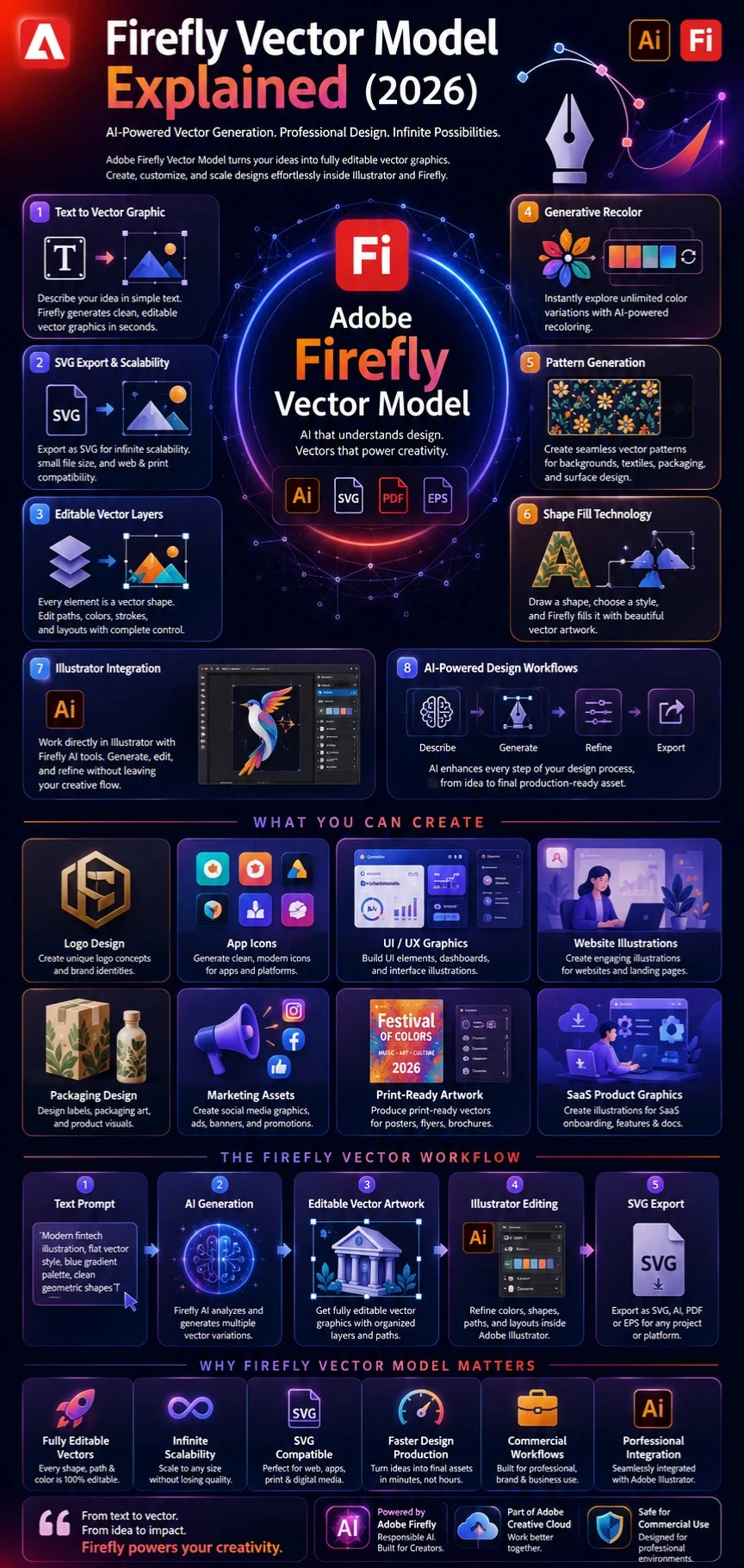
Firefly Vector Model is Adobe’s AI-powered vector generation technology that creates editable vector graphics from text prompts.
Instead of producing raster images composed of pixels, the system generates vector artwork made from paths, shapes, and mathematical curves.
This allows graphics to remain:
- Fully scalable
- Editable
- Production-friendly
- Print-ready
- SVG compatible
The technology powers Illustrator features such as:
- Text to Vector Graphic
- Generative Recolor
- Shape Fill
- Pattern Generation
Adobe introduced Firefly Vector Model as one of the first large-scale AI systems specifically built for vector creation.
Quick Answer
Firefly Vector Model is Adobe’s AI engine that generates editable vector graphics, icons, illustrations, patterns, and SVG assets directly from text prompts inside Adobe Illustrator and Firefly.

Why the Firefly Vector Model Matters in 2026
AI image generation has exploded over the past few years.
However, many AI tools focus only on bitmap imagery.
Professional design teams often require:
- SVG files
- Logo assets
- UI graphics
- Packaging illustrations
- Print-ready artwork
These workflows require vectors rather than pixels.
Firefly fills a major gap by generating assets that can integrate directly into professional design environments.
Key Industry Benefits
Faster Design Production
What once required hours can now be generated in seconds.
Lower Design Costs
Businesses can create concept graphics without hiring illustrators for every project stage.
Improved Creative Exploration
Teams can generate dozens of visual directions before choosing a final design.
Better Scalability
Generated assets can be resized infinitely without quality loss.
Mini Summary
Firefly Vector Model isn’t simply another AI art tool. It’s designed specifically for professional design production where scalability and editability matter.
How the Firefly Vector Model Works
The workflow is surprisingly simple.
Open Adobe Firefly or Illustrator
Users can access vector-generation features through Adobe’s ecosystem.
Choose Text to Vector Graphic
This feature converts written prompts into vector artwork.
Enter a Prompt
Example:
Modern fintech illustration, flat vector style, blue gradient palette, minimalist geometric design
Select Style Preferences
Options may include:
- Flat Design
- Geometric
- Cartoon
- Line Art
- Isometric
Generate Variations
Firefly creates multiple vector options.
Refine Output
Users can edit:
- Colors
- Shapes
- Paths
- Layouts
Export
Common formats include:
- SVG
- AI
- EPS

Core Features of Firefly Vector Model
Text to Vector Graphic
This is the flagship feature.
Users simply describe what they want.
Example:
Modern healthcare icon set, flat vector design, clean blue palette
Firefly generates editable vector graphics automatically.
Benefits
- Faster ideation
- Editable results
- Beginner-friendly
- Illustrator integration
SVG Export Support
SVG remains one of the most valuable formats for modern design.
Advantages include:
- Infinite scalability
- Fast loading speeds
- Responsive web design compatibility
- Small File Sizes
This makes Firefly highly attractive for web designers and SaaS companies.
Editable Vector Layers
Unlike traditional AI image generators, Firefly keeps assets editable.
Users can:
- Modify paths
- Change colors
- Rearrange objects
- Remove elements
- Customize layouts
This dramatically improves workflow flexibility.
Generative Recolor
Color experimentation often consumes significant design time.
Generative Recolor solves this problem.
Example prompts:
- Luxury gold branding
- Modern fintech blue
- Cyberpunk neon palette
- Organic earth tones
Firefly instantly applies new color schemes.
Pattern Generation
Designers can create:
- Packaging patterns
- Wallpaper graphics
- Textile prints
- Surface designs
These remain editable vectors rather than flattened images.
Shape Fill Generation
Shape Fill enables users to draw a shape and generate vector content within it.
Example:
Tropical jungle leaves
Firefly fills the selected shape with matching vector artwork.
Types of Graphics You Can Create
Icons
Ideal for:
- Apps
- Websites
- Dashboards
- SaaS products
- User interfaces
Logos
Useful for:
- Startups
- Personal brands
- Agencies
- Small businesses
Illustrations
Examples include:
- Editorial graphics
- Blog illustrations
- Business scenes
- Educational content
Marketing Graphics
Create:
- Ad creatives
- Landing page visuals
- Email graphics
- Social media illustrations
Packaging Designs
Generate:
- Product artwork
- Label graphics
- Decorative patterns
- Print-ready assets
Pattern Systems
Useful for:
- Textiles
- Home decor
- Product packaging
- Surface design
Benefits for Creators and Businesses
Freelancers
- Faster client delivery
- More concepts per project
- Reduced production time
Agencies
- Rapid prototyping
- Better brainstorming
- Increased profitability
Marketers
- Faster campaign production
- Custom illustrations
- Improved visual consistency
E-commerce Brands
- Product graphics
- Packaging assets
- Promotional content
SaaS Companies
- UI illustrations
- Website graphics
- Icon libraries
Step-by-Step Tutorial: Using Firefly Vector Model
Step 1
Open Illustrator or Firefly.
Step 2
Select Text to Vector Graphic.
Step 3
Write a clear prompt.
Bad Prompt:
business
Good Prompt:
Modern fintech startup illustration, flat vector style, blue gradient palette, clean geometric shapes
Step 4
Generate multiple variations.
Step 5
Choose the strongest concept.
Step 6
Edit paths and colors.
Step 7
Export SVG or AI files.
Pro Tip
Always generate at least 4–6 variations before choosing a final design direction.

Best Professional Use Cases
Branding Concepts
Generate logo directions rapidly before manual refinement.
UI Design
Create:
- App icons
- Dashboard visuals
- Empty states
- Feature illustrations
Social Media Graphics
Build custom vector campaigns without stock imagery.
Print Design
Generate assets for:
- Flyers
- Posters
- Packaging
- Brochures
Educational Content
Create:
- Infographics
- Learning illustrations
- Visual Explainers

Firefly Vector Model Pricing
Pricing changes frequently, but Adobe generally operates on a credit-based system.
| Plan | Suitable For |
| Free Tier | Beginners |
| Individual Plans | Freelancers |
| Creative Cloud Plans | Professionals |
| Enterprise Plans | Large Teams |
Before purchasing, always check Adobe’s latest pricing structure.
Pros and Cons
| Pros | Cons |
| Editable vectors | Some cleanup required |
| Illustrator integration | Not every logo is production-ready |
| SVG export | Prompt quality matters |
| Fast generation | Limited advanced vector precision |
| Commercial focus | Complex scenes may require editing |
People Also Ask
Adobe offers limited free generations for new users, but most advanced usage requires Firefly credits or an active Adobe subscription. The exact limits can vary depending on your plan and Adobe’s latest pricing structure.
Yes. One of Firefly Vector Model’s biggest advantages is its ability to generate editable vector graphics that can be exported as SVG files. This makes the artwork scalable and suitable for websites, mobile apps, branding, and print projects.
Yes. Firefly Vector Model powers several Illustrator AI features, including Text to Vector Graphic, Generative Recolor, and Shape Fill. These tools allow designers to create and edit vector artwork directly within Illustrator.
For true vector creation, Firefly has a significant advantage because it generates editable vector assets. Midjourney excels at artistic image generation but primarily produces raster images that require additional conversion steps for vector workflows.
Adobe designed Firefly with commercial creative workflows in mind. However, businesses should always review Adobe’s latest licensing terms and commercial usage policies before using generated assets in professional projects.
Conclusion:
Something new happens when machines start drawing shapes from words. Firefly’s system builds vector images out of text descriptions, letting designers tweak every path afterward. Instead of starting blank, users get live SVG files shaped by prompts. Color shifts come next – generated on demand, applied across forms automatically. Tools reshape fills without leaving familiar workspaces. Adobe ties it all into Illustrator so tightly that switching apps feels outdated. Speed changes everything here – not just how fast you finish, but how early ideas take visual form.
Picture this: folks like designers, ad teams, online sellers, software firms, web shops, plus those making digital stuff – they all save time using it. Not here to take anyone’s job, mind you; rather, think of Firefly as a spark for fresh ideas, speeding up mockups, Early Versions, and getting things done faster. What once took ages now moves quicker, smoother. Ideas flow better when tools help carry the load.
Still, setting clear goals helps. When visuals get intricate, when brand work demands polish, or when big companies need full design setups, those cases usually need hands-on tweaking. Strongest outcomes happen by pairing machine-made ideas with people’s creative touch and trained eyes.
Starting fast doesn’t always mean better results – yet when it comes to making icons, logos, or digital artwork quickly, Firefly Vector Model stands out among today’s AI tools for vector creation. Speed meets precision here, especially useful for crafting illustrations, user interface elements, patterns, promotional images, or scalable SVGs with ease. While many systems lag, this one pushes forward in delivering clean graphic output on demand.
Tomorrow might see Adobe’s Firefly Vector Model grow stronger, woven tighter into daily creative work. Right now, mastering it gives those focused on current design an edge later on – simply by starting early.











