
Introduction
Out of nowhere, AI tools started making images faster than anyone expected. Still, just because a system creates pictures does not mean it fits real design jobs. Some deliver flashy results, though they fall short when used for client work needing precision. Even so, companies and creatives require outputs that won’t cause legal issues or break under complex demands.
Here comes Firefly Image Model 4 Ultra, stepping into the scene.
A fresh take on image creation comes through Adobe’s Firefly 4 Ultra, built deep inside their Firefly lineup to push realism further. Instead of guesswork, it follows prompts with tighter precision while handing creators more say over results. Picture-grade output lands ready for real jobs – no extra fixes needed afterward. Since sharp visuals matter most, pros in ads lean on them for campaigns that demand clarity. Product shots gain depth without studio time. Architects preview buildings as if already built. Magazines pull images that fit stories exactly. Brand materials stay consistent across every piece made.
Picture tossing ideas into a digital space where images shift like sand under the wind. Some folks shape visuals, others spin words or build brands – each finds their rhythm differently. Now imagine a tool that hums alongside such motions without stealing attention. That quiet presence might belong to Firefly 4 Ultra. For those who paint screens with pixels or chase trends through data trails, testing their fit could reveal subtle gains. Curiosity often begins not with loud claims but soft nudges. This look digs into whether it earns its corner on your desktop shelf.
What Is Firefly Image Model 4 Ultra?
Fine details emerge sharply when Firefly Image Model 4 Ultra paints scenes stroke by invisible stroke. This one happens to be Adobe’s top-tier generator, shaped for lifelike visuals that hold still under close inspection. Realism isn’t faked here – each output grows from precision-tuned over layers unseen. High fidelity comes standard, not as a promise but as structure. Images arrive complete, as if developed in light rather than code.
Built differently from regular image tools, Firefly 4 Ultra focuses on precision instead of just fast results. While others rush outputs, this one sharpens detail through tailored design. Speed matters less here than control and accuracy. Most generators favor broad ideas, yet this version leans into fine adjustments. Where generic systems guess intent, it adapts with tighter feedback loops. Not about flashy variety – more like steady refinement
- Photorealistic rendering
- Professional advertising imagery
- Product visualization
- Architecture concepts
- Interior design scenes
- Brand-focused content
- High-detail image generation
Now there’s Adobe’s Ultra model, built for sharper detail, a clearer sense of prompts, and smoother handling when building layered images. Realism steps up, directions get parsed more naturally, and tricky visuals become easier to shape.
Inside Adobe’s wider Firefly setup, the model runs hand-in-hand with apps like Photoshop, Illustrator, and Express. Other creative tools also form part of this mix.
Quick Summary
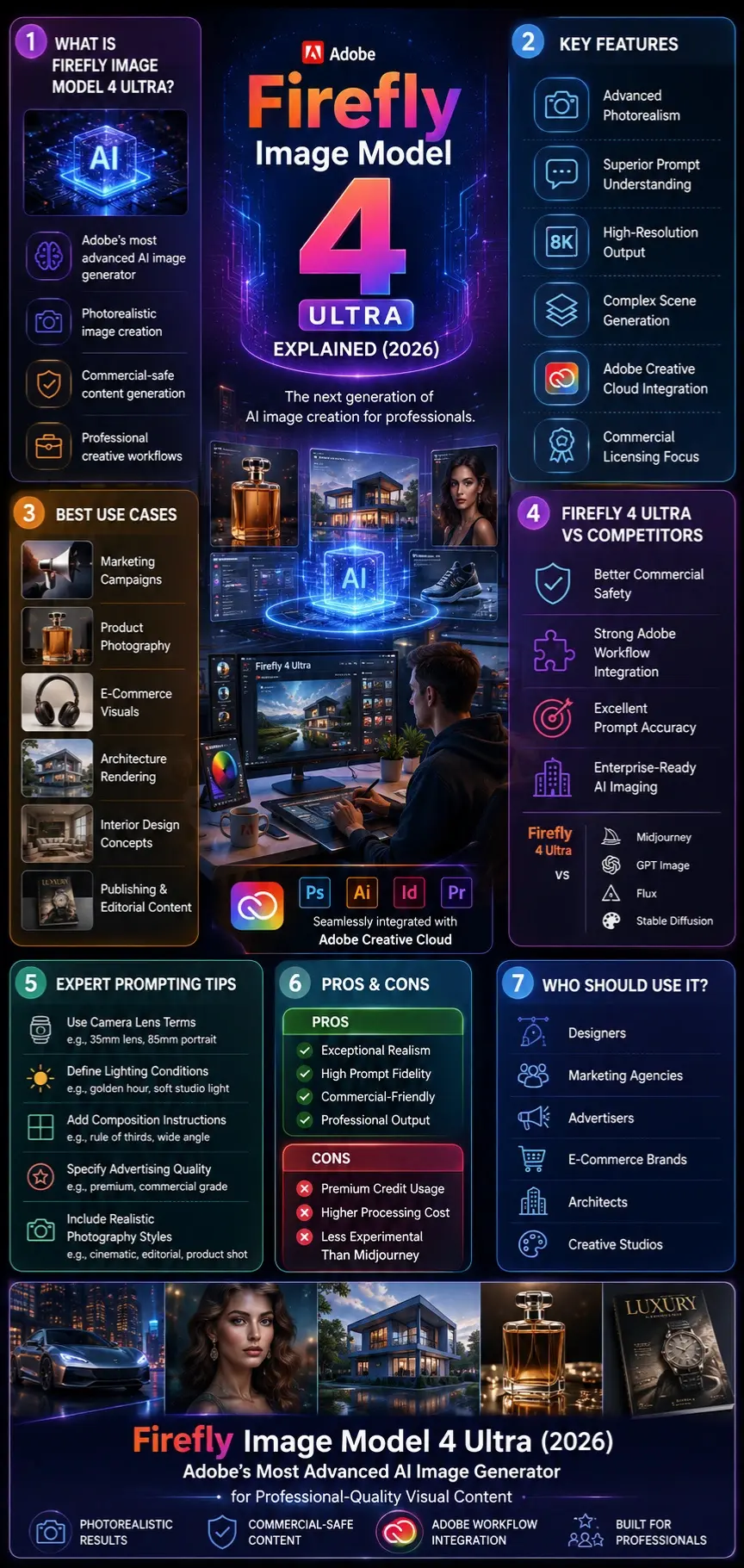
Firefly Image Model 4 Ultra is Adobe’s highest-end AI image generator designed for creators who need exceptional realism, professional-quality output, and commercially safe content creation.
Why Firefly Image Model 4 Ultra Matters in 2026
The AI image generation market has become increasingly competitive.
Tools like Midjourney, GPT Image, Ideogram, Flux, and Stable Diffusion continue pushing visual quality forward. However, many businesses remain concerned about copyright issues, commercial licensing, and brand safety.
Adobe recognized this challenge early.
Instead of competing solely on image quality, Firefly focuses on:
- Commercial safety
- Enterprise adoption
- Creative workflows
- Professional design integration
In 2026, organizations are not simply looking for beautiful AI images. They need assets that can be confidently used in:
- Marketing campaigns
- E-commerce stores
- Advertising materials
- Client projects
- Brand communications
This makes Firefly 4 Ultra particularly attractive for agencies and businesses.

How Firefly Image Model 4 Ultra Works
Firefly 4 Ultra uses advanced generative AI technology trained to understand relationships between visual elements and natural language instructions.
The model processes:
- Subject descriptions
- Scene details
- Camera instructions
- Lighting conditions
- Lens settings
- Artistic styles
- Composition requirements
Instead of generating images based only on keywords, the system interprets context and relationships.
For example:
A prompt like:
“Luxury perfume bottle on black marble, dramatic lighting, luxury advertising photography, shallow depth of field, studio reflections.”
Produces significantly more accurate results because Ultra understands:
- Product placement
- Reflection behavior
- Lighting Dynamics
- Camera perspective
- Commercial photography aesthetics
This enhanced understanding is one of the model’s biggest advantages.
Key Features of Firefly Image Model 4 Ultra
Advanced Photorealism
Photorealism is one of Ultra’s strongest capabilities.
The model produces highly realistic:
- Human portraits
- Animals
- Consumer products
- Vehicles
- Buildings
- Nature scenes
Fine details such as skin texture, reflections, fabric materials, and lighting behavior are noticeably improved.
Superior Prompt Understanding
Many AI generators struggle when prompts become long or complex.
Firefly 4 Ultra handles detailed instructions more effectively by maintaining consistency across:
- Characters
- Lighting
- Backgrounds
- Camera angles
- Styling requirements
This improves workflow efficiency because fewer revisions are needed.
Complex Scene Generation
Ultra performs particularly well when creating:
- Crowded cityscapes
- Architectural projects
- Large environments
- Commercial advertisements
- Detailed product displays
Small visual elements remain more coherent compared to earlier generations.

High Resolution Output
The model supports larger output resolutions suitable for:
- Print materials
- Advertising banners
- Editorial layouts
- Social media campaigns
- Presentation graphics
Higher resolution provides greater flexibility for cropping and post-production editing.
Commercially Safe Content
Adobe’s commercial-safe positioning remains one of Firefly’s most important benefits.
Businesses appreciate:
- Reduced copyright concerns
- Enterprise-friendly licensing
- Brand-focused workflows
- Corporate adoption support
This advantage continues to differentiate Firefly from many competitors.
Creative Cloud Integration
Users can generate and edit images directly within Adobe workflows.
Benefits include:
- Faster production pipelines
- Easier editing
- Better asset management
- Seamless design integration
For existing Adobe customers, this is a major productivity advantage.
Firefly Image Model 4 Ultra vs Firefly Image Model 4
Many users wonder whether upgrading to Ultra is worthwhile.
| Feature | Firefly 4 | Firefly 4 Ultra |
| Generation Speed | Faster | Slightly Slower |
| Cost Efficiency | Better | Lower |
| Detail Level | High | Extremely High |
| Realism | Very Good | Outstanding |
| Product Photography | Very Good | Excellent |
| Architecture | Good | Exceptional |
| Advertising Content | Strong | Premium |
| Complex Scenes | Good | Excellent |
| Professional Use | Strong | Best Choice |
Verdict
Choose Firefly 4 if:
- You need speed
- You generate large volumes of images
- Budget matters
Choose Ultra if:
- Realism matters most
- You’re creating client work
- You need advertising-quality visuals
- Detail accuracy is critical
Firefly Image Model 4 Ultra vs Midjourney
Midjourney remains one of the most popular AI image generators available.
However, the two tools serve different audiences.
| Category | Firefly 4 Ultra | Midjourney |
| Commercial Safety | Excellent | Moderate |
| Prompt Accuracy | Excellent | Good |
| Adobe Integration | Native | None |
| Artistic Creativity | Good | Excellent |
| Brand Work | Excellent | Good |
| Enterprise Use | Excellent | Limited |
| Product Photography | Excellent | Very Good |
| Realism | Excellent | Excellent |

Which Is Better?
Midjourney often excels at artistic and experimental imagery.
Firefly 4 Ultra excels at:
- Commercial projects
- Advertising
- Brand assets
- Enterprise workflows
Firefly Image Model 4 Ultra vs GPT Image
| Category | Firefly 4 Ultra | GPT Image |
| Realism | Excellent | Excellent |
| Typography | Good | Excellent |
| Commercial Focus | Strong | Moderate |
| Photoshop Workflow | Excellent | None |
| Editing Ecosystem | Excellent | Moderate |
| Marketing Assets | Excellent | Good |
Winner
For design professionals already using Adobe products, Firefly Ultra offers a smoother workflow.
For text-heavy designs and creative experimentation, GPT Image can be extremely competitive.
Best Firefly Image Model 4 Ultra Use Cases
Marketing Campaigns
Generate:
- Facebook ads
- Instagram visuals
- Banner advertisements
- Product promotions
The realistic output makes campaigns look more professional.
Product Photography
Perfect for:
- E-commerce stores
- Product launches
- Amazon listings
- Shopify websites
Businesses can create professional product visuals without expensive photoshoots.
Architecture Visualization
Architects can generate:
- Interior concepts
- Building renderings
- Real estate marketing images
- Urban planning concepts
Ultra performs exceptionally well with architectural detail.
Publishing & Editorial Work
Useful for:
- Magazine illustrations
- Book covers
- Blog graphics
- News visuals
The high-resolution output supports publishing workflows.
Creative Agencies
Agencies can rapidly prototype:
- Campaign concepts
- Mood boards
- Client presentations
- Creative mockups
This significantly reduces production time.
Step-by-Step Guide: How to Use Firefly 4 Ultra
Access Adobe Firefly
Open Adobe Firefly through your Adobe account.
Select Image Model 4 Ultra
Choose Ultra from the available image generation models.
Write a Detailed Prompt
Include:
- Subject
- Style
- Lighting
- Composition
- Camera Settings
Generate Images
Allow the model to create multiple variations.
Refine Results
Adjust prompts and settings until satisfied.
Export
Download images for commercial or creative use.
Best Firefly Image Model 4 Ultra Prompts
Cinematic Portrait
Ultra-realistic portrait of a successful entrepreneur, golden hour lighting, 85mm lens, shallow depth of field, natural skin texture, luxury editorial photography, cinematic color grading.
Luxury Product Photography
Luxury perfume bottle on reflective black marble, premium advertising photography, dramatic studio lighting, realistic reflections, and high-end commercial campaign.
Architectural Rendering
Modern sustainable smart home in forest environment, sunrise lighting, glass architecture, ultra-realistic rendering, architectural visualization, cinematic composition.
E-Commerce Product Shot
Professional product photography of wireless headphones, clean white background, studio lighting, realistic shadows, advertising quality image.
Fantasy Character
Epic fantasy queen wearing golden armor, intricate jewelry, cinematic lighting, a realistic face, and highly detailed costume design.
Automotive Advertising
Luxury electric sports car driving through a futuristic city at night, cinematic lighting, realistic reflections, premium advertising photography.

Expert Prompting Tips
To maximize results:
Use Camera Terms
Examples:
- 35mm lens
- 85mm portrait lens
- Macro photography
- Drone shot
Define Lighting
Examples:
- Golden hour
- Soft studio lighting
- Neon lighting
- Sunset photography
Specify Quality
Examples:
- Hyper realistic
- Professional photography
- Advertising quality
- Ultra detailed
Describe Composition
Examples:
- Wide-angle shot
- Close-up portrait
- Rule of thirds
- Symmetrical composition
These additions significantly improve output quality.
Advantages of Firefly Image Model 4 Ultra
Pros
Exceptional realism
Excellent prompt fidelity
Commercial-safe positioning
Strong architecture rendering
Great product photography
Adobe integration
High-resolution output
Enterprise-friendly
Professional workflow support
Cons
Higher computational cost
Premium features may require paid plans
Can consume credits quickly
Sometimes less artistic than Midjourney
Complex prompts may require refinement
Not ideal for highly experimental art
Understanding these limitations helps set realistic expectations.
Common Mistakes to Avoid
Many beginners reduce output quality through poor prompting.
Avoid:
- Extremely vague prompts
- Missing lighting instructions
- Ignoring composition
- Overloading prompts with conflicting styles
- Expecting perfect results on the first generation
Better prompts generally produce better images.
Privacy, Safety & Commercial Use
One of Adobe’s biggest selling points is trust.
Firefly is positioned as a commercially focused AI image generator designed for professional use.
Businesses appreciate:
- Brand safety
- Licensing considerations
- Enterprise readiness
- Professional workflows
However, users should always verify current licensing policies before large commercial projects because AI-related terms may evolve.
Who Should Use Firefly Image Model 4 Ultra?
Ideal Users
- Designers
- Marketing agencies
- Advertisers
- E-commerce brands
- Architects
- Creative studios
- Corporate teams
- Adobe Creative Cloud users
These groups typically benefit most from Ultra’s strengths.

Who Should Avoid the Firefly Image Model 4 Ultra?
It may not be ideal for:
- Casual hobbyists
- Budget-conscious users
- Experimental artists
- Users generate thousands of images daily
Alternative tools may provide better value for these scenarios.
Future of Firefly Image Model 4 Ultra
Adobe’s broader AI vision extends beyond image generation.
Future developments may include:
- Better image editing
- Enhanced video generation
- Improved consistency
- Multi-modal creation
- Deeper Creative Cloud integration
- Collaborative AI workflows
As AI becomes more integrated into creative industries, Firefly is likely to play a major role.
People Also Ask
A: For professionals creating marketing materials, product imagery, architecture visualizations, and client work, Firefly 4 Ultra can provide significant value thanks to its realism and workflow integration.
A: Ultra focuses on maximum detail, realism, and prompt fidelity, while standard Firefly 4 prioritizes speed and efficiency.
A: Yes. Photorealism is one of the model’s strongest capabilities, particularly for people, products, architecture, and advertising content.
A: It depends on your goals. Midjourney often excels at artistic creativity, while Firefly Ultra shines in commercial design and professional workflows.
A: Adobe positions Firefly as commercially focused, but users should always review the latest licensing policies before deploying assets commercially.
Conclusion
Starting with lifelike details, Firefly Image Model 4 Ultra stands as Adobe’s top-tier AI for crafting images. Because precision matters, it follows prompts closely while delivering polished outcomes suited for pros. Photorealistic mockups come naturally – useful when designing ads or showcasing products. Instead of Guesswork, architects get accurate visualizations straight from descriptions. Marketers find reliable support here, along with design teams inside agencies. Businesses aiming for high-end visuals rely on their consistent output across projects. With quality locked in, creative work moves faster without constant revisions.
Truth be told, Firefly 4 Ultra isn’t chasing wild creativity like others might. Because of its tight ties to Adobe Creative Cloud, it holds steady when tasks demand consistency. Picture this: clean outputs, ready for real-world use, every single time. Since commercial results matter most here, the system leans into structure rather than surprise. Though flair exists elsewhere, dependability anchors this tool firmly in place by 2026.
Curious about how AI shapes images today? Head over to ImageToolsAI.com – new breakdowns appear often, each one diving into tools, tips, or tricks worth knowing. Fresh updates pop up regularly, showing what’s possible when machines help make art.











