Introduction
AI image generation is evolving rapidly. In 2026, creators no longer want random-looking AI art with broken anatomy and inconsistent lighting. They want cinematic realism, cleaner compositions, strong branding consistency, and commercially usable visuals.
That’s exactly why Leonardo Signature has become one of the most discussed models inside Leonardo AI.
Unlike older Stable Diffusion-style workflows that often require heavy prompt engineering, Leonardo Signature focuses on polished output quality with less effort. The model is designed for realistic rendering, premium textures, cinematic lighting, and professional-looking aesthetics that work well for YouTube thumbnails, advertising creatives, ecommerce visuals, concept art, and social media campaigns.
For creators, marketers, designers, and agencies, that matters enormously.
In this complete guide, you’ll learn:
- What Leonardo Signature actually is
- How it works
- Best settings for realism
- Professional creator workflows
- Prompt engineering strategies
- Signature vs Phoenix vs Midjourney
- Commercial use cases
- Hidden strengths and limitations
- Expert-level prompt examples
If you want to master Leonardo Signature professionally instead of casually experimenting with AI art, this guide is built for you.
What Is Leonardo Signature?
Leonardo Signature is a proprietary AI image model inside Leonardo.AI designed to generate highly polished, photorealistic, and commercially appealing visuals.
Instead of focusing purely on artistic experimentation, Signature prioritizes:
- Realism
- Composition quality
- Lighting coherence
- Better textures
- Cleaner anatomy
- Consistent aesthetics
- Commercial usability
It evolved from the broader Stable Diffusion ecosystem but introduces stronger creator-oriented optimization.
In simple terms:
Leonardo Signature tries to behave less like a chaotic AI art engine and more like a professional creative production tool.
That distinction is important.
Many AI models produce visually impressive images, but Leonardo Signature specifically focuses on practical creator workflows.
This includes:
- YouTube thumbnails
- Marketing creatives
- Product photography
- Character portraits
- E-commerce ads
- Social media visuals
- Brand-focused content
Why Leonardo Signature Became So Popular
Leonardo Signature exploded in popularity because it solves several major problems that creators faced with earlier AI models.
Cleaner Outputs
Older models frequently produced:
- distorted hands
- strange facial structures
- messy backgrounds
- inconsistent textures
Signature dramatically improves output consistency.
Cinematic Lighting
One of Signature’s biggest strengths is lighting quality.
Images often feature:
- natural shadows
- rim lighting
- cinematic depth
- dramatic contrast
- film-like aesthetics
This is especially valuable for creators making thumbnails and advertising visuals.
Easier Prompting
Compared to traditional SDXL workflows, Leonardo Signature usually requires:
- shorter prompts
- fewer technical modifiers
- less negative prompting
That lowers the learning curve for beginners.
Social Media Optimization
Signature-generated images naturally fit:
- YouTube
- TikTok
- Facebook Ads
- ecommerce creatives
The model tends to create visually engaging compositions with strong focal points.
Why Professionals Like It
Popular user groups include:
- YouTubers
- Thumbnail designers
- Freelancers
- Marketing agencies
- E-commerce brands
- AI artists
- Game designers
The model balances realism and usability extremely well.
Leonardo Signature vs Other Leonardo Models
Not all Leonardo models behave the same way.
Here’s how Signature compares.
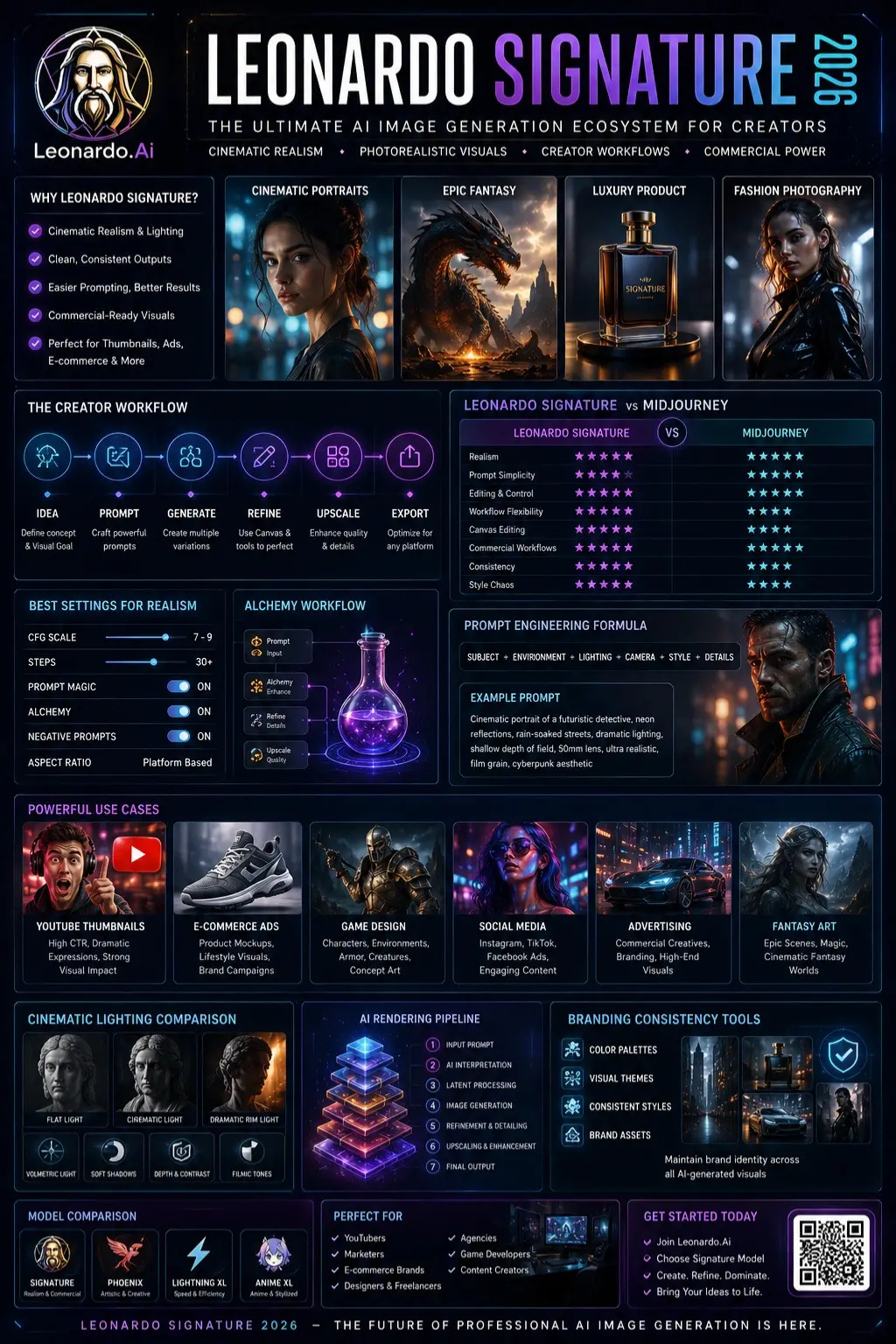
| Model | Best For | Speed | Realism | Creativity |
| Signature | Realistic commercial visuals | Medium | Excellent | High |
| Phoenix | Artistic experimentation | Medium | High | Very High |
| Lightning XL | Fast generation | Very Fast | Medium | Medium |
| Anime XL | Anime artwork | Fast | Stylized | High |
| Community Models | Niche styles | Varies | Varies | Varies |
Signature vs Phoenix
Signature
Best for:
- realistic faces
- thumbnails
- advertising
- product visuals
Phoenix
Better for:
- abstract concepts
- surreal art
- experimental aesthetics
Signature is generally more commercially reliable.
Signature vs Lightning XL
Lightning XL focuses on speed.
Signature focuses on quality.
If your workflow prioritizes:
- realism
- details
- premium textures
Signature usually wins.
Signature vs Anime XL
Anime XL specializes in stylized anime rendering.
Signature performs better for:
- realism
- cinematic portraits
- commercial branding visuals
Leonardo Signature vs Midjourney
This is one of the most searched comparison topics.
Here’s the practical breakdown.
| Feature | Leonardo Signature | Midjourney |
| Realism | Excellent | Excellent |
| Prompt Simplicity | Easier | Moderate |
| Editing Tools | Strong | Limited |
| Workflow Control | High | Medium |
| Canvas Editing | Yes | Limited |
| Commercial Workflows | Excellent | Excellent |
| Style Chaos | Lower | Higher |
| Consistency | Better | Moderate |
Where Leonardo Signature Wins
Leonardo excels at:
- workflow integration
- Canvas editing
- image refinement
- creator pipelines
- commercial consistency
Where Midjourney Wins
Midjourney often produces:
- more artistic compositions
- more imaginative scenes
- stronger stylization
However, it can also feel less controllable for commercial production workflows.
Core Features of Leonardo Signature
Photorealism
Signature specializes in:
- realistic skin textures
- natural lighting
- detailed materials
- believable environments
Cinematic Lighting
The model handles:
- volumetric light
- dramatic shadows
- filmic contrast
- depth effects
extremely well.
Prompt Adherence
Signature follows prompts more accurately than many older SDXL-style systems.
That helps creators achieve predictable results.
Texture Fidelity
Strong texture rendering improves:
- clothing details
- metal surfaces
- architecture
- product photography
Commercial-Ready Visuals
This is one of Signature’s strongest advantages.
Generated images often already look optimized for:
- ads
- social media
- thumbnails
- ecommerce
with minimal editing.
Best Leonardo Signature Settings
Proper settings dramatically improve output quality.
Best Settings for Realism
| Setting | Recommended |
| CFG Scale | 7–9 |
| Prompt Magic | ON |
| Alchemy | ON |
| Steps | 30+ |
| Aspect Ratio | Depends on the platform |
| Negative Prompts | Enabled |
How to Write Better Leonardo Signature Prompts
Prompt quality matters enormously.
A strong structure improves consistency.
Recommended Prompt Formula
Subject + Environment + Lighting + Camera + Style + Details
Example Prompt
cinematic portrait of a warrior queen, dramatic rim lighting, ultra realistic skin texture, shallow depth of field, 85mm lens, volumetric fog, film grain, dark fantasy aesthetic
Why This Works
The prompt clearly defines:
- subject
- atmosphere
- lighting
- camera style
- visual tone
This helps Signature create more coherent results.
Leonardo Signature Prompt Examples
Cinematic Portrait Prompt
ultra realistic cinematic portrait of a futuristic detective, neon reflections, rain-soaked streets, dramatic lighting, shallow depth of field, 50mm lens
YouTube Thumbnail Prompt
shocked YouTuber expression, dramatic lighting, glowing background, cinematic contrast, ultra detailed face, vibrant thumbnail composition
Product Photography Prompt
luxury perfume bottle on reflective black surface, cinematic studio lighting, ultra-realistic glass reflections, premium advertising aesthetic
Fantasy Art Prompt
ancient dragon emerging from volcanic mountains, cinematic atmosphere, epic fantasy lighting, ultra detailed textures
Fashion Photography Prompt
editorial fashion shoot, luxury clothing, cinematic studio lighting, Vogue-style photography, realistic skin texture
Leonardo Signature for YouTube Thumbnails
This is one of the biggest creator opportunities.
Leonardo Signature performs extremely well for:
- emotional faces
- dramatic contrast
- visual hierarchy
- exaggerated realism
- attention-grabbing compositions
Why Thumbnail Designers Like It
The model naturally emphasizes:
- strong facial expressions
- cinematic lighting
- high visual clarity
That improves click-through rates.
Recommended Workflow
- Generate facial expressions
- Increase Contrast
- Use Canvas editing
- Add branding overlays
- Upscale for export
Leonardo Signature for E-commerce Brands
E-commerce creators increasingly use Signature for:
- AI product mockups
- lifestyle ads
- social creatives
- fashion visuals
- branded campaigns
Major Benefits
Faster Creative Production
Brands can generate multiple concepts rapidly.
Lower Production Costs
AI-generated product visuals reduce expensive photo shoots.
Better Creative Testing
Marketers can test many advertising styles quickly.
Leonardo Signature for Game Designers
Leonardo originally gained strong traction among game creators.
Signature works well for:
- armor rendering
- fantasy characters
- environment design
- creature concepts
- sci-fi aesthetics
Why Game Artists Like It
The model balances:
- realism
- detail density
- cinematic mood
- texture consistency
very effectively.
Leonardo Signature Workflow for Professionals
Here’s a practical creator workflow.
Step 1 — Idea Generation
Define:
- target audience
- visual tone
- platform requirements
Step 2 — Prompt Drafting
Build prompts using:
- lighting
- camera style
- mood
- textures
- composition
Step 3 — Generate Variations
Create multiple outputs before selecting finalists.
Step 4 — Upscale
Enhance sharpness and export quality.
Step 5 — Canvas Editing
Use Leonardo Canvas to:
- fix details
- remove errors
- improve compositions
Step 6 — Branding Consistency
Apply:
- color consistency
- visual themes
- repeatable aesthetics
Step 7 — Final Export
Optimize based on platform requirements.
Is Leonardo Signature Worth It in 2026?
For many creators, yes.
Especially if you prioritize:
- realism
- consistency
- commercial visuals
- thumbnail creation
- advertising creatives
Best For
- YouTubers
- marketers
- ecommerce brands
- freelancers
- agencies
- AI designers
Not Ideal For
- chaotic abstract art
- extreme stylization
- surreal experimental aesthetics
Other models may work better for those goals.
Leonardo Signature Pricing & Access
Leonardo.AI uses a token-based system.
Available Access Levels
| Plan | Best For |
| Free Plan | Beginners |
| Paid Creator Plans | Frequent users |
| Professional Plans | Agencies & teams |
Free Plan
Good for experimentation, but limited by daily credits.
Paid Plans
Paid tiers unlock:
- higher generation limits
- faster processing
- premium tools
- advanced workflows
Commercial Usage
Always verify commercial licensing terms directly from Leonardo’s official documentation before client work.
Best Alternatives to Leonardo Signature
| Tool | Best Strength |
| Midjourney | Artistic visuals |
| Adobe Firefly | Commercial integration |
| OpenAI DALL·E | Simplicity |
| Stability AI Stable Diffusion | Customization |
| Black Forest Labs FLUX | High realism |
| Ideogram | Text rendering |
Privacy, Safety & Commercial Use
Businesses should carefully evaluate:
- data policies
- commercial licensing
- copyright risks
- client confidentiality
before deploying AI-generated content at scale.
Always review official documentation for updates.
Future AI Image Trends in 2026
AI image generation is moving toward:
- realtime editing
- multi-image consistency
- AI video integration
- interactive workflows
- creator-focused production pipelines
Who Should Use Leonardo Signature?
Ideal Users
- YouTubers
- social media creators
- E-commerce Marketers
- AI designers
- freelancers
- advertising agencies
- content creators
Who Should Avoid It?
You may prefer other models if you want:
- highly abstract art
- surreal experimentation
- heavily stylized anime aesthetics
Realistic Expectations & Limitations.
Common limitations include:
- occasional anatomy errors
- inconsistent hands
- prompt sensitivity
- limited originality in some outputs
Human editing still matters for professional work.
People Also Ask
A: Leonardo Signature is available inside Leonardo.AI’s ecosystem, including limited free access through token-based usage systems.
A: It depends on your goals. Leonardo Signature is often better for structured commercial workflows, while Midjourney excels at artistic creativity and stylized aesthetics.
A: Most creators get strong results using CFG 7–9, Prompt Magic enabled, Alchemy enabled, and 30+ generation steps.
A: Yes. Realistic portrait generation is one of the model’s strongest capabilities, especially with cinematic lighting prompts.
Absolutely. Many creators use it for dramatic facial expressions, cinematic lighting, and high-contrast compositions that improve click-through rates.
Conclusion
In 2026, has become one of the best AI image models for creators who want realistic, Cinematic, and commercially polished visuals. Its strong realism, easier prompting, and creator-focused workflows make it especially useful for YouTubers, marketers, ecommerce brands, designers, and agencies.
While models like Midjourney still dominate artistic experimentation, it stands out for practical content production, consistency, and professional workflows.
For creators who want high-quality AI visuals with less complexity, it is easily one of the strongest AI creative tools available today.
For creators who want professional-looking visuals without fighting overly complex workflows, it is absolutely worth serious attention.
If you want deeper AI creator guides, workflow breakdowns, and professional AI tool comparisons, explore more resources on ImageToolsAI.com.