Introduction
What makes Stable Diffusion 3 stand out? It’s a major leap forward in how machines create images using artificial intelligence. Developed by Stability AI, this version actually grasps what words mean when forming pictures. Instead of guessing, it lines up visuals much closer to descriptions. Text inside images now appears sharp, natural, and correctly spelled – something past versions often messed up.
Ever tried making images with tools such as DALL·E or Midjourney? Then you’re familiar with the main headache – prompts that don’t hold up, bodies drawn wrong, outcomes you can’t foresee. Sometimes it feels like rolling dice just to get one decent picture.
Fixing this is what Stable Diffusion 3 sets out to do.
This guide covers what happens inside SD3, moving through actual prompt setups. One thing leads to another – like differences with SDXL, where it falls short, and then how experts actually apply it.
This isn’t only about definitions. Picture a full roadmap for making images with artificial intelligence – built for those creating, designing, or promoting by 2026.
What Is Stable Diffusion 3?
Stable Diffusion 3 is a next-generation text-to-image diffusion model designed to generate highly detailed and context-aware images from natural language prompts.
Unlike older versions, SD3 uses a Multimodal Diffusion Transformer (MMDiT) architecture, which allows it to process text and image features more intelligently together.
In simple words:
It understands what you mean more accurately—and turns it into a visually correct image.
Key improvements:
- Better prompt comprehension
- More accurate object placement
- Improved text rendering inside images
- Stronger scene consistency
How It Works
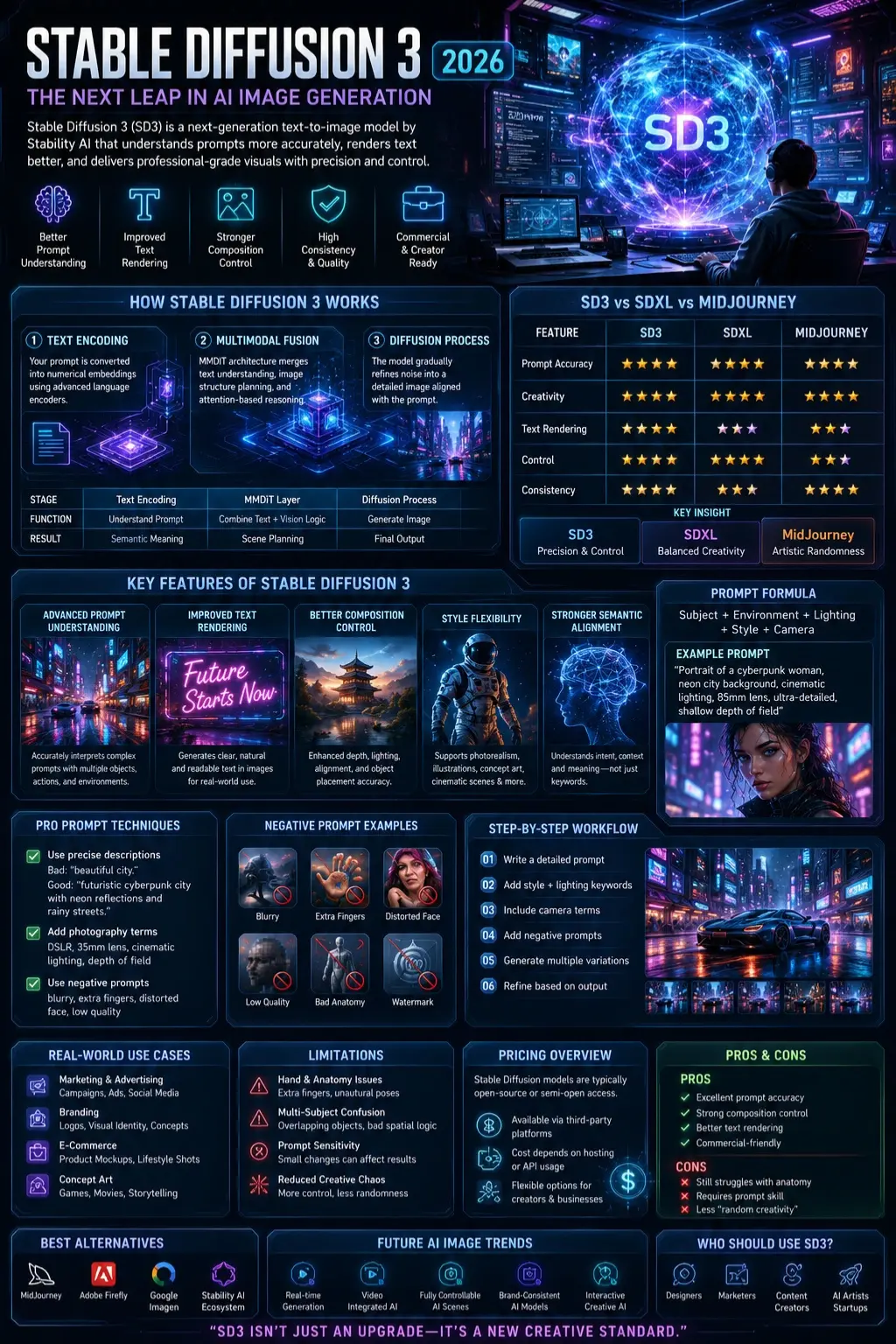
Stable Diffusion 3 works through three major stages:
Text Encoding
Your prompt is converted into numerical embeddings using advanced language encoders.
Multimodal Fusion
This is the biggest innovation.
It merges:
- Text understanding
- Image structure planning
- Attention-based reasoning
Diffusion Image Generation
The model gradually refines noise into a detailed image aligned with the prompt.
Simple Workflow Table
| Stage | Function | Result |
| Text Encoding | Understand prompt | Semantic meaning |
| MMDiT Layer | Combine text + vision logic | Scene planning |
| Diffusion Process | Generate image | Final output |
Why Stable Diffusion 3 Matters in 2026
AI image generation is no longer about “pretty pictures”—it’s about precision, control, and commercial usability.
SD3 matters because it:
- Improves prompt reliability
- Reduces visual randomness
- Enables better commercial design workflows
- Competes directly with closed systems like MidJourney-style models
This shift makes SD3 a professional-grade creative tool, not just an experimental AI toy.
✨ Key Features of Stable Diffusion 3
Advanced Prompt Understanding
SD3 interprets complex prompts with multiple objects and actions more accurately.
Example:
“A futuristic car parked in front of a neon Tokyo street during rain”
Older models often distort relationships. SD3 maintains structure better.
Improved Text Rendering
One of SD3’s strongest upgrades is readable text inside images.
Useful for:
- Posters
- Ads
- UI mockups
- Branding visuals
Better Composition Control
SD3 improves:
- Depth accuracy
- Lighting Consistency
- Object alignment
Style Flexibility
It can generate:
- Photorealism
- Cinematic scenes
- Concept art
- Illustrations
Stronger Semantic Alignment
The model better understands intent, not just keywords.
Stable Diffusion 3 vs SDXL vs MidJourney
| Feature | SD3 | SDXL | MidJourney |
| Prompt Accuracy | ⭐⭐⭐⭐⭐ | ⭐⭐⭐⭐ | ⭐⭐⭐⭐ |
| Creativity | ⭐⭐⭐⭐ | ⭐⭐⭐⭐⭐ | ⭐⭐⭐⭐⭐ |
| Text Rendering | ⭐⭐⭐⭐⭐ | ⭐⭐ | ⭐⭐⭐ |
| Control | ⭐⭐⭐⭐⭐ | ⭐⭐⭐⭐ | ⭐⭐⭐ |
| Consistency | ⭐⭐⭐⭐ | ⭐⭐⭐ | ⭐⭐⭐⭐⭐ |
Key Insight:
- SD3 = Precision & Control
- SDXL = Balanced creativity
- MidJourney = Artistic randomness
Limitations of Stable Diffusion 3
Even advanced models are not perfect.
Hand & Anatomy Issues
- Extra fingers
- Distorted poses
- Unnatural joints
Multi-Subject Confusion
- Overlapping objects
- Incorrect spatial logic
Prompt Sensitivity
Small wording changes can drastically change the output.
Reduced Creative Chaos
Some users feel outputs are more “controlled” and less artistic.
How to Write Perfect Stable Diffusion 3 Prompts
Formula:
Subject + Environment + Lighting + Style + Camera
Example:
“Portrait of a cyberpunk woman, neon city background, cinematic lighting, 85mm lens, ultra-detailed, shallow depth of field”
Pro Prompt Techniques
✔ Use precise descriptions
Bad: “beautiful city.”
Good: “futuristic cyberpunk city with neon reflections and rainy streets.”
✔ Add photography terms
- DSLR
- 35mm lens
- cinematic lighting
- depth of field
✔ Use negative prompts
- blurry
- extra fingers
- distorted face
- low quality
Real-World Use Cases
Marketing & Advertising
- Product visuals
- Social media creatives
- Campaign designs
Branding
- Logo concepts
- Visual identity ideas
E-Commerce
- Product Mockups
- Lifestyle images
Concept Art
- Games
- Movies
Benefits for Businesses & Creators
- Faster content creation
- Reduced design costs
- Scalable visual production
- High-quality marketing assets
- Improved creative testing
Step-by-Step How to Use SD3
- Write a detailed prompt
- Add style + lighting keywords
- Include camera terms
- Add negative prompts
- Generate multiple variations
- Refine based on output
Pricing Overview
Stable Diffusion models are typically:
- Open-source or semi-open access
- Available via third-party platforms
- Cost depends on hosting or API usage
Pros & Cons
Pros
- Excellent prompt accuracy
- Strong composition control
- Better text rendering
- Commercial-friendly
Cons
- Still struggles with anatomy
- Requires prompt skill
- Less “random creativity.”
Best Alternatives
- Midjourney
- Stability AI tools ecosystem
- Adobe Firefly
- Google Imagen
Tips to Get the Best Results
- Use structured prompts
- Avoid vague adjectives
- Iterate gradually
- Use reference styles
- Combine SD3 with ControlNet workflows
Common Mistakes
- Overloading prompts
- Using unclear subjects
- Ignoring lighting details
- Not using negative prompts
Expert Prompt Templates
Template 1:
“[Subject], [Environment], cinematic lighting, ultra-detailed, 4K, DSLR, professional photography”
Template 2:
“[Character], [Action], [Scene], dramatic lighting, cinematic atmosphere.”
Future AI Image Trends
- Real-time image generation
- Video-integrated diffusion models
- Fully controllable AI scenes
- Brand-consistent AI identity models
- Interactive creative AI systems
Who Should Use Stable Diffusion 3
- Designers
- Marketers
- Content creators
- AI artists
- Startups
Who Should Avoid It
- Users expecting one-click perfect results
- Non-technical beginners without a prompt learning interest
People Also Ask
A: Yes, SD3 improves prompt accuracy and text rendering, but SDXL still offers more creative flexibility in some cases.
A: Yes, SD3 significantly improves text generation inside images compared to earlier models.
A: It depends on platform usage. Core models are often open, but hosting may cost money.
A: SD3 focuses on control and precision, while MidJourney focuses on artistic style and creativity.
A: Because diffusion models still struggle with complex spatial reasoning and human anatomy.
Featured Image Prompt
“Futuristic AI image generation lab, glowing neural networks, digital art workstation, Stable Diffusion style visualization, cinematic lighting, ultra-detailed, sci-fi interface”
Social Media Captions
- “Stable Diffusion 3 is changing AI art forever—here’s why creators are switching.”
- “SD3 vs SDXL: The biggest AI image upgrade you need to understand in 2026.”
- “This AI model can finally understand your prompts like a human designer.”
Pinterest Title
Stable Diffusion 3 Explained: Features, Prompts & AI Art Guide (2026)
YouTube Title
Stable Diffusion 3 Explained in 10 Minutes | SD3 vs SDXL Full Guide 2026
AI Overview Snippet
Stable Diffusion 3 is an advanced text-to-image AI model by Stability AI that improves prompt understanding, image composition, and text rendering compared to SDXL, making it more accurate for professional design workflows.
CONCLUSION
Out of nowhere, Stable Diffusion 3 shifts how AI creates images – precision takes priority. Structure matters more now, not just unpredictable results. Instead of chaos, there’s clarity. A professional needs to shape their design. Accuracy steps forward where chance once ruled.
Perfect for designers, yet just as useful for marketers aiming at precise visuals. Quality matters most when AI creators need consistency – this delivers without extra steps.
Yet getting the most out of it depends on skillfully crafted prompts.
Curious about different AI tools? Head over to ImageToolsAI.com – find detailed walkthroughs, side-by-side breakdowns, because fresh insights drop there regularly. That site keeps expanding its library, so new comparisons appear without warning. For anyone tracking how prompt methods evolve, it’s worth checking in now, then later.











