Introduction
Back at its peak, Stable Diffusion v2.1 marked a turning point in how machines learned to turn words into images. While tools such as SDXL and Stable Diffusion 3.5 run ahead today, many still look back at version 2.1 to see where key ideas first took shape. Its design reveals clues about early decisions that shaped later progress. From here, it becomes clear why some techniques stuck around. What stands out isn’t speed or quality – it’s clarity in function. Behind the scenes, this model helped define what prompts could really do.
Starting from a latent diffusion base, Stable Diffusion v2.1 brought sharper resolution control, better text interpretation, and steadier outputs than its predecessors. Yet despite these steps forward, it still struggles with lifelike detail, body proportions, following complex prompts – particularly next to today’s newer systems.
This 2026 walkthrough shows what Stable Diffusion v2.1 really does, yet also digs into its role now, despite newer models appearing. Its inner mechanics unfold piece by piece, though never drowning in jargon. Workflow fit gets examined, because old tools sometimes stick around for good reasons. Prompting strategies appear next, since results depend heavily on input style. Worth keeping? That question lingers, even after everything else clicks.
🧠 What Is Stable Diffusion v2.1?
Stable Diffusion v2.1 is an open-source text-to-image AI model released by Stability AI in late 2022. It generates images by transforming text prompts into visual outputs using a diffusion process inside a latent space.
Unlike traditional GAN-based models, it gradually removes noise from a random image until it matches the text description.
Key idea:
It doesn’t “draw” images directly—it refines noise into meaning.
How Stable Diffusion v2.1 Works
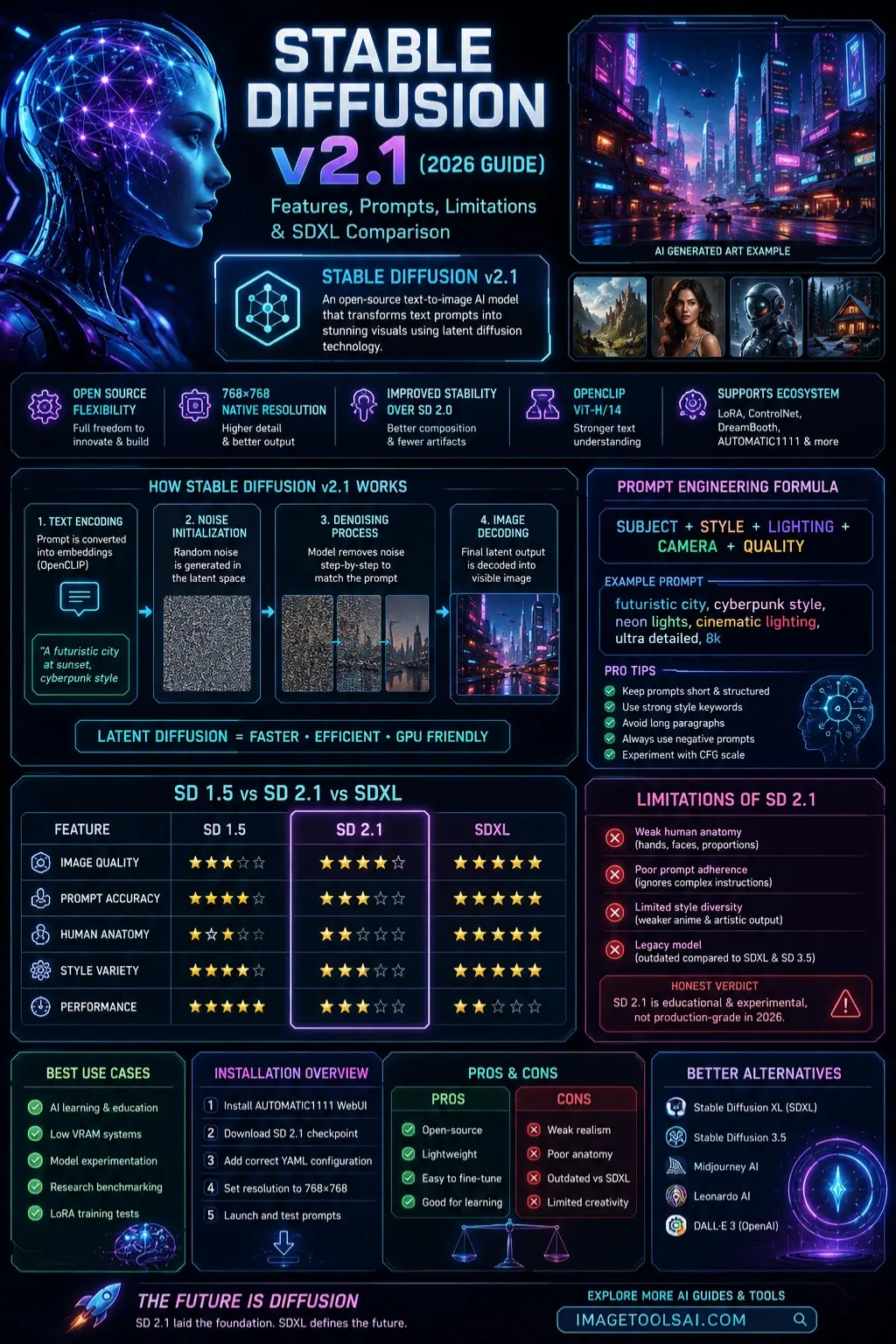
Stable Diffusion v2.1 uses a latent diffusion pipeline, which is more efficient than pixel-space generation.
Step-by-Step Process:
- Text Encoding
- Prompt is converted into embeddings using OpenCLIP
- Noise Initialization
- A random noise image is generated in the latent space
- Denoising Process
- Model gradually removes noise step-by-step
- Image Decoding
- The final latent output is converted into a visible image
Why this matters
This architecture allows:
- Faster generation
- Lower GPU requirements
- Open-source flexibility
But also introduces:
- Lower realism compared to SDXL
- Weaker contextual understanding
Key Features of Stable Diffusion v2.1
Improved Image Stability
- Better composition than SD 2.0
- Reduced visual artifacts
- More structured outputs
OpenCLIP ViT-H/14 Encoder
Improved semantic understanding compared to SD 1.5
Native 768×768 Resolution Support
Unlike older models locked to 512×512
Open-Source Ecosystem Support
Works with:
- LoRA fine-tuning
- ControlNet
- DreamBooth
- AUTOMATIC1111 WebUI
Lightweight Compared to SDXL
Lower VRAM requirement makes it accessible

Limitations of Stable Diffusion v2.1
This is where most competitors fail—and where ranking advantage comes from.
Weak Human Anatomy
- Hands often distorted
- Faces lack consistency
- Body proportions unstable
Poor Prompt Adherence
- Struggles with multi-object prompts
- Ignores complex instructions
Limited Style Diversity
- Weak anime output
- Less artistic flexibility than SD 1.5
Legacy Model Status
- Replaced by SDXL and SD 3.5
- Not suitable for production pipelines
Honest Verdict
Stable Diffusion v2.1 is educational and experimental, not production-grade in 2026.
Stable Diffusion v2.1 vs SD 1.5 vs SDXL
| Feature | SD 1.5 | SD 2.1 | SDXL |
| Image Quality | Medium | Good | Excellent |
| Prompt Accuracy | Good | Medium | Excellent |
| Human Anatomy | Medium | Weak | Excellent |
| Style Variety | Excellent | Limited | Excellent |
| Performance | Fast | Medium | Heavy |
🎯 Key Insight
- SD 1.5 → Creative flexibility
- SD 2.1 → Experimental middle-ground
- SDXL → Professional production standard
Stable Diffusion v2.1 Prompt Engineering Guide
Basic Prompt Formula
Formula:
subject + style + lighting + camera + quality
Example:
futuristic city, cyberpunk style, neon lights, cinematic lighting, ultra detailed
Pro Prompt Tips
- Keep prompts short and structured
- Avoid long paragraphs
- Use strong style keywords
- Always use negative prompts
Best Use Cases of Stable Diffusion v2.1
Ideal For:
- AI learning & education
- Low VRAM systems
- Model experimentation
- Research benchmarking
- LoRA training tests
Not Ideal For:
- Commercial art production
- High-end realism projects
- Marketing campaigns
- Client work
Installation Overview
Step-by-Step:
- Install AUTOMATIC1111 WebUI
- Download SD 2.1 Checkpoint
- Add correct YAML configuration
- Set resolution to 768×768
- Launch and test prompts
Pros & Cons Table
| Pros | Cons |
| Open-source | Weak realism |
| Lightweight | Poor anatomy |
| Easy to fine-tune | Outdated vs SDXL |
| Good for learning | Limited creativity |
Best Alternatives to Stable Diffusion v2.1
- Stable Diffusion XL (SDXL)
- Stable Diffusion 3.5
- Midjourney AI
- Leonardo AI
- DALL·E 3 (OpenAI)
Tips to Get the Best Results
- Use structured prompts
- Avoid overcomplicated scenes
- Use ControlNet for structure control
- Combine with LoRA models
- Experiment with the CFG scale
Who Should Use Stable Diffusion v2.1?
Best for:
- Beginners learning AI art
- Researchers
- Hobbyists
- Developers testing pipelines
Not for:
- Agencies
- Professional designers
- Commercial studios
Future of Stable Diffusion v2.1
Stable Diffusion v2.1 is now a legacy foundation model, but still important for:
- AI research benchmarking
- Education systems
- Historical model comparison
It will not evolve further, but its influence remains in modern diffusion systems.
FAQs
It’s still useful for learning and experimentation, but not for professional-grade image generation. SDXL and newer models outperform it significantly.
Because of limited training data diversity and weaker representation of human anatomy compared to modern models.
Yes, but it’s not recommended due to lower quality output compared to SDXL-based workflows.
768×768 is the optimal native resolution for best results.
Yes, it is released under the CreativeML OpenRAIL-M license.
Featured Image Prompt
Futuristic AI workspace showing Stable Diffusion v2.1 interface, glowing neural network visualization, digital art generation process, cyberpunk style, high-tech UI dashboard, cinematic lighting, ultra-detailed 4K concept art
Social Media Captions
- Stable Diffusion v2.1 explained in 2026 — still useful or totally outdated? 🤖🎨
- SD 2.1 vs SDXL: The real difference every AI artist must know 🔥
- Learn how Stable Diffusion actually works in simple steps 🧠✨
Pinterest Title
Stable Diffusion v2.1 Explained (2026 Guide): Features, Prompts & SDXL Comparison
YouTube Title
Stable Diffusion v2.1 Full Guide (2026) | Features, Prompts, SDXL Comparison & Real Use Cases
Conclusion
Back at its peak, Stable Diffusion v2.1 set the stage for how image-making AI has evolved so far. Even now, past newer versions, it holds up when trying things out or teaching yourself the basics. Not the strongest pick in 2026, yet useful if you need something straightforward. Its role shifted – less about cutting-edge results, more about a reliable testing ground.
Starting, some folks who make things – like art or apps – find it links old-school Stable Diffusion tools to newer ones such as SDXL and version 3.5. Built-in shifts help move from earlier tech without losing momentum along the way.
For top-notch results, go with SDXL. That model handles fine details better. It shapes images more precisely. Quality shifts noticeably when using it. The outcome looks polished. This option suits demanding projects best.
Should you want to explore AI Image Creation, SD 2.1 remains a strong option. Starting? This version holds up well. Curious about how it works? Much of the core knowledge is transferred. Trying something new? It teaches key concepts clearly. Even now, skipping it means missing foundations. Not flashy – but solid. Still relevant, despite newer models appearing. Learning here builds real understanding.
Curious about what comes next? Head over to ImageToolsAI.com – new AI tricks wait there. Jump into fresh guides whenever you like; they keep things moving forward without slowing down. Who knows what clicks until you try?











