Introduction
Midjourney access has changed significantly in recent years. Earlier, users could only generate AI images through Discord commands, but now the platform offers browser dashboards, web-based image creation, gallery management, subscriptions, billing controls, and advanced creative workflows.
Despite these improvements, many users still face login issues, such as:
- Discord authorization errors
- Login redirect loops
- Missing subscriptions
- Wrong Discord account connections
- Blank Dashboards
- Session expiration problems
- Mobile sign-in conflicts
- OAuth verification failures
Many existing tutorials are outdated because they focus only on the old Discord system and ignore the newer browser-based Midjourney experience.
This Midjourney Login Guide 2026 explains everything you need to know about:
- Midjourney sign-in methods
- Web login access
- Discord authentication
- Mobile login workflows
- Troubleshooting fixes
- Subscription verification
- Account security tips
Whether you are a beginner, designer, marketer, student, freelancer, or content creator, this guide will help you understand the modern Midjourney login system in simple and easy language.
What Is Midjourney Login?
Midjourney Login is the authentication framework that allows users to access the Midjourney AI image generation platform. Unlike conventional websites that depend entirely on usernames and passwords, Midjourney primarily relies on third-party authorization technologies such as:
- Discord Login
- Google Authentication
- OAuth verification systems
- Browser session management
- Cookie-based authentication
When users authenticate successfully, Midjourney connects their identity to several platform services, including:
- AI image generation tools
- Prompt history libraries
- Web galleries
- Subscription plans
- Billing dashboards
- Community channels
- Collaboration systems
- Creative workflows
In 2026, Midjourney supports multiple login environments:
| Login System | Purpose |
| Discord Login | Complete platform access |
| Google Login | Easier browser onboarding |
| Web Dashboard | AI image generation & gallery management |
| Mobile Login | Smartphone and tablet access |
The authentication ecosystem has become far more sophisticated than before, especially for creators who prefer browser-based productivity instead of Discord-only operations.
Main Midjourney Login Methods
There are several different ways to access Midjourney in 2026.
Discord Login
Discord authentication remains the most powerful and fully integrated access method.
Benefits of Discord Login
- Complete Midjourney functionality
- Faster server synchronization
- AI generation queue access
- Prompt command workflows
- Community participation
- Subscription linking
- Bot interaction systems
Best For
- Advanced users
- Designers
- Digital artists
- Professional creators
- Community members
Discord still acts as the backbone of many Midjourney systems, even though the browser dashboard has expanded significantly.
Google Login
Google authentication now provides a simplified onboarding experience for browser-focused users.
Benefits
- Faster sign-in process
- Cleaner authentication flow
- Better smartphone usability
- Easier browser access
- Improved onboarding experience
Limitations
Some advanced Midjourney systems still require Discord authorization for complete functionality.
Midjourney Web Login
The Midjourney browser dashboard has become one of the platform’s most important features.
Users can now:
- Generate AI images directly in the browser
- Organize Creative Galleries
- Explore prompt history
- Edit artwork
- Manage subscriptions
- Browse community showcases
- Access account settings
This browser-first workflow is becoming increasingly popular among agencies, brands, designers, and enterprise-level creative teams.
Mobile Browser Login
Midjourney also works effectively on smartphones and tablets.
Supported Devices
- Android phones
- iPhones
- Tablets
- Mobile browsers
Recommended Browsers
| Browser | Recommended |
| Chrome | Yes |
| Safari | Yes |
| Edge Mobile | Yes |
| Firefox Mobile | Moderate |
Mobile authentication has improved substantially in 2026, although some OAuth conflicts still occur occasionally.
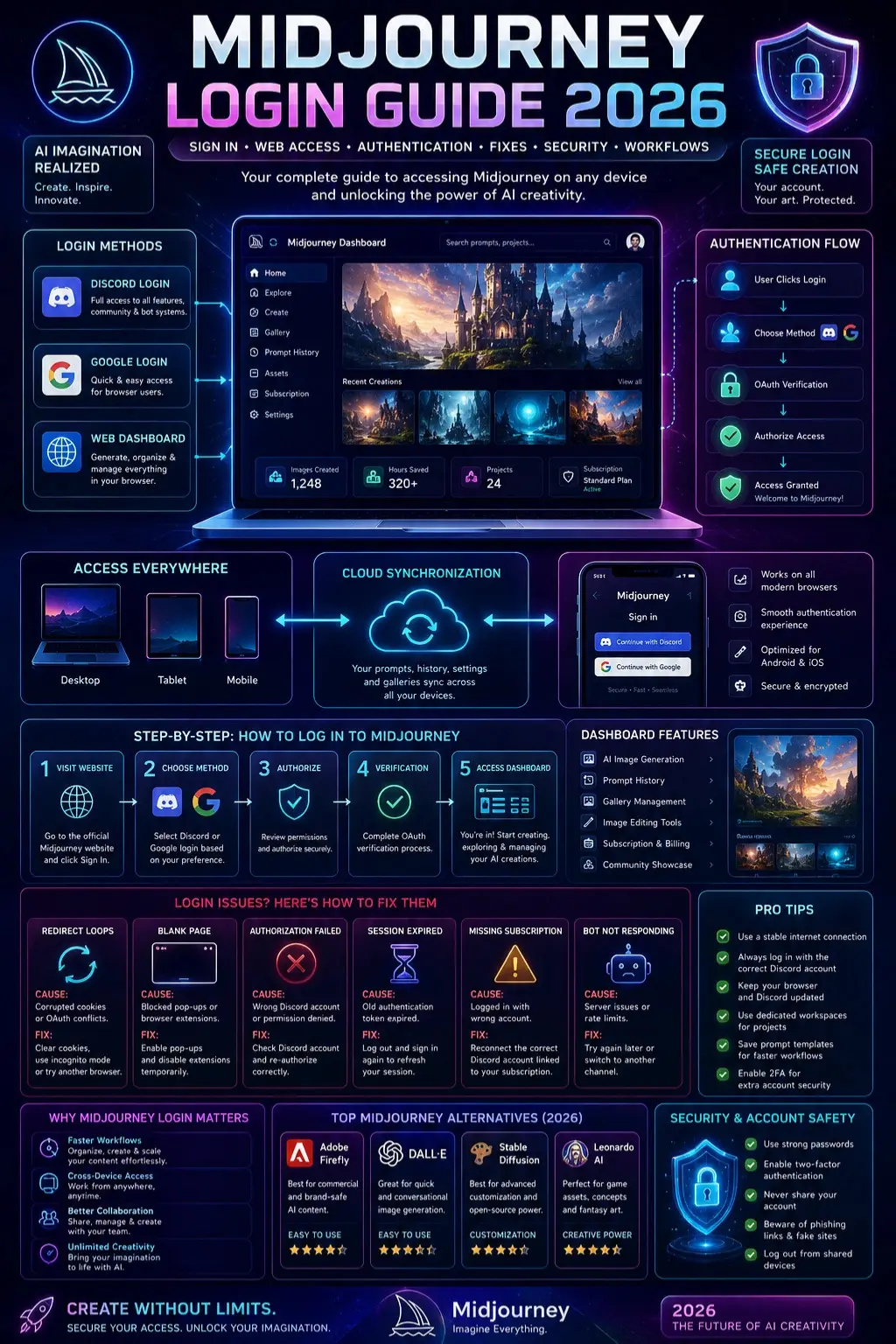
Step-by-Step Guide: How to Log in to Midjourney
Visit the Official Midjourney Website
Go to the official Midjourney homepage and locate the “Sign In” button.
For Best Results
- Use Chrome, Safari, Edge, or Firefox
- Enable browser cookies
- Allow popups
- Disable aggressive privacy blockers temporarily
- Maintain a stable internet connection
Choose Your Login Method
You will usually see:
- Log in with Discord
- Log in with Google
Which Option Should You Choose?
| Login Method | Best For |
| Discord Login | Complete access |
| Google Login | Simpler browser access |
| Web Dashboard | Browser workflows |
| Mobile Browser | Smartphone access |
Authorize Midjourney
If you select Discord authentication:
- Confirm your Discord profile
- Review permissions carefully
- Click “Authorize”
- Return to Midjourney automatically
Important Warning
Many users accidentally authenticate the wrong Discord account.
This often causes:
- Empty galleries
- Missing subscriptions
- Lost prompt history
- Permission failures
- Invisible generations
Always verify the correct Discord account before granting authorization.
Access the Midjourney Dashboard
After successful authentication, users can access:
- AI image generators
- Prompt archives
- Billing settings
- Subscription dashboards
- Community galleries
- Project organization systems
- Creative management tools
Features Available on the Web Dashboard
| Feature | Web Support |
| AI Image Generation | Yes |
| Prompt History | Yes |
| Subscription Management | Yes |
| Gallery Browsing | Yes |
| Community Showcase | Yes |
| Image Editing | Yes |
| Discord Access | Partial |
Midjourney Login on Mobile
Mobile support has improved considerably in 2026.
Users can now access Midjourney using smartphone browsers more reliably than ever before.
Mobile Login Workflow
- Open the Midjourney website
- Tap “Sign In”
- Complete Google or Discord authentication
- Return to the browser
- Access your dashboard
Common Mobile Login Problems
Redirect Loops
Usually caused by corrupted cookies or browser conflicts.
Blank Screens
Often triggered by blocked pop-ups.
Authorization Failures
Frequently caused by conflicting Discord sessions.
Browser Compatibility Problems
Older mobile browsers may struggle with OAuth systems.
Mobile Login Fix Tips
- Clear browser cache
- Update the browser
- Enable popups
- Restart Discord
- Use private browsing mode
- Sign out and sign back in
Midjourney Login Not Working
Login problems are extremely common. Here are the most effective solutions.
Clear Browser Cache and Cookies
Old sessions frequently create authentication conflicts.
Delete:
- Cookies
- Cached files
- Saved sessions
- Site permissions
Then restart your browser completely.
Use Incognito or Private Browsing Mode
Private browsing bypasses many session-related problems.
Very effective for:
- Redirect loops
- OAuth conflicts
- Multi-account confusion
- Broken sessions
Verify the Correct Discord Account
Incorrect account authorization is one of the biggest causes of Midjourney access problems.
Symptoms
- Empty galleries
- Missing subscriptions
- No prompt history
- Permission denied messages
Disable Browser Extensions
Certain browser extensions interfere with:
- OAuth redirects
- Authentication windows
- Browser cookies
- Session verification
Temporarily Disable
- Ad blockers
- Privacy tools
- VPN extensions
- Script blockers
Check Midjourney Server Status
Sometimes the issue is caused by Midjourney itself.
Server outages may create:
- Failed sign-ins
- Slow-loading dashboards
- Broken authorization
- AI generation delays
Log out of Discord Completely
Discord session conflicts are extremely common.
Steps
- Logout from Discord
- Close browser tabs
- Restart the browser
- Sign in to the correct Discord profile
- Retry Midjourney login
Midjourney Login Errors Explained
| Error | Cause | Solution |
| Authorization Failed | Wrong Discord account | Re-login correctly |
| Login Loop | Corrupted cookies | Clear cache |
| Blank Page | Blocked redirects | Enable popups |
| Session Expired | Old authentication token | Sign in again |
| Missing Subscription | Incorrect profile | Reconnect account |
| No Permission | Wrong account | Verify Discord |
| Bot Not Responding | Server issue | Change channel |
Features That Still Require Discord
| Feature | Discord Required |
| Community Channels | Yes |
| Slash Commands | Yes |
| Bot Workflows | Yes |
| Queue Systems | Yes |
| Some Generation Tools | Partial |
Midjourney is slowly becoming more browser-focused, but Discord integration remains deeply connected to the platform infrastructure.
Benefits of Midjourney Login for Creators & Businesses
Midjourney is now widely used by:
- Designers
- Agencies
- Bloggers
- Freelancers
- Students
- E-commerce stores
- Social media creators
- Marketing teams
Faster Creative Workflows
The browser app simplifies AI image organization and content generation.
Cross-Device Flexibility
Users can work from:
- Desktop computers
- Laptops
- Tablets
- Smartphones
Better Collaboration
Teams can organize prompt systems more efficiently.
Scalable Content Creation
Businesses can rapidly create:
- Product images
- Advertisement graphics
- Blog banners
- Social media visuals
Strong Creative Freedom
Midjourney supports:
- Cinematic artwork
- Editorial illustrations
- Fantasy environments
- Commercial branding
- Concept design
Tips to Get the Best Midjourney Experience
Use a stable Internet
OAuth authentication systems are sensitive to unstable connections.
Keep Discord Updated
Outdated Discord sessions frequently create login conflicts.
Use Dedicated Workspaces
Professional users should separate:
- Client projects
- AI experiments
- Collaboration systems
Save Prompt Templates
Reusable prompts dramatically improve workflow efficiency.
Best Midjourney Alternatives in 2026
Adobe Firefly
Best for commercial-safe AI workflows.
Pros
- Adobe ecosystem integration
- Commercial-friendly licensing
- Beginner-friendly interface
Cons
- Less artistic flexibility
DALL·E
Best for conversational image generation.
Pros
- ChatGPT integration
- Fast generation
- Easy learning curve
Cons
- Less cinematic control
Stable Diffusion
Best for advanced customization.
Pros
- Open-source flexibility
- Community-trained models
- Deep customization
Cons
- Technical learning curve
Leonardo AI
Best for stylized artwork and game assets.
Pros
- Strong fantasy visuals
- Fast workflows
- Asset generation tools
Cons
- Limited free access
Midjourney vs Alternatives Comparison Table
| Tool | Best For | Ease of Use | Customization | Web Access |
| Midjourney | Cinematic AI Art | Medium | High | Yes |
| Adobe Firefly | Commercial Branding | Easy | Medium | Yes |
| DALL·E | Beginners | Easy | Medium | Yes |
| Stable Diffusion | Advanced Users | Hard | Very High | Partial |
| Leonardo AI | Game Assets | Medium | High | Yes |
Pros and Cons of the Midjourney Login System
Pros
- Multiple authentication methods
- Browser-based workflows
- Cross-device support
- Strong subscription synchronization
- Modern dashboard experience
- Improved web access
Cons
- Discord dependency still exists
- Redirect loops occasionally occur
- Browser extensions may interfere
- Mobile authorization bugs still happen
- Multi-account systems may confuse beginners
FAQs
A: No. Most AI image generation tools require an active paid subscription.
A: Partially. Some browser workflows support Google authentication, but Discord still powers many important systems.
A: This usually happens because of corrupted cookies, expired sessions, or OAuth authentication conflicts.
A: You are most likely logged into the wrong Discord account.
A: Yes, but using separate browser profiles is strongly recommended.
A: Yes. Users can access Midjourney through Android and iOS browsers.
Conclusion
Midjourney Login has evolved greatly in 2026, combining Discord authorization, browser dashboards, mobile access, subscription management, and AI image generation into one connected platform.
However, many users still face issues like:
- Login loops
- OAuth errors
- Wrong Discord accounts
- Missing subscriptions
- Browser conflicts
- Mobile login bugs
Most tutorials only explain basic sign-in steps and ignore advanced troubleshooting solutions.
This guide covers everything you need, including:
- Browser access
- Discord integration
- Mobile login
- Troubleshooting fixes
- Security tips
- Professional workflows
As Midjourney becomes more browser-focused, understanding its login and authentication system is increasingly important for creators, designers, marketers, and businesses using AI-generated content.











