Introduction
By 2026, making images with artificial intelligence has quietly reshaped how digital art comes to life. Instead of hiring graphic artists, many now turn to smart software – especially for things like YouTube covers or posts online. Even big ad projects once handled by people often start with a machine these days. Tools guided by AI have become the unseen hands behind much of what we see.
Ahead of many others, Midjourney stands out. Its reach has grown fast. What sets it apart is how deeply people have integrated it into their work.
Yet a single big problem shows up for plenty of people.
Most people struggle to fully understand how Midjourney Pricing works.
Midjourney doesn’t bill by image count or downloads like most services do. Instead, it tracks how much GPU time you use. That setup can feel unclear at first. People new to it usually look for simple price tags and get tripped up when they find something different instead.
You could be thinking:
- How many images can I realistically generate?
- What is the actual cost per image?
- Which subscription plan is most suitable for my needs?
- Am I overspending or using resources inefficiently?
This guide is designed to eliminate that confusion.
In this comprehensive Midjourney pricing 2026 guide, you will discover:
- How the pricing system truly functions
- Real-world cost per generated image
- The best plan based on your usage profile
- Proven strategies to reduce expenses
- Practical ways to generate income using Midjourney
This guide gives clear direction – no matter if you’re studying, working solo, building something new, or running a company. From confusion to confidence, it helps shape choices based on real understanding.
What is Midjourney Pricing?
Billed each month, Midjourney runs on a membership plan.
This means:
Each month or once a year, you send a payment to keep using the service. The cost shows up again and again on your schedule. Access stays live only if the payments continue. Missing one might pause what you can do there.
Yet one key difference stands out
Each picture made does not come with a fee. Payment isn’t tied to how many visuals appear.
Fees add up when GPUs run tasks. Your wallet covers those computer hours.
Simplified Explanation
- Every time you create an image → GPU resources are consumed
- More detailed or complex prompts → require additional processing time
- Faster rendering speeds → utilize more GPU power
Instead of counting images, Midjourney calculates how much computing time is used to generate them.
This approach provides flexibility but requires users to think in terms of efficiency rather than quantity.
How Midjourney Pricing Works
To clearly understand Midjourney pricing, you need to grasp three fundamental components:
1Fast GPU Hours
Images are generated quickly
- Uses your allocated monthly GPU hours
- Ideal for high-priority or professional work
Example:
3.3 GPU hours ≈ around 200 images
✔ Best suited for:
- Client projects
- Time-sensitive tasks
- High-resolution outputs
Relax Mode
- Available in Standard plan and above
- Allows unlimited image generation
- Operates at a slower processing speed
This is one of the most valuable features.
✔ Best suited for:
- Blog visuals
- Bulk content production
- Creative experimentation
Users can generate thousands of images without incurring additional costs.
Stealth Mode
- Available in Pro and Mega plans
- Keeps generated images private
✔ Best suited for:
- Businesses handling confidential work
- Client-based projects
- Proprietary design workflows
Midjourney Pricing Plans
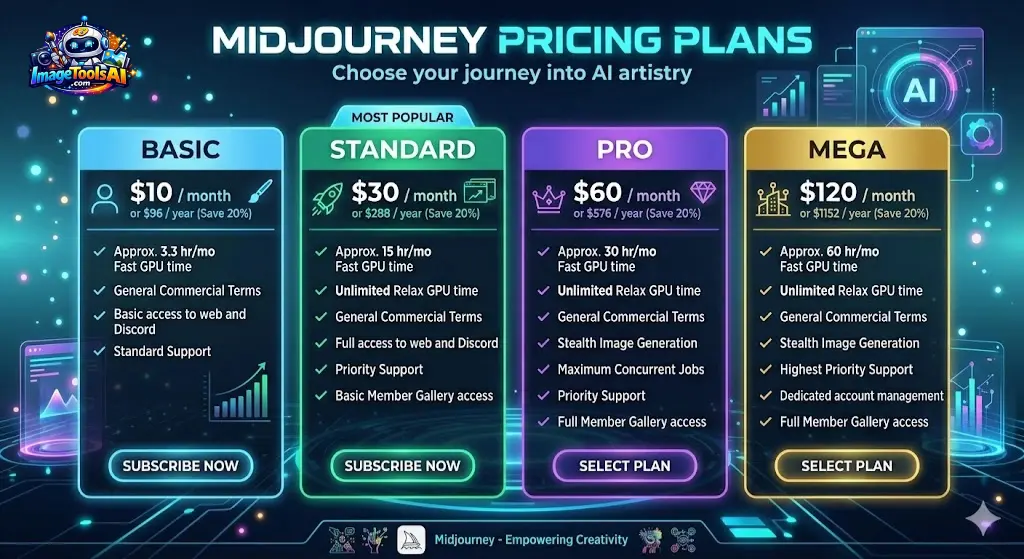
Here’s a clear comparison of current plans:
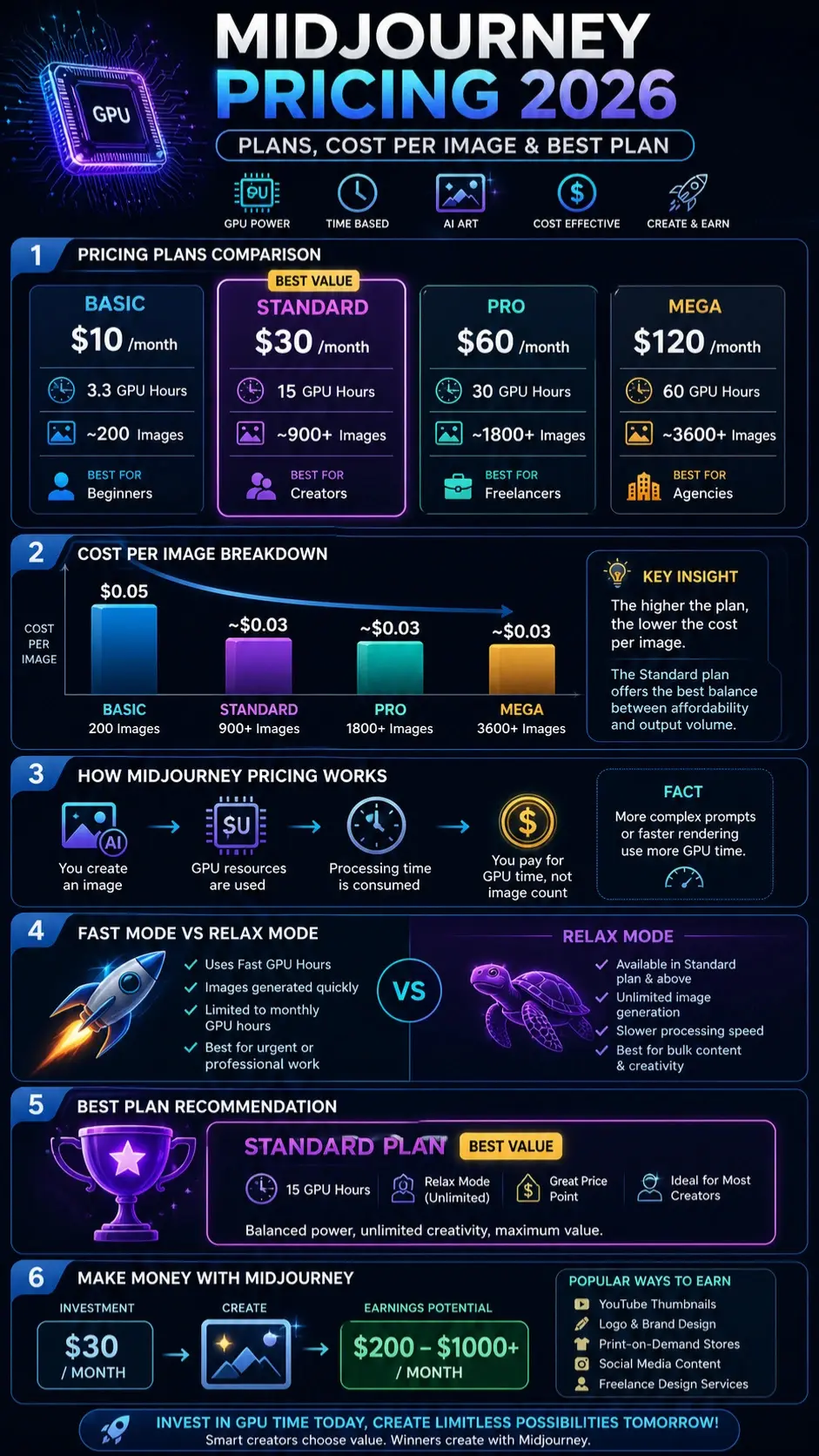
| Plan | Price/month | Fast GPU Hours | Approx Images | Best For |
| Basic | $10 | 3.3 hrs | ~200 | Beginners |
| Standard | $30 | 15 hrs | ~900+ | Creators |
| Pro | $60 | 30 hrs | ~1800+ | Freelancers |
| Mega | $120 | 60 hrs | ~3600+ | Agencies |
Quick Insight
The Standard Plan offers the best Overall Value.
Why?
- Balanced GPU allocation
- Includes Relax Mode
- Cost-effective for most users
Real Cost Per Image
Understanding actual cost efficiency is essential.
| Plan | Monthly Cost | Images | Cost per Image |
| Basic | $10 | 200 | $0.05 |
| Standard | $30 | 900+ | ~$0.03 |
| Pro | $60 | 1800+ | ~$0.03 |
| Mega | $120 | 3600+ | ~$0.03 |
Key Insight
The higher the plan → the lower the cost per image
The Standard plan provides the best balance between affordability and output volume
Key Features of Midjourney Pricing
Flexibility
- Monthly and yearly billing options
- Upgrade or downgrade anytime
Unlimited Creation
- Relax Mode enables unrestricted generation
Exceptional Output Quality
- Highly artistic and photorealistic visuals
Commercial Usage Rights
- Suitable for monetization and business use
Privacy Controls
- Stealth Mode for confidential work
Benefits & Use Cases
Midjourney is utilized globally across multiple industries:
Content Creation
- Blog illustrations
- YouTube thumbnails
- Social media visuals
E-commerce
- Product mockups
- Advertising creatives
- Branding assets
Freelancing
- Fiverr gigs
- Upwork services
- Logo and design work
Business Applications
- Marketing campaigns
- Website imagery
- Brand identity development
Example
A freelancer can:
- Invest $30/month
- Generate $200–$500/month
✔ Simply by creating thumbnails or design assets
Step-by-Step: How to Use Midjourney Efficiently
Join Discord
Midjourney operates within Discord servers.
Subscribe to a Plan
Choose the most appropriate plan based on your needs.
Use the /imagine Command
This command initiates image generation.
Write a Detailed Prompt
Example:
“cinematic portrait, soft lighting, ultra HD, realistic texture”
Generate Images
Processing takes a few seconds to minutes, depending on the mode.
Upscale or Modify
Enhance image quality or create variations.
Download & Use
Deploy images for personal or commercial use.
Hidden Costs You Must Know
Extra GPU Hours
- Costs approximately $4 per hour
- Applies when limits are exceeded
No Free Plan
- Midjourney is entirely subscription-based
Inefficient Prompts Waste Resources
- Poor prompts lead to repeated attempts
- More retries = increased GPU consumption
How to Save Money on Midjourney
Use Relax Mode
Unlimited generation with no extra cost
Avoid Excessive Upscaling
Upscaling consumes additional GPU time
Improve Prompt Quality
Better prompts reduce retries
Batch Generate Images
Create multiple outputs in one request
Choose Annual Billing
Save up to 20%
How to Make Money with Midjourney
Yes, generating income is entirely possible.
Monetization Strategies
- Sell AI-generated art on Etsy
- Offer thumbnail design services
- Launch print-on-demand stores
- Provide social media content creation
ROI Example
Investment: $30/month
Potential Earnings: $200–$1000/month
Pro Tip
Focus on high-demand niches:
- YouTube thumbnails
- Instagram content
- Logo design
These areas generate quick returns.
Pros and Cons
Pros
- Outstanding image quality
- Flexible pricing model
- Unlimited generation capability
- Commercial licensing included
Cons
- No free version available
- The GPU system can be confusing initially
- Requires Discord interface
Best Midjourney Alternatives
DALL·E
- Pay-per-image model
- Beginner-Friendly Interface
Leonardo AI
- Freemium model
- Ideal for game assets
Stable Diffusion
- Open-source
- Free but technically complex
Midjourney vs Competitors
| Tool | Pricing Model | Free Plan | Quality | Best For |
| Midjourney | Subscription | ❌ | ⭐⭐⭐⭐⭐ | Professionals |
| DALL·E | Pay-per-use | ✅ | ⭐⭐⭐⭐ | Beginners |
| Leonardo AI | Freemium | ✅ | ⭐⭐⭐⭐ | Creators |
| Stable Diffusion | Free | ✅ | ⭐⭐⭐⭐ | Developers |
Tips to Get the Best Results
- Use highly descriptive prompts
- Include style modifiers (lighting, angle, mood)
- Experiment with variations
- Save high-performing prompts
- Avoid random or vague inputs
Global Insight
Midjourney is particularly effective for:
- Multilingual marketing campaigns
- International brand expansion
- Reducing design expenses significantly
FAQs
A: No, it starts at $10/month.
A: The standard plan ($30/month) is best for most users.
A: Around $0.03–$0.05 per image.
A: Yes, all paid plans allow commercial use.
A: Midjourney = better quality
DALL·E = easier to use
Conclusion
At first glance, Midjourney’s pricing can feel confusing – particularly when coming from fixed-cost image generators. Once the main concept clicks, though, things start lining up more smartly.
Images cost you nothing. Your wallet stays full when using pictures. Nothing gets charged for visuals. Paying isn’t part of seeing the image. Money doesn’t leave your account for graphics.
You are investing in GPU Processing Power.
This quiet change alters your take on making things, getting work done, and maybe even earning. Not focused on tallying results, effort shifts toward tuning how tasks flow, shaping questions better, and using minutes more wisely.











