Introduction
The world of AI image generation is evolving faster than ever, and Firefly Image Model 4 represents one of the most important shifts in this space. Built within Adobe’s ecosystem, Firefly 4 is designed for creators who need professional, commercially safe, and production-ready visuals rather than experimental AI art.
Unlike tools such as Midjourney or OpenAI’s image systems, Firefly Model 4 focuses on control, consistency, and real-world usability inside design workflows.
In this complete guide, you will learn:
- What Firefly Image Model 4 actually is
- How it works behind the scenes
- How to write powerful prompts
- How it compares with top AI tools
- And how professionals use it in real workflows
By the end, you’ll know whether Firefly 4 is the right AI tool for your creative or business needs.
🧩 What Is Firefly Image Model 4?
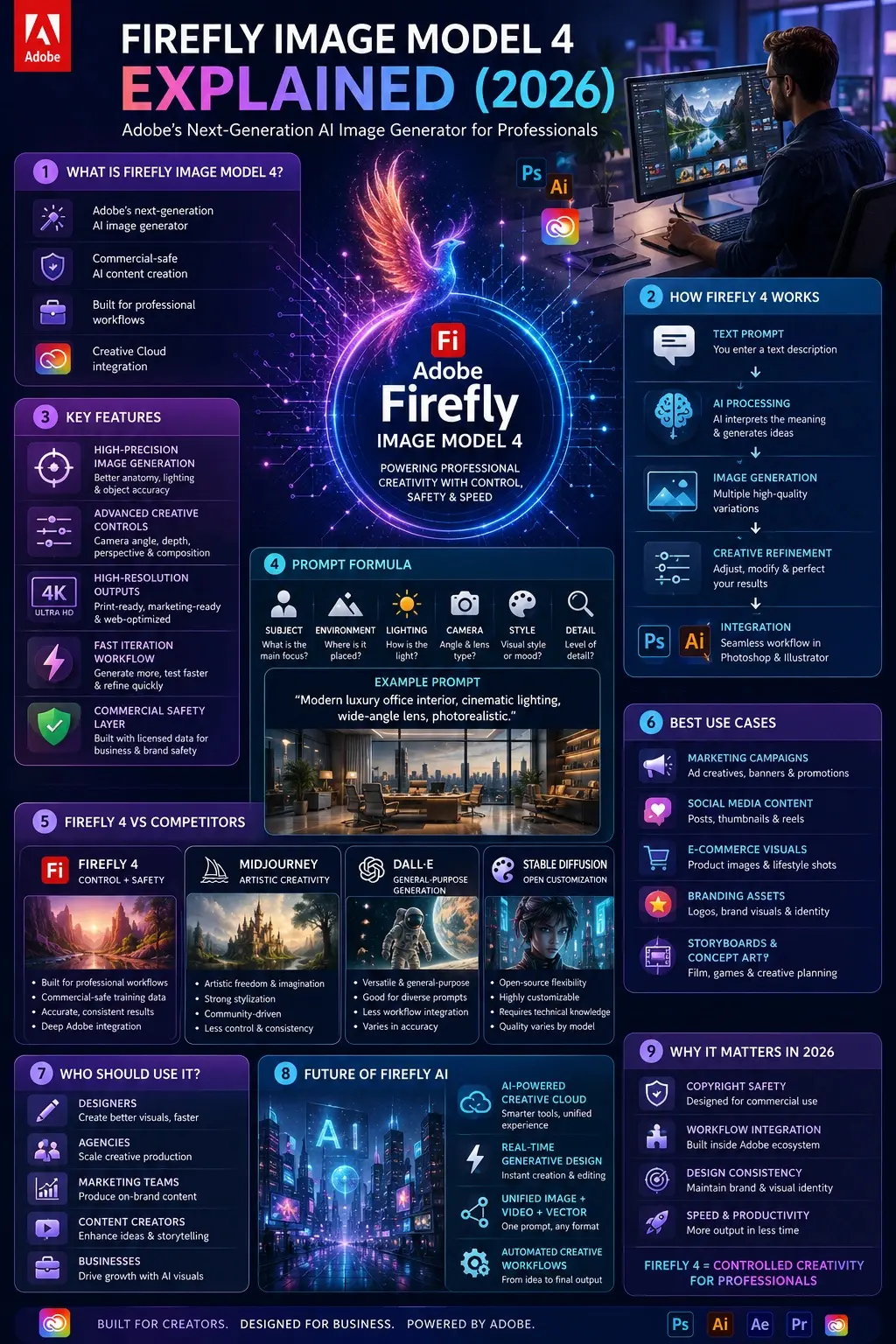
Firefly Image Model 4 is Adobe’s next-generation text-to-image AI system built for professional creators, marketers, and designers.
It is part of the broader Firefly ecosystem, which includes generative fill, text effects, and creative automation tools inside Adobe applications.
Core Purpose
- Generate high-quality images from text prompts
- Maintain commercial safety for business use
- Provide structured creative control
- Integrate directly into Creative Cloud apps
Key Idea:
Firefly 4 is not just about creativity—it is about controlled creativity for production environments.
How Firefly Image Model 4 Works
Firefly 4 uses a deep generative diffusion architecture trained on:
- Licensed Adobe Stock content
- Public domain datasets
- Carefully curated safe image sources
Simple Breakdown:
- You enter a text prompt
- AI interprets the semantic meaning
- The model generates multiple variations
- You refine results using controls
- Final output can be sent to Photoshop or Illustrator
Why It Feels Different
Unlike open creative models, Firefly 4 is engineered to:
- Avoid copyright risks
- Reduce hallucinated objects
- Improve structure accuracy
- Maintain brand-safe outputs
Why Firefly Image Model 4 Matters in 2026
AI image generation in 2026 is not just about art—it’s about production pipelines.
Firefly 4 matters because it solves real industry problems:
Copyright Safety
Businesses need legally safe AI images.
Workflow Integration
Most AI tools are isolated. Firefly is embedded inside Adobe workflows.
Design Consistency
Firefly maintains a structured visual identity better than random generators.
✨ Key Features of Firefly Image Model 4
High-Precision Image Generation
- Better anatomy control
- Improved lighting realism
- Stable object placement
Advanced Creative Controls
Users can control:
- Camera angle
- Zoom depth
- Perspective
- Composition layout
High-Resolution Outputs
- Marketing-ready visuals
- Print-quality assets
- Social media creatives
Fast Iteration System
Generate multiple variations quickly for testing ideas.
Commercial Safety Layer
Designed for:
- Businesses
- Agencies
- Freelancers
- Enterprise workflows

Firefly 4 vs Firefly 4 Ultra
| Feature | Firefly Model 4 | Firefly 4 Ultra |
| Speed | Very Fast | Moderate |
| Detail | High | Extremely High |
| Use Case | Ideation | Final Production |
| Creativity | Balanced | Cinematic |
| Workflow | Fast drafting | Polished assets |
Insight: Use Model 4 for ideation and Ultra for final outputs.
Prompt Engineering Masterclass for Firefly 4
Best Prompt Formula
Subject + Environment + Lighting + Camera + Style + Detail
Example Prompt
“Modern luxury office interior, natural sunlight through glass windows, cinematic lighting, wide-angle lens, minimalistic design, ultra-detailed, photorealistic”
Pro Techniques
- Use “cinematic lighting” → realism boost
- Use “wide-angle lens” → professional framing
- Add mood words: dramatic, soft, foggy
- Always define the environment clearly
Firefly 4 Workflow in Real Projects
Ideation
Use Firefly 4 for brainstorming:
- Mood boards
- Concept sketches
- Campaign ideas
Refinement
Improve outputs using:
- Photoshop AI tools
- Firefly 4 Ultra
Production
Export into:
- Photoshop
- Illustrator
- Adobe Express
Firefly 4 vs Competitors
| Feature | Firefly 4 | Midjourney | DALL·E | Stable Diffusion |
| Realism | ⭐⭐⭐⭐ | ⭐⭐⭐⭐⭐ | ⭐⭐⭐⭐ | ⭐⭐⭐ |
| Control | ⭐⭐⭐⭐⭐ | ⭐⭐⭐ | ⭐⭐⭐⭐ | ⭐⭐⭐⭐⭐ |
| Speed | ⭐⭐⭐⭐⭐ | ⭐⭐⭐ | ⭐⭐⭐⭐ | ⭐⭐⭐ |
| Commercial Safety | ⭐⭐⭐⭐⭐ | ⭐⭐ | ⭐⭐⭐⭐ | ⭐⭐⭐ |

Key Insight:
- Firefly = Professional workflow + safety
- Midjourney = Artistic freedom
- Stable Diffusion = Open customization
Best Use Cases
Marketing
- Ad creatives
- Branding visuals
- Social media content
Film & Media
- Storyboards
- Concept art
- Scene visualization
E-commerce
- Product mockups
- Lifestyle visuals
- Catalog design
Design Industry
- UI concepts
- Client presentations
- Prototype visuals
Limitations of Firefly Image Model 4
Even with advanced improvements:
- Less creative freedom than Midjourney
- Sometimes overly safe outputs
- Limited abstract artistic generation
- Requires strong prompting skills
Future of Firefly AI
Adobe is moving toward:
- Fully AI-powered Creative Cloud
- Real-time generative Photoshop
- Unified image + video + vector AI
- Automated design workflows
Firefly is becoming a complete creative ecosystem, not just a tool.
Who Should Use Firefly 4?
Best For:
- Designers
- Marketing Teams
- Agencies
- Content creators
- Businesses
Not Ideal For:
- Experimental AI artists
- Abstract art creators
- Users wanting full creative randomness
Realistic Expectations
Firefly 4 is powerful, but not magical.
You should expect:
- Structured creativity
- Controlled outputs
- Professional-grade results
- Not unpredictable artistic chaos
People Also Ask
Firefly 4 is better for structured professional work, while Midjourney is stronger in artistic creativity and imagination.
Yes. One of Firefly’s biggest advantages is its commercial-safe training data, making it suitable for business use.
No, but using it with Adobe Photoshop significantly improves workflow efficiency.
Firefly focuses on workflow integration and safety, while DALL·E (from OpenAI) focuses on general-purpose generation.
Yes, but beginners still need to learn prompt structure to get high-quality results.
Conclusion
Firefly Image Model 4 is not just another AI image generator—it represents a strategic shift in how professional design work is done in 2026. Instead of focusing purely on artistic randomness like many competitors, Adobe has positioned Firefly 4 as a controlled, production-ready, and commercially safe creative engine.
This makes it especially powerful for real-world industries where consistency, licensing safety, and workflow integration matter more than experimental creativity.
From marketing agencies to Freelance Designers, Firefly 4 is becoming a core part of modern content pipelines, especially when combined with tools like Adobe Photoshop and the wider Adobe Creative Cloud ecosystem.
However, it’s important to understand its positioning clearly:
- It is not designed to replace artistic platforms like Midjourney
- It is not focused on abstract or experimental art freedom
- It is built for structured creativity, speed, and business usability











