Introduction
Out of nowhere, AI video creation is sprinting ahead, leaving most digital art tools behind – Midjourney Video stands out in the rush. Once famous just for stills that looked like movie scenes, it now breathes life into pictures, turning them into brief moving clips. Motion sneaks in through subtle shifts, cameras glide like ghosts across frames, and atmosphere thickens with each second. What was frozen begins to unfold.
Creators use Midjourney Video
- TikTok content
- YouTube Shorts
- AI music videos
- Product ads
- Concept trailers
- Fashion campaigns
- Fantasy storytelling
Midjourney skips the usual editing tools found in classic programs. What sets it apart is its eye for artful imagery, shaped more like film than standard clips. Rather than cluttered layers and frame-by-frame tweaks, it leans on artificial intelligence to breathe movement into static pictures. Motion comes alive through smart algorithms, not manual adjustments. The result feels less edited, more imagined.
This guide shows how Midjourney Video operates. Since visuals matter, crafting smart prompts makes a difference. Some creators build scenes step by step. Others jump right into motion details. A few frame shots like films, using light and angle tricks. Pricing shifts depending on use. Limits exist, especially around realism. Small tweaks often boost results fast. By 2026, knowing these moves will help produce stronger videos.
What Is Midjourney Video?
Midjourney Video is an AI-powered image-to-video generation system that transforms static images into animated cinematic clips.
The platform focuses mainly on:
- Image animation
- Camera movement
- Atmospheric motion
- Stylized visuals
- Cinematic storytelling
Instead of generating full-length films automatically, Midjourney currently creates short dynamic clips with motion effects and environmental animation.
Its strongest advantage is visual quality. Midjourney videos often look artistic, cinematic, dreamy, and emotionally engaging compared to many traditional AI video generators.
How Midjourney Video Works
The workflow is beginner-friendly and easy to understand.
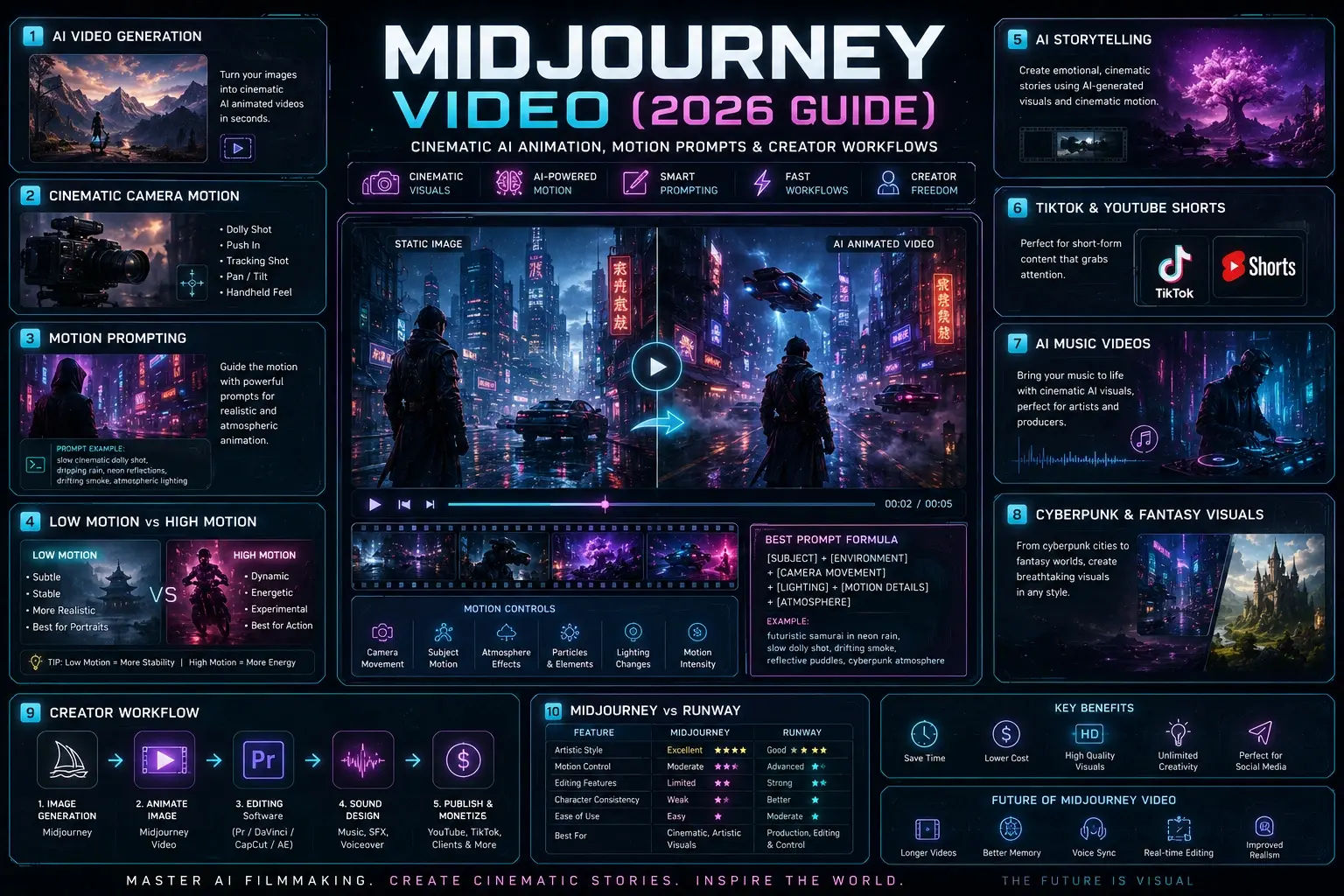
Generate an Image
First, create a cinematic image inside Midjourney. Wide aspect ratios usually work best.
Recommended formats:
- ar 16:9
- ar 21:9
Animate the Image
After generating the image, choose the animation option.
Users can select:
- Low Motion
- High Motion
Add Motion Prompts
Motion prompts improve realism and cinematic quality.
Example:
slow cinematic camera push-in, drifting fog, moving cloth, atmospheric lighting
Generate the Video
The AI predicts motion between frames and creates a cinematic animated sequence.
Why Midjourney Video Is Popular in 2026
The rise of short-form content has dramatically increased the demand for AI-generated videos.
Creators now need:
- Faster production workflows
- Unique visuals
- Low-cost content creation
- Viral social media content
- Cinematic storytelling tools
Midjourney helps creators produce visually impressive content without expensive equipment or large production teams.
Its artistic style makes it especially popular for:
- Cyberpunk Visuals
- Fantasy storytelling
- Anime-inspired scenes
- Fashion content
- Music visualizers
Midjourney V1 Video Model Explained
The Midjourney V1 Video Model is the company’s first dedicated AI video generation system.
Key features include:
| Feature | Description |
| Motion Prompting | Controls scene movement |
| Camera Simulation | Creates cinematic motion |
| Loop Support | Generates repeating animations |
| Timeline Extension | Extends video duration |
| HD Rendering | Higher-quality visuals |
Midjourney’s main focus is artistic cinematic visuals rather than technical production-level editing.
This makes it ideal for creators who prioritize visual beauty over complex editing controls.
Best Midjourney Video Prompt Structure
Prompt engineering plays a huge role in output quality.
The best prompts usually include:
- Subject
- Environment
- Camera movement
- Lighting
- Motion details
- Atmosphere
Basic Formula
[subject], [environment], cinematic lighting, [camera movement], atmospheric realism
Example Prompt
futuristic samurai in neon rain, cinematic lighting, slow dolly shot, drifting smoke, reflective puddles, cyberpunk atmosphere
Strong prompts create better cinematic movement and more realistic animation.
Best Camera Motion Prompts
Camera movement dramatically affects the final video.
Slow Cinematic Motion
- slow camera push-in
- cinematic dolly shot
- gentle handheld movement
- slow tracking shot
Dynamic Motion
- aggressive tracking shot
- dramatic zoom out
- fast cinematic pan
- intense action camera
Atmospheric Motion
- drifting fog
- floating particles
- moving cloth
- wind-blown hair
- smoke movement
The environmental movement usually looks more realistic than aggressive object motion.
Low Motion vs High Motion
| Feature | Low Motion | High Motion |
| Stability | Higher | Lower |
| Realism | Better | Experimental |
| Best For | Portraits | Action scenes |
| Motion Style | Subtle | Aggressive |
Most creators prefer Low Motion because it creates more stable cinematic results with fewer glitches.
High Motion works better for experimental sequences and energetic visuals.
How to Create Cinematic AI Videos
Professional-looking AI videos require more than random prompts.
Use Strong Composition
Your original image matters a lot.
Use:
- dramatic lighting
- foreground depth
- cinematic framing
- layered environments
Add Environmental Effects
Scenes feel more realistic with:
- rain
- fog
- smoke
- fire
- floating particles
Simulate Real Cameras
Use prompts like:
- anamorphic lens
- shallow depth of field
- cinematic handheld
- IMAX composition
These prompt elements help videos feel more film-like.
Character Consistency Tips
One of Midjourney Video’s biggest weaknesses is consistency.
Common problems include:
- changing faces
- disappearing objects
- unstable clothing
- scene drift
- cyberpunk cities
- ocean waves
- magical portals
- floating clouds
- neon environments
Midjourney Video Workflow for Creators
Professional creators rarely use Midjourney alone.
A common workflow looks like this:
Image Generation
Create cinematic keyframes inside Midjourney.
Animation
Animate images using Midjourney Video.
Editing
Use editing software like:
- Adobe Premiere Pro
- DaVinci Resolve
- CapCut
- After Effects
Sound Design
Add:
- cinematic music
- ambient sound
- AI voiceovers
- sound effects
This workflow creates more professional results than raw AI clips alone.
Midjourney Video vs Runway
Runway is one of the biggest competitors in AI video generation.
| Feature | Midjourney | Runway |
| Artistic Style | Excellent | Good |
| Motion Control | Moderate | Advanced |
| Editing Features | Limited | Strong |
| Character Consistency | Weak | Better |
| Ease of Use | Easy | Moderate |
Midjourney is stronger for cinematic, artistic visuals, while Runway offers better editing and production control.
Common Midjourney Video Problems
Even though Midjourney Video is powerful, it still has limitations.
Glitchy Motion
High Motion settings can create unstable movement.
Character Drift
Faces sometimes change during animation.
Weak Action Scenes
Fast action remains difficult for most AI video systems.
Object Permanence Issues
Objects may disappear when moving off-screen.
Understanding these limitations helps creators set realistic expectations.
Monetizing Midjourney Videos
Creators are already making money using AI-generated videos.
Popular monetization methods include:
- TikTok automation
- YouTube Shorts
- AI Music Videos
- Client advertising
- Social media content creation
- Product commercials
- NFT visuals
Businesses are also using AI-generated cinematic ads for fast creative testing.
This market is expected to grow significantly in the coming years.
Future of Midjourney Video AI
AI video generation is still in its early stages, but rapid improvements are happening every year.
Future updates may include:
- longer video generation
- better character memory
- voice synchronization
- advanced storytelling
- real-time editing
- improved motion realism
Midjourney is positioned to become one of the most influential creative AI platforms online.
FAQs
A: Most Midjourney videos start at around 5 seconds, and some clips can be extended depending on the workflow and platform updates.
A: No, Midjourney Video currently requires a paid subscription. Pricing depends on GPU usage, rendering quality, and subscription plans.
A: The best prompts usually include:
cinematic camera movement
atmospheric lighting
environmental motion
realistic motion blur
detailed scene descriptions
Example:
cinematic dolly shot, drifting smoke, neon reflections, atmospheric realism, shallow depth of field
A: Low Motion creates subtle cinematic movement and better stability, while High Motion generates more aggressive movement but may introduce glitches or inconsistencies.
A: Midjourney is stronger for artistic cinematic visuals, while Runway offers better editing tools, motion control, and production workflows.
Conclusion
Out of nowhere, Midjourney Video reshapes how artificial intelligence fuels creative work. Even though smooth movement and consistent scenes remain tricky, its output stands among the most breathtaking animated visuals made by AI right now.
Its biggest strength lies in:
- cinematic atmosphere
- artistic storytelling
- Emotional Visuals
- fast creative experimentation
Picture this: folks diving into cinematic prompts, crafting smooth motion visuals, slicing through edits like pros, then weaving tales that stick – those are the ones pulling ahead as AI reshapes making things online. Not just keeping up. Setting pace.
Picture being able to shape stories in motion, no matter if your work leans toward film, design, YouTube clips, marketing spots, or online content – that is where Midjourney Video steps in, opening doors just when things were starting to feel stuck.











