Introduction
Most folks dipping into Midjourney Start on Discord, drawn by the idea of generating images with AI. Yet confusion hits once they decide it’s time to step away. Each month brings a fresh wave of new members – excited at first, then stuck when looking to leave. You’re not the only one searching for a clean exit from the setup.
The confusion is very common because:
- You use Midjourney inside Discord
- But billing is NOT controlled inside Discord
- Cancellation happens on a separate website
Failing to cancel often results in surprise fees because things do not line up. When steps are missed, payments go through by mistake.
Stopping your subscription doesn’t have to be confusing – here’s how it works, clear as day. Billing troubles? They’re preventable when steps are followed correctly. Take charge of your account without hassle by knowing exactly what happens behind the scenes. All details laid out plainly, nothing hidden, nothing skipped. Year matters less than understanding each move ahead.
Why This Guide Matters
Many users assume:
“If I leave Discord, my subscription will stop automatically.”
“There must be a cancel command inside Discord.”
But that is incorrect.
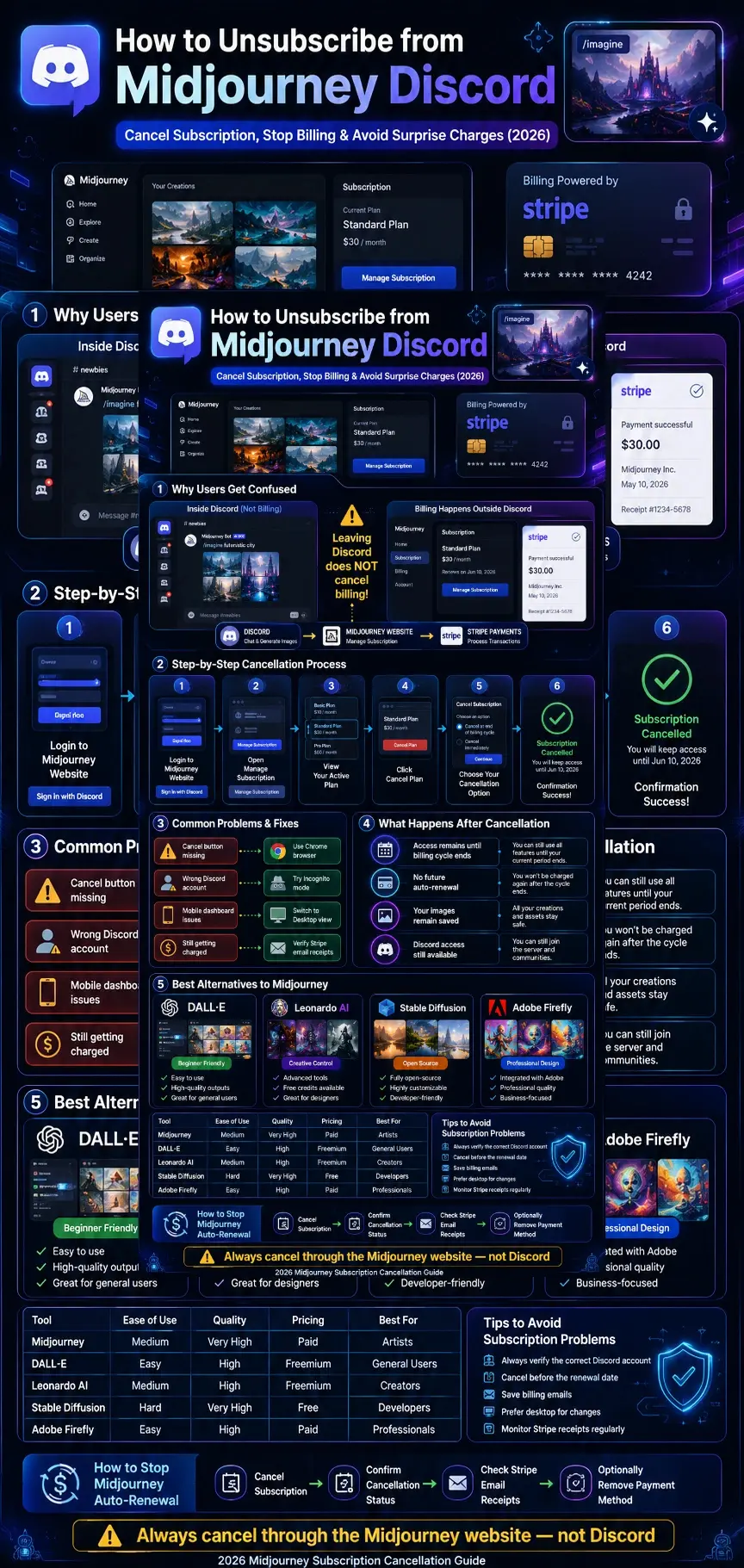
The actual system works like this:
Discord is only an interface
Subscription is managed on the Midjourney website
Payments are processed via Stripe
So even if you:
- Leave the Discord server
- Stop using the bot
- Delete the Discord app
You can still be charged unless you cancel properly.
That is why understanding the correct process is extremely important.
What is the Midjourney Discord Subscription?
The Midjourney subscription is a paid membership that allows users to generate AI images using commands like:
/imagine
inside Discord servers.
However, the key thing to understand is:
Discord does NOT manage billing or payments.
Instead:
- The Midjourney website handles subscription control
- Stripe handles payments
- Discord only acts as a chat-based command system
So the subscription is tied to your account, not to Discord itself.
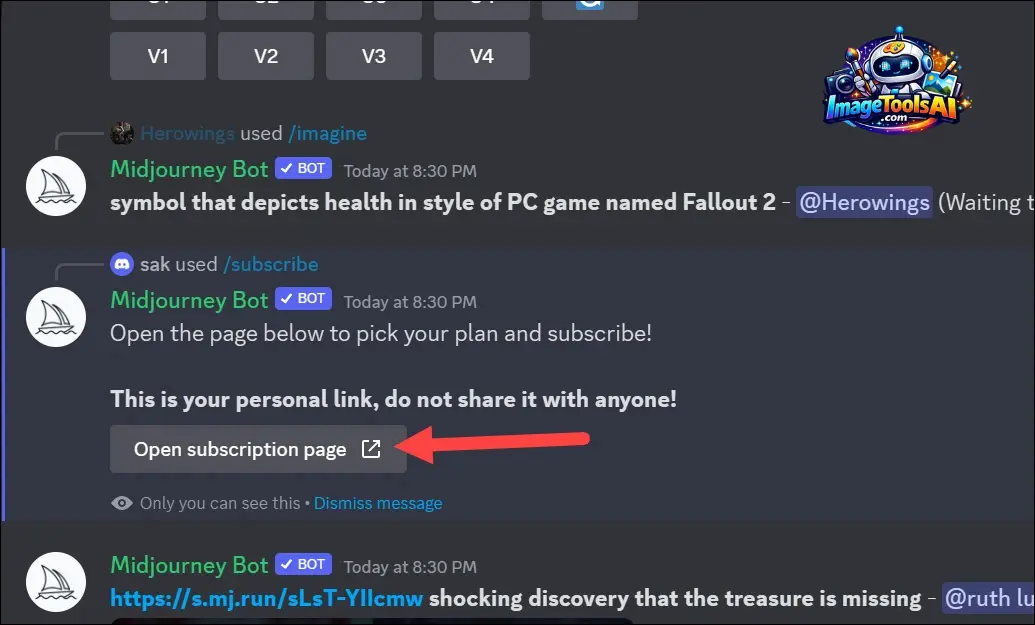
Why Users Get Confused
There are three major reasons people struggle:
Everything happens inside Discord
Users generate images, manage prompts, and interact daily inside Discord. So they assume billing is also inside it.
Stripe emails look unfamiliar
Payment receipts come from Stripe, which can lead users to think it is a third-party service unrelated to Midjourney.
No cancel button in Discord
There is no command like:
/cancel subscription
So users incorrectly believe cancellation is not possible.
How to Unsubscribe from Midjourney Discord
Now, let’s go through the correct cancellation process.
Log in to the Midjourney Website
Then:
- Click “Sign in with Discord”
- Use the SAME Discord account linked to your subscription
Important: If you log into the wrong account, your subscription will not appear.
Open Subscription Dashboard
After logging in:
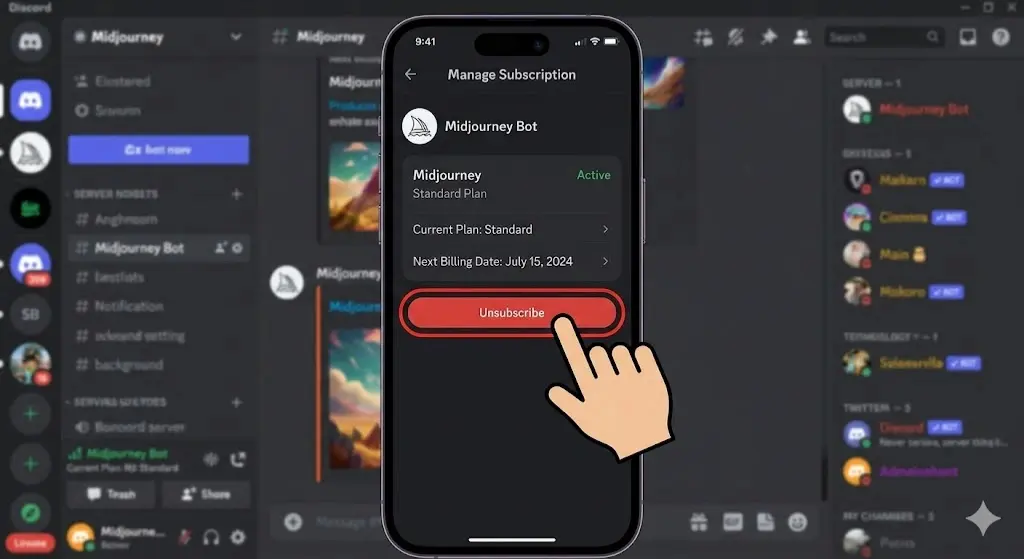
- Click your profile icon (top right corner)
- Select “Manage Subscription”
This opens your billing dashboard.
Find Active Plan
You will see your current plan:
- Basic Plan
- Standard Plan
- Pro Plan
Click Manage next to your active subscription.
Click Cancel Plan
Now select:
Cancel Plan
Ignore upgrade options and billing suggestions.
Confirm Cancellation
You will usually see two options:
Cancel at the end of the billing cycle (recommended)
Cancel immediately (if available)
Recommended choice: Cancel at the end of the billing cycle
This ensures you do not lose access instantly.
Verify Cancellation
After confirmation:
- Status should show “Cancelled”
- No future billing will occur
- Access remains until the cycle ends
Quick Summary Table
| Step | Action | Result |
| 1 | Login | Access dashboard |
| 2 | Open subscription | View plan |
| 3 | Select plan | Manage settings |
| 4 | Cancel plan | Start cancellation |
| 5 | Confirm | Stop renewal |
| 6 | Verify | Ensure success |
Why You Cannot Cancel in Discord
This is the most important misunderstanding.
Key Reasons:
Discord does not process payments
Midjourney uses an external billing system
Subscription is linked to the account, not the server
Even if you:
- Exit the Discord server
- Stop using bot commands
- Uninstall Discord
Billing will continue unless cancelled properly.
Common Problems When Cancelling Midjourney Subscription
Cancel Button Not Visible
Causes:
- Wrong Discord login
- Multiple accounts
- Browser cache issue
Fix:
- Use the Chrome browser
- Try incognito mode
- Re-login properly
Subscription Not Showing
Causes:
- Different email used
- Stripe mismatch
Fix:
- Check billing email
- Search Stripe receipts
- Use the payment portal link
Mobile Dashboard Issues
Mobile view often hides settings.
Fix:
- Switch to desktop mode
- Use a laptop for better control
Still Getting Charged
Causes:
- Cancellation not confirmed
- Wrong account cancelled
- Renewal already processed
Fix:
- Check cancellation status
- Verify email confirmation
- Contact support
What Happens After You Cancel Midjourney?
After cancellation:
You still have access until billing ends
No future payments occur
Your images remain saved
Discord access stays active
Important: Refunds are usually not provided.
Refund Policy Explained
Refunds are strict and limited.
- Most subscriptions are non-refundable
- Partial refunds are rare
- Managed through Stripe policies
Always cancel before the renewal date to avoid charges.
How to Stop Midjourney Auto Renewal
To fully stop billing:
Cancel subscription
Confirm cancellation status
Check Stripe email receipts
Optionally remove payment method
Pros and Cons of Cancelling Midjourney
Advantages:
Save monthly cost
Avoid unwanted billing
Full subscription control
No auto-renew risk
Disadvantages:
Lose fast AI generation
Reduced creative tools
No priority GPU access
Best Alternatives to Midjourney
If you are leaving Midjourney, here are strong alternatives:
DALL·E
- Beginner friendly
- High-quality outputs
- Easy interface
Leonardo AI
- Creative control
- Free credits available
- Good for designers
Stable Diffusion
- Fully open-source
- Highly customizable
- Developer-friendly
Adobe Firefly
- Professional design tools
- Integrated with Adobe apps
- Business-focused
Comparison Table
| Tool | Ease of Use | Quality | Pricing | Best For |
| Midjourney | Medium | Very High | Paid | Artists |
| DALL·E | Easy | High | Freemium | General users |
| Leonardo AI | Medium | High | Freemium | Creators |
| Stable Diffusion | Hard | Very High | Free | Developers |
| Adobe Firefly | Easy | High | Paid | Professionals |
Tips to Avoid Subscription Problems
Always verify the correct Discord account
Cancel before the renewal date
Save billing emails
Prefer desktop for changes
Monitor Stripe receipts regularly
How to Use AI Image Tools Better
To get better results:
Write detailed prompts
Add style keywords like cinematic, realistic
Mention lighting and environment
Save successful prompts
FAQs
A: No. Cancellation must be done through the Midjourney website.
A: Usually due to wrong login, browser issues, or account mismatch.
A: No. Billing continues until you cancel the subscription properly.
A: Refunds are rare and depend on usage and policy.
A: Yes, you can rejoin anytime.
Conclusion
Getting out of your Midjourney plan on Discord turns out straightforward when you see how things fit together. Confusion hits many people since they think Discord runs all parts, yet really, it just lets you make pictures, nothing more. Payment stuff lives elsewhere entirely.
Here’s what matters most
Inside Discord, subscriptions aren’t handled. The process happens elsewhere entirely
Billing via the Midjourney site and Stripe
Cancelling happens through the main account page. Access comes only via your verified login. Changes appear once confirmed there. The system requires this path every time
Stopping payments doesn’t mean losing access. When the right login is used, the system lets you move forward. Open the menu where subscriptions live. Navigate to that section carefully. Confirmation Comes Last. Click only after checking everything. Control stays with you throughout the process.
After cancellation, service continues till the billing period ends. Beyond that point, money stops moving – unless a return happens down the line.
Simply put, staying off Discord won’t stop surprise charges – handling your plan directly through the main site will.











