Introduction
Out of nowhere, artificial intelligence began changing how digital content gets made. AI image generation has changed how designers and creators work. Instead of using complex software or traditional drawing skills, people now simply type descriptions and get detailed visuals in seconds. This shift has quietly spread across industries like advertising, film, gaming, education, and e-commerce.
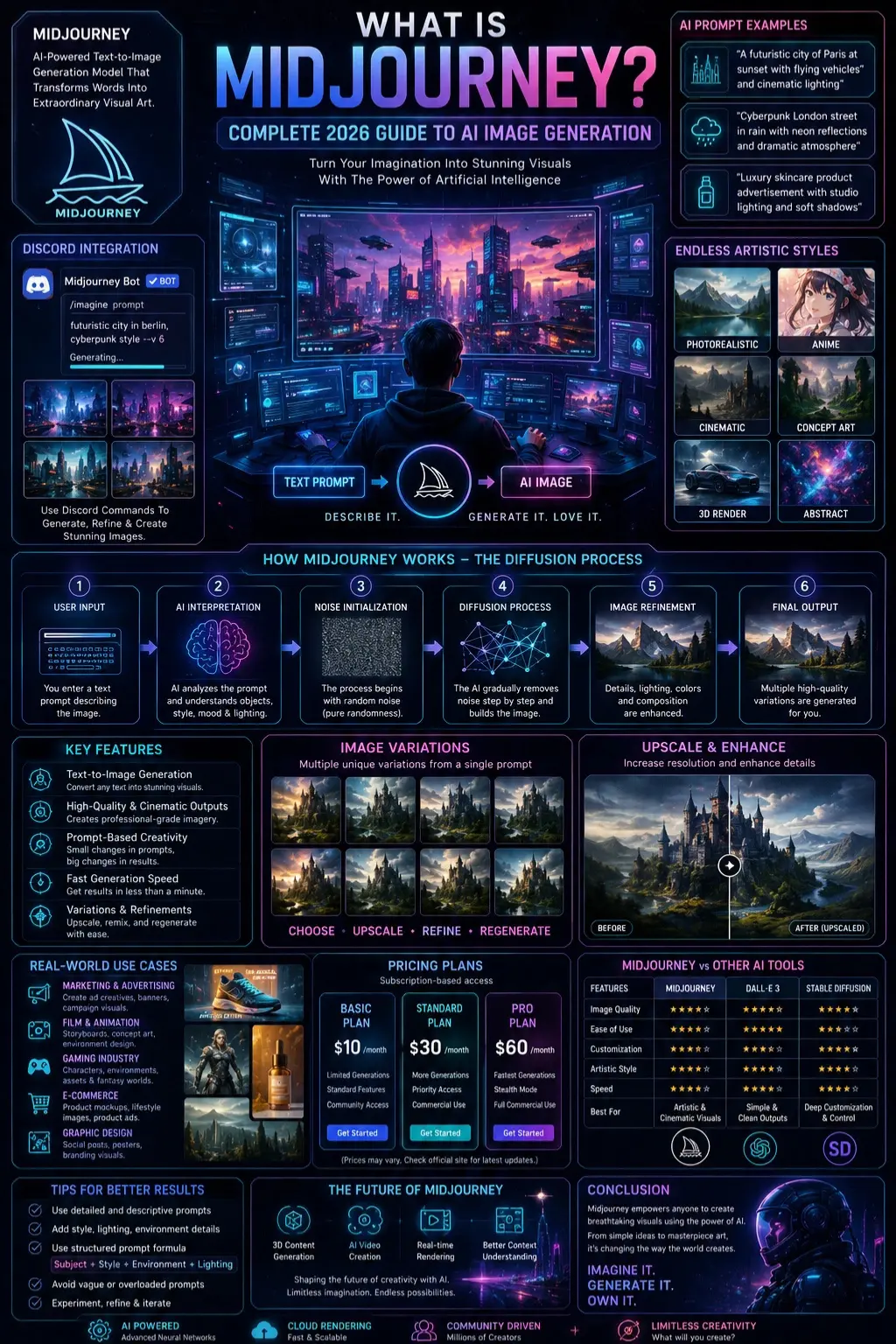
Now, Tools Like Midjourney make this process even more powerful. You write a prompt such as “futuristic Paris at sunset with flying cars” or “cyberpunk street in rain with neon lights”, and the system turns it into a high-quality image almost instantly.
What makes this different from older design methods is speed and accessibility. You don’t need advanced editing skills or expensive software. A clear written idea is enough to produce professional-looking results. While outcomes can vary, the overall process helps individuals and teams quickly turn ideas into visuals.
In short, AI image tools are replacing slow, manual workflows with fast, text-driven creation—making visual design more open, flexible, and widely available than ever before.
What is Midjourney?
Midjourney is an AI-powered text-to-image generation system that converts written prompts into visual artwork.
In simpler terms:
- You describe an image using text
- The AI interprets your description
- It generates multiple image variations based on your input
Example:
Prompt:
“A futuristic robot standing in a desert during sunset”
Output:
An AI-generated cinematic artwork showing exactly that scene with detailed lighting, texture, and composition.
Core Concept
Midjourney is not a traditional design application. It is a generative artificial intelligence system that creates new visual content by learning patterns from large-scale image datasets.
It does not copy existing images. Instead, it synthesizes entirely new visuals based on learned structures, styles, and relationships between objects.
How Midjourney Works
To understand Midjourney deeply, it is important to explore the underlying AI process known as a diffusion model architecture.
User Input
The process begins when a user enters a textual prompt.
Example:
“A cinematic portrait of a knight standing in snowy mountains, ultra-realistic lighting”
A well-structured prompt typically includes:
- Subject (knight)
- Style (cinematic)
- Environment (snowy mountains)
- Lighting (ultra-realistic)
AI Interpretation
The AI analyzes the prompt and breaks it into semantic components:
- Objects: knight, mountains
- Style: cinematic, realistic
- Mood: cold, dramatic
This semantic decomposition helps the model understand intent rather than just keywords.
Noise Initialization
The generation process begins with random noise—similar to static on a television screen. At this stage, there is no meaningful structure or recognizable image.
Diffusion Process
This is the most critical stage in image generation.
xt=αtx0+(1−αt)ϵx_t = \alpha_t x_0 + (1 – \alpha_t) \epsilonxt=αtx0+(1−αt)ϵ
In this process:
- The model gradually removes noise
- It reconstructs patterns step by step
- It refines structure from randomness into clarity
This iterative transformation is what allows AI to generate realistic visuals from abstract noise.
Image Refinement
After the initial generation, the system enhances:
- Sharpness
- Lighting accuracy
- Color grading
- Object detail
- Composition balance
Multiple variations are created for user selection.
Final Output Generation
The system presents several image options (usually 4–8 variations). Users can then:
- Upscale selected images
- Generate new variations
- Modify prompts
- Refine styles
Key Features of Midjourney
Ultra-Realistic Image Generation
Midjourney is known for producing cinematic-quality visuals that often resemble professional photography, film stills, or high-end digital art.
Prompt-Based Creativity
Small changes in wording significantly impact results.
Example:
- “a cat in space”
- “a cinematic cat floating in space with neon cosmic lighting”
The second version produces dramatically more detailed outputs.
Flexible Artistic Styles
Midjourney supports a wide range of visual styles:
- Photorealism
- Anime-style illustrations
- 3D Renders
- Concept art
- Abstract compositions
Fast Generation Speed
Most images are generated within less than a minute, making it ideal for rapid creative workflows.
Variation and Control Features
Users can refine outputs using:
- Upscaling tools
- Variation generation
- Remix mode
- Style adjustments
Midjourney Use Cases
Graphic Design
- Social media posts
- Posters
- Branding visuals
Digital Marketing
- Advertisement creatives
- Campaign visuals
- Landing page graphics
Film & Animation
- Storyboarding
- Concept design
- Environment visualization
E-Commerce
- Product mockups
- Lifestyle product images
- Advertising visuals
Gaming Industry
- Character design
- Fantasy worlds
- Game asset creation
Midjourney vs Other AI Tools
| Feature | Midjourney | DALL·E | Stable Diffusion |
| Image Quality | Very High | High | Very High |
| Ease of Use | Medium | Easy | Advanced |
| Customization | High | Medium | Very High |
| Artistic Style | Strong | Balanced | Flexible |
| Speed | Fast | Fast | Varies |
Conclusion:
- Midjourney → Best for artistic visuals
- DALL·E → Best for simple and clean outputs
- Stable Diffusion → Best for deep customization
How to Use Midjourney
Access Platform
Midjourney can be accessed through:
- Discord interface
- Web-based platform
Join Server
Create a Discord account and join the official Midjourney community server.
Use Prompt Command
Example:
/imagine futuristic city in Berlin, cyberpunk style
Wait for Generation
The AI generates multiple image variations.
Refine Output
- Upscale the best version
- Create variations
- Adjust prompt details
Midjourney Pricing
Midjourney operates on a subscription-based model:
- Basic Plan → Limited usage
- Standard Plan → Regular generation
- Pro Plan → Commercial usage
Important Note:
Midjourney is not completely free. A paid subscription is required for consistent or professional usage.
Pros and Cons of Midjourney
Advantages
- Extremely high-quality visuals
- Fast image generation
- Easy prompt-based system
- Strong artistic output
- Suitable for professional use
Disadvantages
- Requires subscription
- Needs internet access
- Learning curve for prompt writing
- Limited manual editing tools
Best Midjourney Alternatives
DALL·E
Best for simple, structured visuals
Stable Diffusion
Best for advanced customization and control
Adobe Firefly
Best for Adobe ecosystem integration
Leonardo AI
Best for gaming assets and character design
Canva AI
Best for beginners and marketers
Tips to Get Better Midjourney Results
Use Detailed Prompts
“a car.”
“a futuristic sports car in a neon cyberpunk city at night with rain reflections.”
Add Style Keywords
- cinematic
- ultra-realistic
- 8K detail
- concept art
Use Structured Prompt Formula
Subject + Style + Environment + Lighting
Avoid Vague Terms
Bad: “Nice image.”
Good: “golden sunset over Paris skyline with cinematic depth.”
Avoid Overloading Prompts
Too many conflicting instructions reduce the quality of the output.
Is Midjourney Free?
No. Midjourney is not fully free.
A paid plan is required for:
- Regular usage
- High-resolution images
- Commercial licensing
Future of Midjourney
AI image generation is evolving rapidly, and Midjourney is expected to expand into:
- 3D content generation
- AI video creation
- Real-time rendering systems
- Improved contextual understanding
Future Applications:
- Film production
- Digital marketing
- Game development
- Virtual environments
FAQs
A: It is used for generating AI-based images for design, marketing, gaming, and digital content creation.
A: No, users only need to write text prompts. No prior design experience is required.
A: Midjourney excels in artistic and cinematic visuals, while DALL·E focuses on balanced and clean image generation.
A: Yes, but only with an active paid subscription plan.
A: Its ability to transform text into highly detailed, artistic, and cinematic-quality visuals sets it apart.
Conclusion
Picture this: by 2026, Midjourney stands out as a top-tier AI that turns words into images. Instead of complex tools, it uses plain descriptions to spark visuals. What once needed design skills now opens up to all. Through basic phrases, ideas take shape on screen. This system connects thought directly to artwork. Anyone can create what they imagine.
From Marketers to Students, Midjourney helps create images fast. Designers find it useful too. Entrepreneurs tap into its speed. Each user gets results without slow steps. Efficiency shows up right away. Visuals appear almost like that.
One step ahead, Midjourney pushes how images are made as AI moves forward. Not just tools, these systems change the way stories look online. Picture by picture, they redefine how people share ideas through visuals.











