Introduction
Most times when MidJourney V1 Pictures feel off – muddy, flat, unclear – the blame lands on wording. Not the machine. What you describe shapes what shows up, word by word.
What you type tells the AI what picture to make. When the words are strong, the images grab attention. If the wording falls flat, the outcome feels dull. Starting with clear directions shapes what appears next.
By 2026, folks who make content – like writers, online shops, video makers, or college kids – are turning to MidJourney prompts for visuals that grab attention fast. While some still sketch by hand, others tap these tools because results show up quickly. Think of a blogger needing a header, an agency pitching ideas, or a startup testing ads – all getting sharp-looking graphics in moments. Even learners dabbling in design find it useful when time runs short. Though not magic, the process skips long waits usually tied to custom art.
They commonly use prompts for:
- YouTube thumbnails
- Product advertisements
- Social media content
- Blog featured images
- Website banners
- Storytelling scenes
- Fantasy artwork
- Branding campaigns
- Viral Shorts content
- E-commerce listings
The best part?
You do not need to be a professional designer.
You simply need to learn how to write better prompts.
This complete pillar guide will teach you:
✔ What MidJourney V1 is
✔ How prompts function
✔ The best prompt formula
✔ 150 ready-to-use prompts
✔ Cinematic prompts
✔ Realistic prompts
✔ Anime prompts
✔ Product advertising prompts
✔ Viral social prompts
✔ Mistakes to avoid
✔ Advanced prompt tips
✔ Best alternatives
✔ Frequently asked questions
What Is MidJourney V1?
Back when MidJourney first started, it had a look all its own – dreamy, loose, full of surprises. That version now feels like an old friend to some people who liked how wild the images could get. Instead of tight control, it leaned into chaos, almost like painting blindfolded. Over time, things changed, but plenty still reach for that original flavor on purpose. It wasn’t about precision – it was about what spilled out by accident.
Some folks bring up MidJourney V1 while talking about older ways of working with the tool or early prompt techniques.
Pictures once took weeks to sketch, now appear in seconds thanks to MidJourney. Its rise began when words started turning into sharp images without needing a designer’s touch.
Examples:
- Luxury perfume bottle in dramatic studio lighting
- Cyberpunk Tokyo street during rain
- Dragon flying above snowy mountains
- Premium watch close-up advertisement style
The better your wording, the stronger your image.
Why Prompts Matter in MidJourney V1
A high-quality prompt can save time and dramatically improve results.
Benefits of Better Prompts
- More realistic images
- Improved lighting
- Stronger composition
- Better branding visuals
- Faster image generation
- Higher conversion ads
- Viral social media content
- Better thumbnails
- Stronger ecommerce creatives
How MidJourney Prompts Work
MidJourney reads your text like creative instructions.
It analyzes:
- Subject
- Action
- Background
- Camera angle
- Lighting
- Mood
- Style
- Detail level
- Composition
Example
Weak Prompt
dog
Strong Prompt
Golden retriever running through snowy mountain forest, cinematic lighting, ultra realistic, shallow depth of field
Same subject.
Very different result.
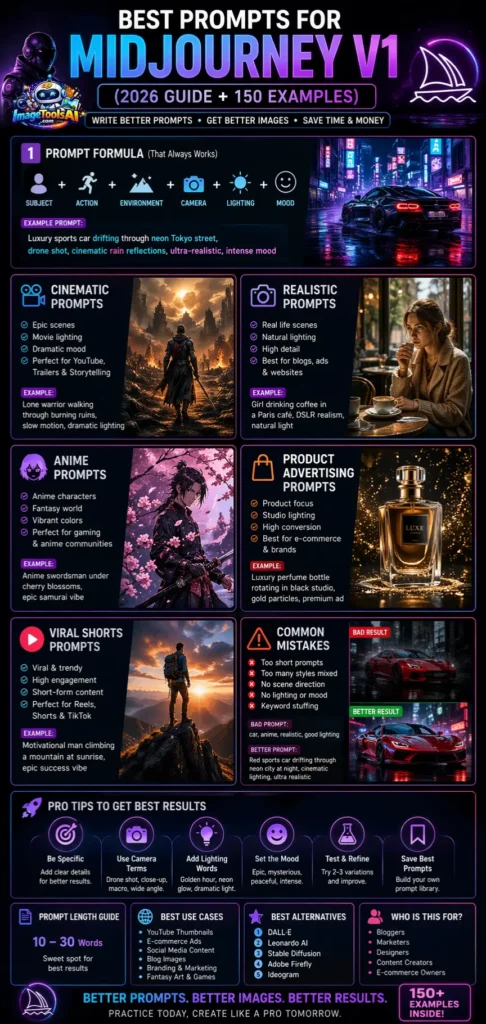
Best Prompt Formula That Always Works
Use this proven structure:
Subject + Action + Environment + Camera + Lighting + Style + Mood
Example
Luxury sports car drifting through neon Tokyo street, drone shot, cinematic rain reflections, ultra-realistic, intense mood
This formula works in nearly every niche.
Best Prompts for MidJourney V1 by Category
Cinematic Prompts
Perfect for YouTube, trailers, storytelling, and premium visuals.
- Lone warrior walking through burning ruins, slow motion, dramatic lighting
- Luxury car racing through the Dubai highway at sunset, drone shot
- Hacker inside neon cyberpunk room, flickering lights
- An astronaut landing on Mars, epic cinematic realism
- Woman standing on rooftop in heavy rain, emotional film style
- Desert chase scene with motorcycles, movie trailer look
- Castle siege at dawn, smoke and fire
- Mafia boss entering dark club, luxury shadows
- Airplane above storm clouds, dramatic sky
- Secret agent in a Paris alleyway at night
Realistic Prompts
Best for blogs, ads, ecommerce, and websites.
- Elderly fisherman smiling beside wooden boat, natural light
- Girl drinking coffee in a Paris café, DSLR realism
- Golden retriever running in snow, detailed fur
- Fashion model walking on a Milan street, premium realism
- Office worker using a laptop near a sunny window
- A child playing football on the village road
- Chef preparing pasta in an Italian kitchen
- Businessman in a glass office tower
- A couple walking through a German Christmas market
Anime Prompts
Perfect for gaming and anime communities.
- Anime swordsman under cherry blossoms
- Magical girl transforming in a glowing city
- Mecha robot battle in futuristic Japan
- Anime rooftop confession at sunset
- Demon King throne room scene
- Ninja running through a bamboo forest
- Floating academy in clouds
- Pirate captain on stormy ocean
- Cyber anime hacker girl neon room
- Dragon rider above the mountains
Product Ad Prompts
Excellent for e-commerce stores and brands.
- Luxury perfume bottle rotating in a black studio, gold particles
- Gaming laptop opening with RGB lights
- Sneakers floating with a smoke burst
- Coffee machine in a premium kitchen with sunlight
- Handbag on marble platform luxury ad
- Headphones surrounded by neon wave lines
- Smartphone splash water resistance ad
- Protein shake bottle, fitness studio look
- Watch macro close-up premium commercial
YouTube Shorts Prompts
Great for viral short-form content.
- Motivational man climbing a mountain at sunrise
- Burger close-up, melting cheese, slow motion
- Money raining in a luxury office
- AI robot typing laptop viral style
- City timelapse neon traffic speed look
- Football celebration stadium lights
- Luxury bedroom millionaire aesthetic
- Girl Dancing rooftop sunset
- Business quote skyline cinematic background
Fantasy Prompts
Excellent for storytelling and entertainment.
- A giant dragon flying over a frozen kingdom
- Elf queen in a glowing forest temple
- A wizard is opening a portal in a dark cave
- Floating island city in clouds
- Ancient phoenix rising from lava
- Golden Knight is entering the cursed castle
- Moonlit vampire palace garden
- Mermaid city under an ocean crystal dome
- Ice giant walking mountains
- Lost treasure jungle temple
Viral Social Media Prompts
Perfect for reels and trending pages.
- Billionaire morning routine luxury penthouse
- AI girlfriend futuristic aesthetic
- Dream travel Maldives drone view
- Hypercar garage millionaire lifestyle
- Productivity desk setup, clean, modern
- Glow-up fashion transition scene
- Secret success mindset background
- Futuristic home interior minimal luxury
- Passive income laptop beach vibe
Comparison Table – Prompt Styles
| Prompt Type | Best For | Difficulty | Conversion Potential |
| Cinematic | YouTube, storytelling | Medium | High |
| Realistic | Blogs, ads, and e-commerce | Easy | High |
| Anime | Gaming pages | Easy | Medium |
| Product Ads | E-commerce brands | Medium | Very High |
| Viral Social | Reels, Shorts | Easy | High |
| Fantasy | Entertainment | Medium | Medium |
Step-by-Step Guide to Write Powerful Prompts
Start with Subject
Choose the main object.
Examples:
- Car
- Dog
- Warrior
- Perfume bottle
- Smartphone
Add Action
What is happening?
- Driving
- Running
- Jumping
- Flying
- Glowing
Add Environment
Where is the scene?
- Tokyo street
- Forest
- Ocean
- Mars
- Dark studio
Add Camera Angle
- Close-up
- Wide angle
- Drone shot
- POV
- Cinematic zoom
Add Lighting
- Golden hour
- Neon glow
- Moonlight
- Studio light
- Dramatic shadows
Step 6 – Add Mood
- Epic
- Peaceful
- Luxurious
- Intense
- Mysterious
Advanced Prompt Tricks
Camera Words
- Macro shot
- Aerial shot
- Lens flare
- Handheld style
- Cinematic lens
Detail Words
- Ultra realistic
- Photorealistic
- Highly detailed
- Sharp focus
- 8K quality
Emotion Words
- Peaceful
- Dramatic
- Luxury
- Emotional
- Futuristic
Motion Words
- Exploding
- Drifting
- Slow motion
- Flowing wind
- Fast moving
Common Prompt Mistakes to Avoid
Too Short
Bad:
car
Better:
Luxury black sports car drifting through neon city rain, cinematic realism
Too Many Styles Mixed
Bad:
anime + watercolor + realism + cartoon + oil painting
Stay focused on one direction.
No Scene Direction
Always mention the location.
No Mood
Mood creates emotional visuals.
Best Use Cases in Europe & Global Markets
Businesses use MidJourney prompts for:
- UK ecommerce ads
- German SaaS graphics
- French fashion campaigns
- Spanish tourism visuals
- Italian restaurant menus
- EU startup branding
- USA YouTube thumbnails
- Global dropshipping ads
Pros and Cons
Pros
- Easy to use
- Fast visual creation
- Great for marketers
- Helpful for creators
- Strong for e-commerce
- Unlimited creativity
Cons
- Requires prompt skill
- Some retries needed
- Results vary by wording
- Faces and hands may fail sometimes
Pricing
MidJourney pricing changes over time.
| Plan Type | Best For | Typical Use |
| Basic | Beginners | Learning prompts |
| Standard | Creators | Daily content |
| Pro | Agencies | Commercial use |
| Enterprise | Teams | Large workflows |
Always check the official MidJourney website for updated pricing.
Best Alternatives to MidJourney V1
1. DALL·E
Excellent prompt understanding.
2. Leonardo AI
Strong for game assets.
3. Stable Diffusion
Best for customization.
4. Adobe Firefly
Great for commercial-safe assets.
5. Ideogram
Excellent for text inside images.
Tips to Get the Best Results Fast
- Test three versions of every prompt
- Keep prompts specific
- Use lighting words
- Add camera terms
- Focus on one scene
- Avoid keyword stuffing
- Save strong prompts
- Improve step by step
FAQs
A: Cinematic, realistic, anime, product ad, and viral social prompts perform very well.
A: Usually, 10–30 words work effectively.
A: Yes. Many creators use ChatGPT to generate advanced prompts quickly.
A: Depends on your goal. Ads need realism. Fantasy content needs creativity.
A: Rewrite using stronger subject, lighting, camera angle, and mood.
Conclusion
Picture this: MidJourney V1 works best when your prompts are sharp, detailed, yet imaginative. Because of that, you can craft movie-like visuals, sleek product shots, lifelike pictures, trending social posts, even dreamy fantasy worlds – fast. What matters is how clearly you describe it. A few well-chosen words spark vivid results. Instead of vague ideas, try painting a full scene. That way, the output matches what’s in your head. Think specifics, not generalities. For example, name the mood, setting, and lighting. Then watch it come alive. Even odd combos work if framed right. Time spent refining phrasing pays off. Results show exactly that effort.
Bloggers, marketers, ecommerce brands, or creators – each finds that mastering prompts cuts hours off workloads. Design Expenses shrink when clear directions replace guesswork. Better outcomes emerge simply by asking the right questions first.
Try the prompts from this guide first. Tinker with different versions afterward. Store the ones that work well. With practice, these saved inputs might prove useful later on.











