Introduction
Out of nowhere, Artificial Intelligence began changing the way visuals come together on the web. By 2026, those making blogs, videos, or running online shops started leaning heavily on smart software for crafting images at speed. While some stick to old methods, many creators – freelancers, students, marketers, even big brands – now rely on machine-driven help when building digital artwork quickly.
MidJourney stands out among others you might have heard of. Known for turning basic text into visuals that feel refined – almost like paintings done by hand. Its reputation comes from crafting images with a polished look, just from words typed in plain language.
If you are completely new, it can feel confusing at first.
You may ask:
- How does MidJourney work?
- Is MidJourney easy for beginners?
- How do prompts work?
- Which plan should I buy?
- Can I use MidJourney images for business?
That is exactly why this guide was created.
Start here if you’re new to MidJourney version one. This guide walks through each part slowly, using clear words. Get what prompts really do, along with settings that matter. A look at pricing options shows up, too. Common errors pop in – see them before they trip you. Smart moves stack up from real users worldwide who speed ahead with this tool. How it helps creative work comes into view near the end.
After reading this piece, confidence grows when working with MidJourney V1 – especially true for those new to it. The starting point doesn’t matter much here.
What Is MidJourney V1?
MidJourney is an advanced AI image generator that converts text into original images.
You simply type what you want.
Example Prompt:
Luxury perfume bottle on marble table, cinematic lighting, realistic photography
Then MidJourney creates image variations based on your idea.
This tool became popular because its visuals often look more artistic, polished, and premium compared to many other AI art platforms.
People use MidJourney for:
- Realistic portraits
- Product advertisements
- YouTube thumbnails
- Social media banners
- Anime artwork
- Fantasy scenes
- Logo ideas
- Interior design inspiration
- Blog graphics
- Marketing creatives
If visuals matter to your business, MidJourney can save both time and money.
How MidJourney V1 Works
Picture this. Words meet art through smart algorithms in MidJourney. Styles form from patterns it has seen before. Color choices come alive based on what fits best. Light bends how a scene feels – soft, sharp, warm. Subjects appear shaped by the descriptions given. Moods emerge quietly, built from hints in phrases. Textures grow detailed when prompts point the way. Composition arranges itself like pieces of a puzzle falling into place.
Start typing, then watch how it picks apart what you asked for before showing possible pictures. Each step happens without hurry, shaped by your original words yet moving on its own track.
Basic Workflow
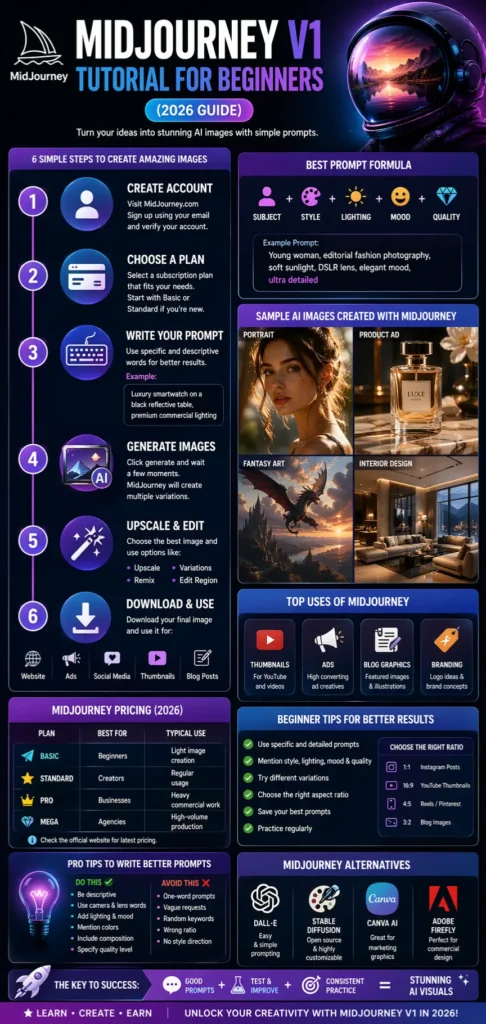
- Open MidJourney
- Enter a prompt
- AI generates image versions
- Choose the best result
- Upscale or edit it
- Download and use it
Example Prompt
Modern Scandinavian living room, natural sunlight, luxury interior photography
This can generate four clean interior design images.
Why MidJourney Is Popular in 2026
Many AI tools exist, but MidJourney remains powerful because of its output quality.
Main Reasons Users Love It
1. Premium Image Quality
MidJourney often creates professional-looking visuals with strong detail and mood.
2. Beginner Friendly
You do not need graphic design skills.
3. Great for Business Use
Use it for:
- Ads
- Thumbnails
- Branding concepts
- Blog visuals
- Social content
4. Fast Workflow
Create visuals in seconds instead of hours.
5. Wide Style Variety
Generate:
- Realistic photos
- Anime art
- Cinematic scenes
- Fashion photography
- 3D renders
- Watercolor art
- Minimal graphics
Who Should Use MidJourney?
MidJourney is useful for many users.
Bloggers
Create:
- Featured images
- Pinterest graphics
- Travel visuals
- Comparison charts
YouTubers
Create:
- Thumbnail ideas
- Story visuals
- Channel art
eCommerce Sellers
Create:
- Product mockups
- Lifestyle Ads
- Packaging concepts
Agencies
Create:
- Client concepts
- Social creatives
- Campaign graphics
Students
Create:
- Presentations
- Posters
- Creative assignments
Step-by-Step MidJourney V1 Tutorial for Beginners
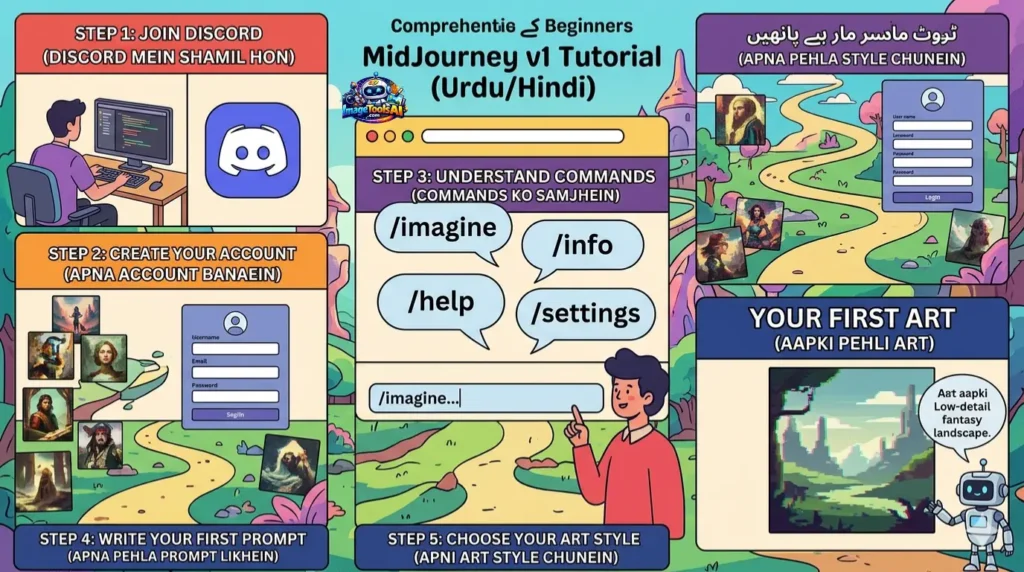
Step 1: Create an Account
Visit the official MidJourney website and register.
Use your email address and verify the account.
Step 2: Choose a Subscription Plan
Pick a package based on monthly image needs.
You are new, start with Basic or Standard.
Step 3: Open the Create Dashboard
After logging in, open the creation panel where prompts are entered.
This is where creativity begins.
Step 4: Write Your First Prompt
Use specific words.
Example:
Luxury smartwatch on a black reflective table, premium commercial lighting
Step 5: Generate Images
Click generate and wait a few moments.
The AI will create multiple versions.
Step 6: Choose the Best Version
Use options like:
- Upscale
- Variations
- Remix
- Edit Region
Step 7: Download Final Image
Use your image for:
- Website content
- Ads
- Social media
- Client work
- Thumbnails
- Blog posts
Best Prompt Formula for Beginners
Use this simple structure:
Subject + Style + Lighting + Camera + Mood + Quality
Example:
Young woman, editorial fashion photography, soft sunlight, DSLR lens, elegant mood, ultra detailed
girl photo
10 Best MidJourney Prompt Examples for Beginners
Realistic Portrait
Professional businesswoman, natural daylight, DSLR photo
Product Ad
Luxury perfume bottle on marble table, cinematic lighting
Anime Style
Teen hero, anime style, dramatic action pose
Logo Idea
Minimal lion logo, gold and black branding
Travel Scene
Santorini, Greece, sunset street, summer travel photo
Food Shot
Fresh pizza with steam, restaurant photography
YouTube Thumbnail
Shocked face, bright colors, dramatic lighting
Interior Design
Modern luxury bedroom, warm mood lighting
Fashion Shoot
Streetwear model in Tokyo, neon city
Fantasy Scene
Dragon flying over the castle at sunrise
Best MidJourney Settings for Beginners
| Setting | Best Use |
| 1:1 Ratio | Instagram posts |
| 16:9 Ratio | YouTube thumbnails |
| 3:2 Ratio | Blog images |
| Stylize Medium | Balanced creativity |
| High Quality | Final exports |
| Fast Mode | Quick generations |
MidJourney Pricing
| Plan | Best For | Typical Use |
| Basic | Beginners | Light image creation |
| Standard | Creators | Regular use |
| Pro | Businesses | Heavy commercial work |
| Mega | Agencies | High-volume production |
Always check the official website for current pricing.
Pros and Cons of MidJourney
Pros
- Exceptional image quality
- Easy interface
- Great for marketers
- Fast results
- Many styles available
- Strong Community support
Cons
- Paid platform
- Prompt learning takes time
- Some outputs need retries
- Text in images may look wrong
MidJourney vs Best Alternatives
| Tool | Best For | Strength |
| MidJourney | Artistic visuals | Premium image quality |
| DALL·E | Simplicity | Easy prompting |
| Stable Diffusion | Customization | Open ecosystem |
| Canva AI | Marketing graphics | Beginner-friendly |
| Adobe Firefly | Commercial design | Adobe ecosystem |
How to Use These AI Tools Smartly
To maximize results:
- Use AI for drafts first
- Edit final outputs manually
- Test 5–10 prompts
- Save winning prompts
- Combine with Canva or Photoshop
- Build repeatable workflows
Tips to Write Better MidJourney Prompts
Do This
- Mention lighting
- Mention camera style
- Mention mood
- Mention colors
- Mention composition
- Mention the quality level
Avoid This
- One-word prompts
- Vague requests
- Random keywords
- No ratio
- No style direction
Common Beginner Mistakes to Avoid
1. Too Short Prompts
Bad:
car
Better:
Luxury red sports car on mountain road, cinematic sunset
2. No Style Mentioned
Use styles like:
- realistic
- anime
- watercolor
- cinematic
- 3D render
3. Wrong Ratio
Use the correct sizes:
- 16:9 = YouTube
- 1:1 = Instagram
- 4:5 = Reels cover
- 3:2 = Blog image
4. Expecting Perfect First Result
Generate multiple versions.
Professionals test many results
Advanced Prompt Tips
Camera Words
- DSLR
- cinematic lens
- macro shot
- aerial view
Lighting Words
- golden hour
- soft light
- neon light
- studio lighting
Mood Words
- dramatic
- calm
- luxury
- futuristic
Detail Words
- ultra detailed
- realistic texture
- high resolution
FAQs
Yes. It is beginner-friendly once you understand prompt basics.
No. Strong prompts matter more than design experience.
Usually subscription-based. Check official plans.
Depends on your plan and licensing terms.
Popular in the UK, Germany, France, Spain, Italy, and the Netherlands.
Conclusion
Picture this: Color choices come alive based on what fits best. Light bends how a scene feels – soft, sharp, warm. Subjects appear shaped by the descriptions given. Moods emerge quietly, built from hints in phrases. Composition arranges itself like pieces of a puzzle falling into place.
Each step happens without hurry, shaped by your original words yet moving on its own track.
The key to success with MidJourney is simple:
- Learn how prompts work
- Test different styles and settings
- Improve your wording over time
- Save your Best-performing prompts
- Practice regularly
Begin simply, test new things regularly – skills grow that way slowly. Little shifts add up without needing big leaps.
Right now, AI is shifting how things work. Picking up MidJourney along the way builds real skill for making content that stands out. Think brand visuals, outreach efforts – those paths open up. New ways to earn online start looking possible too.











