Introduction
Even if older by 2026, Midjourney V4 still holds steady among creatives – from illustrators to ad teams – throughout Europe and elsewhere. Because it blends quick results with a distinct flair, many lean on it when imagination takes priority over pixel-perfect detail. Newer models like V5 and V6 offer tighter control, yet this earlier release keeps showing up in daily toolkits. Its strength? Delivering usable images without fuss. Think mood-driven sketches, stylized products, film-like frames – the kind of visuals where feeling beats exactness. Despite time passing, it stays relevant simply by performing well under real demands.
Clarity in understanding prompts sets V4 apart, yet it’s the subtle artistry it adds that gives results their flavor. Instead of just generating images, it builds mood through texture and light, almost like brushwork on canvas. From city studios in Paris where campaigns take shape, to design desks in Berlin mocking up products, its presence reshapes how words become pictures. Even in fast-paced environments such as Milan, where storyboards evolve by the hour, consistency remains steady across every frame produced. The engine behind it doesn’t rush toward realism; rather, it lingers in atmosphere, favoring depth over sharpness. Many artists find themselves returning to these outputs, drawn not by precision but by soulful imperfections others smooth away.
This walkthrough shows what Midjourney V4 does behind the scenes, how prompt writing shapes outcomes, which settings deliver the strongest effects, while contrasting its behavior against versions five and six. Alongside, real cases appear alongside staged processes, errors worth sidestepping, plus subtle moves that push output toward sharper, clearer, repeatable quality. For those just starting out or already deep into creation, this 2026 breakdown opens up more of what V4 can actually do.
What Is Midjourney V4?
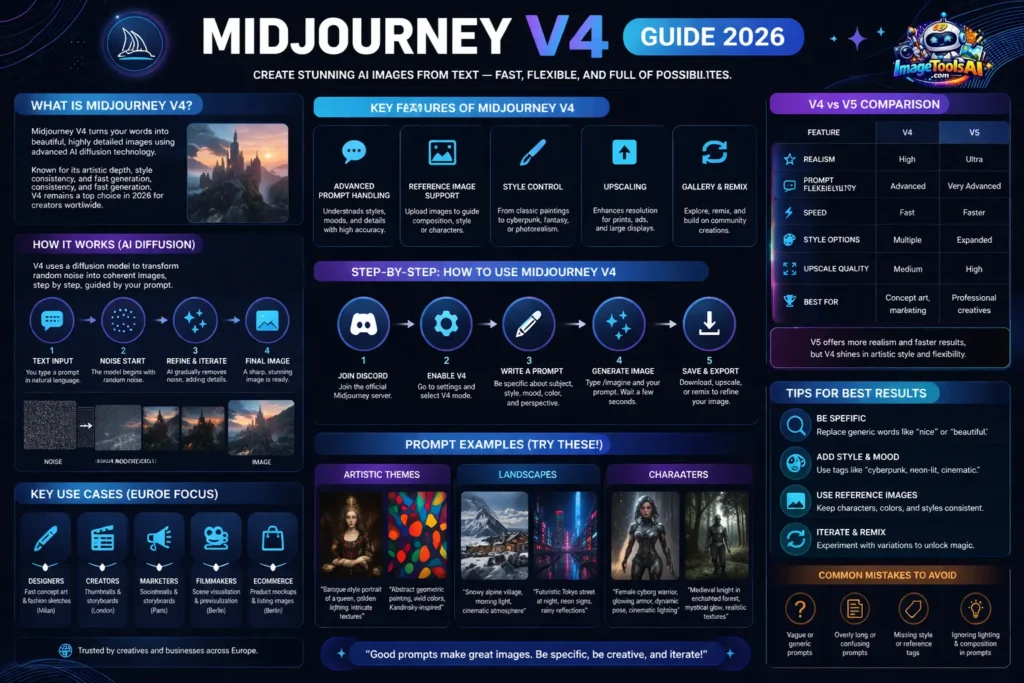
Midjourney V4 creates images from text using AI. Instead of drawing by hand like old methods, it reads what you type and turns it into art right away through learning systems built in.
Key Differences From Other Versions:
| Feature | V3 | V4 | V5 |
| Image realism | Moderate | High | Ultra-realistic |
| Prompt flexibility | Limited | Advanced | Very advanced |
| Style customization | Basic | Enhanced | Professional-level |
| Reference image support | Partial | Full | Full + AI blending |
| Upscaling | Low | Medium | High |
How Midjourney V4 Works
1. Understanding Diffusion Models
A fresh twist on image creation lives inside Midjourney V4 – its core runs on a Diffusion system, an artificial mind trained to shape chaos into clarity. Imagine blank static slowly settling into form, step after quiet step. This process does not leap; instead, it listens to your words, nudging foggy pixels toward something solid. From haze comes structure, prompted gently, one refined layer at a time. What began as digital noise finally looks like thought made visible.
2. NLP and Prompt Understanding
Starting with MidJourney v4, understanding gets sharper through smarter language processing. Because of the upgraded NLP, context fits better with what you describe. Style, mood, even subtle tones – picked up clearer now. Earlier models missed some depth. Not so here. Subject details lock in closer, thanks to refined interpretation layers.
Example:
Prompt: “A futuristic city skyline at sunset, cyberpunk style, vibrant colors.”
Key Features of Midjourney V4
1. Advanced Prompt Handling
V4 accepts nuanced prompts, including adjectives, artistic styles, emotions, and technical specifications.
2. Reference Image Support
Pictures go up, letting the AI mix what it knows with what you show. Input shapes output when visuals lead the way.
3. Style Control
Fine old paintings might shape your choice – yet pixel-perfect glows have their own pull. A brushstroke feel could set the tone; then again, sharp neon edges whisper differently. Think Renaissance calm mixed with glitchy pulses. Smooth marble forms sit beside jagged data trails. Quiet elegance meets stuttering motion. Ink on parchment finds company in liquid screens
- Realism
- Impressionism
- Cyberpunk
- Fantasy
4. Upscaling
Fine detail comes through clearly, perfect for posters or ads. Outputs hold up well on big screens, too. Crisp results work smoothly across videos and presentations. Quality stays strong even when scaled up. Projects meant for public display benefit from sharp visuals.
5. Gallery & Remix
Starting fresh each time, V4 gives space to twist what’s already made or wander through tweaks. Creativity loops happen when trying again feels natural, simply by playing with changes now and then.
Benefits & Use Cases
| User Type | Benefit | Example |
| Designers | Rapid concept creation | Fashion sketches in Milan |
| Creators | Storyboarding & art | YouTube thumbnails & webcomics in London |
| Marketers | Social media visuals | Campaign ads for brands in Paris |
| Filmmakers | Scene visualization | Previsualization for European films |
| eCommerce | Product mockups | Online stores in Berlin |
Guide to Using Midjourney V4
- Joining Discord:
Start by heading over to Discord, where Midjourney runs. Their official server holds everything needed – just join it. Once inside, step through the setup steps shown there. - Enabling V4:
Start by opening your Discord settings. Inside, pick V4 mode from the options shown. That choice changes how things work going forward. - Writing Prompts:
Be descriptive: specify subject, mood, style, color, and Perspective. - Generating Images:
Start by typing /imagine followed by your idea. Wait while the system creates the image. - Saving & Exporting:
Pictures come in sharp detail when you pull them down. A boost in size might follow, just to stretch the view. Change things up if it feels right – tweak until it fits. Variation sneaks in through small shifts, not big leaps.
Midjourney V4 Prompt Examples
Artistic Themes
- “Baroque-style portrait of a queen, golden lighting, intricate textures”
- “Abstract geometric painting, vivid colors, Kandinsky-inspired”
Landscapes
- “Snowy alpine village, morning light, cinematic atmosphere”
- “Futuristic Tokyo street at night, neon signs, rainy reflections”
Characters
- “Female cyborg warrior, glowing armor, dynamic pose, cinematic lighting”
- “Medieval knight in enchanted forest, mystical glow, realistic textures”
Comparison Table: Midjourney V4 vs V5 vs V6
| Feature | V4 | V5 | V6 |
| Realism | High | Ultra | Hyper-realistic |
| Prompt Flexibility | Advanced | Very advanced | Professional-level |
| Speed | Fast | Faster | Fastest |
| Style Options | Multiple | Expanded | Extensive + AI blending |
| Upscaling | Medium | High | Ultra |
| Best For | Concept art, marketing | Professional creatives | Film, high-res commercial projects |
Tips to Get the Best Results
- Use specific, descriptive prompts –Steer clear of terms such as “nice” or “beautiful.”
- Add style or mood tags – e.g., “cyberpunk, neon-lit, cinematic.”
- Experiment with reference images – keeps things looking uniform throughout
- Iterate and remix –Finding different ways to do things makes V4 powerful.
FAQs
A: Now here’s something different – V5 brings sharper details, better accuracy, plus it understands prompts more deeply. Yet speed still leans toward V4, which handles artistic ideas with strong results
A: Images made with Midjourney? They’re okay for selling stuff, so long as you follow the rules they set.
A: Once the picture appears, hit the upscale option on Discord to get a clearer version. Resolution jumps when you tap that button after generation. After creation, boosting quality happens through Discord’s upscaling tool. The moment the image shows, use Discord’s upgrade feature for sharper results. Sharpness improves if you apply Discord’s scale-up function post-generation.
A: Definitely shines in moments needing creativity – think abstract ideas, where V5 or V6 could get stuck on exactness rather than open meaning.
Conclusion
Even in 2026, plenty turn to Midjourney V4 – designers, marketers, those behind films – all chasing clean visuals without long waits. Feed it precise cues, toss in reference shots, and watch how much smoother it runs if you’ve learned the core moves first. Once your process locks into place, solid output shows up more naturally. Getting good at it? Not luck. Just doing things step by step.
Start by exploring detailed prompts, refining them step by step, staying alert to fresh shifts in AI image tools. When shaping Advertisements, drawing fantasy scenes, or mapping out movie visuals, Midjourney V4 becomes a flexible partner – always ready, full of options, quietly effective.











