Introduction
By 2026, pictures made by artificial intelligence will no longer be rare experiments tucked inside high-end labs. Instead, they’re everywhere – fueling ideas in ad firms, shaping visuals for game developers, giving indie artists new ways to draw, filling online stores with fresh images, even helping weekend creators on their screens. Leading that shift? A tool called Midjourney, which turns plain words into striking, imaginative scenes using smart algorithms behind the scenes.
Midjourney eliminates the need for hand-drawn sketches, specialized knowledge, or mastery of complex programs. Instead, it uses smart systems built on learning patterns to turn words into images – images that sometimes go beyond what a person imagined. While its structure keeps changing over time, the tool pushes new ways of making art. It opens creative power to more people than ever before.
This complete Midjourney Handbook from 2026 breaks down every detail needed to master the tool – think of it as your steady companion through the learning curve. Instead of guessing, you follow clear steps that build skill over time. Each section opens new doors, revealing how small choices shape results. Behind every image lies a method, now made visible. What once felt confusing becomes familiar, almost second nature.
Once you finish reading, a clear picture forms in your mind of how to build Midjourney prompts. Crafting them becomes natural, shaped step by step through real examples. Style choices click into place after seeing how small tweaks shift results. Optimization isn’t guesswork once patterns emerge from trial and error. Refinement happens quietly, almost without notice, each version better than the last. Studio-grade images start appearing regularly, even on early attempts. These visuals work just as well for selling products as they do for private projects. Drawing talent? Not required here. The process fills that gap.
What Is Midjourney?
Picture this: Midjourney turns words into pictures using artificial intelligence. Instead of just reading your description, it digs into the meaning through smart pattern recognition. Starting with a prompt, the system builds visuals step by step. Because it learns from vast image data, results often feel surprising yet accurate. Rather than copying existing art, it crafts new scenes each time. Through layers of digital refinement, rough ideas become clear images. Context matters – it picks up on subtle hints in phrasing. Diffusion methods help shape fuzzy beginnings into detailed outputs.
A brushstroke away from imagination, Midjourney works like a partner who paints ideas. Instead of waiting for cues, it shapes visions through quiet understanding. Picture a sketchpad that dreams in colors you never mixed. It builds images not by rules but by hunches. Each output feels less made, more uncovered. Not code pretending to create – just motion guided by instinct
- Photorealistic portraits
- Stylized concept designs
- Fantasy illustrations
- Sci-fi landscapes
- Artistic posters
- Hyperreal 3D renderings
- Cartoon or anime-style visuals
- Cinematic scenes
What sets Midjourney apart isn’t just how it draws, but how it imagines. Where most AI sticks close to realism, this one leans into bold choices. Mood comes through clearly, sometimes dark, sometimes vibrant. Drama builds in the lines, shapes, textures – unfolding like scenes from a dream. Stylized touches appear naturally, not forced. Depth feels layered, lived-in, not flat or generic. Other systems chase precision; here, artistry takes the lead. Traditional generators often miss these nuances entirely.
Why Midjourney Is Popular
One big reason Midjourney stands out? It turns ideas into images fast. What helps it shine is how easily people can jump in and start creating. A key strength lies in its community-driven approach – users share, learn, and grow together. The tool keeps evolving because feedback shapes each update. Another point worth noting – it handles complex prompts without slowing down. Visual quality matters here more than flashiness. People stick around not because of hype but because it just works. Its simplicity hides deep flexibility underneath. Creativity flows better when friction fades away
1. Ultra-Creative Output
Picture dreamlike scenes woven with mood and color – Midjourney shapes them effortlessly. From shadow-drenched cityscapes to realms unbound by reality, each image breathes feeling. Crafted not just with precision but a whisper of soul, outputs linger as memories half-remembered. Vision meets intuition here, where every detail feels both invented yet strangely familiar.
2. Flexible Prompts
With words alone, almost any look takes shape through detailed descriptions. Settings shift by adding specific details to a request. Through tweaks in phrasing, colors change along with styles. Each choice flows from how ideas get described. Details guide adjustments across shapes, tones, and layouts. By shaping sentences differently, results transform accordingly
- Styling
- Composition
- Texture
- Lighting
- Camera angles
- Mood tones
- Art mediums
- Model versions
With room to move, trying new things becomes natural – tweaking what follows feels almost automatic.
3. Fast Iteration
A fresh set of options appears almost instantly with Midjourney. Upscaling takes just a moment, while tweaks happen smoothly right after. Remixed versions pop up fast, sometimes before you finish deciding. New attempts roll out one after another without delay.
4. Community Inspiration
Inside the Midjourney Discord, creators from everywhere trade ideas – some post prompts, others share visuals or techniques. Learning moves faster when insight flows freely between people.
5. Customizable Workflows
A fresh look starts by shaping your own style choices. Preferences grow sharper when you guide them again and again. Visual patterns take form through repeated touches, each one holding a familiar thread. Themes emerge quietly, shaped by what feels right over time. The longer you work within it, the more intuitive the results become.
How Midjourney Works:
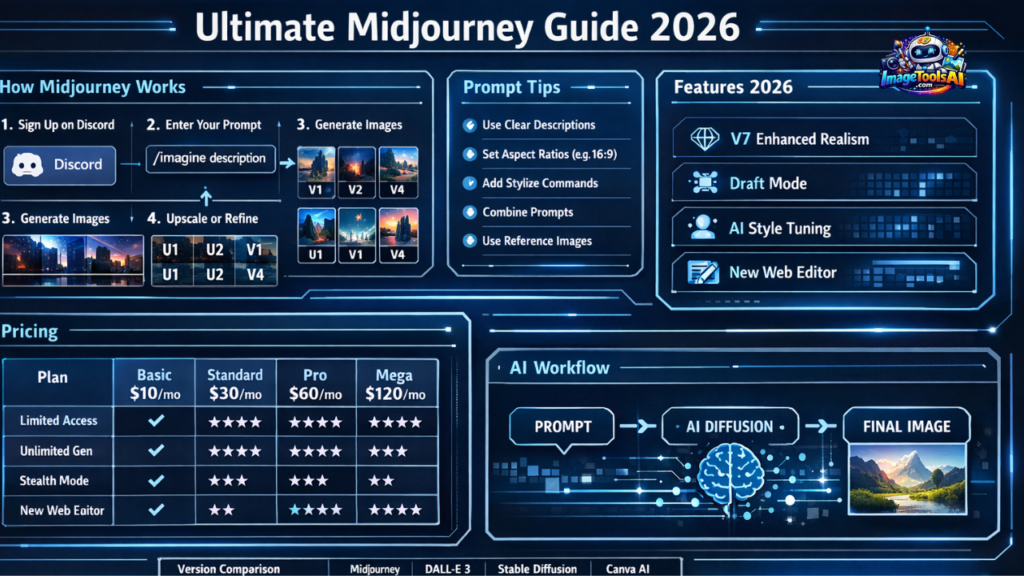
Getting how Midjourney works makes it easier to create high-quality results. Here’s one way to go through the process, piece by piece.
Choose a Plan
A membership keeps Midjourney running. By 2026, options roll out like this:
| Plan | Price | Key Perks |
| Basic | ~$10/month | Limited generations, standard rendering |
| Standard | ~$30/month | Unlimited relaxed mode + fast speed |
| Pro | ~$60/month | Stealth Mode + priority rendering |
| Mega | ~$120/month | Maximum fast hours, advanced support |
Key Midjourney Features
Midjourney 2026 includes numerous upgrades, especially with Version 7+.
Here are the major features:
1. Text-to-Image Generation
Fresh pictures emerge when words meet smart math tricks behind the scenes. A mind turns speech into shapes without skipping steps. Each idea spreads through layers till colors form on their own.
2. High Customization with Parameters
Lighting bends to your choices, while colors shift step by step. Composition sits where you place it, shaped by angle and view. Camera positions change, each tilt a new frame. Every detail moves under quiet direction, layer by layer.
3. Draft Mode for Fast Iteration
Faster ideas start cheap, built fast to test what works. A trial version appears quickly, skipping delays. This way skips high costs at first. Try it now means less risk up front. Speed matters most here – get feedback before details settle.
4. Personalization & AI Style Preferences
Starting small, Midjourney picks up on what art styles you like when you give a thumbs-up to certain pictures. Over time, it gets better at showing similar ones just by watching your choices unfold quietly behind the scenes. Each rating nudges it closer without any loud Announcements or flashy signals involved.
5. Enhanced Realism & Detail
Sharp details come through clearly in V7, while physical behavior behaves closer to reality. Textures look less fake because they move as real materials would. Every part of the image feels grounded when you see how light hits surfaces. Reality slips into view with subtle shifts in shadow and depth.
Benefits and Use Cases
Flying through design studios, Midjourney slips into film sets just as easily. A quiet helper here, a bold idea there – it fits where imagination leads. Painters lean on it, architects whisper to it, storytellers twist its output like clay. Not magic, just tools meeting minds.
Designers & Artists
- Create mock-ups for branding
- Design book covers, posters, album artwork
- Concept art for films, comics, and animation
- Style matrices for visual research
Marketing Teams
- Custom ads
- Social media design
- Brand-tailored themes
- Visual storytelling
Students & Educators
- Academic visualization
- Research diagrams
- Presentation enhancement
- Art education aids
Guide to Using Midjourney
Here’s a simplified yet advanced guide:
- Change your choices by going to /settings
- Start with what you see first, then shape it through tone. Build on how it feels using atmosphere instead of rules. Light sets the temperature, changing everything quietly. Viewpoint comes last, shifting where eyes land without warning
- Use prompt weighting for focus
- Apply parameters strategically
- Only high-quality results get enhanced
- Save everything in categorized folders
Pros & Cons
Pros
- High creative quality
- Fast generation
- Extensive customizations
- Strong global community
- Regular version updates
Cons
- No free plan
- Requires Discord familiarity
- Folks see different outcomes depending on how clear their prompts are
- Payment unlocks business usage rights
Pricing and Plan Details
| Plan | Cost | Features |
| Basic | $10/mo | Limited generations |
| Standard | $30/mo | Relaxed mode, more hours |
| Pro | $60/mo | Stealth, advanced controls |
| Mega | $120/mo | Teams, max speed hours |
Choose based on usage intensity.
Best Alternatives to Midjourney
| Tool | Strengths | Weaknesses |
| DALL·E 3 | Strong literal interpretation | Less artistic |
| Stable Diffusion | Open-source, flexible | Technical setup |
| Canva AI | Easy for beginners | Limited fine control |
| Leonardo AI | Templates + speed | Smaller community |
Midjourney vs Competitors
| Feature | Midjourney | DALL·E 3 | Stable Diffusion | Canva AI |
| Creativity | ⭐⭐⭐⭐⭐ | ⭐⭐⭐ | ⭐⭐⭐⭐ | ⭐⭐ |
| Ease of Use | ⭐⭐⭐ | ⭐⭐⭐⭐ | ⭐⭐ | ⭐⭐⭐⭐ |
| Licensing | Yes | Yes | Yes | Yes |
| Speed | Fast | Fast | Moderate | Moderate |
| Community | Large | Medium | Medium | Small |
FAQs
Right now, access depends on your subscription type. Look up the current rules online before assuming anything.
Start by naming exactly what you need. Shape it step by step, using clear details. Try different versions to see what fits best
True, the Discord layout needs some getting used to. Still, it works once you spend time on it. A few minutes of clicking around helps more than expected. At first glance, things seem scattered. Yet patterns show up after a while. Navigation feels odd at the start. Over time, pieces fall into place naturally.
A fresh look comes through clearer details. Draft Mode shows work as it grows. One size fits none, so changes fit you. The web tool shapes edits easily.
Use cultural landmarks, local art styles, and regional lighting moods for relevance
Conclusion
Still standing strong in 2026, Midjourney leads the pack among AI art tools – its creative strength comes through in fluid processes, Imaginative Edits, and steady upgrades. Artists, teachers, learners, marketers, or just curious minds might find their ideas moving more quickly, exploring freely, and landing on visuals that used to demand years of training. What once seemed out of reach now shows up in moments











