Introduction
Most people who write online face a tough problem: keeping up with fresh material. Think about it – blog entries, updates on platforms, messages sent through mailboxes, details listed for items, paperwork at work. Each task takes more time than expected. Staying regular? That rarely happens without effort piling up behind the scenes.
Here’s when Canva Magic Write steps into the picture.
Now shaping up beyond basic tricks, Canva’s Magic Write grows smarter with each update. Not just crafting sentences, it sparks thoughts when stuck on concepts. From reshaping paragraphs to pulling key points fast, it adapts on the fly. Staying true to your voice matters – this tool keeps tone steady across every design. Hidden inside Canva, it works without fuss, always ready when words fall short.
Starting inside Canva Docs, Magic Write slips right into whiteboards, presentations, and more – no jumping between apps needed. Ideas spark here, then shift smoothly into words and visuals, all within one place.
Picture this: a full walkthrough of Canva Magic Write – how it runs, what stands out, where it fits best. Peek into smart prompt methods. See how SEO gains strength from it. Watch teams grow output without burning extra hours by 2026.
What Is Canva Magic Write?
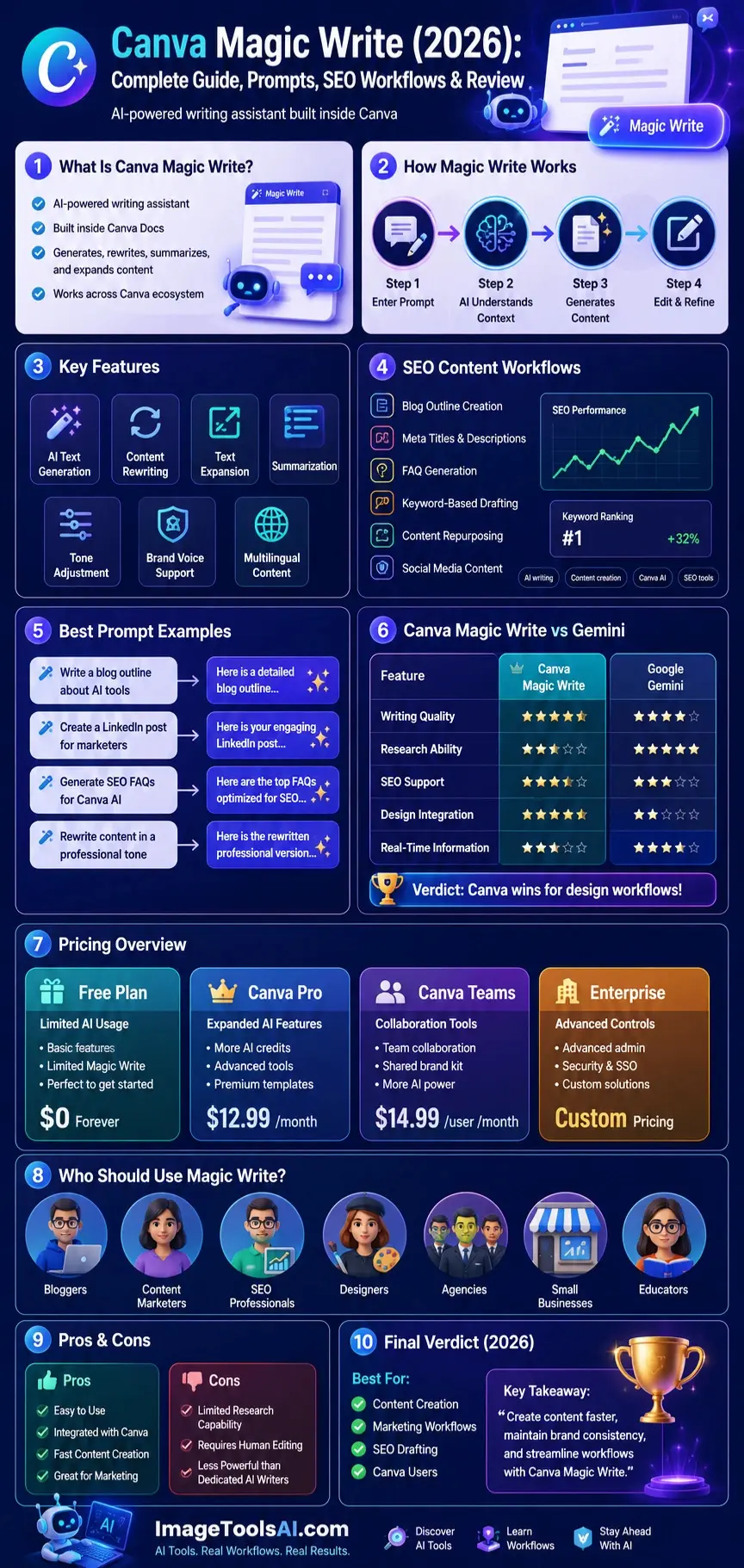
Canva Magic Write is Canva’s AI-powered writing assistant that helps users create, edit, rewrite, summarize, and expand text using generative artificial intelligence.
It is built directly into Canva’s ecosystem, making it easy for users to generate written content without switching between multiple applications.
Magic Write can assist with:
- Blog writing
- Marketing copy
- Social media content
- Product descriptions
- Email campaigns
- Business documents
- Presentation content
- Creative writing
- Educational materials
The tool is designed to accelerate content creation while keeping users inside the Canva workspace.
How Magic Write Works
Magic Write uses large language model technology to understand prompts and generate relevant text based on user instructions.
The process is simple:
User Enters a Prompt
Example:
“Write a LinkedIn post about AI productivity tools for small businesses.”
AI Analyzes Context
The system interprets:
- Topic
- Audience
- Intent
- Tone
- Writing style
Content Generation
Magic Write creates content that aligns with the instructions provided.
User Refines Output
Users can:
- Expand content
- Rewrite sections
- Change tone
- Adjust length
- Add brand guidelines
This iterative process often produces significantly better results than relying on a single prompt.
Evolution of Canva AI Writing Tools
Canva’s AI journey has evolved rapidly over the last few years.
Initially known as a graphic design platform, Canva gradually introduced AI-powered productivity features to help users create complete content experiences.
Major milestones include:
Early Canva Era
Focus on:
- Graphic design
- Templates
- Social media visuals
- Collaboration
AI Expansion Phase
Introduction of:
- Canva Docs
- Magic Write
- Magic Design
- Magic Media
Modern AI Ecosystem
Current capabilities include:
- AI writing
- AI image generation
- Brand voice management
- Presentation creation
- Workflow automation
Today, Magic Write serves as a central component of Canva’s broader AI productivity ecosystem.
Why Canva Magic Write Matters in 2026
Artificial intelligence is no longer optional for content teams.
The demand for content continues to increase while deadlines become shorter.
Businesses need faster ways to produce:
- Blog posts
- Social content
- Marketing campaigns
- Product pages
- Internal communications
Canva Magic Write addresses these challenges by reducing the time spent on repetitive writing tasks.
Growing Content Demands
Organizations today often manage:
- Multiple websites
- Social media platforms
- Email campaigns
- Video content
- Sales materials
Creating content manually for every channel can quickly overwhelm teams.
Magic Write helps reduce this workload.
Productivity Benefits
Users commonly leverage Magic Write for:
- Brainstorming ideas
- Generating first drafts
- Repurposing content
- Improving consistency
- Accelerating publishing schedules
Instead of starting with a blank page, users receive a working draft that can be refined and improved.
Why Businesses Are Adopting AI Writing Tools
Businesses increasingly value:
- Speed
- Scalability
- Consistency
- Cost Efficiency
Magic Write helps organizations achieve these goals while remaining accessible to non-technical users.
Canva Magic Write and the Rise of AI Productivity
The modern workplace is undergoing a major transformation.
AI productivity tools are changing how people:
- Write
- Design
- Communicate
- Collaborate
Magic Write represents part of a larger trend toward AI-assisted workflows.
Rather than replacing human creativity, it enhances productivity by handling repetitive drafting tasks.
Common Productivity Challenges
Many professionals struggle with:
- Writer’s block
- Limited time
- Content volume requirements
- Team coordination
Magic Write helps overcome these obstacles by generating ideas and content quickly.
The Human + AI Model
The most successful users combine:
Human expertise +
AI assistance
This approach typically delivers:
- Faster production
- Better efficiency
- Higher output volume
- Improved workflow management
Key Features of Canva Magic Write
Understanding Magic Write’s capabilities helps users maximize its value.
AI Text Generation
The core feature allows users to generate content from simple prompts.
Examples include:
- Blog introductions
- Marketing copy
- Emails
- Social captions
- Business reports
Example Prompt
“Write a friendly welcome email for new customers.”
Within seconds, Magic Write creates a draft that can be edited further.
Content Rewriting
Existing content can be rewritten for:
- Clarity
- Brevity
- Engagement
- Different audiences
This is useful when repurposing content across channels.
Text Expansion
Magic Write can expand short ideas into detailed content.
For example:
Input:
“Benefits of remote work”
Output:
A complete section discussing productivity, flexibility, cost savings, and employee satisfaction.
Summarization
Long documents can be condensed into key points.
Useful for:
- Research notes
- Meeting summaries
- Reports
- Educational materials
Tone Transformation
Users can modify tone to suit specific audiences.
Popular tone options include:
- Professional
- Friendly
- Casual
- Persuasive
- Educational
- Inspirational
This feature improves audience targeting and engagement.
Brand Voice Integration
One of Canva’s strongest advantages is its growing focus on brand consistency.
Organizations can align content with:
- Brand guidelines
- Messaging standards
- Preferred language styles
This helps teams maintain a consistent voice across multiple campaigns.
Multilingual Content Creation
Magic Write supports content generation in multiple languages.
Benefits include:
- Global Marketing
- International audiences
- Multilingual campaigns
- Cross-border communication
This capability makes Canva attractive for businesses operating in multiple regions.
How to Use Canva Magic Write
Getting started is straightforward.
Using Magic Write in Canva Docs
Step 1
Open Canva.
Step 2
Create a new Canva Doc.
Step 3
Click the Magic Write option.
Step 4
Enter your prompt.
Example:
“Write a blog outline about AI image generators.”
Step 5
Review and edit the generated output.
Step 6
Expand or refine content as needed.
Using Magic Write in Presentations
Magic Write can assist with:
- Presentation outlines
- Speaker notes
- Slide content
This significantly reduces preparation time.
Using Magic Write in Whiteboards
Teams can generate:
- Brainstorming ideas
- Project Concepts
- Campaign strategies
during collaborative sessions.
Using Magic Write Across Canva Designs
Users can also generate text for:
- Social graphics
- Ads
- Marketing materials
- Promotional assets
without leaving the Canva platform.
Canva Pricing Overview
| Plan | Best For | AI Access |
| Free | Individuals and beginners | Limited AI usage |
| Canva Pro | Creators and professionals | Expanded AI access |
| Canva Teams | Businesses and teams | Collaboration + AI tools |
| Enterprise | Large organizations | Advanced controls and governance |
Canva Magic Write vs Google Gemini
Google Gemini offers broader access to web-connected information and productivity tools.
| Feature | Canva Magic Write | Gemini |
| Writing | Strong | Strong |
| Research | Limited | Strong |
| Google Workspace | No | Excellent |
| Canva Integration | Excellent | No |
| Real-Time Information | Limited | Better |
| Design Workflow | Excellent | Limited |
Verdict
Gemini is better for research-heavy tasks.
Magic Write is better for Canva-based content creation.
People Also Ask
A: Yes. Canva provides limited access to Magic Write through its free plan, while paid plans offer expanded AI capabilities and higher usage allowances.
A: Yes. It can generate outlines, introductions, sections, and complete drafts. Human editing is recommended for quality and originality.
A: It depends on your needs. Magic Write excels within Canva workflows, while ChatGPT generally offers deeper content-creation and reasoning capabilities.
A: Yes. It can help generate outlines, metadata, FAQs, and draft content optimized around keywords.
A: Yes. Canva supports content creation in multiple languages, making it useful for global audiences.
Conclusion
Now in 2026, Canva Magic Write stands out as an easy-to-use AI helper for writing tasks. Though not built to swap places with heavy-duty tools when tackling complex analysis or niche material, it works well for sparking thoughts, shaping early drafts, and staying on track while fitting naturally into the Canva workspace. Then again, its strength lies more in support than replacement.
Because it works closely with Canva Docs, Presentations, Whiteboards, Brand tools, and the wider Canva AI system, people like marketers, designers, Independent Workers, teams, teachers, and smaller companies often find it useful. What stands out is how smoothly it fits into their usual workflow.
Some people get better results when they see Magic Write as a helper, not a substitute. Instead of relying on it fully, they tweak its output, verify details, add their own insights – and that speeds things up without losing originality. Working like this keeps the process fast but still thoughtful.
Starting with Canva? Then Magic Write might surprise you as a standout feature hiding inside. Not every tool there grabs attention like this one does when you write often. Worth a look, especially if typing takes up your time each day.
Curious about how tools stack up? Head over to ImageToolsAI.com – real breakdowns, real workflows. Creators shape the future; see what they’re doing. New updates shift fast; keep pace without the noise. Discover each step, one at a time.











