Introduction
Back when making sharp images meant mastering complex tools, costly programs filled hard drives. Now artificial intelligence flips that script entirely. Picture typing words – just plain sentences – and watch them bloom into posters, sketches, digital art pieces, brand materials, or feed-ready pictures fast. Effortless? Not exactly. But possible without training? Absolutely.
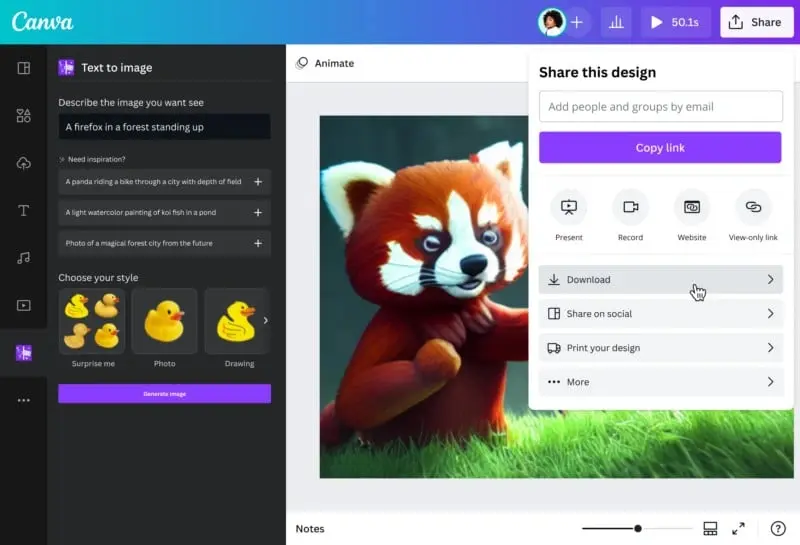
Most tools keep AI art separate from design work. Not here. Snap the generated picture right into slides or stories without leaving. Imagine building ads, posters, or web banners while the artwork forms beside you. Jump straight from idea to layout in one spot. The visual appears, then fits exactly where needed – no switching apps. Even social updates get smarter, pulling fresh images on demand. Canva Text to Image Brand sheets stay consistent because everything links together. Work moves faster when steps collapse into one.
Picture this – how Canva turns words into visuals, step by step. Crafting sharper prompts comes down to clarity, not tricks. Businesses might reach for it during early brainstorming rounds. Other tools sometimes go deeper, yet miss speed. Getting clean results means testing small tweaks first. Real tasks shape what works best in the end.
From bloggers to entrepreneurs, folks who create content can get more out of Canva’s AI tools by using what’s inside this guide. It opens up how images are made when you type just a few words. Freelancers, students, and marketers might find new ways to work faster without losing quality. Anyone typing ideas into Canva could discover tricks hidden in its features. The steps here show exactly what happens when prompts turn into visuals. Learning these methods changes how fast drafts become real designs. Even if you write posts or plan campaigns, the process fits your routine. Each part aims to stretch what Canva does without needing extra apps.
What Is Canva Text to Image?
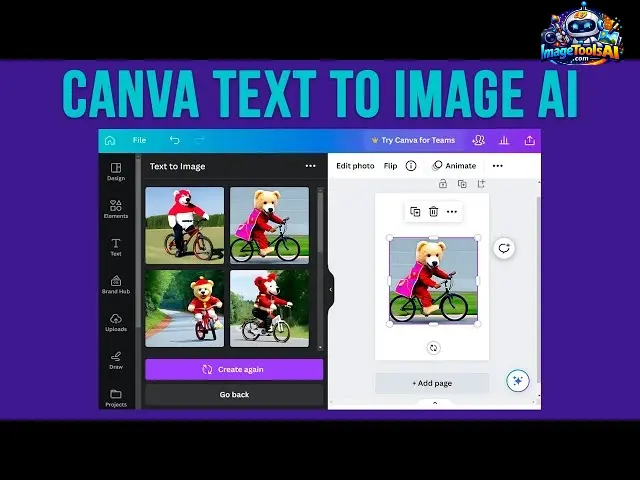
Instead of searching stock photo libraries, users can describe what they want, and Canva generates unique visuals automatically.
Example:
Prompt:
Modern coffee shop interior, natural sunlight, Scandinavian design, professional photography
Result:
An AI-generated image matches that description.
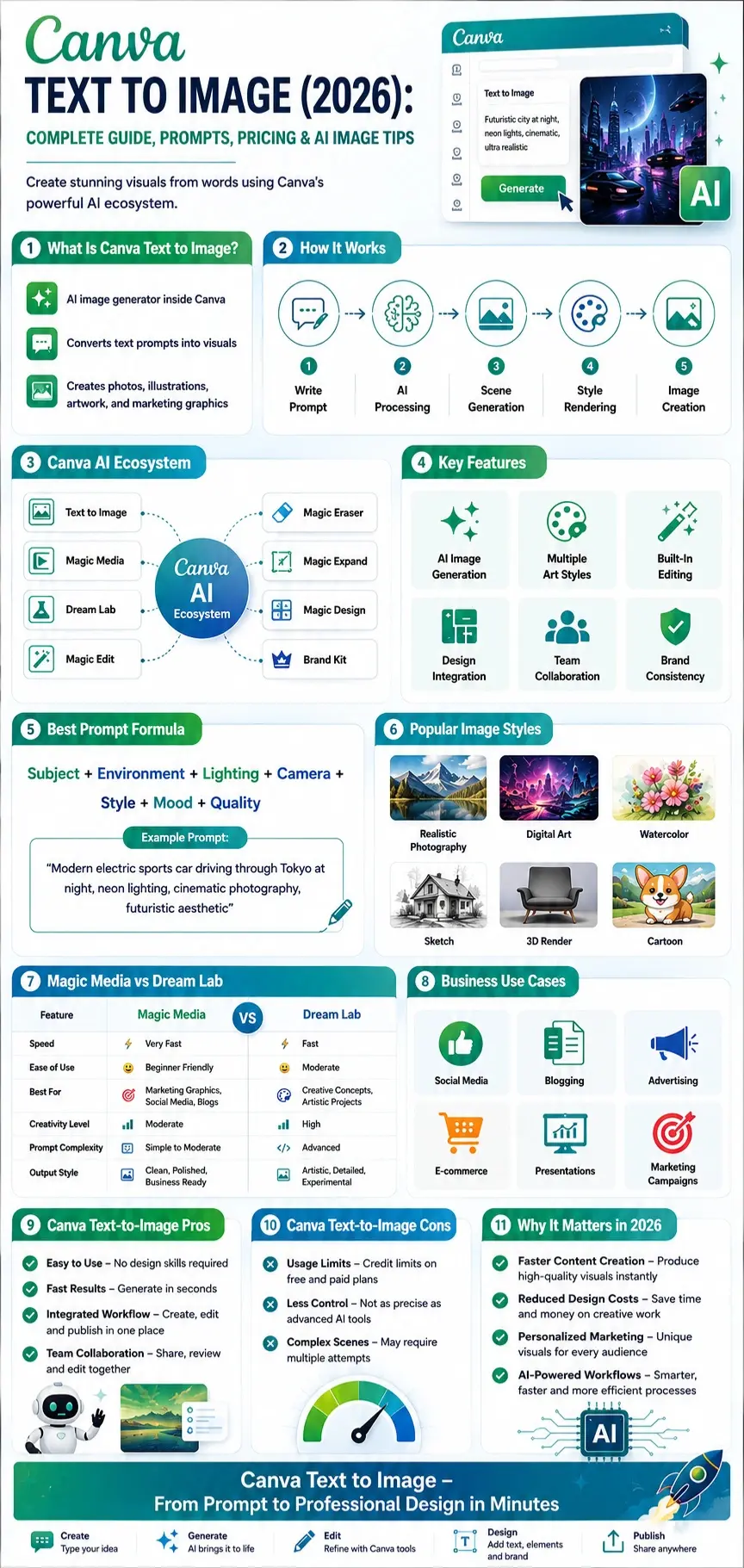
How Canva Text to Image Fits Into Canva’s AI Ecosystem
Many users think Canva Text to Image is a standalone feature.
In reality, it’s connected to Canva’s broader AI ecosystem.
Core AI Components
| Canva AI Tool | Purpose |
| Text to Image | Generate images from prompts |
| Magic Media | Create visual content with AI |
| Dream Lab | Advanced AI image generation |
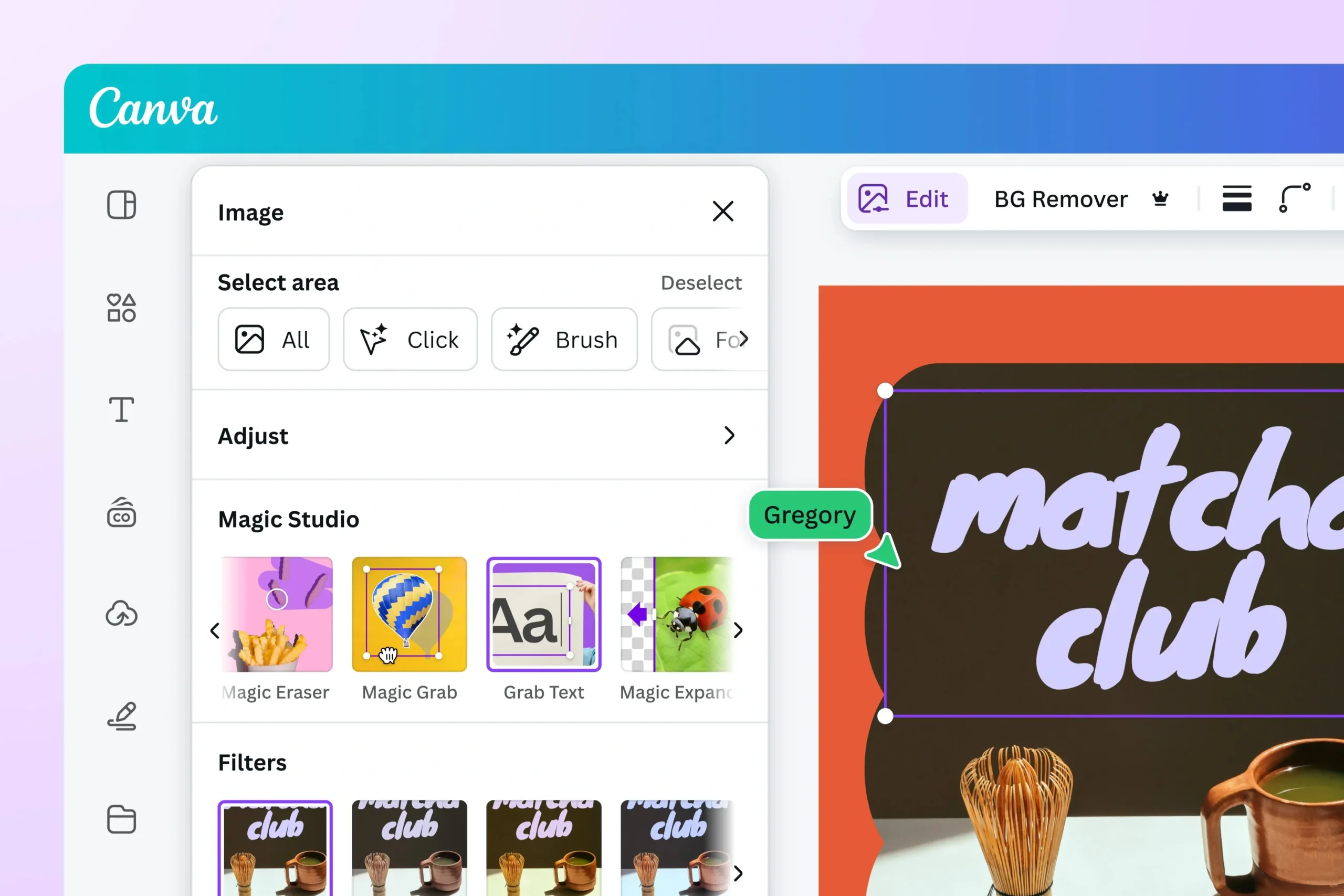
| Magic Edit | Modify image elements |
| Magic Eraser | Remove unwanted objects |
| Magic Expand | Extend image borders |
| Magic Design | Generate layouts automatically |
| Brand Kit | Maintain visual consistency |
| Canva AI Assistant | Conversational design helps |
This integration gives Canva a major advantage over standalone image generators.
Why Canva Text to Image Has Become So Popular
Several factors drive Canva’s rapid AI adoption.
Simplicity
Most AI image tools require learning new workflows.
Canva users already understand the interface.
Speed
Images can be generated within seconds.
Accessibility
No advanced design experience required.
Built-In Editing
Users can immediately edit generated visuals.
Business Integration
Generated images can instantly be used in:
- Presentations
- Social media graphics
- Ads
- E-commerce visuals
- Marketing materials
- Blog posts
Mini Summary
Canva Text to Image is not just an AI art tool. It’s part of a larger AI-powered design ecosystem that allows users to generate, edit, customize, and publish visuals without leaving Canva.
How Canva Text to Image Works
Understanding the technology behind Canva’s image generation helps users create significantly better results.
Prompt Interpretation
Everything starts with a text prompt.
Example:
Luxury skincare product on marble surface, soft studio lighting, premium advertising photography
The AI analyzes:
- Objects
- Environment
- Style
- Mood
- Composition
- Colors
- Lighting
AI Model Processing
Canva’s AI models convert language into visual concepts.
The system predicts:
- Shapes
- Textures
- Objects
- Perspective
- Lighting conditions
Millions of learned visual patterns contribute to image creation.
Scene Construction
The AI builds a completely new image.
Unlike photo editing tools, it does not simply search a database.
It generates entirely new pixels based on the prompt.
Style Rendering
Canva applies selected visual styles such as:
- Photography
- Illustration
- Watercolor
- 3D Art
- Digital Painting
- Concept Art
- Cartoon
- Sketch
Style selection significantly impacts output quality.
Image Delivery
Within seconds, Canva generates multiple variations.
Users can:
- Select favorites
- Regenerate
- Edit
- Resize
- Enhance
- Integrate into designs
Why Canva Text to Image Matters in 2026
AI image generation is no longer a novelty.
It is becoming a core content production workflow.
Content Demand Is Exploding
Modern businesses need visuals for:
- Websites
- Social media
- Email Campaigns
- Ecommerce
- Advertising
- Branding
Producing these manually is expensive.
AI dramatically reduces costs and production time.
Faster Content Creation
Instead of:
- Hiring photographers
- Purchasing stock images
- Creating illustrations manually
Users can create visuals instantly.
Personalized Marketing
Brands increasingly require custom visuals.
Generic stock photos often underperform.
AI-generated content enables:
- Unique campaigns
- Personalized ads
- Audience-specific visuals
Key Features of Canva AI Image Generator
Text-to-Image Generation
Create visuals from written descriptions.
Suitable for:
- Marketing
- Blogging
- Education
- Creative projects
Multiple Art Styles
Users can generate:
- Realistic photography
- Digital art
- Watercolor
- Sketches
- Anime-inspired artwork
- Concept art
Built-In Editing Tools
Unlike many competitors, Canva includes editing tools directly after generation.
Examples:
- Cropping
- Background removal
- Object editing
- Text overlays
Design Integration
Generated images can immediately be inserted into:
- Social posts
- Presentations
- Flyers
- Brochures
- Ads
Brand Consistency Tools
Using Brand Kit, organizations can maintain:
- Colors
- Fonts
- Logos
- Visual guidelines
This is particularly valuable for marketing teams.
Collaborative Workspaces
Teams can:
- Share designs
- Review visuals
- Edit collaboratively
without leaving Canva.
AI-Powered Content Creation Ecosystem
One of Canva’s biggest advantages is ecosystem integration.
Users can combine:
- AI writing
- AI image generation
- AI editing
- AI presentations
- AI branding
inside one platform.
Magic Media vs Dream Lab
One of the most confusing areas for users is understanding the difference between Canva’s AI image-generation experiences.
Magic Media
Magic Media focuses on fast AI content creation.
Best for:
- Social media graphics
- Marketing visuals
- Blog imagery
- Everyday design work
Advantages:
- Easy to use
- Fast generation
- Integrated workflow
Dream Lab
Dream Lab is Canva’s more advanced AI creative environment.
Best for:
- Artistic concepts
- Detailed image generation
- Experimental designs
- Advanced prompting
Advantages:
- Higher creative flexibility
- More sophisticated outputs
- Better prompt interpretation
Comparison Table
| Feature | Magic Media | Dream Lab |
| Ease of Use | Excellent | Good |
| Beginner Friendly | Yes | Moderate |
| Speed | Very Fast | Fast |
| Creative Freedom | Moderate | High |
| Marketing Graphics | Excellent | Good |
| Artistic Concepts | Good | Excellent |
| Prompt Complexity | Moderate | Advanced |
| Business Workflows | Excellent | Good |
Which One Should You Use?
Choose Magic Media if:
- You create content regularly
- You need quick visuals
- You focus on marketing
Choose Dream Lab if:
- You want creative experimentation
- You need advanced visual concepts
- You enjoy prompt engineering
How to Use Canva Text to Image Step-by-Step
Open Canva
Log in to your Canva account.
Create a new design or open an existing project.
Access AI Tools
Navigate to:
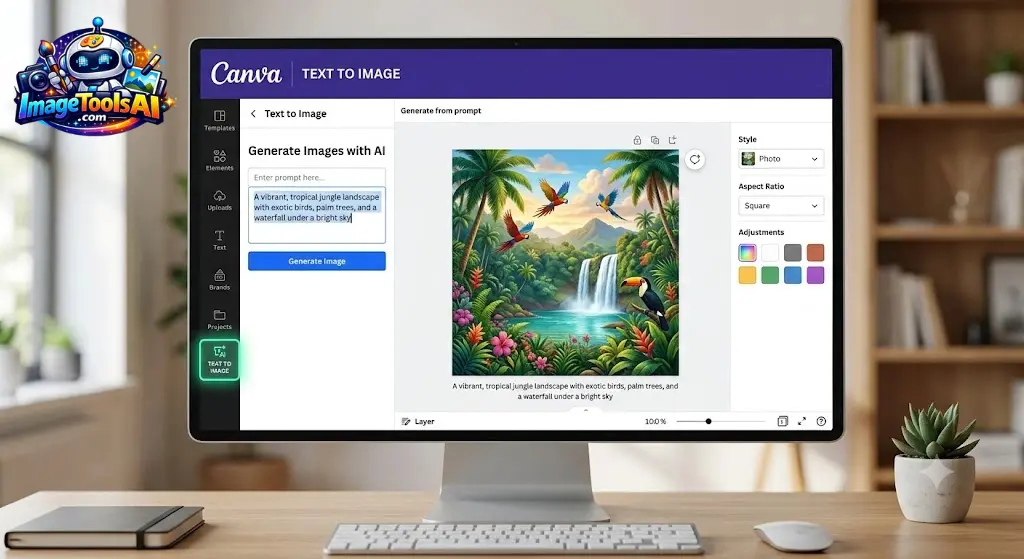
Apps → Text to Image
or access AI generation through Magic Studio features.
Write Your Prompt
Example:
Professional fitness trainer in a modern gym, cinematic lighting, ultra-realistic photography, shallow depth of field
Select Style
Choose from available visual styles.
Examples:
- Photo
- Illustration
- Painting
- Sketch
- 3D
Generate Images
Click Generate.
Canva produces multiple image variations.
Review Results
Evaluate:
- Composition
- Accuracy
- Lighting
- Details
- Brand alignment
Edit and Improve
Use:
- Magic Edit
- Magic Eraser
- Magic Expand
- Background Remover
to refine results.
Publish or Export
Export for:
- Websites
- Social media
- Ads
- Presentations
- Print projects
Best Canva Text-to-Image Prompt Framework
One of the biggest reasons users get poor AI images is weak prompting.
Most people write:
A dog running in a park
While experienced creators write:
Golden retriever running through a green park at sunrise, cinematic lighting, shallow depth of field, professional wildlife photography, ultra realistic, 85mm lens
The second prompt provides significantly more context.
The Professional Prompt Formula
A highly effective Canva formula:
Subject + Environment + Lighting + Camera + Style + Mood + Quality
Example:
Modern electric sports car driving through Tokyo at night, neon lighting, cinematic photography, 50mm lens, futuristic aesthetic, dramatic mood, ultra detailed
Canva AI Image Styles Explained
Selecting the right style can dramatically improve output quality.
Realistic Photography
Best for:
- Marketing
- Product concepts
- Website visuals
- Advertisements
Example Prompt:
Luxury perfume bottle on a black reflective surface, professional studio photography, soft lighting, premium advertising campaign
Digital Art
Best for:
- Creative projects
- Branding concepts
- Social media
Example Prompt:
Futuristic city skyline with flying vehicles, digital art, vibrant colors, and highly detailed
Watercolor
Best for:
- Invitations
- Children’s content
- Artistic Projects
Example Prompt:
Colorful wildflowers in a spring meadow, watercolor painting style, soft brush strokes
Sketch Style
Best for:
- Concept development
- Storyboarding
- Early design ideas
Example Prompt:
Modern house architecture concept sketch, pencil drawing style
3D Render
Best for:
- Product mockups
- Technology visuals
- Startup marketing
Example Prompt:
Futuristic AI robot assistant, 3D render, glossy materials, studio lighting
Cartoon Style
Best for:
- Educational content
- Social media
- Character design
Example Prompt:
Friendly robot teacher helping students in the classroom, colorful cartoon illustration
Advanced Canva Prompt Engineering
The difference between average and exceptional images often comes down to prompt engineering.
Use Detailed Lighting Instructions
Instead of:
Portrait of a woman
Use:
Portrait of a woman, golden hour lighting, soft shadows, natural sunlight, professional photography
Lighting dramatically affects realism.
Add Camera Language
Photography prompts benefit from camera terminology.
Examples:
- 35mm lens
- 50mm lens
- 85mm portrait lens
- shallow depth of field
- bokeh background
- cinematic composition
Example:
Business executive portrait, 85mm lens, shallow depth of field, professional corporate photography
Define Mood
Mood influences image atmosphere.
Examples:
- Inspirational
- Luxurious
- Minimalist
- Dramatic
- Cozy
- Futuristic
Example:
Luxury hotel lobby, sophisticated mood, warm lighting, premium design aesthetic
Specify Color Palettes
Color control improves branding consistency.
Example:
Technology workspace, blue and purple gradient palette, modern SaaS branding
Use Composition Instructions
Examples:
- Close-up shot
- Wide-angle shot
- Centered composition
- Rule of thirds
- Aerial view
- Top-down perspective
Example:
Healthy breakfast arrangement, top-down photography, magazine editorial style
50 Canva Text-to-Image Prompt Examples
Product Photography Prompts
1 Luxury skincare bottle on marble surface, soft studio lighting, premium commercial photograph.
2 Smartwatch product showcase, futuristic technology aesthetic, dark background
3 Premium coffee packaging mockup, professional branding photography
4 Sports shoes advertising campaign, dramatic lighting, dynamic action composition
5 Luxury perfume bottles surrounded by flowers, elegant beauty photography
Blog Featured Image Prompts
6 AI technology workspace with a holographic interface, modern business environment
7 Remote work, home office setup, productivity-focused environment
8 Digital marketing dashboard visualization, modern business aesthetic
9 Entrepreneur planning strategy, clean professional workspace
10 Content creator editing videos in the creative studio
Social Media Prompts
11 Vibrant summer travel scene, Instagram-worthy photography
12 Fashion influencer lifestyle photo, luxury urban setting
13 Healthy lifestyle fitness image, motivational atmosphere
14 Productivity desk setup, aesthetic social media visual
15 Minimalist workspace inspiration, modern design
E-commerce Prompts
16 Luxury jewelry product showcase, black reflective background
17 Premium furniture catalog image, Scandinavian interior
18 Modern electronics product launch visuals
19 Home decor showcase, elegant living room setting
20 Fashion ecommerce hero banner image.
Advertising Prompts
21 Premium car advertisement, cinematic sunset lighting
22 Luxury travel destination marketing visuals
23 Fitness supplement campaign image
24 Financial technology promotional artwork
25 Modern SaaS software advertising illustration
Technology Prompts
26 Artificial intelligence concept visualization
27 Cybersecurity operations center, futuristic interface
28 Cloud computing network visualization
29 Smart city powered by AI
30 Future workplace with advanced technology
Creative Prompts
31 Floating islands in a fantasy world
32 Ancient dragon flying above the mountains
33 Underwater futuristic city
34 Space station orbiting a distant planet
35 Magical forest with glowing plants
Business Prompts
36 Professional team meeting in a modern office
37 Corporate leadership concept photography
38 Startup founders brainstorming innovation
39 Business growth visualization
40 Professional networking event
Educational Prompts
41 Students learning with AI technology
42 Modern digital classroom
43 Science laboratory innovation
44 Future education concept
45 Global online learning platform
Lifestyle Prompts
46 Luxury vacation villa overlooking the ocean
47 Cozy reading corner with natural light
48 Healthy morning routine visualization
49 Urban lifestyle photography
50 Modern minimalist living environment
Canva Text-to-Image for Bloggers
Bloggers are among Canva’s largest user groups.
Why Bloggers Love Canva AI
Creating custom visuals traditionally requires:
- Stock photography
- Graphic designers
- Illustration tools
Canva AI simplifies the process.
Best Blog Image Types
Featured Images
Create unique hero graphics.
Section Illustrations
Support key concepts visually.
Infographics
Transform data into visuals.
Tutorial Graphics
Explain workflows clearly.
Concept Art
Visualize abstract topics.
Canva Text-to-Image Pros & Cons
Pros
Easy for Beginners
No technical knowledge required.
Integrated Design Workflow
Generate and publish from one platform.
Strong Business Utility
Excellent for content marketing.
Fast Learning Curve
Most users can generate images immediately.
Collaboration Features
Ideal for teams.
Cons
Less Artistic Than Specialized Tools
Midjourney often produces more creative outputs.
Limited Prompt Precision
Advanced users may desire more control.
AI Credit Restrictions
Heavy users may hit usage limits.
Complex Scenes Can Struggle
Highly detailed prompts may require multiple attempts.
People Also Ask
Yes, Canva offers AI image generation access through its platform, although usage limits and advanced capabilities may vary depending on your plan.
For most blogs, social media campaigns, ads, presentations, and business graphics, Canva provides more than enough capability. Large creative agencies may still use specialized tools alongside Canva.
It depends on your goal. Canva is better for complete design workflows, while Midjourney generally produces more artistic and visually sophisticated AI images.
In many cases, commercial use is permitted under Canva’s terms. Always verify the latest licensing policies before selling or distributing AI-generated assets commercially.
Conclusion
Now, way more than just turning words into pictures, Canva’s tool shapes how visuals come alive. By 2026, it anchors a full design world driven by artificial intelligence. Creating images is only the start – editing follows close behind. Branding weaves through each step, while teams build together in real time. Publishing flows naturally from the same space. One place holds it all, connected, working.
Bloggers, marketers, teachers, freelancers, online shop owners, and small teams find Canva simple for making sharp visuals fast. What makes it stand out is less about creating award-winning art – more about turning thoughts into ready-to-share work without delays.
Should you need faster content creation, Uniform Brand Visuals, or smoother design processes, Canva still stands out among current AI-powered tools. While many options exist, few match its blend of ease and reliability when putting ideas into visual form quickly.
Right now, picture-making tools driven by artificial intelligence keep changing fast. Canva stands ready to grow stronger as a place where people and teams create things together.
Start exploring extra tutorials at ImageToolsAI.com if you want a deeper look at AI image generators. Picture crafting skills grow as you dive into prompt techniques. Tools for designing with AI wait there too, quietly ready. See what fits your process while shaping visuals another way. Learning stays open-ended through each resource found nearby.











