
🧠 Introduction:
The world of AI image generation is evolving rapidly, and Adobe Firefly Image Model 3 has become one of the most important tools in professional design workflows. Unlike experimental AI art tools, Firefly is built for commercial safety, brand consistency, and enterprise-level creative production.
Built by Adobe, Firefly Image Model 3 is part of the broader Creative Cloud ecosystem and is deeply integrated into Photoshop, Illustrator, and Adobe Express.
But here’s the real question designers and marketers ask in 2026:
Is Firefly 3 truly better for real-world work—or just safer but less creative?
In this guide, we break everything down:
- Features
- Real workflows
- Prompt engineering system
- Limitations
- Comparisons with Midjourney and DALL·E 3
- Business use cases
By the end, you’ll know exactly where Firefly fits in your creative workflow.
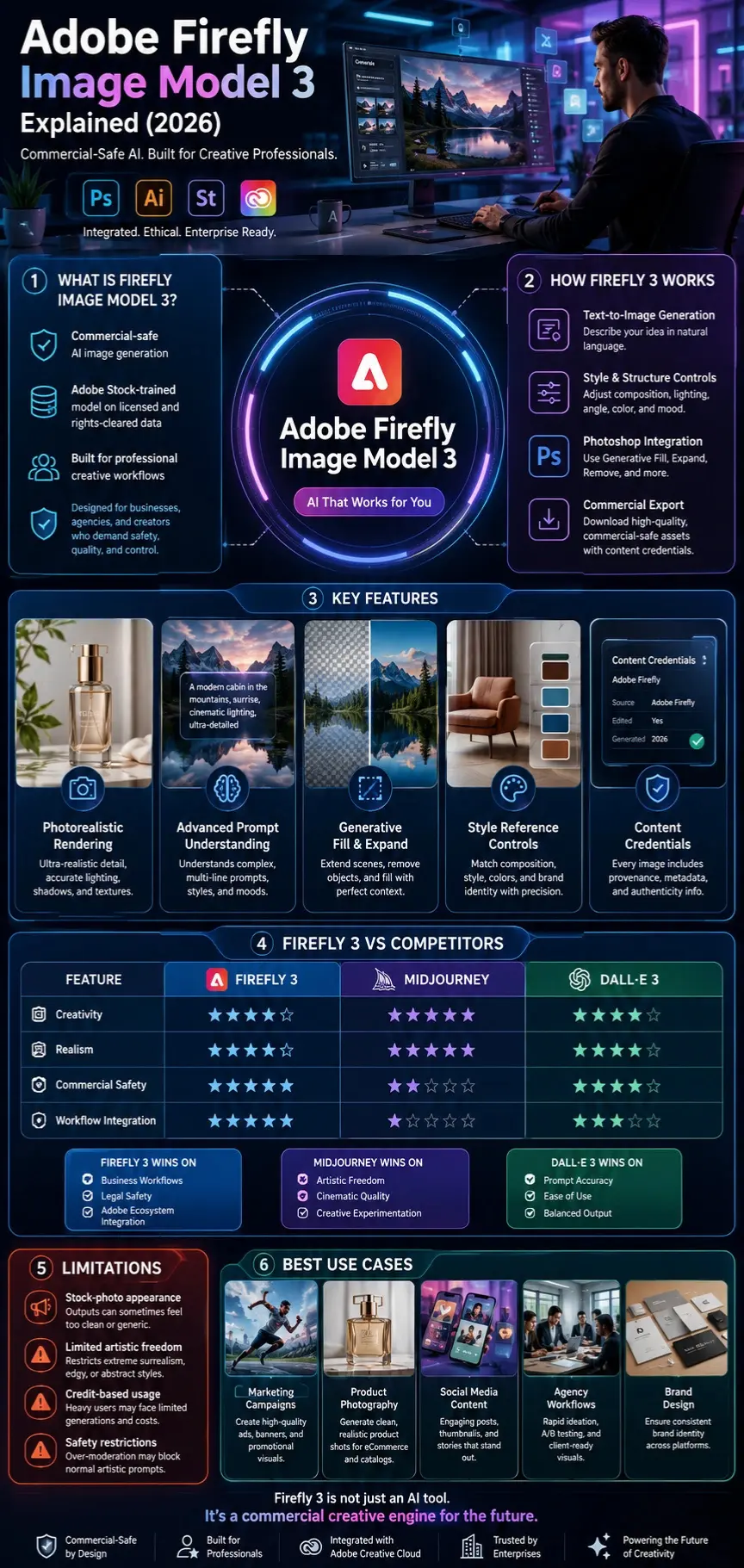
What Is Adobe Firefly Image Model 3?
Adobe Firefly Image Model 3 is the third-generation AI image generation system designed to produce:
- Photorealistic images
- Marketing visuals
- Brand-safe creative assets
- Editable design components
Unlike many AI tools trained on random web data, Firefly is trained on:
- Adobe Stock licensed content
- Public domain data
- Rights-cleared datasets
Key Idea:
Firefly is not just an image generator—it is a commercial design engine.
How Firefly Image Model 3 Works
Firefly 3 uses a combination of:
Text-to-Image Diffusion Model
You type a prompt → AI generates an image from noise → refined into final output.
Style & Structure Conditioning
Users can control:
- Composition
- Lighting
- Style reference
- Object placement
Adobe Ecosystem Integration
Firefly connects directly with:
- Photoshop (Generative Fill)
- Illustrator
- Adobe Express
Simple Workflow:
- Enter prompt
- Choose style controls
- Generate image
- Refine in Photoshop
- Export for commercial use
Why Firefly Image Model 3 Matters in 2026
AI image tools are no longer “experimental.” They are production systems.
Firefly 3 matters because:
Commercial Safety First
Businesses need legally safe AI images.
Enterprise Integration
Used inside global marketing workflows.
Faster Creative Production
Designers reduce hours of manual work.
Brand Consistency
Ideal for agencies managing multiple clients.

Key Features of Firefly Image Model 3
Photorealistic Rendering Engine
Firefly 3 improves:
- Skin texture realism
- Light behavior
- Depth and shadows
- Product photography output
Ideal for ads and branding.
Advanced Prompt Understanding
It can interpret:
- Multi-line instructions
- Style blending
- Scene composition
- Mood-based descriptions
Photoshop Integration
Firefly powers:
- Generative Fill
- Generative Expand
- Object removal
- Scene extension
This makes it a professional editing tool, not just a generator.
Style Reference Control
Users can:
- Match image composition
- Maintain brand identity
- Control layout structure
Content Credentials
Every image includes:
- Source metadata
- Editing History
- Authenticity tracking
Firefly Image Model 3 vs Competitors
| Feature | Firefly 3 | Midjourney | DALL·E 3 |
| Realism | ⭐⭐⭐⭐ | ⭐⭐⭐⭐⭐ | ⭐⭐⭐⭐ |
| Creativity | ⭐⭐⭐ | ⭐⭐⭐⭐⭐ | ⭐⭐⭐⭐ |
| Commercial Safety | ⭐⭐⭐⭐⭐ | ⭐⭐ | ⭐⭐⭐⭐ |
| Photoshop Integration | ⭐⭐⭐⭐⭐ | ❌ | ⭐⭐⭐ |
| Prompt Accuracy | ⭐⭐⭐⭐ | ⭐⭐⭐⭐ | ⭐⭐⭐⭐ |
Midjourney dominates creativity.
DALL·E 3 balances accuracy and simplicity.
Firefly wins in:
- Business workflows
- Legal safety
- Adobe ecosystem integration
Limitations of Firefly Image Model 3
“Stock Image Look.”
Outputs often feel:
- Too clean
- Too polished
- Less artistic
Limited Creative Freedom
Firefly avoids:
- Extreme surrealism
- Edgy or abstract art
- Highly experimental styles
Credit-Based Usage System
Heavy users may face:
- Limited generations
- Subscription dependency
Over-Moderation Issues
Sometimes blocks:
- Normal artistic prompts
- Stylized human generation
Enterprise Features Locked
Advanced features are often:
- Restricted to business tiers
Real-World Use Cases
Designers
- Social media creatives
- Product mockups
- Brand kits
Marketing Teams
- Ad campaigns
- Landing page visuals
- Email marketing graphics
Agencies
- Client branding visuals
- Rapid A/B testing assets
Content Creators
- Blog thumbnails
- Pinterest images
- YouTube covers
Firefly Prompt Engineering System
Formula for Best Results:
Subject + Style + Lighting + Environment + Camera + Mood
Example 1:
“A luxury skincare product on a marble surface, soft natural lighting, cinematic photography, ultra-detailed, minimal aesthetic”
Example 2:
“Modern startup office workspace, AI technology theme, bright daylight, clean corporate style, wide-angle shot”
Example 3:
“Futuristic city skyline at sunset, ultra-realistic, golden lighting, cinematic depth, 35mm lens”
Firefly vs Midjourney
Firefly Strengths:
- Safe for commercial use
- Integrated into Photoshop
- Ideal for agencies
Midjourney Strengths:
- Artistic freedom
- Cinematic visuals
- Creative experimentation
conclusion:
Firefly = Business tool
Midjourney = Creative art engine
SEO & Business Strategy Insights
To rank higher than competitors:
You MUST include:
- Workflow-based content
- Prompt engineering guide
- Comparison Tables
- Honest limitations
- Business use cases
- Entity-based SEO (Adobe, Photoshop, etc.)
People Also Ask
A: Adobe Firefly offers limited free generations through Adobe accounts, but most professional features and higher generation limits require a paid Creative Cloud subscription. Usage is based on Adobe’s generative credit system.
A: Firefly Image Model 3 is primarily used for creating commercial-safe images, marketing graphics, product photography concepts, social media visuals, blog illustrations, and branded creative assets. It is especially popular among designers and marketing teams working within the Adobe ecosystem.
A: The biggest difference is purpose. Firefly focuses on business-friendly, legally safer image generation with deep integration into Adobe tools, while Midjourney prioritizes artistic creativity, cinematic visuals, and experimental image creation. Firefly is generally better for commercial workflows, whereas Midjourney excels at creative exploration.
A: Yes. Adobe states that Firefly is trained using licensed Adobe Stock content, public domain materials, and rights-cleared datasets. This approach is designed to reduce copyright concerns and make generated content more suitable for commercial projects.
A: Yes. Firefly powers several AI features within Adobe Photoshop, including Generative Fill, Generative Expand, object removal, background replacement, and scene extension. This integration allows users to edit AI-generated content directly within professional design workflows.
Featured Image Prompt
“A futuristic digital design studio with AI-powered tools, glowing interface screens, a designer working on Adobe Firefly-style image generation, cinematic lighting, ultra-realistic, modern workspace”
Social Media Captions
- “Is Adobe Firefly 3 the safest AI image generator in 2026? Full breakdown inside 🔥”
- “Firefly vs Midjourney: Which AI wins for real designers? 🎨”
- “Stop guessing—learn how Firefly 3 actually performs in real workflows 🚀”

Pinterest Title
Adobe Firefly Image Model 3 Guide: Features, Prompts & Comparison 2026
YouTube Title
Adobe Firefly Image Model 3 Explained (2026) – Features, Prompts & Midjourney Comparison
AI Overview Snippet
Adobe Firefly Image Model 3 is Adobe’s AI image generation system designed for commercial-safe, high-quality visual creation. It integrates with Photoshop and focuses on marketing, branding, and professional workflows, offering strong enterprise use but less creative freedom compared to Midjourney.
Conclusion
Adobe Firefly Image Model 3 represents a major step forward in the evolution of commercial AI image generation, especially for professionals who need safe, Reliable, and brand-friendly visuals. It is not designed to compete purely on artistic freedom, but rather on workflow efficiency, legal safety, and enterprise integration.
In real-world usage, Firefly 3 becomes most powerful when used inside the Adobe ecosystem, especially with tools like Photoshop’s Generative Fill and Generative Expand. This makes it extremely valuable for designers, marketers, and agencies who work on tight deadlines and need consistent output quality.
However, it is equally important to understand its limitations. Firefly 3 still struggles with:
- Highly creative or experimental art styles
- Emotional or cinematic storytelling compared to Midjourney
- Occasional “stock-like” visual output
- Restricted flexibility due to safety filters











