
Introduction
Firefly Image Model 1 arrived like a quiet shift beneath the noise. Instead of chasing dazzling visuals, Adobe steered another way. Safety mattered more than spectacle here. Creators came first in how it worked. This wasn’t about flash – it built space where art meets real use. Trust shaped its core, not just pixels. A step forward that didn’t shout stood firm anyway.
When generative AI began reshaping design, marketing, creative work, and digital visuals, Adobe saw a deeper need beyond polished pictures. Legal clarity became essential, paired with smooth workflows and practical features built for actual company demands.
Flying through the digital space, Firefly Image Model 1 arrived as Adobe’s reply.
Even if recent versions deliver sharper images and feel more lifelike, the first model still matters – it sparked Adobe’s journey into generative artificial intelligence. While improvements stand out now, that original release shaped what followed.
This guide covers all corners of Firefly Image Model 1, starting from where it began. Built on evolving tech, each part reveals how it works under the surface. Strengths stand out in some areas, though flaws appear when pushed hard. While one area shines, another might lag behind expectations. Real-world uses show up across different fields, not just a single niche. When lined up beside others, certain traits become clearer than before. Safety around business use shapes key decisions behind the scenes. How prompts are shaped can shift results more than expected. By 2026, its role fits into bigger shifts already underway.
What Is Firefly Image Model 1?
Firefly Image Model 1 was Adobe’s first major text-to-image generation model.
The model enabled users to create images from written descriptions, allowing creators to transform ideas into visual content within seconds.
Unlike many competing AI image generators at the time, Adobe focused heavily on:
- Commercial usability
- Copyright awareness
- Enterprise adoption
- Creative workflow integration
- Professional content creation
Rather than targeting hobbyists alone, Adobe designed Firefly for marketers, designers, agencies, and businesses already working inside Creative Cloud.
Quick Definition
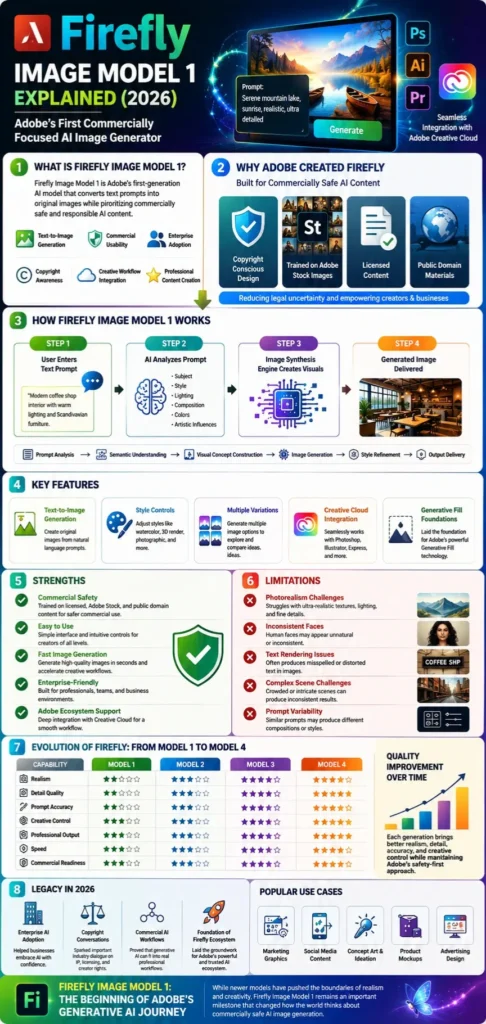
Firefly Image Model 1 is Adobe’s first-generation AI image-creation model that converts text prompts into original images while emphasizing the generation of commercially safe content.
The Origins of Adobe Firefly

Why Adobe Built Firefly
A sudden leap in generative AI opened new paths, along with tough problems. While chances grew quickly, so did complications. New tools arrived fast – each bringing both promise and difficulty. With rapid change came benefits mixed tightly with risks. Progress surged forward yet tangled itself in fresh dilemmas.
Midjourney, Stable Diffusion, and DALL·E started showing what artificial intelligence could do with pictures. Still, plenty of companies held back – worries about ownership rights popped up, along with questions on where the systems learned their skills.
Adobe recognized a gap in the market.
Professional creators wanted AI assistance, but they also wanted protection.
Firefly was developed to bridge this gap.
The Rise of Generative AI
Between 2022 and 2023, AI image generation became one of the fastest-growing technology sectors.
Organizations increasingly explored:
- Marketing content generation
- Concept art creation
- Product visualization
- Advertising Design
- Social media graphics
Adobe needed a solution that aligned with its professional user base.
Firefly Image Model 1 became that solution.
Adobe’s Commercially Safe Approach
One of Firefly’s most distinctive features was its training philosophy.
Adobe emphasized:
- Licensed content
- Adobe Stock imagery
- Public domain materials
This strategy aimed to reduce legal uncertainty and encourage commercial adoption.
The approach quickly differentiated Firefly from many competitors.
How Firefly Image Model 1 Works
Text-to-Image Generation
Users provide a written prompt describing the desired image.
For example:
“Modern coffee shop interior with warm lighting and Scandinavian furniture.”
The model interprets the prompt and generates original images based on learned visual patterns.
Prompt Interpretation
The AI analyzes:
- Objects
- Subjects
- Styles
- Lighting
- Composition
- Colors
- Artistic influences
The better the prompt, the better the output.
This principle remains true across nearly all AI image generators.
Image Synthesis Process
The generation workflow typically includes:
- Prompt analysis
- Semantic understanding
- Visual concept construction
- Image generation
- Style refinement
- Output delivery
Although invisible to users, these stages form the backbone of Firefly’s image creation process.
Key Features of Firefly Image Model 1
Text-to-Image Creation
The model’s primary feature was generating original images from natural language descriptions.
Users could create:
- Illustrations
- Digital artwork
- Marketing visuals
- Product concepts
- Background scenes
within seconds.
Generative Fill Foundations
Firefly Image Model 1 also laid the groundwork for Adobe’s later Generative Fill technology.
This feature eventually became one of Adobe’s most successful AI innovations.
Benefits included:
- Object insertion
- Object removal
- Scene extension
- Creative editing
Style Controls
Users could influence output through style modifiers such as:
- Watercolor
- Oil painting
- 3D render
- Minimalist
- Futuristic
- Photographic
This increased creative flexibility.
Creative Variations
Multiple image variations could be generated from a single prompt.
This allowed creators to:
- Explore ideas faster
- Compare concepts
- Refine visual direction
without starting over.
Adobe Ecosystem Integration
One major advantage over many competitors was seamless integration with Adobe products.
Examples include:
- Photoshop
- Illustrator
- Express
- Creative Cloud workflows
This significantly improved productivity.

Training Data and Commercial Safety
Adobe Stock Images
Adobe relied heavily on Adobe Stock content for model training.
This distinguished Firefly from some competing models that faced criticism over training practices.
Licensed Content
Licensed content helped Adobe create a stronger trust narrative.
Businesses felt more comfortable using AI-generated content when legal risks appeared lower.
Public Domain Sources
Public domain materials provided additional training resources while maintaining Adobe’s safety-focused approach.
Why Commercial Safety Matters
Commercial safety affects:
- Advertising campaigns
- Corporate branding
- Client projects
- Product marketing
- Professional publishing
For businesses, legal confidence can be just as important as image quality.
Firefly Image Model 1 Strengths
Ease of Use
Firefly was designed for mainstream creators.
Advantages included:
- Simple interface
- Fast learning curve
- Beginner-friendly controls
Brand Safety
This remains one of Firefly’s strongest historical advantages.
Organizations concerned about intellectual property issues often viewed Firefly favorably.
Fast Image Generation
Firefly generated results quickly, enabling rapid experimentation.
This accelerated:
- Brainstorming
- Design exploration
- Campaign planning
Creative Workflow Integration
Adobe users benefited from seamless movement between AI generation and editing tools.
This reduced friction compared to standalone AI platforms.
Firefly Image Model 1 Limitations
Photorealism Challenges
Compared to later Firefly versions, Model 1 sometimes struggled with:
- Human faces
- Fine details
- Realistic textures
- Lighting consistency
Photorealistic outputs often appeared less convincing than those from newer models.
Complex Scene Generation
Highly detailed prompts occasionally produced inconsistent results.
Challenges included:
- Multiple subjects
- Crowded environments
- Intricate compositions
Text Rendering Issues
Like many early AI image generators, Firefly Model 1 often had difficulty generating readable text within images.
Common problems included:
- Misspelled words
- Distorted lettering
- Inconsistent typography
Prompt Consistency Problems
Users sometimes reported varying results from similar prompts.
Common observations included:
- Composition shifts
- Style inconsistencies
- Subject alterations
These issues became less prominent in later Firefly generations.
Popular Use Cases
Marketing Graphics
Businesses used Firefly to create:
- Promotional visuals
- Campaign concepts
- Ad creatives
faster than traditional workflows.
Social Media Content
Content creators generated:
- Instagram graphics
- YouTube thumbnails
- LinkedIn visuals
- Facebook posts
within minutes.
Concept Art
Artists explored:
- Characters
- Environments
- Product ideas
- Storyboarding concepts
using Firefly as an ideation tool.
Product Mockups
Brands leveraged Firefly for:
- Packaging concepts
- Product visualization
- Presentation materials
before investing in expensive production.
Advertising Design
Agencies used generated imagery for brainstorming and creative exploration.
This helped accelerate campaign development.
Firefly Image Model 1 vs Firefly Image Model 2
| Feature | Model 1 | Model 2 |
| Image Quality | Good | Better |
| Prompt Accuracy | Moderate | Improved |
| Realism | Basic | Enhanced |
| Detail Rendering | Limited | Better |
| Style Control | Good | Improved |
| Professional Output | Good | Stronger |
Model 2 primarily focused on improving image quality and prompt adherence while maintaining Adobe’s safety-first philosophy.

Firefly Image Model 1 vs Firefly Image Model 3
| Feature | Model 1 | Model 3 |
| Realism | Moderate | High |
| Human Faces | Inconsistent | Much Better |
| Detail Quality | Basic | Advanced |
| Lighting | Moderate | Realistic |
| Prompt Understanding | Good | Excellent |
| Professional Use | Good | Excellent |
Model 3 represented a major leap forward in Adobe’s AI image generation capabilities.
Firefly Image Model 1 vs Firefly Image Model 4
| Category | Model 1 | Model 4 |
| Generation Quality | Early Generation | Advanced Generation |
| Photorealism | Moderate | Professional |
| Speed | Fast | Faster |
| Prompt Fidelity | Good | Excellent |
| Commercial Readiness | Strong | Very Strong |
| Creative Flexibility | Moderate | High |
Model 4 demonstrates how far Adobe’s AI ecosystem has evolved since the launch of Image Model 1.
How Firefly Changed the AI Industry
Commercial AI Adoption
Before Firefly, many organizations hesitated to adopt AI-generated imagery due to legal concerns.
Adobe helped normalize enterprise AI adoption.
Copyright Discussions
Firefly sparked important conversations regarding:
- Training data
- Licensing
- Intellectual property
- Creator compensation
These discussions continue to influence the AI industry today.
Enterprise AI Creation
Firefly demonstrated that generative AI could be integrated into professional business workflows rather than existing solely as an experimental technology.

Best Prompting Practices for Firefly Image Model 1
Prompt Structure
A simple structure often works best:
Subject + Style + Lighting + Composition + Quality
Example:
Modern luxury living room, Scandinavian interior design, soft natural lighting, wide-angle photography, highly detailed.
Style Keywords
Useful style modifiers include:
- Cinematic
- Realistic
- Minimalist
- Watercolor
- Futuristic
- Concept Art
- Studio Photography
Lighting Keywords
Try:
- Golden hour
- Soft lighting
- Dramatic lighting
- Volumetric lighting
- Neon lighting
Composition Keywords
Useful terms include:
- Close-up
- Wide shot
- Top-down view
- Symmetrical composition
- Rule of Thirds
Who Should Use Firefly Image Model 1?
Ideal users include:
- Designers
- Marketers
- Students
- Small businesses
- Content creators
- Adobe ecosystem users
Especially those interested in understanding the evolution of Adobe’s AI technology.
Who Should Avoid It?
Users seeking:
- Cutting-edge realism
- Advanced cinematic rendering
- Ultra-detailed commercial photography
may benefit more from newer Firefly models.
Is Firefly Image Model 1 Still Relevant in 2026?
Yes—but primarily as a historical milestone.
While newer models outperform it in quality and realism, Firefly Image Model 1 remains important because it introduced Adobe’s commercially safe approach to generative AI.
Its influence can still be seen across today’s Firefly ecosystem.
For researchers, AI enthusiasts, designers, and businesses studying the evolution of creative AI, understanding Model 1 provides valuable context for how Adobe became a major player in the generative AI industry.
People Also Ask
A: It emerged during Adobe’s early generative AI rollout and became the foundation for subsequent Firefly developments.
A: Adobe designed Firefly around commercially safer training practices, making it attractive to businesses and professional creators.
A: Adobe emphasized Adobe Stock imagery, licensed materials, and public domain content.
A: For artistic quality, many creators preferred Midjourney. For workflow integration and commercial confidence, Firefly offered unique advantages.
A: Newer models provide significantly better realism, prompt accuracy, detail rendering, and creative control.
Conclusion
What Firefly Image Model 1 truly signals isn’t just Adobe stepping into image generation. Instead, behind the scenes, it kicks off a shift – how artists, teams, Brands, and makers begin using AI changes right here. Though quiet at launch, workflows evolve once tools like this settle in. Because of this leap, creativity doesn’t stop – but adapts – with machines nearby.
One step at a time, Firefly Image Model 1 showed how machines might fit into making art. Not just flashy tricks – this was different. Because it helped shape ideas, not replace them. While many chased speed, this model slowed down to listen. A quiet shift happened then. Instead of mimicking, it began responding. Some creators noticed right away. Others took longer. Yet each interaction felt less like control and more like a conversation. That change mattered. Not because it shouted progress – but because it whispered possibility.
Should you look into Adobe’s path with artificial intelligence, study tools that create pictures from words, or check out different systems for generating images, getting familiar with Firefly Image Model 1 offers a clear view of just how much has changed across the field. Though it began simply, its role now feels central when tracing growth in this space. Because early choices shaped later advances, seeing where it started helps explain present capabilities. While newer models exist, this one remains a marker of a shift. Since progress builds on past steps, revisiting version one clarifies what once seemed impossible.











